To avoid these ads, REGISTER NOW!

new ryobi garage door opener

To avoid these ads, REGISTER NOW!

djjsr

Well-known member
Joined
Sep 4, 2006
Messages
4,796
Location
In the cornfields
Must be something new but I checked HD's website and they have it. $248 without the accessories. I like the battery backup.
 

djjsr

Well-known member
Joined
Sep 4, 2006
Messages
4,796
Location
In the cornfields
Here's a surprise. In the event of a power failure, that thing is capable of opening the door 100 times on the battery.
 

lewis26

Well-known member
Joined
Aug 1, 2012
Messages
139
Location
Indianapolis, IN
$550 with all accessories, plus it's still a center mounted opener. I think you could get a liftmaster, plus bettery versions of the accessories for less or the same amount of money.
 

4free

Member
Joined
Apr 13, 2016
Messages
16
Location
Detroit, Michigan
I have had one on order, but I picked up mine yesterday from the store - they had 8 in stock (still in back on the dock). Started installing it last night . . . posting pics in a few . . .
 

4free

Member
Joined
Apr 13, 2016
Messages
16
Location
Detroit, Michigan
What opts did you get with it?

The only add-on I got was the laser guide. I will get a set of batteries for backup when I get a Ryobi jigsaw.

Got it up and running, but haven't set up the external keypad, laser or Homelink in the cars yet.

First impressions:
First, I am coming from a 35year old 1/3 HP chain drive Stanley that finally lost a tooth in the nylon sproket at the far end of the track. Never really had issues with it since I owned the house (22 years)

Yes, it is quieter, but I never thought the Stanley was that noisy itself. The door creaking made as much noise as the opener. The hum of the motor is not loud, but still noticeable.

The 3-piece shaft seems fairly strong, but not as good as the one-piece tubular shaft on the Stanley.

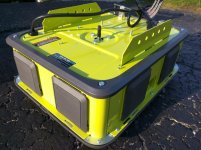
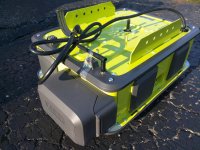
The unit is HEAVY. All metal with plastic trim. Feels solid too. I hope the long-term durability of the plastic components is there. The only issue I had with the Stanley was the light cover did not use enough UV stabilizers, and would loose a section if you touched it. :(

Not thrilled with the LED light. It is adequately bright, but it has a clear cover, which is annoying when looking at it, but not bright enough to light the entire garage. Also, I prefer the garage door facing light, since with the door up, there is no other good way to light the area.

It is also slower, not terrible, but there is a 2-3 second difference versus the Stanley.

The unit also has a Vacation lock on the inside kepad, that disables operating it using remotes, Homelink or external keypad. The button placement is in the middle of the keypad, just below the manual light button. My concern is that it is too easy to press this accidentally, locking everyone out of the house.
 
OP
L

lightning02

Well-known member
Joined
Jul 29, 2013
Messages
2,677
Also, need to figure out where to store the photos so you can access them - I don't see a place to upload them in the forum.

You have to hit the "go advanced" button and you upload them right off your computer.
 

4free

Member
Joined
Apr 13, 2016
Messages
16
Location
Detroit, Michigan
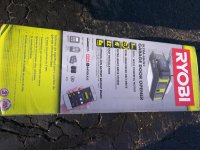
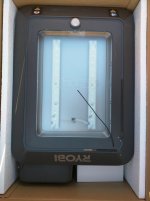
Pictures . . . unboxed! :D
 

Attachments

  • IMG_20160412_183852.jpg
    IMG_20160412_183852.jpg
    148.4 KB · Views: 119
  • IMG_20160412_184110.jpg
    IMG_20160412_184110.jpg
    143.7 KB · Views: 108
  • IMG_20160412_184208.jpg
    IMG_20160412_184208.jpg
    134.1 KB · Views: 120
  • IMG_20160412_184444.jpg
    IMG_20160412_184444.jpg
    138.7 KB · Views: 116
  • IMG_20160412_184505.jpg
    IMG_20160412_184505.jpg
    143.4 KB · Views: 130
  • IMG_20160412_184605.jpg
    IMG_20160412_184605.jpg
    141.9 KB · Views: 132
  • IMG_20160412_184539.jpg
    IMG_20160412_184539.jpg
    144.1 KB · Views: 145

djjsr

Well-known member
Joined
Sep 4, 2006
Messages
4,796
Location
In the cornfields
I'm not too crazy about all of those accessories but they might make sense if you only have one electrical outlet. I really like that battery backup and I've got a bunch of Ryobi batteries.
 
To avoid these ads, REGISTER NOW!

Ratchet Guy

Well-known member
Joined
Nov 25, 2014
Messages
175
Location
Richmond, BC
I think that Milwaukee, Makita and Dewalt might come out with one like this sometime in the future, all those added features really make sense to have it, and homelink is new security thing in our time, most of my colleage at work that owns a house has all these camera and other new homelink features now. i have bump into a makita rep one time when i was in a store and chat with him, he said that makita is coming out with all those tools that has a blue tooth feature that lets you interact with your smart phone, but i think this Garage opener by Ryobi makes more sense in our everyday practical life if you think about it more.
 

reader2580

Well-known member
Joined
Dec 31, 2014
Messages
14,550
Location
Minneapolis, MN
I don't know if I want the security for my house exposed to the Internet. I think about Myq for my garage door, but then I read about various hacks to home systems that allow doors to be opened or unlocked remotely and decide not to do it.
 

4free

Member
Joined
Apr 13, 2016
Messages
16
Location
Detroit, Michigan
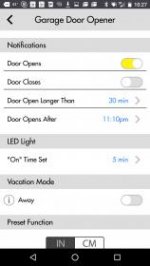
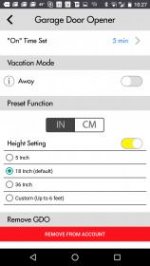
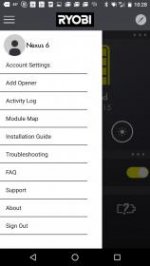
So . . . the app is now available!
Was the first download from the Google Play store. :D

Setting up is a bit tricky, and I already found a couple of bugs, but it is cool. It is also necessary to be able to get to all the settings on the opener.

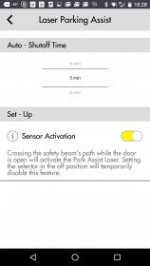
For example, I have the laser guide. The app is the only way to change the length of time to keep the laser on.

I see this being even more useful when the CO sensor and camera come out.
 

4free

Member
Joined
Apr 13, 2016
Messages
16
Location
Detroit, Michigan
The way you connect the WiFi via the app is good, but will be a pain for many users. You basically connect directly to the Ryobi's WiFi on your phone, AFTER you start the app (you need to goto your phone's settings and find the WiFi). Then, it pulls up a list of available WiFi signals in range. You select your WiFi, enter your passcode, and it then connects the opener to your network. The app then switched off your WiFi connection, so you NEED a cellular connection initially to do the setup.

BTW, this is for Android phones - I have a Nexus 6 with the latest Marshmallow updates. I will set up my wife's iPhone later today.
 

99LeCouch

Well-known member
Joined
Apr 18, 2011
Messages
1,053
Location
Rochester, NY
Wonder how this compares to the liftmaster belt drive in loudness

I bet this is a Liftmaster/Chamberlain product customized for Ryobi.

Nice to have, but a little spendy compared to Chamberlain's own battery-backup belt-drive units. Those are very quiet. My garage doors are louder than the belt-drive openers I just installed, lol!
 

4free

Member
Joined
Apr 13, 2016
Messages
16
Location
Detroit, Michigan
So I downloaded the Ryobi app on the iPhone. Looks identical to the Android version. Just logged into the account I had created and everything was there.

One caveat - it seem all the settings are handled at the account level. That is mostly good, but for Alerts, some should be available at the local level - for example, I set mine to alert me every time the door opens and when the door is open longer than an hour. My wife doesn't want to get all those alerts, but she doesn't have a choice if she is logged in to the app.
 

lewis26

Well-known member
Joined
Aug 1, 2012
Messages
139
Location
Indianapolis, IN
The way you connect the WiFi via the app is good, but will be a pain for many users. You basically connect directly to the Ryobi's WiFi on your phone, AFTER you start the app (you need to goto your phone's settings and find the WiFi). Then, it pulls up a list of available WiFi signals in range. You select your WiFi, enter your passcode, and it then connects the opener to your network. The app then switched off your WiFi connection, so you NEED a cellular connection initially to do the setup.


This is normal for all devices without a user interface that allows inputting passwords. Many wifi thermostats work the same.

I'm not sure if it so much switched off your wifi connection, but rather it turned off its internal wifi connection to connect to your network. I'm sure if you would have reconnected to your own wifi, you could have continued setup without a data connection.
 

4free

Member
Joined
Apr 13, 2016
Messages
16
Location
Detroit, Michigan
I'm not sure if it so much switched off your wifi connection, but rather it turned off its internal wifi connection to connect to your network. I'm sure if you would have reconnected to your own wifi, you could have continued setup without a data connection.

I though the WiFI was actually shut off on my phone.

There is a bug I did find. if you change the name of your account in Account Settings, it automatically tries to use that name as your email address. :( If you try to change the email back, it prompts you for your password, which fails since it is trying to associate it with the changed email address. I had to kill the app and that fixed it - the new name with the original email address.
 

Firebird 1

Well-known member
Joined
Mar 11, 2015
Messages
624
Location
Maryland
I broke down and bought one of these today. I have 3 doors. One has a craftsman opener 15yrs old that is wore out. Another has a 6 yo chamberlain that crapped out, the third is a year old chamberlain. The Ryobi was $20 cheaper than the comparible chamberlain so I figured I would take a chance. I will try to get it installed tomorrow and give a critique.
 

Firebird 1

Well-known member
Joined
Mar 11, 2015
Messages
624
Location
Maryland

Got mine installed today. It seems to be well built product. It is by far the quietest door opener I have never heard. It has a soft start and it slows down and closes softly. Lights blink and it beeps a warning when closing. I tried to use my existing safety eyes from my original craftsman opener but they did not work so I had to surface mount the wiring of the new ones. As of now I would recommend this, I hope it holds up over the long haul.
 

sbarton

Well-known member
Joined
Nov 6, 2008
Messages
87
Location
NJ
If you have two if these GDO's, can you operate both separately from one keypad?
 
Last edited:

gebobs

New member
Joined
Sep 19, 2018
Messages
4
Location
Atlanta
My old opener started failing a few weeks ago and began looking into these. I would have preferred Ego since we already have an Ego mower, chainsaw, etc. Unfortunately, they aren't there yet. On the bright side, I do still have a Ryobi drill. I use its battery as the backup and the app lets me know how much it's charged.

Last Tuesday, I ordered one of these from Home Depot to be delivered to my home. I also ordered the installation. The HD website said I would hear from an installation professional within 24 hours of order confirmation (which I got minutes after ordering).

Got the unit on Thursday. Nothing from the installers. Called Home Depot and now they said 2 business days from receipt (which now puts it past the weekend). I finally heard from them the following Wednesday so that was bull too. So just beware if you order install that it might not happen when they say it will.
 
Last edited:

gebobs

New member
Joined
Sep 19, 2018
Messages
4
Location
Atlanta
Anyhoo, on Saturday, I asked the wife if she wanted to help me install the unit. With a little trepidation, we decided to give it a shot. We found the official Ryobi install video to be quite helpful.

I have not gotten any accessories yet. I am going to get the retractable cord this weekend. The inflator looks like it might useful but not for us. I can't see the point in any of the others.

A couple questions though...

1. Our wireless keypad would appear to be backlit but is not. Is it defective? Does anyone else's have backlighting?

2. I left to go out of town on Monday. Since then, the app says the garage door has been open since Monday 6 am. I can open and close it but the app continues to tell me it's been open since I left. Also, the status of the backup battery hasn't changed at all so it's not just the sensor.

I believe I've set up the sensor and the relay correctly. Both LEDs on the relay are solid. Anyone have any idea what's wrong?
 

gebobs

New member
Joined
Sep 19, 2018
Messages
4
Location
Atlanta
#2 addressed. Unplugged the hub for a minute and plugged in again. Out of town again and all seems to be working fine.
 
To avoid these ads, REGISTER NOW!
Top Bottom