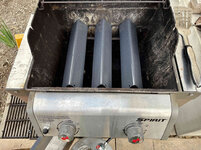
Like so?Ahhh, the pooper scooper for people with a really weak stomach and bad gag reflex!
Or really, really big dogs.


Like so?Ahhh, the pooper scooper for people with a really weak stomach and bad gag reflex!
Or really, really big dogs.


No offense Nick but this is why I won't invest in smart home tech. I hope you get things sorted out.
This is why I'm writing my own wifi and esp-now based ecology. I get something I can fix, and there's tons of entertainment value. The only downside is that it takes me forever to get round to creating the next device.No offense Nick but this is why I won't invest in smart home tech. I hope you get things sorted out.
No offense Nick but this is why I won't invest in smart home tech. I hope you get things sorted out.
This is why I won't invest in smart home tech until @nicholam77 gets it sorted out... then I can just ask him whenever I have a problem!

This is why I'm writing my own wifi and esp-now based ecology. I get something I can fix, and there's tons of entertainment value. The only downside is that it takes me forever to get round to creating the next device.
For once I'm glad I have no idea what you guys are talking about, and I'm perfectly OK with that!
Nick, I've been lucky to have zero issues with Hubitat C7 yet. That said, I back it up C7 using the free cloud migration backup every few weeks, and I have a C8 waiting to take that backup. This ensures all zwave and zigbee devices along with all the apps are covered for restoration if needed. I figure nothing based on a chip/computer/OS is 100%.
To quote someone...That is pretty cool. I've too many devices and not enough know-how to do something like this full scale, but I have been meaning to dip my toes into ESPHome to leverage some cheaper devices in the future.
I’ll be following along with your HA project. I do love the concept of it in every way. HA has the inertia already of a large user base/development to be one of the major players out there.Well you're more prepared than me
If I was doing free cloud backups, I don't know how to retrieve them. I had the local backups going, but now that the thing is bricked there's no getting those.
I am backing up my Home Assistant install, locally and with a free cloud add-on to Google Drive.
The chain wax automation is super cool. You always have interesting and unique applications.
I have nothing against Hubitat. In fact I really liked it. It's probably the most capable and mature system out there besides Home Assistant. Other than the two times mine bricked up on me, I had no issues with reliability, signal strength, device issues, etc. That's why I'm kind of inclined to think something was wrong with mine.
But it doesn't make sense to run two platforms, so I am using this as an opportunity to consolidate. There are some features of Home Assistant I've really grown to like, and my hardware is FAR more powerful than the Hubitat box so there is plenty of room to grow. I've also put a lot of work into my Home Assistant mobile dashboard, and their iOS companion app is far superior. So I am leaving Hubitat behind... but it was good while it lasted!
To quote someone...
It's kind of like 3d printing... lot's of jargon but not all that hard to get the hang of once you dive in.
I’ll be following along with your HA project. I do love the concept of it in every way. HA has the inertia already of a large user base/development to be one of the major players out there.
I too would love to follow your HA project please. I'd love to see more of what you are doing there. I've been on Insteon for the last 10 years or so, and I do love it, but I have some gremlins that randomly turn on some of my lights that I just cannot get rid of. - I seriously considered going to HA last year, and went as far as buying the 'yellow', but ended up selling it again because I just did not have the energy to start over.





 ), but the kids found it amusing, and I do plan on using it for temporary notifications.
I have quite a few Philips LED strips, the latest in my garage, over the workbench. I have similar channel as well to go into my updated editing suite (to adjust color temp for grading). They are solid and reliable...not cheap, but reliable. The one in the garage flashes red as a 2 minute warning if the overhead door is going to be closing via automation.Kitchen Under Cabinet LEDs
In the spirit of smart home stuff, I knocked out a long standing project — kitchen cabinet LEDs.
I've wanted to do this forever, and have mostly been held back by cost. I knew I either wanted LED strips, or something like IKEA's Tradfri system like @Denwood has.
I even bought some TP-link light strips once, but quickly realized they were only RGB with no dedicated whites... which translates to terrible white colors. I need reliable warm whites (2700k) that look good. High CRI and not noticeably tinted. They also reflected badly in my glossy white countertops. So I returned the TP-link.
I thought about IKEA Tradfi, but the drivers are on the large side and the system itself is not that cheap. And I kind of wanted the option for RGB.
I thought about getting high-quality, high-CRI warm white LED strips and DIY'ing smart controllers and power supplies for them with WLED. But I quickly got overwhelmed with the tech specs and options, and didn't want another open source project to update and maintain.
So I found my way back to trusty ol' Philips HUE. Again... not cheap. But the ones I wanted (non-addressable, RGBWW strips) went on a bit of a sale on Amazon recently, so I bit at the opportunity.
HUE maybe isn't the highest quality LED out there, but it is quite good. Above the competition in the same smart home space. The power supply is compact, and comes with it and I don't need to worry about specs. And HUE... just works. Period. I have many HUE lights and they are all flawless.
I actually had existing incandescent under-cabinet lights installed by the previous owners, but every bulb but one was burnt out, and I wanted them to be 'smart'.
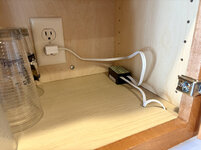
This meant there were already outlets in the cabinets for power supply / adaptor which was nice.
What I thought would be a 10min replacement quickly ballooned into a multiple hour, multiple day project.
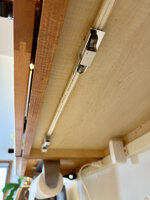
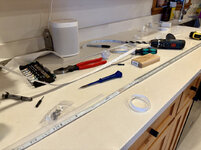
After removing the old lighting, I had to drill some holes and install some clips, because I am mounting the new HUE strips in aluminum channels with a diffuser cap.
In a controversial move, I am mounting the channels facing the wall the cabinets are on, instead of pointed down at the countertop. This is because the HUE strips are not high-density, and even with the diffuser they reflect badly in the glossy counter as a bunch of dots. But pointed horizontally at the wall, they still have a similar under-cabinet glow but without the reflection.
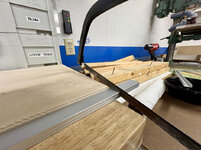
Of course all the channel and diffusers had to be cut to length.
On the other side of the sink I got fed up with the clips and opted for 3M Mount-It double sided tape.
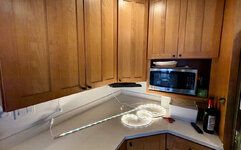
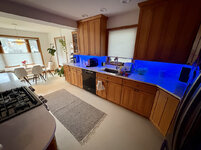
Here's what it looks like installed, pointed at the wall:
I should have cleaned up some **** off the counter before taking the pics
The warm whites are pleasing, and of course it can do RGB:
I don't think the RGB will get too much use as my wife forbids it (doesn't want our kitchen looking like a gamer dorm room
For example, turn red for 10sec if my wife arrives home and I am on a Zoom call in the basement. This would let her know not to bust in, or let the kids down there.
Or flash green when the laundry finishes.
Or flash red when I run my goodnight routine if any doors or windows are open at the end of the day.
Or if I ever get a garage door sensor... turn a certain color if the garage door is left open, or open at night.
Or when a person is detected on the doorbell. Or if the mail is delivered. The possibilities are endless.
And of course I have a bunch of motion-based automations planned, too.
I'm glad to finally have this done as we spend a lot of time in the kitchen, and it adds a nice ambience, especially in the evening.
Looks great, those little Sonos One's are fantastic too.
I have quite a few Philips LED strips, the latest in my garage, over the workbench. I have similar channel as well to go into my updated editing suite (to adjust color temp for grading). They are solid and reliable...not cheap, but reliable. The one in the garage flashes red as a 2 minute warning if the overhead door is going to be closing via automation.
Our main and basement kitchens use the Tradfri LED setup, and they too have been great. Solid design and the Tradfri LED drivers integrate nicely with non Ikea controllers (Zigbee) for automation. We don't do anything fancy for the kitchens with respect to color, but the motion lighting switches over to under cabinet lights only at 10% after midnight which is a nice mood setter. The main floor lights all have a master control (an IKEA switch) in the kitchen which toggles them either to full brightness, or disables motion and dims them all to 10% for mood, evening gatherings etc.
Your setup looks great
Love the new under-cabinet lights. Been on my list to do for a long time, but I don't have any power there, so I would need to figure out how to fish a wire from an existing outlet somewhere to the top of the cabinets, as I don't want to see a plug.
Sorry your hubbitat has failed and forced you into a forced migration at this point. I am running a similar setup to you. Smartthings for connecting everything and Home Assistant for all new automation. I have not even at this point moved my existing automation that were already in Smartthings over yet.
I assume unfortunately, with you not able to get the habitat up and running one more time you will have to manually move each zwave device? If that is the case your unfortunate issue might get me to move quicker on my migration since at least while Smartthings is still working that were is a way to use a zwave utitility to migrate everything to a new controller. I don't really want to manually move my 70-80 devices at this point.
Very interested to follow along on your Zooz 800 stick as it is the one I am considering. I see mixed reviews on the Zooz sticks but unfortunately, even with some negative reviews and issues, they appear to be the best option.
 I wouldn't want to do that either!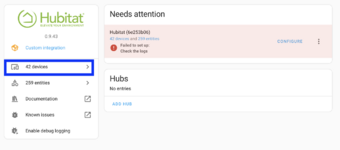
Very interested to follow along on your Zooz 800 stick as it is the one I am considering.



Excellent post. I feel your pain.So I got both 'coordinators' (Zwave and Zigbee radio antennas) in the mail today. They are completely separate setups, so I decided to tackle the Zwave first.
This is mainly for @cccoltsicehockey , so feel free to jump over it if you don't care!
Wow, the Zooz 800 is small!
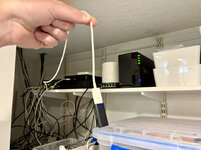
I installed with a USB 2.0 extension cable to get it away from the computer (this is recommended).
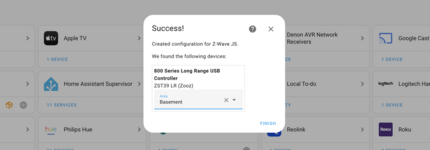
Then I installed the Z-Wave JS add-on, and the Z-Wave Integration to Home Assistant. It found the Zooz 800 stick no problem.
I wasn't sure how to go about re-adding the devices. A couple issues:
— if I 'disabled' the Hubitat devices, they still show up in the automations, cause duplicate names if I retained the names
— if I 'deleted' the Hubitat devices, it would only let me delete some of the entities for some reason
— if I tried 'renaming' the entities, some weird conflicts and anomalies started happening
So I tried to make as many screenshots and notes of how my devices were named, and the automations they used. And then I removed the Hubitat integration altogether, which does scorch earth on all those devices and entities.
I will say, this had me a bit nervous.
Afterwards, I spot checked some of my automations, and the former Hubitat entities were no longer displaying in the UI editor, but YAML only.
It was a mixed bag. Some automation triggers I had renamed with a description (like in the green bubble), so that was helpful. Others (like in the red bubble) I had no reference to a 'friendly name'. The YAML listed the old ID numbers... but I couldn't find reference to that anywhere, especially since those devices had been deleted.
Here's an example where I really lost any reference to what the device was, other than it was a 'light' domain:
So basically... deleting devices makes automations that used those devices pretty confusing.
So not only did I have to exclude each Z-wave device, re-include it, set up any device configuration, give everything new names, but I also had to go through all my automations and rewrite the portions that were referencing the old, deleted devices. A PITA for sure.
I will say that the exclusion and inclusion process was very easy, and probably the most responsive of any hub / coordinator I've tried.
I did lose some of the more intricate configurations on my devices (specifically dimmer switches and power meters), so I'll have to fine tune those again over time.
But, everything was recognized and seems to be working. So YAY for the Zooz 800 stick.
I got everything done, including automations redone, in about 4 hrs. But it's not my first rodeo.
Now I have to figure out the SMLight ZIgbee one and do all those.
TL;DR Immediate impression is the Zooz stick works, and if you are going to migrate, I strongly recommend doing it before you write your automations in Home Assistant

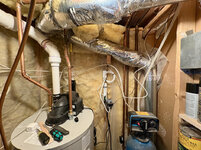
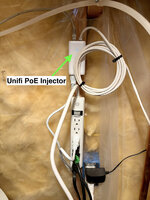
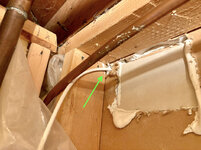


And I hope this was the last time I have to do this, ever.

I want to try and rely on as few cloud resources as possible is the real reason to want to get off of SmartThings. With the fact that HA now has its own voice control box would allow me to slowly get off my Google Homes to something that runs locally as well for that.Thanks! Yep, love the Sonos One's except for the botched app. They are a bit overkill as I listen to the same (internet) radio station 99% of the time in the kitchen, but they still sound nice. And the Home Assistant compatibility is great for scenes, local voice announcements, etc.
Nice!
I have some Tradfri GU10's in my range hood on your recommendation that have been great. I did strongly consider the IKEA route, but last time I checked it seemed to be around the same price as HUE and I thought HUE would be an easier install and the bonus of RGB for notifications.
I have an extra IKEA switch I'll probably slap on the wall to control the new light strips, though.
Interesting setup with disabling motion on the ambience 10% scene. Something I've always added to my motion lighting automations is a condition "if X light (light being automated) has been off for 1 min". That way motion trigger will never adjust a light that's already on, no matter the brightness. Also, if someone physically turns a light off at the switch, it gives a little extra time (plus the motion sensor cooldown) to exit the room before they auto turn on again.
Thanks! I am loving them, too. Wishing I had done it sooner. I can see how power would slow you down... that can be a pain. I was lucky to have the outlets in the cabinets from the old incandescent lights.
Yeah, I expect I'll have to manually reset and re-include each Zwave and Zigbee device, which will create new devices in Home Assistant, and I'll have to figure out naming compared to the old ones, removing the old ones, and replacing them throughout my gazillion automations. Gonna be a fun ride.
I 'only' have 42 devices piped in from Hubitat, but some of those were virtual devices so I think the actual amount is less.
Your 70-80 is a lot
In theory there's nothing wrong with linking a hub like SmartThings. Maybe that integration is more 'official', but I'm pretty sure the Hubitat one was maintained by an individual. You never know when they'll stop development. I know SmartThings integration had a recent scare with the latest HA update but sounds like it got sorted.
I'll for sure let you know about the Zooz 800 stick. My co-worker has the older Zooz 700 stick and says it's 100% reliable. Seems they don't make that anymore, though. There's other options but everything I read pointed me to Zooz, so I'm giving it a shot!
I really do appreciate the detailed account of your experience with this. It helps me realize I should bump this up my home automation to do list before I do much more automation. I have a tool I plan to use to migrate all my devices which means they would keep all their names. In case that does not work, I really don't want to have more automation to update.So I got both 'coordinators' (Zwave and Zigbee radio antennas) in the mail today. They are completely separate setups, so I decided to tackle the Zwave first.
This is mainly for @cccoltsicehockey , so feel free to jump over it if you don't care!
Wow, the Zooz 800 is small!
I installed with a USB 2.0 extension cable to get it away from the computer (this is recommended).
Then I installed the Z-Wave JS add-on, and the Z-Wave Integration to Home Assistant. It found the Zooz 800 stick no problem.
I wasn't sure how to go about re-adding the devices. A couple issues:
— if I 'disabled' the Hubitat devices, they still show up in the automations, cause duplicate names if I retained the names
— if I 'deleted' the Hubitat devices, it would only let me delete some of the entities for some reason
— if I tried 'renaming' the entities, some weird conflicts and anomalies started happening
So I tried to make as many screenshots and notes of how my devices were named, and the automations they used. And then I removed the Hubitat integration altogether, which does scorch earth on all those devices and entities.
I will say, this had me a bit nervous.
Afterwards, I spot checked some of my automations, and the former Hubitat entities were no longer displaying in the UI editor, but YAML only.
It was a mixed bag. Some automation triggers I had renamed with a description (like in the green bubble), so that was helpful. Others (like in the red bubble) I had no reference to a 'friendly name'. The YAML listed the old ID numbers... but I couldn't find reference to that anywhere, especially since those devices had been deleted.
Here's an example where I really lost any reference to what the device was, other than it was a 'light' domain:
So basically... deleting devices makes automations that used those devices pretty confusing.
So not only did I have to exclude each Z-wave device, re-include it, set up any device configuration, give everything new names, but I also had to go through all my automations and rewrite the portions that were referencing the old, deleted devices. A PITA for sure.
I will say that the exclusion and inclusion process was very easy, and probably the most responsive of any hub / coordinator I've tried.
I did lose some of the more intricate configurations on my devices (specifically dimmer switches and power meters), so I'll have to fine tune those again over time.
But, everything was recognized and seems to be working. So YAY for the Zooz 800 stick.
I got everything done, including automations redone, in about 4 hrs. But it's not my first rodeo.
Now I have to figure out the SMLight ZIgbee one and do all those.
TL;DR Immediate impression is the Zooz stick works, and if you are going to migrate, I strongly recommend doing it before you write your automations in Home Assistant
I really do appreciate the detailed account of your experience with this. It helps me realize I should bump this up my home automation to do list before I do much more automation. I have a tool I plan to use to migrate all my devices which means they would keep all their names. In case that does not work, I really don't want to have more automation to update.
I am glad to hear that the Zooz800 stick is working well. I didn't know about the extension recommendation, so that is good information to have.
I have not tried this but when researching the migration from SmartThings to Home Assistant a while back I stumbled on this video be suggested on a Reddit post. It seems pretty straight forward but I have not actually done the work yet. I am hoping it works as easily as it appears to.No problem! Is the migration tool specific to SmartThings? Mind sharing what that is out of curiosity?
Even if it doesn't work, and even though you have a lot of switches, excluding and repairing is not that bad. Rebuilding automations could really be not fun depending on how many you have. I think that's the big takeaway when moving.
When re-adding, I kept all the same names as well. But HA seems to attach an underlying unique ID number. So if you're migration tool can preserve that, you might be good, otherwise you still may run into the same issue with automations that use the devices getting confused.
After a week or so the Zooz stick is still working well. I've noticed sometimes the dimmer brightness takes a sec to update in the UI, or read correctly, on a few switches (mostly my GE/Jasco ones I think?). But I've had some weird business there on multiple platforms so I'm not too concerned.
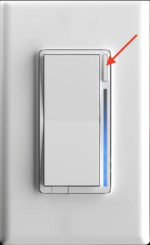
I still haven't figured out how to enable the child notifications (LED lights) on my Inovelli switches, but I know it's possible.
Yeah, a 3-6 ft extension cable is recommended for any Z-wave or Zigbee sticks connected directly to a HA computer. I guess powered USB ports can create electrical interference with the radios when plugged in directly.
I don't know 100% if there are all the brands of switches. I started out with GE which is really just GE branding on JASCO switches. It is now hard to find either of those these days without paying a premium. I have bought some UltraPro switches which look identical and get added the same way and seem to function the same way while costing much less.Guys, Im 95% on Insteon at the moment, so migrating to HA and changing switches and plugs (50+) all over the house to Z-wave is a pretty big step that I would like to start correctly. - I have a couple of GE Z-wave plugs and switches which on Insteon are a little flakey, but before I continue, would anyone have any suggestions on what brand to buy? - is it GE? Jasco? Is Inovelli worth the extra money? or are there others out there that I haven't heard about yet that are a better option?
I have a couple of GE Z-wave plugs and switches which on Insteon are a little flakey, but before I continue, would anyone have any suggestions on what brand to buy? - is it GE? Jasco? Is Inovelli worth the extra money? or are there others out there that I haven't heard about yet that are a better option?
I have not tried this but when researching the migration from SmartThings to Home Assistant a while back I stumbled on this video be suggested on a Reddit post. It seems pretty straight forward but I have not actually done the work yet.
I am hoping it works as easily as it appears to.











Thank you very much for the additional information. - My thoughts on sticking with the same brand was just to avoid any compatibility gremlins that may be out there. Im actually quite happy with my Insteon setup except for the gremlins and I just can't find a way to get rid of those, which is why I am seriously considering starting over. (Waking up in the middle of the night because all the lights in one end of the house suddenly turn on to the brightest setting doesn't fly well with 'the one who must be obeyed'.)I think @cccoltsicehockey covered it well, but I'll add a few things.
Inovelli are awesome, but personally I would not go all in on them if you have a bunch of switches to replace. They are ~ $80 a switch minimum. Unless money is no object.
They have a lot of amazing features, but maybe think if you really need them. I use the light bar notifications for laundry alerts and a few things, but is it critical? Not really. Neat though.............................
Very nice, that looks great!






Hey Nick
I’ve been quietly following along, and reading all the performance of getting things to turn on and
off remotely and I must say I’m glad to see ,
you back on the woodworking and out in the garden.
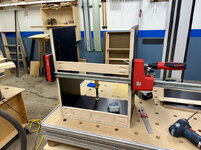
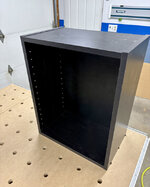
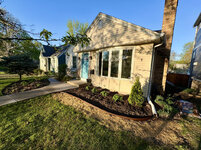
Good work with the cabinet and the plants will be up and running before you know it.
Good work all round.
Steve
Let me know if you figure out how to remedy this. Mine looks identical.Thanks!
80° F weather hit us early this spring for a few weeks, so I've been doing a lot of yard work and landscaping.
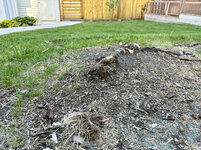
For some reason our front grass always comes back like this