To avoid these ads, REGISTER NOW!

NID box

v1ru5879

Well-known member
Joined
Feb 19, 2018
Messages
369
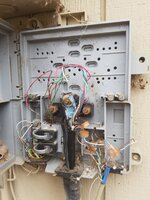
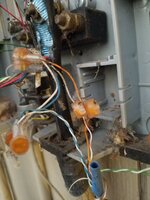
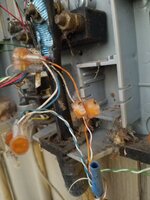
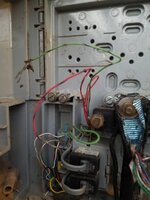
Was walking around the house planning my runs for my home network and decided to peek into the NID and it looks a little messy. Also looks like the blue cat5 was an after thought seeing how it is spliced in. Would like some input on how to clean this mess up10dfd0579fe7cad07d7251f222df400c.jpg

Sent from my SM-G930V using Tapatalk
 

Attachments

  • 10dfd0579fe7cad07d7251f222df400c.jpg
    10dfd0579fe7cad07d7251f222df400c.jpg
    100 KB · Views: 2
To avoid these ads, REGISTER NOW!

merlin1952

Well-known member
Joined
Oct 23, 2015
Messages
179
Location
Eastern, NC
V1, I have no idea where you live but in my area the phone company is responsible for the NID the customer is only responsible for the inside wiring out to the NID. How many lines do you have in your house? It appears that one pair from the service wire coming in is connected directly to a pair of your cat-5 without being connected tthrough a protective block (the black block with the two lugs on it) that is designed to protect your house from dangerously high voltages. That is definitely an older style NID and should probably be upgraded anyway so I encourage you to contact your local phone service provider.
 
OP
V

v1ru5879

Well-known member
Joined
Feb 19, 2018
Messages
369
My service provider in my area is Windstream I can give them a call n see if they can come have a look. The cat that's spliced into is actually where my modem is connected to inside. Apparently when the house was sold the previous owners that had the house ripped out the carpeting n the main phone line was damaged some how and the cat5 cable was introduced. We have a bonded dsl connection and that's the only Jack in the house that it is able to work on. Main reason I was peeping that box was I had considered running cat5 to each Jack but then realized using a Network switch is what I actually need.

Sent from my SM-G930V using Tapatalk
 

CharlieM

Well-known member
Joined
Jan 8, 2005
Messages
280
Have them come out and terminate the drop (looks like a buried 6pr). As of right now your equipment is not protected from a foreign voltage per Bell Standards.

The drop wire supposed to be connected to the lugs on either side of the ground. Then from there the red/green wires then to the TIM/Test jack. Then your IW would terminate to the lugs next to the TIM/Test Jack. Looks like they need to add another protector to your NID, looks to be 2 circuits cut in. Blue/White and Orange/White from the drop.

Whoever was in there looks like they just UR'd the drop directly to your cat5.
 
Last edited:
OP
V

v1ru5879

Well-known member
Joined
Feb 19, 2018
Messages
369
Yeah from what I've gathered this is a hackjob at best. I'm gonna call n request they come out and take a look at it and upgrade to a new box. Hopefully it doesn't turn into a game of cat and mouse lol

Sent from my SM-G930V using Tapatalk
 
OP
V

v1ru5879

Well-known member
Joined
Feb 19, 2018
Messages
369
Called and a tech is supposed to be showing up tomorrow. Hopefully I get a new box and it doesn't turn into a "it looks fine to me" situation
 
OP
V

v1ru5879

Well-known member
Joined
Feb 19, 2018
Messages
369
To my surprise this box wasn't latched shut it literally just took a push and it opened right up, no locking screw or anything. I really hope I get a new box put it even if I am responsible for the cat5 going into the house, with proper terminals I can connect that line myself. I dunno why it would even be spliced together the way it is
 

CharlieM

Well-known member
Joined
Jan 8, 2005
Messages
280
I know I would replace, but they also have parts to rebuild the nid. Sometimes
When there is not a lot of drop wire they would piece it out to reach the protector.
Just ask him to replace it, most guys will oblige. It’s a nice cake job for a tech.
 
OP
V

v1ru5879

Well-known member
Joined
Feb 19, 2018
Messages
369
Yeah I was thinking the tech would be more than happy to just put in a new one and ground it properly, I have horrible service when it gets wet outside and have read that causes static in the lines and poor service. Well I got the be home tomorrow and a tech will be there before 6PM so guess its hurry up and wait for me.
 

23ford

Well-known member
Joined
Jul 26, 2014
Messages
517
Location
Turley America
Guys sad to say but I see this everyday........And to add injury to this a lot of the techs just leave it this way due to the pressure from management to complete more tickets per shift. And Windstream just filled for Bankruptcy.
 
OP
V

v1ru5879

Well-known member
Joined
Feb 19, 2018
Messages
369
Guys sad to say but I see this everyday........And to add injury to this a lot of the techs just leave it this way due to the pressure from management to complete more tickets per shift. And Windstream just filled for Bankruptcy.
I was reading about that today unfortunately. If it comes down to it I may just purchase my own NID and seek help on here for wiring it up. Windstream is horrible at getting tech out here so I'm hoping for the best. Work ticket has been closed and work order has been opened so I have to stay home n wait between 7 am n 6 pm

Sent from my SM-G930V using Tapatalk
 

Miss the Pontiacs

Well-known member
Joined
Nov 7, 2016
Messages
16,392
Location
Saskatchewan Canada
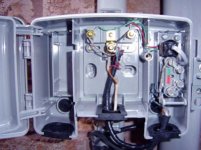
The shielded part should have an external ground likely coming from inside the house or at least a ground rod. Then the 2 terminals on the outside of the buried cable look like terminal points only. I see no carbon protectors in place at all, but carbon protectors weren’t the best anyway. On the second pic marked F are old carbon protectors used on an inside block for aerial drops. The first pic shows a white ground terminated on the shield of the BSW.
 

Attachments

  • C32D4D01-28E0-4FB0-BF64-F8703EF64B5C.jpg
    C32D4D01-28E0-4FB0-BF64-F8703EF64B5C.jpg
    24.2 KB · Views: 113
  • BC0D30F6-F542-4A37-89C0-BEEC6C6C7270.jpeg
    BC0D30F6-F542-4A37-89C0-BEEC6C6C7270.jpeg
    54.9 KB · Views: 90
OP
V

v1ru5879

Well-known member
Joined
Feb 19, 2018
Messages
369
The shielded part should have an external ground likely coming from inside the house or at least a ground rod. Then the 2 terminals on the outside of the buried cable look like terminal points only. I see no carbon protectors in place at all, but carbon protectors weren’t the best anyway. On the second pic marked F are old carbon protectors used on an inside block for aerial drops. The first pic shows a white ground terminated on the shield of the BSW.

Hmmm maybe the ground is that black wire that is behind the main line coming in, I will have to go back out and do some more looking and get some more and better pictures. I know I am only able to connect the adsl modem to the jack that the cat5 is run to at the moment. When we first had the service the tech said he would have to come back and run a cable to the NID to our upstairs phone jack if we wanted the router upstairs otherwise it would have to be on the cat5 cable run jack downstairs. Either way I have had multiple people suggest getting upgraded to a new box which I hope the tech does. I see the cat5 is tied into the main run and not through terminals like the other lines, I guess I should look at a diagram of what each wire does on the main run as it looks like there are quite a few in that group
 

Miss the Pontiacs

Well-known member
Joined
Nov 7, 2016
Messages
16,392
Location
Saskatchewan Canada
If the black is indeed a ground wire it should be placed between the nut and the metal sheath of the service cable. Not much sense running it behind as the ground would have no potential for grounding. As for terminating there should be a strip inside the house for access. That would be the point of demarcation for your service and allow an individual to run their own wire. When the tech is on site ask him why the individual service wires have no grounding. Or is this supposed to be done within the house, but I doubt it. Really nothing wrong with the box except the access point on the bottom right has been cut for easy access to the NID for both bugs, dirt and the installer.
 
OP
V

v1ru5879

Well-known member
Joined
Feb 19, 2018
Messages
369
If the black is indeed a ground wire it should be placed between the nut and the metal sheath of the service cable. Not much sense running it behind as the ground would have no potential for grounding. As for terminating there should be a strip inside the house for access. That would be the point of demarcation for your service and allow an individual to run their own wire. When the tech is on site ask him why the individual service wires have no grounding. Or is this supposed to be done within the house, but I doubt it. Really nothing wrong with the box except the access point on the bottom right has been cut for easy access to the NID for both bugs, dirt and the installer.

What would this termination strip look like? I haven't seen anything phone related inside other than the jacks. So say I wanted to run another cat5 to another jack in the house how would I tie that into the NID? Would I have to use some of those tab splices to tie it in? I have a list going of questions for the tech and I will ad this to that list
 

Miss the Pontiacs

Well-known member
Joined
Nov 7, 2016
Messages
16,392
Location
Saskatchewan Canada
The blue (painted)wire bottom right should run into the house and terminated on some kind of strip. I never worked residential install before the NID came out, so just go by what I’ve heard and seen. This wire likely in your case is likely ran to a single phone location, short cut by a lazy or poorly trained installer. Get the new guy to run wire between the NID and a term block inside the house, likely near your power panel. Then terminate any wiring in the house on the strip. This will give you some place to terminate any new jacks, phones etc.

Where do those wires on bottom right terminate? The BSW isn’t tied to anything by the looks of it or has been disconnected.
 
Last edited:
OP
V

v1ru5879

Well-known member
Joined
Feb 19, 2018
Messages
369
The blue (painted)wire bottom right should run into the house and terminated on some kind of strip. I never worked residential install before the NID came out, so just go by what I’ve heard and seen. This wire likely in your case is likely ran to a single phone location, short cut by a lazy or poorly trained installer. Get the new guy to run wire between the NID and a term block inside the house, likely near your power panel. Then terminate any wiring in the house on the strip. This will give you some place to terminate any new jacks, phones etc.

Where do those wires on bottom right terminate? The BSW isn’t tied to anything by the looks of it or has been disconnected.

The blue cat5 is run to a jack where my adsl modem is. That's the only Jack that the modem was able to run on. It literally goes under the home n up to the floor to a phone jack. I'll get some pictures here in a bit. Sounds like I currently have no term block. This house is around 40 years old and I imagine the current phone Jack's are Daisy chained hence why he couldn't get the modem to get the bonded connection but was able to with the cat5 that's directly to the NID. The cat5 is spliced into the main run that feeds the box

Sent from my SM-G930V using Tapatalk
 
OP
V

v1ru5879

Well-known member
Joined
Feb 19, 2018
Messages
369
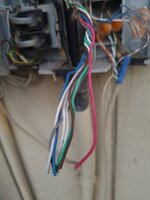
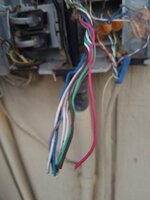
Here are some pictures of the current set up. First picture is where the cat5 at the NID runs to inside. Second pic is the feed from the phone company. Third is the tap n ring wires with the terminal ends not connected to anything. Forth and fifth is the splices into the main. Sixth is the original lines going into the house. Seventh is where they didn't go though the gromet smh. The last is the wires that are in the screw terminals8ca4bde1ee57a3b94b425192f9f59a4d.jpg5d650d8e10c4009d6bd1e4451a55648a.jpg6d8e09b27764ed622bd50596215ce60e.jpg271bc37d582560723c9455353d547b97.jpg1a65943b14723af91892ec78576978df.jpg4691f53f7390e7860983807c9f40ab70.jpg53114d7c85544cc70844e50f09c33580.jpg602fec9bc2fde86b9a8f120b56e6bea4.jpg

Sent from my SM-G930V using Tapatalk
 

Attachments

  • 602fec9bc2fde86b9a8f120b56e6bea4.jpg
    602fec9bc2fde86b9a8f120b56e6bea4.jpg
    53.3 KB · Views: 2
  • 53114d7c85544cc70844e50f09c33580.jpg
    53114d7c85544cc70844e50f09c33580.jpg
    51.8 KB · Views: 2
  • 4691f53f7390e7860983807c9f40ab70.jpg
    4691f53f7390e7860983807c9f40ab70.jpg
    56.3 KB · Views: 2
  • 1a65943b14723af91892ec78576978df.jpg
    1a65943b14723af91892ec78576978df.jpg
    77.1 KB · Views: 2
  • 271bc37d582560723c9455353d547b97.jpg
    271bc37d582560723c9455353d547b97.jpg
    64.3 KB · Views: 2
  • 6d8e09b27764ed622bd50596215ce60e.jpg
    6d8e09b27764ed622bd50596215ce60e.jpg
    71.2 KB · Views: 2
  • 8ca4bde1ee57a3b94b425192f9f59a4d.jpg
    8ca4bde1ee57a3b94b425192f9f59a4d.jpg
    37.1 KB · Views: 2
  • 5d650d8e10c4009d6bd1e4451a55648a.jpg
    5d650d8e10c4009d6bd1e4451a55648a.jpg
    48.2 KB · Views: 2
To avoid these ads, REGISTER NOW!
OP
V

v1ru5879

Well-known member
Joined
Feb 19, 2018
Messages
369
I wish you luck with Windstream. Here in Rochester, they just announced that they were filing for bankruptcy. It is Chapter 11, but it is still bankruptcy.


.
Lol it's always a gamble with Windstream here ever since they first got to town. They used to be valor Telecom. I feel like Windstream is like that scene on grownups 2 where they say sorry we missed you

Sent from my SM-G930V using Tapatalk
 

MTY

Active member
Joined
Oct 10, 2017
Messages
31
The nid has been bypassed by scotch locking the first two pairs of the drop to the cat 5.
The shield of the drop should have a bond in it with a wire leading to the ground lug.
There should be no inside punch down strip. The cat 5 should lead straight to a jack.
None of the individual wires in the cat 5 need to be grounded. There usually is no provision for grounding a shield in an inside wire.
The black bar should contain gas tubes between the ground lug and the terminals.
The only time a ground should be run to a stand alone ground rod is when the building is devoid of power or water.
This mess is more or less standard and has more to do with employee attitude than anything else. The company may be pressing for higher productivity, but the employee is more likely than not finding time to goof off, considering coffee more important than craftsmanship.
 

CharlieM

Well-known member
Joined
Jan 8, 2005
Messages
280
There are still some techs out there that do the right thing.
Hope you get one of them.
 
OP
V

v1ru5879

Well-known member
Joined
Feb 19, 2018
Messages
369
So say I wanted to run cat5 to the rest of the jacks in the home, how would I do that?

Sent from my SM-G930V using Tapatalk
 
OP
V

v1ru5879

Well-known member
Joined
Feb 19, 2018
Messages
369
There are still some techs out there that do the right thing.
Hope you get one of them.
I really hope so if not it looks like I'll be taking it upon myself to redo it with help from the knowledgeable ppl here on GJ

Sent from my SM-G930V using Tapatalk
 
OP
V

v1ru5879

Well-known member
Joined
Feb 19, 2018
Messages
369
The nid has been bypassed by scotch locking the first two pairs of the drop to the cat 5.

The shield of the drop should have a bond in it with a wire leading to the ground lug.

There should be no inside punch down strip. The cat 5 should lead straight to a jack.

None of the individual wires in the cat 5 need to be grounded. There usually is no provision for grounding a shield in an inside wire.

The black bar should contain gas tubes between the ground lug and the terminals.

The only time a ground should be run to a stand alone ground rod is when the building is devoid of power or water.

This mess is more or less standard and has more to do with employee attitude than anything else. The company may be pressing for higher productivity, but the employee is more likely than not finding time to goof off, considering coffee more important than craftsmanship.
So say I wanted to run cat5 to the rest of the jacks in the home, how would I do that?

Sent from my SM-G930V using Tapatalk
 

MTY

Active member
Joined
Oct 10, 2017
Messages
31
That NID is a modular system. You need a protection module and a plug in module for each line (not wire) you run.

The drop bond has little **** on it that dig into the shield. The washer in place now is usless.

You would take pair one of the drop to the protection module, and connect one of the pairs of wires leading from the plug in module to it. Blue/white and red/green are pair one.

For the second line, you would take pair two of the drop and run it to another of the plug in modules. Pair two is orange/white. To do that, take the orange/white and run that to another protection module, and connect that plug in module's pair one to the protection module along with with the orange/white of the drop.

You then attatch your inside wires to the first pair of the plug in module by using the screws. You then attach your jack on the far end of the inside wire.

Ideally the NID should be within 20' of the service entrance and the ground from the NID should be bonded to the power ground.
 
Last edited:
OP
V

v1ru5879

Well-known member
Joined
Feb 19, 2018
Messages
369
Is there any place that I could get these modules, these things seem to be either an ebay thing or am I at the mercy of the phone company? I am pretty sure I get what you are saying, I have attached a rough image on what I am visualizing made in paint
 

Attachments

  • NID mock up.jpg
    NID mock up.jpg
    59.7 KB · Views: 29
Last edited:

CharlieM

Well-known member
Joined
Jan 8, 2005
Messages
280
Just use google images and search for NID box and search around
There are many images of your nid that has correct wiring
 
OP
V

v1ru5879

Well-known member
Joined
Feb 19, 2018
Messages
369
Just use google images and search for NID box and search around
There are many images of your nid that has correct wiring
Hmmm so maybe a dsl splitter is what it seems I would need to run cat5 to the existing Jack's and they would all tie in at that box which is then tied to the NID

Sent from my SM-G930V using Tapatalk
 

MTY

Active member
Joined
Oct 10, 2017
Messages
31
If you have dsl, you need a splitter. Basically it is a low pass filter that only lets about 300-3000 hz go to you phone. It can be placed in the nid, or at a jack that has a phone on it.

If you want multiple hardwired phones, the best option is to put a splitter at the nid and dedicate one wire for your dsl modem.

The easiest option is to use a cordless phone, run one wire to a jack, split the line there, plug a dsl splitter into one side with the cordless phone coming out of it. Plug a line cord into the other side of the split line and into the dsl modem.
 
OP
V

v1ru5879

Well-known member
Joined
Feb 19, 2018
Messages
369
If you have dsl, you need a splitter. Basically it is a low pass filter that only lets about 300-3000 hz go to you phone. It can be placed in the nid, or at a jack that has a phone on it.

If you want multiple hardwired phones, the best option is to put a splitter at the nid and dedicate one wire for your dsl modem.

The easiest option is to use a cordless phone, run one wire to a jack, split the line there, plug a dsl splitter into one side with the cordless phone coming out of it. Plug a line cord into the other side of the split line and into the dsl modem.

I do have a bonded dsl connection, we do not use the home phone and literally only have it because we need it to have the internet. We have a filter plugged into the cat5 run inside that's connected to the modem.

Main reason I was wanting to re-wire the current jacks with cat5 was the option to be able to move the modem to different locations if needed. Since I can only get the bonding to occur at that jack. Luckily The modem is in a central location to the home currently.

What actually sparked all this was me getting ready to wire up a home network and have some DSL jacks in the bedrooms so I wanted to ensure my line for the router was solid. I have a crawl space so I am fortunate enough to be able to run all my cat5e and drop down from above when I do this. I will have the modem running to a switch then branch out the connections from that.
 

MTY

Active member
Joined
Oct 10, 2017
Messages
31
If that is the case, you have everything you need to make this work. Well almost everything. You could use an eatit washer to make the drop bond connection. Move the washer behind the plastic sheath. Put the eatit washer on the shield side of the drop and tighten it down. Not perfect, but better than what you have.

Figure out which pair of the drop has the dsl on it. Connect that to the black protection module. Connect the red/green pair of the plug in to the black protection module. Virtually everything has a steering bridge in it these days, so you do not have to worry about polarity.

Connect the cat 5 to the screws of the module you hooked to the drop. On the other end connect the cat 5 to the modem and the modem to the switch. Run wire from the switch to the various jack locations.

Tell the telco you want dry dsl. That is dsl without a phone line. It is available in most locations. It will depend on your state tarrifs, but I would be surprised if you could not get it.

The rest of the inside wires can be cleared and left in the NID.
 
OP
V

v1ru5879

Well-known member
Joined
Feb 19, 2018
Messages
369
If that is the case, you have everything you need to make this work. Well almost everything. You could use an eatit washer to make the drop bond connection. Move the washer behind the plastic sheath. Put the eatit washer on the shield side of the drop and tighten it down. Not perfect, but better than what you have.

Figure out which pair of the drop has the dsl on it. Connect that to the black protection module. Connect the red/green pair of the plug in to the black protection module. Virtually everything has a steering bridge in it these days, so you do not have to worry about polarity.

Connect the cat 5 to the screws of the module you hooked to the drop. On the other end connect the cat 5 to the modem and the modem to the switch. Run wire from the switch to the various jack locations.

Tell the telco you want dry dsl. That is dsl without a phone line. It is available in most locations. It will depend on your state tarrifs, but I would be surprised if you could not get it.

The rest of the inside wires can be cleared and left in the NID.

Do you think the phone company would have a dsl splitter or am I on my own for that one? I am pretty sure the bonded connection uses the blue and blue/white along with the orange and orange/white

Not too sure what an eatit washer is, Google doesn't seem to be any help

Sent from my SM-G930V using Tapatalk
 

bottom feeder

Well-known member
Joined
Dec 10, 2012
Messages
331
Location
Utah
Lol it's always a gamble with Windstream here ever since they first got to town. They used to be valor Telecom. I feel like Windstream is like that scene on grownups 2 where they say sorry we missed you

Valor Telecom? Wow, that's a name I haven't heard for awhile. We did some contract work for them back in the day when they were just starting out. Their Windstream successor is, if anything, in even more disarray than they were.

So say I wanted to run cat5 to the rest of the jacks in the home, how would I do that?

One way is to choose a place in your home for your router, and run all the cables from each of the jacks to that location ("home run" them to your router location; one cat5 for each jack, no daisy-chaining). You could also run a new cat5 from your NID to your router location (if your current cable isn't long enough) and have the Windstream guy tie it into the NID instead of fixing up your old cable (assuming he shows up). Put a male cat5 connector on each of the cables near your router, then connect up your modem as it is now. If by chance your DSL router has enough Ethernet jacks for your homerun wires, then plug them in to your router and you're done. If not, buy a simple unmanaged Ethernet switch and run a cat5 cable from your router to the switch, then plug in your other homerun wires to the switch. You wouldn't need anything more than a 10/100 meg switch, since your DSL bandwidth is probably not all that high.

If you're only using the Internet and not the wireline telephone, then you don't need the DSL filter. If you want one anyway, Windstream should provide it.
 

MTY

Active member
Joined
Oct 10, 2017
Messages
31
An eatit washer has little **** on that eat into the object it is tightened against. It is a type of lock washer.

Dsl was never 4 wire. It would seriously reduce the number of pairs available for other sevices. VoIP, dsl and ISDN are two wire.

If you want a splitter for the NID, the telco is probably your only option. You only need it if you are running voice and dsl. If you want the one that goes between your phone and the jack, there are probably tons of them floating about. You may be able to get either on fleabay. I don't know.

Sorry to bug out on you, but starting tomorrow I will be without internet for a week or so.
 
OP
V

v1ru5879

Well-known member
Joined
Feb 19, 2018
Messages
369
Valor Telecom? Wow, that's a name I haven't heard for awhile. We did some contract work for them back in the day when they were just starting out. Their Windstream successor is, if anything, in even more disarray than they were.


One way is to choose a place in your home for your router, and run all the cables from each of the jacks to that location ("home run" them to your router location; one cat5 for each jack, no daisy-chaining). You could also run a new cat5 from your NID to your router location (if your current cable isn't long enough) and have the Windstream guy tie it into the NID instead of fixing up your old cable (assuming he shows up). Put a male cat5 connector on each of the cables near your router, then connect up your modem as it is now. If by chance your DSL router has enough Ethernet jacks for your homerun wires, then plug them in to your router and you're done. If not, buy a simple unmanaged Ethernet switch and run a cat5 cable from your router to the switch, then plug in your other homerun wires to the switch. You wouldn't need anything more than a 10/100 meg switch, since your DSL bandwidth is probably not all that high.

If you're only using the Internet and not the wireline telephone, then you don't need the DSL filter. If you want one anyway, Windstream should provide it.

Yeah I have pretty much figured out the network using an 8 port switch and running cat5 through the attic and dropping to each room. I lucked out and the current cat5 from the NID is ran to a central location in the home so wifi is available pretty much everywhere inside.

Lol so on the phone with the telco yesterday and I was told the work order was for either today or tomorrow so I should keep my phone near by today incase they call otherwise I should expect to stay home tomorrow :lol_hitti
 
OP
V

v1ru5879

Well-known member
Joined
Feb 19, 2018
Messages
369
An eatit washer has little **** on that eat into the object it is tightened against. It is a type of lock washer.

Dsl was never 4 wire. It would seriously reduce the number of pairs available for other sevices. VoIP, dsl and ISDN are two wire.

If you want a splitter for the NID, the telco is probably your only option. You only need it if you are running voice and dsl. If you want the one that goes between your phone and the jack, there are probably tons of them floating about. You may be able to get either on fleabay. I don't know.

Sorry to bug out on you, but starting tomorrow I will be without internet for a week or so.

I know exactly what you are talking about now by that description!

This bonded connection makes use of the two lines to deliver "upgraded" speeds to the modem is what I was told. So from that I am guessing the blue and orange sets are whats feeding the "bonded" connection. Well lets see what the outcome is either today or tomorrow as I will follow up on here with what happened or most likely didn't happen seeing as Windstream is so hit or miss. I have a feeling I am going to most likely end up purchasing an NID on my own and wiring it up then using a DSL splitter outside with a cat5 ran to my modem location

Thank you for all the input and knowledge I really appreciate it!
 
To avoid these ads, REGISTER NOW!
Top Bottom