To avoid these ads, REGISTER NOW!

Ok so I just bought myself a 3D printer...

dogdog

Well-known member
Joined
Nov 15, 2011
Messages
12,711
Ok so I just bought myself a 3D printer... what now ?

the older Creality 5 3d printer beginners model I think.. doesn't matter. I want to learn the capability of 3D printing... still stuck in 2D drawing with a draft table stuff... so...

Do I needed to take a autocad class ? what is the best way to get started and acquire this new skill...

I don't mean just to be able to set something up and insert a STL file and print something... type of capability... I mean design,draw,and print... basic stuff..
 
To avoid these ads, REGISTER NOW!

dr_clyde

Well-known member
Joined
Jan 7, 2009
Messages
6,431
Location
Holland, MI
Well, unless you want to be limited by pre-drawn and available models, you're gonna have to learn 3D modeling to some degree.

There are several programs that output a filetype used for 3D printing. AutoCAD is not one of them. You want a MODELING program, not a DRAFTING program. Models contain all the information a printer needs, whereas a drawing simply shows dimensioned views and tolerance information.

If I was in your shoes, I'd download and learn Autodesk Fusion. It is CAD/CAM software that is free to small businesses and home users. It allows 3D modeling and has a big online following for hobbyist use.

I personally use Solidworks for all my 3D modeling and drafting. It even has a button for 3D printing. The downside to Solidworks is the cost. It is full professional modeling software, and if you are only wanting to make simple models to print its probably more than you're wanting to learn and spend. You may be able to use a student licence to 3D print, I'm not sure.
 

sz0k30

Well-known member
Joined
Feb 12, 2014
Messages
881
Location
SE Michigan
You definitely put the cart before the horse. Without 3D modeling knowledge & capability that printer is useless.
 

WoodsTruck

Well-known member
Joined
Jan 12, 2013
Messages
1,020
My daughter took some intro 3D printing classes so we bought the Ender 5 for something to work with. She had used TinkerCAD and one other program so that is what I have been playing with but it seriously elementary in its ability to do precision work. I have the AutoDesk 360 downloaded but haven't done anything with it yet.

I did print a jig for drilling door handle holes in a bi-fold door, a raised pivot block for the same doors as they were dragging in the carpet otherwise, and a new presser foot for my commercial sewing machine just to see if it was going to work and very stout.

Kind of fun to have a new tool to build stuff.
 

Attachments

  • image1.jpg
    image1.jpg
    64.8 KB · Views: 58
  • image2.jpg
    image2.jpg
    63 KB · Views: 53
  • image3.jpg
    image3.jpg
    95 KB · Views: 57

mrcole

Well-known member
Joined
Sep 6, 2016
Messages
54
Location
Indianapolis, IN
Where are you located (someone may be able to provide local assistance)?

Check out design spark mechanical (free) - excellent (and easy) software for designing parts quickly (direct export to .stl). There is certainly a learning curve, but I wouldn't say the printer is useless w/o 3D modeling knowledge and/or capability. I know plenty of people with printers that don't even know how to install CAD software, much less design things, and chooch all day long on their printers with downloaded models.

Creality will be a good starter system. Although it is already mostly built, make sure everything is tight and square. Simplify 3D is a pretty decent slicer imo and worth the money (also many free ones to try - Repetier, Cura, Craftware, etc). If you decide to go that route I can send you a profile. Keep us posted on how it goes. Start with slicing some downloaded models from Thingiverse to get a feel for how slicers work.
 

cleaner

Well-known member
Joined
Dec 22, 2018
Messages
134
Location
At home
The fact that you have the skill to draft on the board will serve you well when migrating to 3D CAD modeling. As others have said you will need the capability to create 3D models and to output them in a suitable format, typically .stl files. There are many 3D modeling programs available if you could disclose what you want to do with the printer then we could offer more insight into what CAD to look at. You should also consider the printer materials and fabrication limitations if you are intending to use these parts as functional components.

What would you like to design and print? There are different tools for various workflows. Some are free and professional design tools run well into the 5 figure range. Do you want to control your designs/intellectual property? If so, think long and hard before comitting to a cloud based tool.

Do you intend to reverse engineer parts?
Do you need freeform sculpting (digital clay) capability?
Do you intend to simulate the performance of designs before prototyping them?
Will your design models be used as the source for other fabrication methods (i.e. CNC subtractive mfg)?
 

engineer2

Well-known member
Joined
Dec 13, 2009
Messages
11,795
Location
Chicago burbs
Check your local community college. Most of them offer CAD classes.
The SW student edition is a great bargain. The license is only for one year and drawings are marked as being from the student edition. No big deal though.
BTW, SolidWorks Professional annual subscription is $1495.
Sketchup and FreeCAD are other programs to look at.

3D CAD programs have a fairly steep learning curve and you have to use them regularly to remain proficient. Of course if you are printing your own stuff, you don't have to worry as much about dimensional tolerancing, draft angles, weldments, industry standards, correct print layouts and such.
 

kd3pc

Well-known member
Joined
Aug 10, 2013
Messages
3,630
Location
Northern Neck
IF you have a maker space near you - they usually have classes or one on one orientation about 3D printers and what is needed to at least be safe.

I have a Tevo and my challenge was to simply get it to make a 20mm cube reliably and then the little tug boat. I have learned enough cad/cam coding to hack a few things and thingiverse.com has tons of files already compiled to print almost anything you need to get started.
 
OP
D

dogdog

Well-known member
Joined
Nov 15, 2011
Messages
12,711
You definitely put the cart before the horse. Without 3D modeling knowledge & capability that printer is useless.

:lol_hitti ;p , I have 2D drafting knowledge would that be sufficient ?
 
Last edited:
To avoid these ads, REGISTER NOW!
OP
D

dogdog

Well-known member
Joined
Nov 15, 2011
Messages
12,711
The fact that you have the skill to draft on the board will serve you well when migrating to 3D CAD modeling. As others have said you will need the capability to create 3D models and to output them in a suitable format, typically .stl files. There are many 3D modeling programs available if you could disclose what you want to do with the printer then we could offer more insight into what CAD to look at. You should also consider the printer materials and fabrication limitations if you are intending to use these parts as functional components.

What would you like to design and print? There are different tools for various workflows. Some are free and professional design tools run well into the 5 figure range. Do you want to control your designs/intellectual property? If so, think long and hard before comitting to a cloud based tool.

Do you intend to reverse engineer parts?
Do you need freeform sculpting (digital clay) capability?
Do you intend to simulate the performance of designs before prototyping them?
Will your design models be used as the source for other fabrication methods (i.e. CNC subtractive mfg)?

Strictly for hobby and design / print what I need bases... not for business or career :( Not sure what other terms you are talking about...
 
OP
D

dogdog

Well-known member
Joined
Nov 15, 2011
Messages
12,711
My daughter took some intro 3D printing classes so we bought the Ender 5 for something to work with. She had used TinkerCAD and one other program so that is what I have been playing with but it seriously elementary in its ability to do precision work. I have the AutoDesk 360 downloaded but haven't done anything with it yet.

I did print a jig for drilling door handle holes in a bi-fold door, a raised pivot block for the same doors as they were dragging in the carpet otherwise, and a new presser foot for my commercial sewing machine just to see if it was going to work and very stout.

Kind of fun to have a new tool to build stuff.

Ender 5(the older one, Not their super size pro one)is what will be arriving next Tues I think, how do you find that printer ?
 
Last edited:

bdbecker

ALLIANCE MEMBER
Joined
Nov 18, 2015
Messages
5,551
Location
Iowa
Welcome to the club! I just got a Creality CR10-S4 a month or so ago and have been melting a fair amount of PLA over the last few weeks.

Having a drafting background will help with learning 3D modeling. TinkerCAD is a good beginner software that is free, but also has its limitations. Fusion360 is much more powerful and is also free for hobbyists. If you're a DIY learner, YouTube is a great resource for tutorials on how to operate these programs.

We've got a 3D printer thread going on here on GJ you might be interested in:
https://www.garagejournal.com/forum/showthread.php?t=384990
 

Outlander

Well-known member
Joined
Jul 30, 2010
Messages
5,154
Location
Quebec, Canada
K-12 STEM programs like FIRST usually have licences for mentors & students. Give back, learn from the kids who are probably already producing 3D printed parts.
 

WoodsTruck

Well-known member
Joined
Jan 12, 2013
Messages
1,020
Ender 5(the older one, Not their super size pro one)is what will be arriving next Tues I think, how do you find that printer ?

My daughter read off the directions for assembly and I put it together. Once that was done and the bed was flat we used one of her print files and ran that through the provided slicer and told it to print. Absolutely no problems so far. I'm slow on the sketch up phase so I haven't printed as much as I'd like. I need some fuel line clamps to attach lines to the frame on my Bronco so I'm looking at printing some this weekend.
 

bdbecker

ALLIANCE MEMBER
Joined
Nov 18, 2015
Messages
5,551
Location
Iowa
...I need some fuel line clamps to attach lines to the frame on my Bronco so I'm looking at printing some this weekend.

You might want to think twice about which filament you choose - PLA (the stuff that came with your printer) is biodegradable and doesn't last very long outdoors. PETG would be a better option and it supposedly is easier to print than ABS (no first hand experience with either).
 
OP
D

dogdog

Well-known member
Joined
Nov 15, 2011
Messages
12,711
thanks Folks, will try to install those free programs and watch some youtubes this weekends, any good recommendations ? Class wise, I think local community college is offering a autocad program for adult continue education program for $900-ish... that is about it... Will have to check out those maker class I guess...
 

cleaner

Well-known member
Joined
Dec 22, 2018
Messages
134
Location
At home
For hobby purposes I would suggest Fusion 360 for free if you are comfortable with not controlling the cloud software. If you want the CAD running locally get the student version of Solidworks or Creo Parametric. There are plenty of on line resources for all of those, you can also get books to teach the basics through exercises. Many new to CAD claim solidworks is easier to learn than Creo but Creo is more capable in the surfacing and some other not often used areas in the hobbyist environment.

Autocad is a 2D drafting tool and is not suitable to create the Stl files.
 
Last edited:

Fasthotrod

Well-known member
Joined
Dec 14, 2015
Messages
218
Location
Oklahoma
I'll tell ya... I did drafting back in high school and learned CAD my senior year. (1988) Since then, I've dabbled with it over the years using AutoCAD at work, but I'm far from being an expert at it.

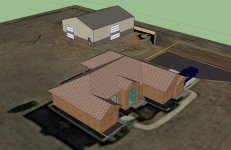
Then one day I found out about Google's Sketchup so I downloaded it and got to playing with it. I gotta say that after I got the hang of it, I was hooked. I've drawn a bunch of stuff on it... and when I planned out my shop project I took the time to design the shop out on my land. I used the plot plan and satellite photos to dial in the property lines, then I built a 3D model of the house and the shop to show where everything was laid out. (Picture attached with a bird's eye view I submitted with the package.)

When I brought in my shop drawings to get my building permit, the local office was stunned that a homeowner went into the level of detail like that. (I live in a small country town, not in the big city so they are used to seeing stuff hand written on napkins sometimes.)

Anyway, Sketchup is free and has been a lot of fun to use. It wasn't until my wife bought me a 3D Printer for Christmas and I started looking for stuff to make did I even realize that it could be used to 'make stuff.'

Here's a list of tips and tricks to get you started:

https://i.materialise.com/blog/en/3d-printing-with-sketchup/

I recently started printing tap handles for our brewery in OKC. I didn't do the model... that was done by my business partner's brother so I'm just printing it for us... but I plan on educating myself on how to do it using Sketchup because it's what I know. I've attached some examples of the tap handles so you can check them out. The first two are while they were printing, the third is printed but not yet painted, and the last one is after painting.

Good luck with your designing and printing!

Mark
 

Attachments

  • FB_IMG_1531512514436.jpg
    FB_IMG_1531512514436.jpg
    140.4 KB · Views: 28
  • IMG_20190910_164315.jpg
    IMG_20190910_164315.jpg
    42.2 KB · Views: 24
  • IMG_20190910_164404.jpg
    IMG_20190910_164404.jpg
    76.9 KB · Views: 25
  • IMG_20190910_195436.jpg
    IMG_20190910_195436.jpg
    56.9 KB · Views: 31
  • IMG_1679.jpg
    IMG_1679.jpg
    137.6 KB · Views: 32

gte718p

Well-known member
Joined
Mar 12, 2009
Messages
3,972
Solidworks has a military license that's $20 for a full version.

Of course this is only useful if you are or were a US or Canadian service member.

Thanks I did not know that.

Fusion 360 is also free. It is an Autodesk product so if you have been using AutoCad it will feel familiar.

Solid Edge also has a free full version (I think it does watermark drawing, but feature wise complete) if you have any connection to an education institution
 
To avoid these ads, REGISTER NOW!
Top Bottom