To avoid these ads, REGISTER NOW!

Old Canadian Drill Press

the gypsy

Well-known member
Joined
Mar 13, 2013
Messages
1,780
Location
Montreal, Quebec, Canada
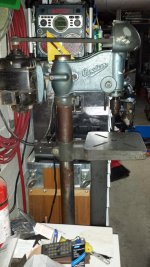
I just bought a Canadian drill pres floor model. I want to rebuild it, although I am not sure how far I will get. I got hooked when I saw the $50.00 price tag. But seeing as I am not one to back down from a challenging project I will give it my best try.

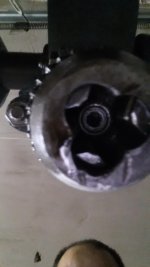
First thing is that the chuck does not close completely, so I would like to remove the chuck and clean it up or replace whatever the case may be. My problem is I don't know how to remove the chuck. Can anybody point me in the right direction, it would be appreciated.

Although I have tried to find previous posts regarding the removing of chucks, I can't seem to find it now that I need it.
 
To avoid these ads, REGISTER NOW!

trexdoink

Well-known member
Joined
Dec 28, 2010
Messages
259
Location
Iowa
Some are attached using a tapered shaft on the drill into a taper in the chuck with a socket head (Allen head) screw as a lock to hold the chuck on the taper. It will be deep up inside the chuck. Hard part will be getting it off the taper (if it is tapered) without screwing something up. Or It may have a window in the shaft if you extend it out ( like if you were drilling) that takes a steel wedge to release it. Those are the easy ones if you have the wedge. if not it wouldnt be hard to make. MSC may have one to order. Good luck! Post pictures.
 
Last edited:

Outlawmws

Well-known member
Joined
Aug 9, 2011
Messages
39,269
Location
The Badlands
:+1: on the post pics

and yes, extend the quill and see if there is an opening. if there is, you line up the spindle window with the quill window, and you can see the top of the taper.
 

zkling

Well-known member
Joined
Jan 23, 2007
Messages
16,939
A model number, size or best would be pics of it. Probably a JT33 taper that needs to be knocked off with taper wedges.

Those are good machines. Is it a Canadian Buffalo or Canadian Otto...? I always get a few different Canadian brands mixed up. :headscrat
 

zkling

Well-known member
Joined
Jan 23, 2007
Messages
16,939
Taper wedges? Is there any other way or must I buy these taper wedges. Or can I use a hammer puller.

Please post a picture or description of your press.

It is best to use the proper tool for the job to prevent unnecessary damage to the parts. Especially when the parts are old and hard to find. ;)
 
To avoid these ads, REGISTER NOW!
OP
T

the gypsy

Well-known member
Joined
Mar 13, 2013
Messages
1,780
Location
Montreal, Quebec, Canada
Thank you for all the help so far. I wish to apologize for not posting any pictures. The reason is that I just got a new Samsung S4 and still can't figure out how to upload pictures to my computer. So I guess I may have to resort to borrowing a digital camera and take it from there. so I guess I'll post later.
 

Attachments

  • 20130831_194609.jpg
    20130831_194609.jpg
    150.8 KB · Views: 49
Last edited:

zkling

Well-known member
Joined
Jan 23, 2007
Messages
16,939
Can you post a up close pic of the chuck/mounting area? AKA the area in question.
 

treimers

Well-known member
Joined
Feb 5, 2012
Messages
177
Thank you for all the help so far. I wish to apologize for not posting any pictures. The reason is that I just got a new Samsung S4 and still can't figure out how to upload pictures to my computer. So I guess I may have to resort to borrowing a digital camera and take it from there. so I guess I'll post later.

For getting pictures from the phone to your computer, you have two options -

My favorite approach for just one or two pics is to take the picture, and then while viewing the picture, tap the screen.
Among the things that pop up, you'll see a little "Y" shaped symbol, labeled
Sharing.
Just use that, select Email, and email yourself the photo.
I've been doing that for months for photos I've taken, and have come nowhere near my data usage limit.

Option #2 -
Disconnect the USB cable from your white charger, and plug it into your computer.
Your computer should beep a couple of times as the phone connects.
You may get a notification on the phone asking how to connect - whether you want to tether (share the data connection of the phone with the computer), or just "view files".
You want the ' view files' option.

Your computer should then have a new drive letter in My Computer, which will be your phone.
Browse that drive letter, find the DCIM folder, click it, then look for Camera.
In there will be your pictures.
Just cut and paste to move them from the phone to your My Documents folder or My Pictures folder on your computer.


This PDF should show you more about how to do it.
It's from US Cellular, so if you're on a different carrier, YMMV.


http://www.uscellular.com/uscellular/pdf/samsung-galaxy-s-4-Transferring-Content-from-PC-or-MAC.pdf
 
Last edited:
OP
T

the gypsy

Well-known member
Joined
Mar 13, 2013
Messages
1,780
Location
Montreal, Quebec, Canada
Can you post a up close pic of the chuck/mounting area? AKA the area in question.

Thank you, I will do that immediately although I don't know if I will be able to load the pics. I keep getting this message about a security token, blah blah blah. I can't figure this out yet and I have sent a message to the administrator, but no answer yet. I am waiting patiently.
 
OP
T

the gypsy

Well-known member
Joined
Mar 13, 2013
Messages
1,780
Location
Montreal, Quebec, Canada
For getting pictures from the phone to your computer, you have two options -

My favorite approach for just one or two pics is to take the picture, and then while viewing the picture, tap the screen.
Among the things that pop up, you'll see a little "Y" shaped symbol, labeled
Sharing.
Just use that, select Email, and email yourself the photo.
I've been doing that for months for photos I've taken, and have come nowhere near my data usage limit.

Option #2 -
Disconnect the USB cable from your white charger, and plug it into your computer.
Your computer should beep a couple of times as the phone connects.
You may get a notification on the phone asking how to connect - whether you want to tether (share the data connection of the phone with the computer), or just "view files".
You want the ' view files' option.

Your computer should then have a new drive letter in My Computer, which will be your phone.
Browse that drive letter, find the DCIM folder, click it, then look for Camera.
In there will be your pictures.
Just cut and paste to move them from the phone to your My Documents folder or My Pictures folder on your computer.


This PDF should show you more about how to do it.
It's from US Cellular, so if you're on a different carrier, YMMV.


http://www.uscellular.com/uscellular/pdf/samsung-galaxy-s-4-Transferring-Content-from-PC-or-MAC.pdf

Thank you but I figured that out, my problem is that I cannot post, I keep getting a message about a missing security token.
 

zkling

Well-known member
Joined
Jan 23, 2007
Messages
16,939
Awesome, looks like someone put the wrong (kinda) chuck on there. That is going to be a bit of a pain to get off without damaging the threads. There should be a threaded collar that goes on the threads above chuck. The collar is used to pull on and push the chuck off its taper. You can try a very thin set of wedges, but be very careful to not damage the threads in the process. I'm not sure how much clearance you have between the threads and the top of the chuck.

If you have a cheap open end wrench that you don't care about, you could grind it thin and then taper it to act as a homemade wedge, just make sure to go slow and deburr so you don't scuff anything. :beer:
 
OP
T

the gypsy

Well-known member
Joined
Mar 13, 2013
Messages
1,780
Location
Montreal, Quebec, Canada
Thank you for the info. If i were to disassemble the head to clean and grease bearing or whatever needs fixing, is there another way of removing the chuck.
Do you know where I can get a threaded collar or is it something I will have to get machined?
 
To avoid these ads, REGISTER NOW!
Top Bottom