
You are using an out of date browser. It may not display this or other websites correctly.
You should upgrade or use an alternative browser.
You should upgrade or use an alternative browser.
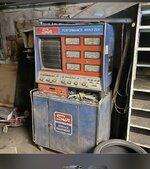
Old dusty electronic cleaning; Sun Performance Analyzer 1115
- Thread starter mkarlin
- Start date
engineer2
Well-known member
Compressed air nozzle at moderate pressures. The OSHA safety standard is 30 PSIG, so that's a good start.
RPH
Well-known member
Document as much as possible with photo’s. Get close ups of the connectors and wire colors / numbers. While cleaning it’s possible to dislodge something. Those photo’s hopefully will have that detail.
Odd Job
Well-known member
I like to spray everthing liberally with Nu-Trol control cleaner. Especially taking off the knobs and shooting the shafts on the pots then rotating them and repeating. Switches too, douse them. Circuit board plugs also.
Last edited:
justsam
Well-known member
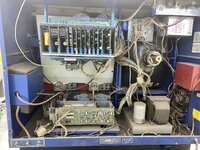
Moderate air pressure and soft bristle brush. When you are ready to power it up, bring it up slowly, with a variac rather than sudden full line voltage. That large can electrolytic capacitor next to the power transformer is probably going to fail if it hasn't already.
Dry ice blasting
walta
Well-known member
What is the goal?
If the goal is to operate the machine to tune cars like back in the day that is very different that if it will be decorative.
If it will be decorative put the back on and clean the exterior only.
If the goal is operational seems to me you are going to need to find a specialist and the smart move is to leave the machine unmolested.
There is always a small chance that some future owner may want to make the machine operational and your well-meaning attempt at internal cleaning can only make any future restoration more difficulty.
Walta
If the goal is to operate the machine to tune cars like back in the day that is very different that if it will be decorative.
If it will be decorative put the back on and clean the exterior only.
If the goal is operational seems to me you are going to need to find a specialist and the smart move is to leave the machine unmolested.
There is always a small chance that some future owner may want to make the machine operational and your well-meaning attempt at internal cleaning can only make any future restoration more difficulty.
Walta
Last edited:
iron block
Well-known member
A few things to add to your cleaning routine:

Good luck.
- Use the blue levers to dislodge each of the cards in that card cage at the top. No need to remove the cards completely, just back them out and push them back in so that the fingers of the edge connectors get some wiping action.
- Do the same for the four black board edge connectors on the motherboard beneath that card cage.
- Check the various white connectors on that board at the bottom left that is facing us. If they are not gold connectors mating to gold pins, then a good contact cleaner spray is advised. Tin-plated contacts can tarnish with age and cause all kinds of weird intermittent problems.
- Check that little shaded pole fan motor that is blowing up into card cage to see if it rotates. A drop of oil may be needed.
Good luck.
Metal-Marc
Well-known member
This is what we always did with dusty old electronics before fixing them. Soft bristle brush with a vacuum cleaner first, then some air to dislodge the harder to get dust.
Before taking anything apart, ie removing boards, etc, power it on first and see what works and what doesn't work. The last thing you want to do is to start pulling boards and parts as you might introduce a problem that was not there in the first place. Then you start chasing your tail and dig yourself a hole. Very common thing for people with no experience at fixing electronics to do. Also avoid using water for obvious reasons.
Before taking anything apart, ie removing boards, etc, power it on first and see what works and what doesn't work. The last thing you want to do is to start pulling boards and parts as you might introduce a problem that was not there in the first place. Then you start chasing your tail and dig yourself a hole. Very common thing for people with no experience at fixing electronics to do. Also avoid using water for obvious reasons.
engineer2
Well-known member
Found an old Sun price list. An 1115 cost $8,650 in 1980. About $30,350 in today's dollars.
thanks for the reply, it is currently working well and that is the goalWhat is the goal?
If the goal is to operate the machine to tune cars like back in the day that is very different that if it will be decorative.
If it will be decorative put the back on and clean the exterior only.
If the goal is operational seems to me you are going to need to find a specialist and the smart move is to leave the machine unmolested.
There is always a small chance that some future owner may want to make the machine operational and your well-meaning attempt at internal cleaning can only make any future restoration more difficulty.
Walta
thanks!!!A few things to add to your cleaning routine:
Oh, and since your original question was about cleaning -- for really dirty electronics I have been known to remove the boards, wash them in lots of soapy water, rinse with a hose, and dry in a 200 degree oven. Not a wife-approved approach, though.
- Use the blue levers to dislodge each of the cards in that card cage at the top. No need to remove the cards completely, just back them out and push them back in so that the fingers of the edge connectors get some wiping action.
- Do the same for the four black board edge connectors on the motherboard beneath that card cage.
- Check the various white connectors on that board at the bottom left that is facing us. If they are not gold connectors mating to gold pins, then a good contact cleaner spray is advised. Tin-plated contacts can tarnish with age and cause all kinds of weird intermittent problems.
- Check that little shaded pole fan motor that is blowing up into card cage to see if it rotates. A drop of oil may be needed.
Good luck.
Zeke
Well-known member
I belong to an antique radio forum and they suggest the brush and vacuum method in a well ventilated area. Artist's brushes work well and can be found cheap a sales. A brush that has been abused is of no use to an artist.
83VillageRepair
Well-known member
It goes without saying but I am going to anyway. Remove all power sources and discharge all capacitors before attempting any cleaning. That picture tube can light up your world.
Cool project. I have a weakness for old Sun equipment.
Cool project. I have a weakness for old Sun equipment.
MBfreak
MEMBER EMERITUS
Zeke .
Kris in Sweden here.
Would like to join the antique radio forum you mention.
Is that possible?
Best regards
Ola
Kris in Sweden here.
Would like to join the antique radio forum you mention.
Is that possible?
Best regards
Ola
MBfreak
MEMBER EMERITUS
One source of contamination which is difficult to clean is if the exhaust gas analyzer tubing that runs thru the cabinet and the analyzer has leaked exhaust gases.
I had an analyzer like yours, but equipped with a second scop for value listing and also automatic tuning of gas analyzer. Pai in the backside.
Spent a year restoring!
Ola
I had an analyzer like yours, but equipped with a second scop for value listing and also automatic tuning of gas analyzer. Pai in the backside.
Spent a year restoring!
Ola