To avoid these ads, REGISTER NOW!

Phone/Ethernet jacks

v1ru5879

Well-known member
Joined
Feb 19, 2018
Messages
369
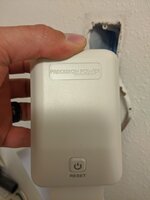
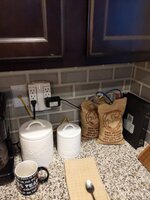
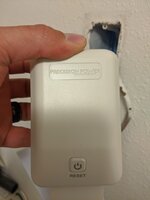
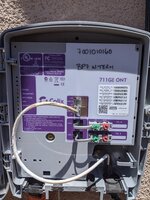
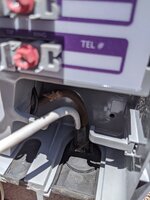
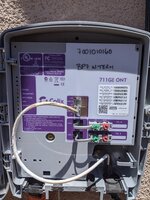
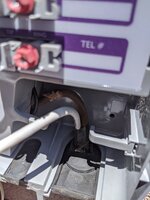
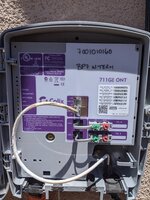
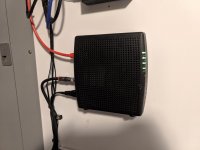
My home is 3 years old and is wired for fiber. At least I am assuming that's what it is since is has this box in the laundry room. Anyway the only jack in the house to plug my modem into is in the kitchen of all places. What exactly is involved in adding these jacks to say bed room n office room so I could move the modem to a more out of the way location. I understand enough about Ethernet wiring for something like a network switch. Wires run to each room back to the switch that goes back into the modem. How does it work to wire the phone jacks or in my case Ethernet jack? Does each line run to the network box outside the house? Do they get spliced together somewhere? I have an electrician coming Friday to add a jack to my office room for $100. I am genuinely interested in how this is done and I hate to be in his way asking questions about the process while he is trying to work. Second picture is where the lone jack in my house is located. The Mrs is not happy having the modem right next to the coffee pot and much less in the kitchen.1eba5f93c8a32c6189d3d7928e6eb46f.jpg6bbe0c29f47af4a1b555f44c03c04a76.jpg

Sent from my Pixel 3a XL using Tapatalk
 

Attachments

  • 6bbe0c29f47af4a1b555f44c03c04a76.jpg
    6bbe0c29f47af4a1b555f44c03c04a76.jpg
    557.7 KB · Views: 2
  • 1eba5f93c8a32c6189d3d7928e6eb46f.jpg
    1eba5f93c8a32c6189d3d7928e6eb46f.jpg
    412.3 KB · Views: 0
To avoid these ads, REGISTER NOW!

wyliesdiesels

Well-known member
Joined
Aug 14, 2012
Messages
19,994
Location
Modesto, CA
Cant tell what you have there. Can you post some pics of the label and connections?

As for connecting POTS/plain old telephone lines, there is a DEMARC box (gray) on the outside where the lines from the phone company come in and the wires from the jacks connect. Phone lines can also be daisy chained from jack to jack if its easier than home runs back to the DEMARC.

Ethernet on the other hand, CANNOT be daisy chained or spliced. Each ethernet cable/jack needs to be home ran to the switch. It would not go outside either.

The switch then plugs into your router or gateway (modem and router all in one)....
 

Innovate1

Well-known member
Joined
Jul 28, 2014
Messages
4,286
Location
Illinois near St. Louis, Missouri
"Wired for fiber"?? Is it wire or fiber? I don't see anything that looks like fiber. Can't see the wires on the back of the laundry room box. Can't see much of the wires in the kitchen either as they are covered by the bags of beans. What's the blue wire go to? Looks more like a wired modem but I am not familiar with fiber equipment. What's the demarc box look like?

Is the jack the electrician is adding for phone or ethernet?

To move the modem you likely will need to do a new run from the demarc box to where you want the modem. Then run phone to existing wiring and ethernet to any jacks you want. Ethernet could be wireless.

Need more info and pictures.
 

jbwilkins

Well-known member
Joined
Mar 16, 2016
Messages
310
Location
Nashville Tn
Very few, if any, residences have fiber in the walls. Still too expensive.

That looks to be the plug providing backup power to your ONT that's on the outside of the home.....(Google Precision Power PP36PB-12B)......I'm guessing you're phone is over fiber too, the provider has to provide backup power so your phone will work when the power is out....

"Fiber Homes" typically have "fiber to the house" and it terminates at the demarcation location outside and converts to CAT5e/6 at that location. CAT5e/6 gets you gigabit speeds and fiber products are still much more expensive as he said.
 

rok_hunter

Well-known member
Joined
Apr 10, 2020
Messages
153
Location
home
When I built my house I had my electrician “plumb” each anticipated TV location with CAT5 Ethernet. Since he’s an electrician and not a network guy he did exactly that, and ran the other end of each CAT5 cable to the same spot on the outside of my house that he ran all the shielded coax for the cable tvs. At the time I thought it didn’t seem right but he was the electrician, and I was just a home buyer. When I asked him, he even said “that’s where your internet & cable will come in the house, so you can just hook it all up there”.

Since then I’ve learned that I need a single Ethernet line coming to my modem/router to decode the signal, and then a cable from the modem/router either to each device (my modem/router has four LAN outputs: two are used by my computer and printer, one is used to supply the signal to my network switch, details on that below) or to a switch so I can split it to multiple devices. This led me to re-working all those LAN cables that terminated outside my house.

See if you can follow along with what I did, and ask questions as you see fit:

I purchased a TP Link Gigabit 8-port POE switch and a Leviton 47605-140 enclosure (plus a Leviton 47605-ACS J-Box to plug in the switch, and a 49605-AUB plastic universal shelf bracket) to put in my master bedroom closet. I pulled all of the LAN cables that terminated at the junction box outside and re-routed them through the attic and into the bedroom wall that I planned to put the enclosure. I ran a single CAT5 from my modem/router to the same spot as the ‘source’ cable for the switch. The next two gadgets I bought were indispensable - a Network Cable RJ45 tester (<$10 on Amazon) and an All-In-One RJ45 Crimper Tool Kit (currently $33 on Amazon). That came with several RJ45 plugs to install on the ends of my LAN cables. I also learned there are two “standards” to wire RJ45 plugs - T568A, and T568B. You can use either one, just make sure you use the same standard at each end of the LAN cable. Since one end of all my LAN cables had already had a plug installed by the electrician, I had no way to know which standard he used; the RJ45 tester mentioned earlier let me figure out my guy used T568B, so that’s how I wired all the ends in my closet. I also used the RJ45 tester to figure out which cable in the closet went to which port throughout the house, and labeled them appropriately.

I chose the enclosure location based on where I had a power outlet in the hallway on the other side of my closet wall, so I could simply tie into that to put a plug in the enclosure to power the network switch.

From there it was a pretty simple task - plug each of the newly installed-and-labeled connectors into my switch, and then go to each outlet on the other end and make sure there was an internet signal there. Now each of my TVs, the cable box, the kid’s PlayStation, and my A/V receiver has a LAN cable for it’s internet/network access instead of bogging down my wifi. Final step was throwing the cover on the enclosure box in the closet, and I have a professional-looking install!

Keep in mind that to meet code (at least in Florida) you’ll have to seal any holes you drill down into your walls. Most of your construction should have a 2x4 or similar that you’ll have to drill down through, to route your LAN cables into the wall at your switch and device locations. When everything is done and it all works, get yourself a can of expanding spray foam to seal up that hole from the attic at each location you drill through.

Back to the switch I chose - I mentioned I used a Gigabit 8 port POE model. Three things are important here:
1) You want a Gigabit switch. That’s a reference to the speed that data can flow through. Your options are 10/100 Mbps (megabytes per second), or 10/100/1000 Mbps. The 10/100 may work if all you have is dial-up or DSL and no intention of ever being faster. If you’ve got anything identified as “high speed” internet you want the 10/100/1000, which is gigabit.
2) POE - Power over Ethernet. I bought a switch that has this because one of my LAN lines is to a spot in my ceiling where I can hang a wireless router, but that needs to be powered over the LAN cable instead of being plugged in.
3) Get a switch with enough ports, knowing one will be ******* by the “line in” from your modem/router. For me, I had seven lines to run out to my various rooms so the 8-port switch worked perfect.
 

Showkey

"MEMBER EMERITUS"
Joined
Aug 9, 2014
Messages
8,638
Location
Wausau WI
Cancel the electrician and the wired connections......unless they are installing a WiFi router.

Back to the same old question........wired or wireless ( WiFi) internet.

85% of the typical household devices have NO WIRED Connection.

99.9% of the typical household devices have NO NEED FOR A WIRED connection.

So the answer is a good quality home WiFi network. Which can be up and running in 15 minutes.*

If there fiber coming to the home you may have 1 gig internet and quality WiFi will cover the complete home with amazing speed and bandwidth.

* Which means no network switches, no wires to each room and all that home wiring was a waste of money and pretty much obsolete the day it was installed. My last two homes had were prewired CAT 5/6 that were never used. Even the phone and cable Wiring in multiple rooms has no value in today’s internet. Lost the land and fax line years back.

Example ..........try to find a wired Internet connection in modern hotel....that ship sailed 10 years back ? ( well maybe 8 if you stay in an old Holiday Inn).
 
Last edited:

wyliesdiesels

Well-known member
Joined
Aug 14, 2012
Messages
19,994
Location
Modesto, CA
Very few, if any, residences have fiber in the walls. Still too expensive.

Not true at all.

In the early 2000s i was pulling structured media cable, which included fiber, inside the walls of homes.

Out here, AT&T and comcast in certain neighborhoods have FTTH/fiber to the home. It runs right inside to a media converter.

In the bay area, there is google fiber as well...
 
OP
V

v1ru5879

Well-known member
Joined
Feb 19, 2018
Messages
369
"Wired for fiber"?? Is it wire or fiber? I don't see anything that looks like fiber. Can't see the wires on the back of the laundry room box. Can't see much of the wires in the kitchen either as they are covered by the bags of beans. What's the blue wire go to? Looks more like a wired modem but I am not familiar with fiber equipment. What's the demarc box look like?

Is the jack the electrician is adding for phone or ethernet?

To move the modem you likely will need to do a new run from the demarc box to where you want the modem. Then run phone to existing wiring and ethernet to any jacks you want. Ethernet could be wireless.

Need more info and pictures.

Behind that box there is what looks like a large brown ethernet wire with a large red and black power and ground that terminates to the box. The yellow wire plugged into the wall is the only place I can connect my modem to in the entire house, no other jack, that is the only one. The blue wire is an ethernet cable that I use to connect my laptop on occasion. Basically I want to figure out where the other end of the yellow jack terminates. I do not like the fact that currently I am at the mercy of that single jack for my modem. I don't see why they did not locate that jack to the office room or bedroom, the location they chose in the kitchen is not ideal at all.
 
OP
V

v1ru5879

Well-known member
Joined
Feb 19, 2018
Messages
369
Cancel the electrician and the wired connections......unless they are installing a WiFi router.

Back to the same old question........wired or wireless ( WiFi) internet.

85% of the typical household devices have NO WIRED Connection.

99.9% of the typical household devices have NO NEED FOR A WIRED connection.

So the answer is a good quality home WiFi network. Which can be up and running in 15 minutes.*

If there fiber coming to the home you may have 1 gig internet and quality WiFi will cover the complete home with amazing speed and bandwidth.

* Which means no network switches, no wires to each room and all that home wiring was a waste of money and pretty much obsolete the day it was installed. My last two homes had were prewired CAT 5/6 that were never used. Even the phone and cable Wiring in multiple rooms has no value in today’s internet. Lost the land and fax line years back.

Example ..........try to find a wired Internet connection in modern hotel....that ship sailed 10 years back ? ( well maybe 8 if you stay in an old Holiday Inn).

my modem/router does have WiFi capabilities. The real issue is re locating the single jack in the home to a more practical location. I could very well punch it though the wall into the office and run a long cable to the location I need it, but that makes absolutely no sense in a new home. I would like it to look like the jack was intended to be in the new location
 
OP
V

v1ru5879

Well-known member
Joined
Feb 19, 2018
Messages
369
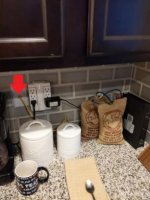
Where the red arrow is pointing to is the only location in the home that I can connect the modem to. Where does the other end of the terminate? The grey box outside the home?
 

Attachments

  • 6bbe0c29f47af4a1b555f44c03c04a76.jpg
    6bbe0c29f47af4a1b555f44c03c04a76.jpg
    19.5 KB · Views: 61

Dustball

Well-known member
Joined
Jun 25, 2011
Messages
2,081
Location
Hudson, WI
As someone else has mentioned already, the Precision Power module is a power supply for your ONT (Optical Network Terminal), the interface to your communication company's fiber network.

Manual- http://www.coretelecom.net/media/pdf/PP36PB-12B.pdf

You need to find out where the other end of that Ethernet wall jack is. There's a module somewhere in your house that the cable connects to and it's not going to be hidden. Once you find where that module is, you can route a new cable from that module to wherever you'd like or even put the modem there as well.
 

Dustball

Well-known member
Joined
Jun 25, 2011
Messages
2,081
Location
Hudson, WI
Where the red arrow is pointing to is the only location in the home that I can connect the modem to. Where does the other end of the terminate? The grey box outside the home?
What's the model number on the modem on your countertop?

Who is your fiber provider? Are you able to open the box and take a picture?
 
OP
V

v1ru5879

Well-known member
Joined
Feb 19, 2018
Messages
369
CenturyLink c3000z is the modem. I'll start looking around to see if I can find a module that the Ethernet cable connects to. Is there a chance it would be in the attic space? I'll take a picture of the box when I get off work today

Sent from my Pixel 3a XL using Tapatalk
 

Innovate1

Well-known member
Joined
Jul 28, 2014
Messages
4,286
Location
Illinois near St. Louis, Missouri
Behind that box there is what looks like a large brown ethernet wire with a large red and black power and ground that terminates to the box. The yellow wire plugged into the wall is the only place I can connect my modem to in the entire house, no other jack, that is the only one. The blue wire is an ethernet cable that I use to connect my laptop on occasion. Basically I want to figure out where the other end of the yellow jack terminates. I do not like the fact that currently I am at the mercy of that single jack for my modem. I don't see why they did not locate that jack to the office room or bedroom, the location they chose in the kitchen is not ideal at all.

I would guess the red and black wires go to the same place as the other end of the wire to the yellow jack. Not sure if that's the demarc box or somewhere inside. Some pics of the demarc box (open if possible) but figuring out where the wires run to may take some detective work. For example, pull the face plate and see which way the wire run in the wall if you can. Look in the nooks and crannies of closets, basement, etc for where they may have hidden the box. Ask the builder where it is. Ask others in your neighborhood - they are likely similar.
 

Dustball

Well-known member
Joined
Jun 25, 2011
Messages
2,081
Location
Hudson, WI
CenturyLink c3000z is the modem. I'll start looking around to see if I can find a module that the Ethernet cable connects to. Is there a chance it would be in the attic space? I'll take a picture of the box when I get off work today

Sent from my Pixel 3a XL using Tapatalk

I don't think it's even being used as a modem since that is intended for DSL. It's probably only being used as a router with the actual modem being either inside the grey box or elsewhere in your house.
 

ddawg16

Well-known member
Joined
Jul 11, 2008
Messages
21,005
Location
S. California
The in-laws have fiber...or rather the Verizon Fios fiber comes to a converter box in the garage where it connects to the existing POTS line (2 twisted pairs). One pair feeds the wireless modem upstairs and the other line is for the phone.

When I did my 2-story addition....I ditched all the POTS wiring. I have cable going to my garage where it then goes to conduit underground to central point in my house. From there it goes to the Cable modem. I have Cat6 Running everywhere.....including a line back to the garage.

When possible, I have as much as possible on hard Ethernet.
 

Denwood

Well-known member
Joined
Sep 22, 2014
Messages
4,184
Location
Thunder Bay, Ontario, Canada
That power supply is likely feeding the ONT (Optical Network Terminal) which is likely in the "grey box" outside your house. If not, it's close to the power source...check on other side of your laundry wall.

The ONT takes the fiber signal and converts to ethernet. That one cable goes to your router. From the router, you typically have a single discrete run of cable to each network jack in your house. Many routers also integrate wifi, and this is why the builder terminated in your kitchen. It's likely central in your house.

The WIFI coverage issue is something to be aware of if you move that router to say a remote corner of the basement. If able, you should run at least one ethernet cable to each one of your entertainment racks/areas. This way you can locate a small Ethernet switch in each one of these areas to connect all your AV, gaming, streaming bits. It's also a good place usually to plug in a wired access point if you'd like high(er) speed WIFI coverage in your home/shop. An ethernet switch (say 8 ports) can provide 7 extra network ports providing it's connected back to your router using one of the switch ports.
 
Last edited:
OP
V

v1ru5879

Well-known member
Joined
Feb 19, 2018
Messages
369
Ok so after some more investigation I answered my own question I believe. The brown wire goes back to the grey box outside. Also traced the Ethernet jack line to the box (white wire). It appears I can only run one more line to a jack from the way the box is. I think I will try going into the attic and see if I can make it easy and pull the white line up and relocate it. Most likely won't be that easy since it's pry stapled to the studs. I imagine splicing the cat5 isn't the best, but would it be possible to splice into it in the attic to branch off into other rooms? I took lots of pics now that I am more determined to educate myself on how this all works662fc8c05a5d0e9ae2f1925bb928e058.jpg4961aa7429746856094d87bee955ecaf.jpg472328fbb130ed9bda4bf1875255dd7d.jpg203f1aa38beb6eaa231dfefca404e3f7.jpg0b77c22ca612b452cc70d33940bd0383.jpg254c6d90482fde3f245905bac5b3bdb9.jpgee7fbbfa2bcf720f451d52191df24ac3.jpg

Sent from my Pixel 3a XL using Tapatalk
 

Attachments

  • 203f1aa38beb6eaa231dfefca404e3f7.jpg
    203f1aa38beb6eaa231dfefca404e3f7.jpg
    474.1 KB · Views: 1
  • 4961aa7429746856094d87bee955ecaf.jpg
    4961aa7429746856094d87bee955ecaf.jpg
    626.9 KB · Views: 0
  • 662fc8c05a5d0e9ae2f1925bb928e058.jpg
    662fc8c05a5d0e9ae2f1925bb928e058.jpg
    393.6 KB · Views: 0
  • 472328fbb130ed9bda4bf1875255dd7d.jpg
    472328fbb130ed9bda4bf1875255dd7d.jpg
    781.4 KB · Views: 0
  • 0b77c22ca612b452cc70d33940bd0383.jpg
    0b77c22ca612b452cc70d33940bd0383.jpg
    494.6 KB · Views: 0
  • 254c6d90482fde3f245905bac5b3bdb9.jpg
    254c6d90482fde3f245905bac5b3bdb9.jpg
    744 KB · Views: 0
  • ee7fbbfa2bcf720f451d52191df24ac3.jpg
    ee7fbbfa2bcf720f451d52191df24ac3.jpg
    676.7 KB · Views: 0
To avoid these ads, REGISTER NOW!
OP
V

v1ru5879

Well-known member
Joined
Feb 19, 2018
Messages
369
The in-laws have fiber...or rather the Verizon Fios fiber comes to a converter box in the garage where it connects to the existing POTS line (2 twisted pairs). One pair feeds the wireless modem upstairs and the other line is for the phone.

When I did my 2-story addition....I ditched all the POTS wiring. I have cable going to my garage where it then goes to conduit underground to central point in my house. From there it goes to the Cable modem. I have Cat6 Running everywhere.....including a line back to the garage.

When possible, I have as much as possible on hard Ethernet.
I really wish the house would have been built in this manner. I for the small amount of rooms I am considering a power line adapter to give ports were they are needed to save the hassle of running cat cable from a switch to each room since there is only 4 rooms that would ever possibly need a port or two. My goal is to get the Ethernet jack out of my kitchen and into the office where our computers are. I am curious as to how the electrician is gonna do it. For $100 a jack I can't really complain

Sent from my Pixel 3a XL using Tapatalk
 

Denwood

Well-known member
Joined
Sep 22, 2014
Messages
4,184
Location
Thunder Bay, Ontario, Canada
Running a few CAT5/6 to each room from a central hub/mechanical room is a nice way to do things as you can re-task pairs for phone, HVAC, automation, LAN etc.

Powerline should be your last resort. You'll be amazed at what an electrician with wire fish can do :)
 

theoldwizard1

Well-known member
Joined
Feb 22, 2011
Messages
43,125
Location
SE MI
In the early 2000s i was pulling structured media cable, which included fiber, inside the walls of homes.
Okay, so you have done a couple hundred. In the Bay area maybe 10,000 homes ? 50,000 ? That is still "not very many" in my book !

Out here, AT&T and comcast in certain neighborhoods have FTTH/fiber to the home. It runs right inside to a media converter.

In the bay area, there is google fiber as well...

FTTH is great, Wish I could get it. Once it hits my house, I would just do Cat5E/Cat6 gigabit copper wire. MUCH cheaper. If you run fiber to a room, you still need an adapter to connect your "network appliance".

802.11ac w/MU-MIMO is capable of over 1 Gb wirelessly.
 

Jkcolo22

Well-known member
Joined
Nov 28, 2018
Messages
74
Location
Castle Rock, CO
Typically in wall Ethernet goes to a patch panel first (search Ethernet patch panel), THEN to a switch. This is because it’s much more efficient to to buy bare cable (without ends) and punch it down to a patch panel and wall jacks, rather than trying to crimp on cat5 ends/connectors. When a patch cable is needed (“plugs”/connectors on each end) most pros just buy factory cables rather than making their own. Seriously, making your own cables *****. The “pass-through” connectors have made it a bit easier than the old days, but you still need a cable tester and a lot of patience.

Now for your situation, if you wanted to add additional interior jacks/ports, you could probably fish a shielded cable down to somewhere near that exterior box, mount a new weatherproof box and install a patch panel and switch. But for the switch, you would also need to have power nearby to power the switch. There’s a couple work-arounds if no power nearby...

Ideally you would have a patch panel inside your house. Where does that electrician plan on running the wire to? If it’s going outside, it should be a shielded cable. If I was in your shoes, I’d have him do it right and run a cable from your outside box to a patch panel somewhere inside the house (with power nearby), then run your new outlet to that same location. There’s a way of getting around the need to have power outside, but I’d have to draw it out to explain it.

A cheaper option is drilling a couple holes in the bottom of those cabinets, hide your equipment inside or on top of said cabinets, and conceal cables inside of surface mount cable raceway.


Sent from my iPhone using Tapatalk
 

wyliesdiesels

Well-known member
Joined
Aug 14, 2012
Messages
19,994
Location
Modesto, CA
I don't think it's even being used as a modem since that is intended for DSL. It's probably only being used as a router with the actual modem being either inside the grey box or elsewhere in your house.

Fiber service does NOT need a modem like DSL or cable internet does...
 

wyliesdiesels

Well-known member
Joined
Aug 14, 2012
Messages
19,994
Location
Modesto, CA
Ok so after some more investigation I answered my own question I believe. The brown wire goes back to the grey box outside. Also traced the Ethernet jack line to the box (white wire). It appears I can only run one more line to a jack from the way the box is. I think I will try going into the attic and see if I can make it easy and pull the white line up and relocate it. Most likely won't be that easy since it's pry stapled to the studs. I imagine splicing the cat5 isn't the best, but would it be possible to splice into it in the attic to branch off into other rooms? I took lots of pics now that I am more determined to educate myself on how this all works662fc8c05a5d0e9ae2f1925bb928e058.jpg4961aa7429746856094d87bee955ecaf.jpg472328fbb130ed9bda4bf1875255dd7d.jpg203f1aa38beb6eaa231dfefca404e3f7.jpg0b77c22ca612b452cc70d33940bd0383.jpg254c6d90482fde3f245905bac5b3bdb9.jpgee7fbbfa2bcf720f451d52191df24ac3.jpg

Sent from my Pixel 3a XL using Tapatalk

As i said previously, you CANNOT splice ethernet cable to split it to multiple jacks. You need 1 home run per jack that will terminate into a patch panel. From the patch panel you connect each jack to a switch. The switch then connects to your router...
 

Attachments

  • 662fc8c05a5d0e9ae2f1925bb928e058.jpg
    662fc8c05a5d0e9ae2f1925bb928e058.jpg
    68 KB · Views: 0
  • 4961aa7429746856094d87bee955ecaf.jpg
    4961aa7429746856094d87bee955ecaf.jpg
    179.5 KB · Views: 0
  • 472328fbb130ed9bda4bf1875255dd7d.jpg
    472328fbb130ed9bda4bf1875255dd7d.jpg
    286 KB · Views: 0
  • 203f1aa38beb6eaa231dfefca404e3f7.jpg
    203f1aa38beb6eaa231dfefca404e3f7.jpg
    102.5 KB · Views: 0
  • 0b77c22ca612b452cc70d33940bd0383.jpg
    0b77c22ca612b452cc70d33940bd0383.jpg
    103.8 KB · Views: 0
  • ee7fbbfa2bcf720f451d52191df24ac3.jpg
    ee7fbbfa2bcf720f451d52191df24ac3.jpg
    207.4 KB · Views: 0
  • 254c6d90482fde3f245905bac5b3bdb9.jpg
    254c6d90482fde3f245905bac5b3bdb9.jpg
    257.3 KB · Views: 0

Jkcolo22

Well-known member
Joined
Nov 28, 2018
Messages
74
Location
Castle Rock, CO
Ok so after some more investigation I answered my own question I believe. The brown wire goes back to the grey box outside. Also traced the Ethernet jack line to the box (white wire). It appears I can only run one more line to a jack from the way the box is. I think I will try going into the attic and see if I can make it easy and pull the white line up and relocate it. Most likely won't be that easy since it's pry stapled to the studs. I imagine splicing the cat5 isn't the best, but would it be possible to splice into it in the attic to branch off into other rooms? I took lots of pics now that I am more determined to educate myself on how this all works662fc8c05a5d0e9ae2f1925bb928e058.jpg4961aa7429746856094d87bee955ecaf.jpg472328fbb130ed9bda4bf1875255dd7d.jpg203f1aa38beb6eaa231dfefca404e3f7.jpg0b77c22ca612b452cc70d33940bd0383.jpg254c6d90482fde3f245905bac5b3bdb9.jpgee7fbbfa2bcf720f451d52191df24ac3.jpg

Sent from my Pixel 3a XL using Tapatalk


That second jack probably isn’t active. You don’t “splice” cat5. You could, however, cut that cable, terminate the end by either punching down to a patch panel (preferred) or crimping on a new connector (*****... see my post above). You could then run any new jacks back to the patch panel in your attic. But as stated in prior post, you need power at your patch panel for a switch. Power is usually not hard to find in an attic, just make sure you don’t pick a light fed by a switch. I think this is actually your best bet...

If you go this route, I’d run two cables to a central location wherever you want your modem/router located. The exterior fees will go to patch panel. Then you will connect that port on your patch panel directly to the jack that feeds your modem (WAN port)—bypassing the switch. Then you will run a cable from the “Ethernet” /LAN port of your modem to the 2nd jack, then run a short Ethernet cable from that port on your patch panel into your switch. Connect any other feeds from patch panel to switch. ...Alternatively, you could do a second POE switch at modem location or simple POE injector and power the attic router with just an Ethernet cable (“Power over Ethernet”). Much cleaner (and easier) install, but slightly more expensive.

You could also just locate your modem/router in your attic, but whenever you need to reset the modem, you have to crawl in the attic and unplug it. And because you are putting your modem in a very hot, dirty place, that will probably be more often than not.

On a side note, that brown plug that runs to the exterior appears to be a POE injector carrying likely carrying 15watts at 12v. It’s a very rudimentary way of doing POE, but it’s doing it’s job of powering the equipment in that external box.


Sent from my iPhone using Tapatalk
 

Attachments

  • ee7fbbfa2bcf720f451d52191df24ac3.jpg
    ee7fbbfa2bcf720f451d52191df24ac3.jpg
    207.4 KB · Views: 0
  • 254c6d90482fde3f245905bac5b3bdb9.jpg
    254c6d90482fde3f245905bac5b3bdb9.jpg
    257.3 KB · Views: 0
  • 662fc8c05a5d0e9ae2f1925bb928e058.jpg
    662fc8c05a5d0e9ae2f1925bb928e058.jpg
    68 KB · Views: 0
  • 4961aa7429746856094d87bee955ecaf.jpg
    4961aa7429746856094d87bee955ecaf.jpg
    179.5 KB · Views: 0
  • 0b77c22ca612b452cc70d33940bd0383.jpg
    0b77c22ca612b452cc70d33940bd0383.jpg
    103.8 KB · Views: 0
  • 203f1aa38beb6eaa231dfefca404e3f7.jpg
    203f1aa38beb6eaa231dfefca404e3f7.jpg
    102.5 KB · Views: 0
  • 472328fbb130ed9bda4bf1875255dd7d.jpg
    472328fbb130ed9bda4bf1875255dd7d.jpg
    286 KB · Views: 3
OP
V

v1ru5879

Well-known member
Joined
Feb 19, 2018
Messages
369
First I gotta thank everyone for all their knowledge and input, I appreciate it!

I do like the idea of a patch panel, I would just have to find a place that is out of sight to make the wife happy. Ideally since the house is already wired with the coax cable I would like to run the Ethernet cable in the same stuff space and use the appropriate wall plate.

The electrician is supposed to come by today n take a look n tell me his plan here in a couple of hours. I'm gonna ask lots of questions like I am on here. At least now I have a much better understanding about everything.

Would plugging in a cable to the second port outside be just that easy? Then just fishing it to the area I would like a second jack? Sounds way to easy but I'm never afraid to ask questions.

Sent from my Pixel 3a XL using Tapatalk
 

Jkcolo22

Well-known member
Joined
Nov 28, 2018
Messages
74
Location
Castle Rock, CO
Would plugging in a cable to the second port outside be just that easy? Then just fishing it to the area I would like a second jack? Sounds way to easy but I'm never afraid to ask questions.

Sent from my Pixel 3a XL using Tapatalk


I’m not as educated on fiber as Ethernet, but I highly doubt it. If you want to keep it simple, I’d just stick your new cable in port 1. Sounds like you don’t really need a jack in the kitchen anyway.


Sent from my iPhone using Tapatalk
 

wyliesdiesels

Well-known member
Joined
Aug 14, 2012
Messages
19,994
Location
Modesto, CA
First I gotta thank everyone for all their knowledge and input, I appreciate it!

I do like the idea of a patch panel, I would just have to find a place that is out of sight to make the wife happy. Ideally since the house is already wired with the coax cable I would like to run the Ethernet cable in the same stuff space and use the appropriate wall plate.

The electrician is supposed to come by today n take a look n tell me his plan here in a couple of hours. I'm gonna ask lots of questions like I am on here. At least now I have a much better understanding about everything.

Would plugging in a cable to the second port outside be just that easy? Then just fishing it to the area I would like a second jack? Sounds way to easy but I'm never afraid to ask questions.

Sent from my Pixel 3a XL using Tapatalk

Nope, doesnt work that way. the second jack probably isnt even active. But even if it was, you would need a second router behind it. Using both of those jacks would give you 2 separate networks.

All jacks need to connect BEHIND your router/firewall...

My fiber service uses an Arris CM820a modem.

You must not have Fiber service then because thats a cable modem with a coax connector on it NOT an optical port.

https://www.amazon.com/dp/B008GG78FU/?tag=atomicindus08-20
 

jeepxj

Well-known member
Joined
Mar 2, 2008
Messages
17,837
As i said previously, you CANNOT splice ethernet cable to split it to multiple jacks. You need 1 home run per jack that will terminate into a patch panel. From the patch panel you connect each jack to a switch. The switch then connects to your router...

I thought you could with 10/100 ethernet? :thumbup: but thats super nerdy and not realistic to do.
 

wyliesdiesels

Well-known member
Joined
Aug 14, 2012
Messages
19,994
Location
Modesto, CA
I figured you'd have that exact response so I took pictures ahead of time.

Thats not fiber service.

Theyre using the fiber to send the coax signal to the house to feed your coax modem.

If i ordered fiber service from Comcast in my home, they would give me a copper handoff to plug into my router.

True fiber service has no modem. It uses a Fiber switch or media converter that connects to a router like the OP has.

Ive done many vendor meets where fiber service was being installed for both cable companies and phone companies. NONE of them utilize a modem.

McLane in Manteca has fiber service from Charter. It goes from the patch bay to a Ciena fiber switch (for diagnostic) and then into the customers router via fiber.

Did a cutover for a centurylink over AT&T fiber circuit for a bank last month. Fiber comes from AT&T termination enclosure goes to a Ciena fiber switch, then switches to copper which plugs into customers firewall. Again, no modem.

My house has AT&T GPON service installed. Theres a media converter on my wall. From there one plugs the copper into a gateway (no modem). I dont currently use it and instead have cable internet via coax and a modem...
 

Denwood

Well-known member
Joined
Sep 22, 2014
Messages
4,184
Location
Thunder Bay, Ontario, Canada
With fibre to the home/business, the provider will install an ONT (optical network terminal) which provides an ethernet port ...so as Wylie has indicated, no "modem" is required by the client. Our provider here also installs a UPS which if failed, will bring down the ONT :-(

The ONT ethernet port connects to your router. That's it.
 
Last edited:

Dustball

Well-known member
Joined
Jun 25, 2011
Messages
2,081
Location
Hudson, WI
Thats not fiber service.

Theyre using the fiber to send the coax signal to the house to feed your coax modem.

If i ordered fiber service from Comcast in my home, they would give me a copper handoff to plug into my router.

True fiber service has no modem. It uses a Fiber switch or media converter that connects to a router like the OP has.

Ive done many vendor meets where fiber service was being installed for both cable companies and phone companies. NONE of them utilize a modem.

McLane in Manteca has fiber service from Charter. It goes from the patch bay to a Ciena fiber switch (for diagnostic) and then into the customers router via fiber.

Did a cutover for a centurylink over AT&T fiber circuit for a bank last month. Fiber comes from AT&T termination enclosure goes to a Ciena fiber switch, then switches to copper which plugs into customers firewall. Again, no modem.

My house has AT&T GPON service installed. Theres a media converter on my wall. From there one plugs the copper into a gateway (no modem). I dont currently use it and instead have cable internet via coax and a modem...
Regardless of what you've described, fiber is used to my house and all around my area (newly laid lines, rural area). It may be a different form of fiber communications (RFoG) but it still uses fiber to transport.
 

Jkcolo22

Well-known member
Joined
Nov 28, 2018
Messages
74
Location
Castle Rock, CO
I thought you could with 10/100 ethernet? :thumbup: but thats super nerdy and not realistic to do.


Yea technically you can... either for discrete passive sniffing for illegitimate purposes, or for legitimate purposes by using a splitter on both ends. Never used one of those splitters, but the OP would be limiting himself to 100BASE-T if he did. I would bet his fiber speeds are much better than 100mb/s.


Sent from my iPhone using Tapatalk
 

wyliesdiesels

Well-known member
Joined
Aug 14, 2012
Messages
19,994
Location
Modesto, CA
Regardless of what you've described, fiber is used to my house and all around my area (newly laid lines, rural area). It may be a different form of fiber communications (RFoG) but it still uses fiber to transport.

my point still stands.

youre transporting RF signals over fiber.

Its NOT fiber service, which does not use RF at any point of the service.
 

jeepxj

Well-known member
Joined
Mar 2, 2008
Messages
17,837
Yea technically you can... either for discrete passive sniffing for illegitimate purposes, or for legitimate purposes by using a splitter on both ends. Never used one of those splitters, but the OP would be limiting himself to 100BASE-T if he did. I would bet his fiber speeds are much better than 100mb/s.


Sent from my iPhone using Tapatalk

making me cry in comcast country. I wish I could saturate 100mb in either direction.
 

wyliesdiesels

Well-known member
Joined
Aug 14, 2012
Messages
19,994
Location
Modesto, CA
making me cry in comcast country. I wish I could saturate 100mb in either direction.

you must not have had an upgrade yet. I get 200/5 from comcast on coax, could upgrade t0 400/20 on coax or switch to 1Gig or 2Gig symmetrical fiber....

AT&T also has 1gig over fiber here as well. 2 of my neighbors have it and its installed on my house...
 
To avoid these ads, REGISTER NOW!
Top Bottom