To avoid these ads, REGISTER NOW!

Photocell replacement with wireless ?

pago cruiser

Well-known member
Joined
Dec 6, 2009
Messages
65
Location
Tucson
Did a search, and could not find this topic.

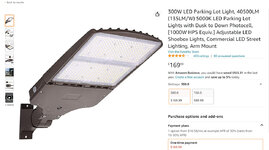
Looking for a way to control 3 or 4 parking lot lights on garage exterior with network wireless.

We live literally out in the sticks on a hilltop, and regularly deal with coyotes, havelina, skunks, and an occasional bobcat. It is 120 feet from one end of the house to the far end of the garage.
When I hear a noise in the middle of the night, I want to be able to hit one button on my phone and all exterior lights come on.

Don't think I can use wireless control switches, as there are 2 walls and a Motorhome between my wifi router and the interior wall switches in the garage.

Have attached pics of the light, and of the photocell-wireless-node device that I was thinking about. It is pretty cool, as it just replaces the factory Photoelectric switch on top of the light. That said, they also mention a controller, so it looks like the node does not have it's own IP, requiring another box. Could not find any costs on that device.

Unfortunately, the few vendors I could find who list the node on their site ALSO list that Legrand has discontinued this device; with no replacement. Pity, at about $30 each they were an ideal solution.

I don't mind if I have to run another hot from the switch to the light in order for a relay to energize to provide power to the light. That's easy-peasy.
What I do NOT want is something tied to Alexa or some other invasive audio monitoring system within the house.

Anybody done something similar? Or found similar hardware that is actually obtainable?

Just thought of something else; I added a low voltage conduit from the garage slab to near the house; Guess i could run a Cat5 direct from the router in the house, to a wireless AP in the garage, so that the wireless switch(es) could then have a clear signal. Seems like this might work?

TIA
 

Attachments

  • Electrical LED Parking Lot Light.jpg
    Electrical LED Parking Lot Light.jpg
    127.7 KB · Views: 13
  • Legrand wireless photocell replacement node.jpg
    Legrand wireless photocell replacement node.jpg
    212.3 KB · Views: 10
To avoid these ads, REGISTER NOW!

cybrdyke

Well-known member
Joined
Sep 9, 2014
Messages
3,447
Location
USA
FYI- that fixture has a built in photocell on the side, so there is no way to install that device, or any other, onto it. Doesn't matter much since that device wont be useful to you, anyway. It requires other controllers to make it work.
Even if you used a light fixture that had a 7-pin socket on it, and found a wireless device to twist into it, you'd have no way to control it without some sort of control equipment or wifi. Yes, there are apps and wireless controls, but I dont see them working from 120' away through walls. Not reliably anyway.
There are similar lights with 7-pin sockets that can accept motion sensors, if that would work for your requirements.
CD
 

gpiggaz

Well-known member
Joined
Mar 14, 2010
Messages
2,556
Location
Tucson, AZ & Edmonds, WA
So I've not used the Lighting and power control stuff from this company- but I have used their remote temperature monitors to monitor my Garage freezer temperature. And it works well, even through the metal door- They claim up to 1/4 to 1/2 mile coverage.

https://shop.yosmart.com/collections/power-lighting They have power products that apparently work with their app on your phone and while you do need an internet connection to their Hub, they rest of it uses something called LoRa.

They sell there stuff at Amazon.com too.

https://www.amazon.com/dp/B085LC46RF/?tag=atomicindus08-20
 
OP
P

pago cruiser

Well-known member
Joined
Dec 6, 2009
Messages
65
Location
Tucson
Thanks guys.
There is guy the Q&A section on Amazon who detailed a photocell bypass/delete. Attached, if anybody else is interested.
I ended up switching the lites, but another flavor on Amazon has the photocell on the top. I am assuming I could prolly find a 7-pin format base somewhere.
I still do not know what their controller is, but if they have indeed discontinued the Nodes, the point is moot. Not looking for motion detectors - have cameras with IR lights for that.

I like the Powerline device, but I can get Cat5 to the garage after I spend a day or so under the house routing it from the router to the slab penetration, after roto hammering through the stem wall below grade; it's gonna be a pita, but it is...straightforward. But the Powerline does not help with the controlling device. Would really like to stick with my native wifi, and create static IP's for the light controllers.

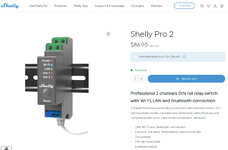
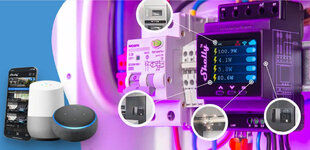
Spent way more time on this than I wanted, but I did find these "Shelly" Cat5 connected "PRO" 120VAC relays. They have their own android app, and you can also use Home Assistant or other controller software.
The neat thing I like about the Shelly is that if you lose your Inet (maybe once a week for us), local control still works, as long as your router is up.

That said, there are ...mixed reviews on their site. They also offer KW monitoring, as well as several true wireless devices that mount inside your light fixture box.

For $80 for the Pro relay, think I'll give it a try. Can find nothing else at this price point with these features.

So... anybody have any experience with these Shelly devices?
 

Attachments

  • Photocell bypass.jpg
    Photocell bypass.jpg
    91 KB · Views: 5
  • Shelly Pro 2.jpg
    Shelly Pro 2.jpg
    151.5 KB · Views: 5
  • Shelly Controller.jpg
    Shelly Controller.jpg
    169 KB · Views: 7

Denwood

Well-known member
Joined
Sep 22, 2014
Messages
4,191
Location
Thunder Bay, Ontario, Canada
I would 100% be doing that with a Hubitat hub (local control, no internet required) and Phillips HUE lights if you're looking for rock solid reliable. Hue also has outdoor motion sensors. You can build pretty much any automation on top of that hub if you want. Hubitat integrates now with Apple Homekit so a simple button on your phone to fire them up is very easy to do.

That said, the "dumb" solution below has also worked very well for us.

We get a surprising variety of critters in our (urban) back yard, including at least once...a black bear. I have about eight of the small solar lights (no wiring, no tech) like these on our fence, every eight feet : https://www.amazon.ca/dp/B07V4QS61S/?tag=atomicindus04-20

They work remarkably well for critters because they stay on for just 30 seconds so not only can you tell something is moving, but you can also see where it's going. I think we're on our fourth winter (temps get to -35 C) and I've not had a single failure. They also work very nicely if your 14 year old is trying to sneak out at 4 am...ha. The family of skunks that lives under our shed has gotten used to them, but most critters don't seem to appreciate being "followed" by lights.
 
OP
P

pago cruiser

Well-known member
Joined
Dec 6, 2009
Messages
65
Location
Tucson
Denwood - Thanks for the detailed responses.
I had looked briefly at ZWave earlier, but I read a couple posts re: limited range compared to typical wifi signals.
But now that it looks like I may need and can provide Cat 5 cable in the garage, I guess I could put the Hubitat in the garage, and with the relays indicated inside the switch boxes for the LED Spotlights. It would be no more than 20' or so from the Hubitat to the wall switches.

Sounds like this would work, and the cost is certainly reasonable. So I now have one solution.:thumbup:

But... I now have another semi-proprietary network - with its own hub - tied to my Network.

I was really trying to find an IP ethernet based solution, with a front-end android app. After some more hunting around, found this device:

https://cdn.shopify.com/s/files/1/2...rochure_and_Spec_Sheet_FINAL.pdf?v=1644064831
Cut sheet attached.

I would need to add a pair of relays, and wire the (3) LED Floods like a 2-way switch. But it is full IP, comes with it's own Webserver front end, is android and Apple compatible (although Apple lost me as a customer years ago when I discovered you could not just add a song to your MP3 player - you had to add it to a master file on your computer, and then re-synch the entire thing... making a 3 minute job take hours with 100gb of music... but I digress :lol:) and also works when Inet is down. That said, I have not been able to see what the Android App looks like, nor found any forum on this product's use.

Been all over the place here with possible solutions... Anybody have any comments on the above or another flavor that has been missed?
 

Attachments

  • USwitch.jpg
    USwitch.jpg
    230.7 KB · Views: 5

Denwood

Well-known member
Joined
Sep 22, 2014
Messages
4,191
Location
Thunder Bay, Ontario, Canada
Yes, adding Cat 5/6 to the shop makes things a lot easier!

I figure pretty much every product is proprietary in some way, but the zwave/zigbee collection of devices is enormous, and surprisingly functional across many platforms. I mention Hubitat as you can close it off from the Interwebs completely if you'd like and it will work just fine. I've used quite a few of the Aeotec Nanoswitches , including in commercial applications, and they just work. They are ideal when you want to take a line voltage device and make it "smart".

The thing about the Hubitat hub (or similar) is that once you get one, you'll find other applications ranging from managing your Christmas lights, to turning off your house water if leaks are detected. I much prefer this approach and in fact use precisely zero LAN based standalone devices. Sticking with a hub platform means that you can use any device later down the road, to trigger/manage any other device...and often these ideas come after the fact. An example might be blinking your outside lights if for example you've forgotten to close your garage door. Another example would be using a wireless motion sensor in your treeline to trigger those lights via the hub.

The LAN devices look like they will work, but again if you use something that has a large installed user base, you can often find answers in a quick google search, vs trying to figure issues out on the phone. Keep in mind that you'll also need to figure out the 9-30 Volt DC power supplies for these devices using a wall wart, or line voltage power supplies. If you use a line voltage zWave relay, it will use 120V power already in the fixture.

My commercial building had a full perimeter of your typical LED wall mounted RAB perimeter lights with photocell, but they were held off at night by interconnected motion sensors. Any motion from the 8 odd motion sensors (two on each side of the building) triggered the entire building lighting package, and then turned it off after 10 minutes. All "dumb" tech but it worked great :)
 
To avoid these ads, REGISTER NOW!
OP
P

pago cruiser

Well-known member
Joined
Dec 6, 2009
Messages
65
Location
Tucson
Denwood,

Good points all.
A few questions:

With the Zooz Relay inside the switch box, it sounds like it might be tight with 3 relays and 3 switches within a 3 gang box? The electrical Contractor is providing those wide-body

Any problems with getting the Z-wave signal from the Hubitat to the Zooz relays through the plastic face panel on a metal box?
If so, is there a work-around that will still allow both local (wall switch) and Android control? I saw a Z-Wave box on Amazon
https://www.amazon.com/dp/B00YTCZZF0/?tag=atomicindus08-20
While it has an external antenna, it appears that "local control" is the push-button on the box?

Last, as the house and garage are separated by about 50' - with a RV parked in the middle - I would assume that if I wanted to control other devices in the house I would need another Hubitat Hub within the house? Can both Hubitat Hubs be controlled from within the same Android App?

Thanks again; learning a lot here.
 

jlv03

Well-known member
Joined
Jan 19, 2020
Messages
346
Location
SE IA
If you are going through the trouble of getting a network out to your garage, I think I would just use "smart" light switches and skip the relays AND regular switches.

The Emrighten box you linked in post #11 might be a bit overkill for your situation.

As for range, hard to give a one-size-fits-all, but the beauty of Zwave and ZigBee systems is the more stuff you add the bigger/stronger the network becomes.

Hubitat allows you to have multiple hubs and pool them together. However, if it is just the garage lights you are looking to automate, I'd place the Hubitat hub in the garage. I wouldn't worry much about Zwave signals getting through switch boxes and reaching the hub if they are all in the same building and relatively close together.
 

Denwood

Well-known member
Joined
Sep 22, 2014
Messages
4,191
Location
Thunder Bay, Ontario, Canada
I have gone a few routes to make more room if needed for relays. One is to use a deeper box and the other is replace the 3 gang with a four gang and blanking plate (for the fourth). You can also just add a retrofit box just below your existing if that works better, and use a blanking plate for it. I used plastic boxes on my last project (which helps with RF) but they are designed to work in metal boxes.

If the power is run to the lights first, then the relays should go at the light fixtures, but if load/neutral is run to the switch (which is current code), you'll want the the relay there. When you use these relays, the physical switch connects to the relay, as does the load. Your manual switch will then toggle the relay. Zwave automation will ignore the switch position if the system is powering on/off the lights.

If your intention is just to gain control of a switch, then don't bother with the relay and use a zwave switch like this: https://www.getzooz.com/zooz-zen76-s2-700-series-switch/ They are low profile and will fit into your existing box. The switch looks and works similar to a "dumb" switch, but you can control it also via automation.

The nice thing about Hubitat is that you can have multiple hubs on the same LAN network so that is 100% an option if you want one in your shop, and one in your house. The other option (if you want just one hub in your house) is to add a powered zwave device (like a light switch) on your shop wall closest to the house, or one inside the house closest to your shop. Most of the zwave devices now are Gen2 which means longer range.

I have just one hub centrally located in the house, but because we have quite a few zwave and zigbee devices, the mesh is extended out to my shop (about 60 feet from house) quite nicely. If you can upload a rough sketch with distances I can give you an idea of where you might need to add devices to extend your house mesh.
 
OP
P

pago cruiser

Well-known member
Joined
Dec 6, 2009
Messages
65
Location
Tucson
Jlv03 - While I was originally only considering the garage flood lights, after spending some time on the Hubitat forum and a few other sites, it would appear that this opens the door to other...possibilities.

Denwood - I have attached a pdf of a partial civil plan with the bldgs and dims and lights added. Your garage reno looks suberb!
Thanks.
 

Attachments

  • House Garage Lighting.pdf
    55 KB · Views: 3
OP
P

pago cruiser

Well-known member
Joined
Dec 6, 2009
Messages
65
Location
Tucson
Another question I just thought of:
Looking at our weather the next couple days, expecting nighttime 24F then 22F for Tues/Wed. This is when I have to go and set the oil filled electric heater in the RV to maintain 40-50.

Is there a Hubitat sensor/controller that would get through the RV skin? Wood cabinetry, 0.25" wood wall, steel tube structure at 12" and 24" on center, then 1/8 - 3/16" fiberglass.
 

jlv03

Well-known member
Joined
Jan 19, 2020
Messages
346
Location
SE IA
If your RV has windows, the home automation signals (Zwave, Zigbee, WiFi) should reach in and out of it.
 

RAYJAY

Well-known member
Joined
May 29, 2006
Messages
2,638
Location
UNION DALE PA
Did a search, and could not find this topic.

Looking for a way to control 3 or 4 parking lot lights on garage exterior with network wireless.

We live literally out in the sticks on a hilltop, and regularly deal with coyotes, havelina, skunks, and an occasional bobcat. It is 120 feet from one end of the house to the far end of the garage.
When I hear a noise in the middle of the night, I want to be able to hit one button on my phone and all exterior lights come on.

Don't think I can use wireless control switches, as there are 2 walls and a Motorhome between my wifi router and the interior wall switches in the garage.

Have attached pics of the light, and of the photocell-wireless-node device that I was thinking about. It is pretty cool, as it just replaces the factory Photoelectric switch on top of the light. That said, they also mention a controller, so it looks like the node does not have it's own IP, requiring another box. Could not find any costs on that device.

Unfortunately, the few vendors I could find who list the node on their site ALSO list that Legrand has discontinued this device; with no replacement. Pity, at about $30 each they were an ideal solution.

I don't mind if I have to run another hot from the switch to the light in order for a relay to energize to provide power to the light. That's easy-peasy.
What I do NOT want is something tied to Alexa or some other invasive audio monitoring system within the house.

Anybody done something similar? Or found similar hardware that is actually obtainable?

Just thought of something else; I added a low voltage conduit from the garage slab to near the house; Guess i could run a Cat5 direct from the router in the house, to a wireless AP in the garage, so that the wireless switch(es) could then have a clear signal. Seems like this might work?

TIA
used these they work great,

Thinkbee Wireless Lights Switch Kit, No Wiring Mini Remote Switch, No WiFi Needed, Outdoor 1969ft Indoor 328ft Remote Control Lighting Fixture for Led Light, Ceiling Lights and Lamps, Waterproof​


https://www.amazon.com/gp/product/B0814R5PSX/?tag=atomicindus08-20
 

Denwood

Well-known member
Joined
Sep 22, 2014
Messages
4,191
Location
Thunder Bay, Ontario, Canada
I think a hub in your computer room and the Zooz light switches in your garage and you are good to go. Looks like about 40 feet?

Do either of your sheds have power run to them?

For your RV, you could just use a Zwave appliance switch or in line “dongle” like the Zooz Zen 15. I use a few of the outdoor GE switches and bunch of Aeotec power monitoring smart switches for pool automation, Christmas lighting etc.

I use the Fibaro Smart Implant for all of my temp sensors on our pool control system, as well as for our HRV automation. It is a powered (tiny) unit that also works as a Zwave repeater. Each implant can support up to six external temp sensors. They are rock solid reliable.

Hubitat can provide the outside temp via one of the free weather apps or using a dedicated outdoor sensor from companies like Ecowitt. You can set up a simple rule to manage that RV heater. I don’t think you would have an RF issue inside the RV at all. You just need to make sure the heater will turn on with power on…the newer ones with digital display may not behave..you want one that is a bit more old school.

Thanks for the kind words on my shop :). Be careful on automation…it’s a rabbit hole! The good news is that even in the last 2 years the products and reliability have steadily improved. I always have a look at the Hubitat forum to see what folks think of various products first before investing any $$ in them.
 
Last edited:
OP
P

pago cruiser

Well-known member
Joined
Dec 6, 2009
Messages
65
Location
Tucson
RAYJAY - That looks interesting. Have a corridor in the house with a switch at one end only.:headscrat This would solve that.
It does look like the original switch must be replaced for true 2-way functionality?

Denwood - "Do either of the sheds have power"? Well... in our county you can build up to a 200SF shed without permits - or hard wired electrical, without re-assessment for tax purposes. So... no. But I have seen some extension cords laying around.

Thanks again for your informative posts. I'll be going done this road soon. Concrete is just reaching 7 days Thursday, so things should begin moving a little quicker, I hope.
 

Denwood

Well-known member
Joined
Sep 22, 2014
Messages
4,191
Location
Thunder Bay, Ontario, Canada
RAYJAY - That looks interesting. Have a corridor in the house with a switch at one end only.:headscrat This would solve that.
It does look like the original switch must be replaced for true 2-way functionality?

Denwood - "Do either of the sheds have power"? Well... in our county you can build up to a 200SF shed without permits - or hard wired electrical, without re-assessment for tax purposes. So... no. But I have seen some extension cords laying around.

Thanks again for your informative posts. I'll be going done this road soon. Concrete is just reaching 7 days Thursday, so things should begin moving a little quicker, I hope.
I just mentioned power in the shed, as they would be a good location for a powered zwave and/or zigbee device if you need one to keep the mesh strong in your garage. If you do go the automation route, you'll figure out shortly that zwave and zigbee devices each maintain their own mesh. Only the powered devices (meaning not running on battery) can function as mesh "routers".

If you put a hub in your garage, then it won't matter.
 
To avoid these ads, REGISTER NOW!
Top Bottom