To avoid these ads, REGISTER NOW!

Photocell wiring question....

Titanium Frost

Well-known member
Joined
Jul 2, 2011
Messages
76
Location
Vancouver, BC
Background:
- Moved into a new house 4 years ago, but did not have any input into lighting or electrical design. House was 90% complete when we put our offer in.
- There were 2 photocells installed: one to operate the soffit lights and one to operate the other outdoor lights on the exterior of the house/garage.
- Both photocells are mounted remotely from the lights.
- The photocell for the soffit lights failed within 18 months, so I unhooked it, spliced the lighting wires together and turned off the breaker.
- The second photocell just failed recently, leaving the exterior in the dark (I've only noticed it now as the days get shorter).
- Both photocells installed by the builder were Intermatic K4221 photocells. I purchased a GE 18292 from HD to replace the Intermatic.

So....I went to install the new photocell and discovered that the builder's electrician only ran 2 wires + grnd to the box where the photocells are mounted. The photocells are 3 wire devices. The electrician wired the white common coming from the Intermatic to the ground in the box. I only realized this when I went to wire a new photocell.

So....I'm pretty sure that's a no no (wiring common on the device to ground). The photocell is a powered device, so I can't use the inexpensive 3 wire model as a switch. Does anyone know of a 2 wire photocell? The alternative I guess is to install a photocell at every light fixture? Not my first choice if there is a simpler solution. I currently have the 2 wires for the house/garage lights in the remote photocell box spliced together so the lights are on all the time...not ideal for energy conservation, but a deterant for the undesirables roaming the lanes at night.

The other question is...why did the Intermatic devices work in the first place? And was the incorrect wiring the cause of the very premature failures?

Thanks in advance....
 
To avoid these ads, REGISTER NOW!

sparky36000

Well-known member
Joined
Dec 25, 2012
Messages
116
Location
North Dakota
It worked because he used the equipment ground as the neutral which is at the same potential as the neutral. Not code or right by any means though. I don't think it would cause premature failure of the photocells though. I'm not aware of any two wire photocells but maybe someone else will chime in and know of something. Is it possible to replace the two wire cable with three wire?
 

1/2 Cup

Member Emeritus
Joined
Apr 28, 2012
Messages
19,283
Location
Shepparton. Victoria. Australia
It worked because he used the equipment ground as the neutral which is at the same potential as the neutral. Not code or right by any means though. I don't think it would cause premature failure of the photocells though. I'm not aware of any two wire photocells but maybe someone else will chime in and know of something. Is it possible to replace the two wire cable with three wire?

I have never seen 2 wire PE cells???
Not to our standards either!!
Go with running the additional cable.:thumbup:
 
OP
T

Titanium Frost

Well-known member
Joined
Jul 2, 2011
Messages
76
Location
Vancouver, BC
It worked because he used the equipment ground as the neutral which is at the same potential as the neutral. Not code or right by any means though. I don't think it would cause premature failure of the photocells though. I'm not aware of any two wire photocells but maybe someone else will chime in and know of something. Is it possible to replace the two wire cable with three wire?

So I wired the new photocell to ground and it flashed the lights on and off slowly. Cheap photocell, or is something else going on?

I have never seen 2 wire PE cells???
Not to our standards either!!
Go with running the additional cable.:thumbup:

Third wire option is not an option...
 

sparky36000

Well-known member
Joined
Dec 25, 2012
Messages
116
Location
North Dakota
So I wired the new photocell to ground and it flashed the lights on and off slowly. Cheap photocell, or is something else going on?

Not sure what could be causing that, but if the original installer pulled two wire cable to a photo cell who knows what else he did. Are there instructions with the new photo cell? Most of them will turn on briefly when first powered up until the sensor adjusts to the light.
 

Speedy Petey

Well-known member
Joined
Apr 22, 2012
Messages
1,430
Location
NY State
So I wired the new photocell to ground and it flashed the lights on and off slowly. Cheap photocell, or is something else going on?
So you knew it was totally wrong, but you did it anyway???
You CANNOT have neutral current on a ground wire. PERIOD.
The original installer was an IDIOT!!


Third wire option is not an option...
Then find another solution. Neutral current on a ground wire is NOT an option either.
Or don't have a PC. Install a timer inside.
 

Milton Shaw

Well-known member
Joined
Feb 11, 2011
Messages
4,837
You might consider moving the photo cell back to the breaker box and then powering the two circuits with lights from the photo cell at the breaker box. Mount the photo cell outside of course. I have even hooked up a relay operated by a photo cell to control two 15 amp circuits in an outdoor sign instead of two photo cells to operate it, they would switch on at different times. The sign was a large interstate sized sign for our church that the sign company had hooked up to be lighted 24/7/365. The relay, photocell and mounting box paid for itself in two weeks electrical savings over 25 years ago now. The relay was a two pole with a 120 volt operating coil.
 

1/2 Cup

Member Emeritus
Joined
Apr 28, 2012
Messages
19,283
Location
Shepparton. Victoria. Australia
Not sure what could be causing that, but if the original installer pulled two wire cable to a photo cell who knows what else he did. Are there instructions with the new photo cell? Most of them will turn on briefly when first powered up until the sensor adjusts to the light.

Second thought :dunno: (1/2 educated guess) is that the cell must be connected in series with the load it is switching. It will still require a neutral.
 
Last edited:
To avoid these ads, REGISTER NOW!
OP
T

Titanium Frost

Well-known member
Joined
Jul 2, 2011
Messages
76
Location
Vancouver, BC
So you knew it was totally wrong, but you did it anyway???
You CANNOT have neutral current on a ground wire. PERIOD.
The original installer was an IDIOT!!


Then find another solution. Neutral current on a ground wire is NOT an option either.
Or don't have a PC. Install a timer inside.

Point taken on ME being the idiot for trying to wire it back the same way when I knew it was a no no. The timer is a great idea, but instill think I have the same problem with the wiring. I would imagine most timers are 3 wire devices?

Not sure what could be causing that, but if the original installer pulled two wire cable to a photo cell who knows what else he did. Are there instructions with the new photo cell? Most of them will turn on briefly when first powered up until the sensor adjusts to the light.

No instructions in the package, except for basic wiring diagram and the obvious turn off the power...etc

Second thought :dunno: (1/2 educated guess) is that the cell must be connected in series with the load it is switching. It will still require a neutral.

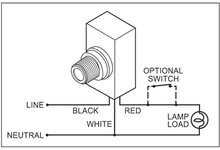
Yup...3 wire....red to hot, black to load, white to common neutrals...

Thanks for the replies everyone. Looks like they will be permanently turned on, unless I install a PC at every light fixture.
 

2ManyProjects

Well-known member
Joined
Jul 18, 2013
Messages
757
Background:
- Moved into a new house 4 years ago, but did not have any input into lighting or electrical design. House was 90% complete when we put our offer in.
- There were 2 photocells installed: one to operate the soffit lights and one to operate the other outdoor lights on the exterior of the house/garage.
- Both photocells are mounted remotely from the lights.
- The photocell for the soffit lights failed within 18 months, so I unhooked it, spliced the lighting wires together and turned off the breaker.
- The second photocell just failed recently, leaving the exterior in the dark (I've only noticed it now as the days get shorter).
- Both photocells installed by the builder were Intermatic K4221 photocells. I purchased a GE 18292 from HD to replace the Intermatic.

So....I went to install the new photocell and discovered that the builder's electrician only ran 2 wires + grnd to the box where the photocells are mounted. The photocells are 3 wire devices. The electrician wired the white common coming from the Intermatic to the ground in the box. I only realized this when I went to wire a new photocell.

So....I'm pretty sure that's a no no (wiring common on the device to ground).

DEFINITELY a "No-No".

The photocell is a powered device, so I can't use the inexpensive 3 wire model as a switch. Does anyone know of a 2 wire photocell? The alternative I guess is to install a photocell at every light fixture? Not my first choice if there is a simpler solution.

I'm not sure about "simpler"; but there is unquestionably at least one (probably more) "better" solutions. See below.

I currently have the 2 wires for the house/garage lights in the remote photocell box spliced together so the lights are on all the time...not ideal for energy conservation, but a deterant for the undesirables roaming the lanes at night.

That might be workable as a temporary stop-gap; but OTOH, it could also be quite counterproductive. A house with the exterior lights going 24/7 is in effect a big flashing neon sign reading "We're On Vacation, House Is Empty, Please Burglarize!" to those same "undesirables".

Point taken on ME being the idiot for trying to wire it back the same way when I knew it was a no no. The timer is a great idea, but instill think I have the same problem with the wiring. I would imagine most timers are 3 wire devices?

Not necessarily. But at least most of the 2-pole devices I've seen have been simple mechanical devices which plug into a duplex outlet. The load (such as a table lamp) then plugs into them. This would surely not be suitable for mounting in the exterior location(s) your old photocell(s) were mounted in. And besides, you'd still need to add wiring (i.e., a second "2-conductor plus ground" cable) from that device to the load(s). And do you REALLY want to have to climb up on a ladder several times a year to adjust the on/off times to match the seasonally varying dusk/dawn times?

Thanks for the replies everyone. Looks like they will be permanently turned on, unless I install a PC at every light fixture.

Here is a MUCH better solution...

First, you need ONE of the following (which one will depend on the specifics of your home/installation, and to some extent your preferences):

http://www.smarthome.com/2466SW/Tog...ontrol-On-Off-Switch-Non-Dimming-White/p.aspx
2466swbig.jpg


http://www.smarthome.com/2477S/Swit...-Remote-Control-Switch-Dual-Band-White/p.aspx
2477sbig.jpg


http://www.smarthome.com/2487S/Keyp...pad-with-On-Off-Switch-Dual-Band-White/p.aspx
2487sbig.jpg


http://www.smarthome.com/2475S2/INSTEON-In-LineLinc-On-Off-Module-Non-dimming-w-Sense/p.aspx
2475s2big.jpg


I suspect, given your notation of currently having the lights on 24/7, the latter one will be the most appropriate, UNLESS you are willing to install a wall switch box (and it's associated wiring) for that circuit. (Why such a switch was not installed from the very beginning is a major mystery. At the very least, I think you'd want -- and perhaps that code would require -- to be able to disable the exterior lights, even if they "normally" run under automated (i.e., photocell) control.)

To that, add EITHER both of the following two devices:

http://www.smarthome.com/71928/Minotaur-Engineering-LS2-Light-Dusk-Dawn-Sensor/p.aspx
71928big.jpg


http://www.smarthome.com/2450/IOLin...-Contact-Closure-Interface-1-In-1-Out-/p.aspx
2450big.jpg


OR, if (and only "if") you are willing to add a central controller of some sort (more on that in a moment), you can use this instead:

http://www.smarthome.com/2842-222/INSTEON-Wireless-Motion-Sensor/p.aspx
2842-222big.jpg


Note that this latter device is primarily intended for motion-controlled applications, such as security lights which will only come on when it senses someone/something moving in the scanned area. And if that sort of functionality is adequate for your purposes, you can skip the central controller; the device itself can enable/disable itself based on ambient light levels (i.e., day vs. night). Said central controller is needed only if you want to trigger the lights based SOLELY on Dusk/Dawn.

Also note that the sensor devices do NOT need to be mounted adjacent to (or anywhere near, really) the existing lights or the old photocell locations, as long as you're only using them for Dusk/Dawn sensing. So this can provide some installation convenience. If you are also doing motion-sensing, then you'd probably want that sensor near the area to be illuminated.

Or, if simple timer-based control (with no automatic compensation for Dusk/Dawn times; but of course, you can always manually go in and redefine the timer values as needed) is acceptable, then you can skip ALL of those sensors, and just use the "central controller" to generate those on/off commands. Here are a couple possible controllers:

http://www.smarthome.com/2242-222/INSTEON-Hub/p.aspx
2242-222side2big.jpg

2242-222side4big.jpg


http://www.smarthome.com/12237DB/IS...tomation-Controller-with-Dual-Band-PLM/p.aspx
12237dbbig.jpg

12237dbside2big.jpg

12237dbside6big.jpg


Frankly, it seems to me that you're going to wind up needing (or at least "wanting") to add some wiring and switching no matter what approach you eventually settle upon.

And trust me, once you get your feet wet with an Insteon system, you WILL find all manner of other good applications for it. So don't let the moderate initial investment (or the apparent complexity; in practice, it's really MUCH simpler than I've made it in look here) scare you off.


smurfs

New member
Joined
Feb 18, 2024
Messages
1
It worked because he used the equipment ground as the neutral which is at the same potential as the neutral. Not code or right by any means though. I don't think it would cause premature failure of the photocells though. I'm not aware of any two wire photocells but maybe someone else will chime in and know of something. Is it possible to replace the two wire cable with three wire?
They do make to wire photos cells.
 

walta

Well-known member
Joined
Jan 13, 2017
Messages
2,311
Location
Dutzow Missouri
Just to be 100% clear the 3-wire switch needs to be wired like the attached photo.

If you like the location of the remote sensor you will need to run the correct wires.

If you are averse to running new wires you could move the sensor to the first light fixture so long as you can prevent the light from shining on the sensor.

30 years ago, almost all the dusk to dawn were 2 wire they worked OK with incandescent lamps but no go with todays LEDs.


Walta
 

Attachments

  • 2024-02-18_19-32-02.jpg
    2024-02-18_19-32-02.jpg
    34.3 KB · Views: 7

dave*99

Well-known member
Joined
May 5, 2009
Messages
4,263
Location
Coastal NJ
OP, are you able to determine which light is the first on the string? That box should have incoming power, and a 2 wire switch leg going to the photocell. If you can get to that box, you have options.

Otherwise, is there a wall switch controlling the lights in addition to the photocell? If so, you could put a timer there.

Otherwise.... are all the exterior lights on their own breaker? You could interrupt the cable running from the panel and install a timer there.

Essentially, if you can find the cables feeding the light strings, you can bypass the photocell switch leg and install timers. I've had good luck with the Leviton smart switches. My outside lights can be switched from a phone app and programmed to turn on and off by time, sunset, sunrise etc.

Describe the physical layout of your circuits for better advice from the crowd.
 
To avoid these ads, REGISTER NOW!
Top Bottom