How come this picture worked, but everything else won't?

You are using an out of date browser. It may not display this or other websites correctly.
You should upgrade or use an alternative browser.
You should upgrade or use an alternative browser.
Picture practice thread
- Thread starter 383
- Start date

I can't ever post pics from my phone, it always just says oops we encountered an error.....To post from my PC I just open google photos and copy/paste the image no issues, why can't I post from my phone?! I'm no android and just use the upload button but nada.
minke
Well-known member
I can't ever post pics from my phone, it always just says oops we encountered an error.....To post from my PC I just open google photos and copy/paste the image no issues, why can't I post from my phone?! I'm no android and just use the upload button but nada.
This worked for me:



dangerRuss
Member
test
Eric Brown
ALLIANCE MEMBER
- Joined
- Jun 14, 2024
- Messages
- 715

Didn't work. This was a gif file and the bit should rotate.
Last edited:
Gogo300
Well-known member
Oops
First Post Test... Grandpa's Chrysler/Plymouth Garage... Not sure timeline 40's/50's most likely...
Anyhoo... Test Test
Edit: Test Test (Picture worked, but it is way late... good night, hope I make a fit in the group... Mostly probable just asking questions on what is what with old tools and such.

Anyhoo... Test Test
Edit: Test Test (Picture worked, but it is way late... good night, hope I make a fit in the group... Mostly probable just asking questions on what is what with old tools and such.
NightSky
Well-known member
NightSky
Well-known member
NOPE !!!
Ok- I quit with this madness- thanks again for trying to help- I won't pester or bother you or anyone else with this !!

I am sending this as a test message. I discovered the Garage Journal years ago but have never posted anything. I appreciate the time others have spent to share their stories and ideas on their garages. I have finally gotten around to consolidating the progress photos I have taken over the years, and I can start to tell my story.
The first photo is of the garage that was on the property when we purchased it in 2000. The 32 ft wide X 24 ft deep 3 bay garage was demolished in September 2011 to make way for the 32 ft wide X 36 ft deep multi-story garage in the second photo, which was erected in the Summer of 2012.
If someone can comment on where I should continue with this thread, it would be appreciated. I can post a few progress photos at a time with narrative descriptions, and describe how this project evolved from its concept to where it is today.
Someone should probably double check my answer… but here goes with my 2 cents…
From my iPhone I selected Formus from menu as seen in screenshot below.

Then select which forum you would like to start a post in, for example the garage gallery. As seen in screenshot below.

Then press the red post button. And then enter your post in area that appears as in screenshot below shot below.

Good luck with posting your story!
mwscale
New member
Test Photos new old stock Dunlap motor.
Attachments






Tom Graham
Well-known member
This is a test inserting a photo using the menu icon of the photo > Drop Image …
I notice that it inserts both a thumbnail and a full size image…

I notice that it inserts both a thumbnail and a full size image…
Tom Graham
Well-known member

Tom Graham
Well-known member
Tom Graham
Well-known member
Some text is required. And the UI barked at me as I ”Insert’d multiple” images — but selected more than 10
Attachments
-
 IMG_7157.jpeg1.7 MB · Views: 4
 -
 IMG_7158.jpeg255.7 KB · Views: 3
 -
 IMG_7159.jpeg1.1 MB · Views: 3
 -
 IMG_7160.jpeg1.8 MB · Views: 3
 -
 IMG_7161.jpeg1.1 MB · Views: 3
 -
 IMG_7162.jpeg1.8 MB · Views: 3
 -
 IMG_7163.jpeg1.5 MB · Views: 3
 -
 IMG_7164.jpeg848.3 KB · Views: 3
 -
 IMG_7165.jpeg746.6 KB · Views: 2
 -
 IMG_7292.jpeg15.7 KB · Views: 3
Last edited:
zimman
Well-known member
Are you on a phone or computer?Is there a forum approved method of posting pics?
Admins?
Zim
zimman
Well-known member
If you're on a phone you must allow your photos to be shared and that' in your settings under permissions.
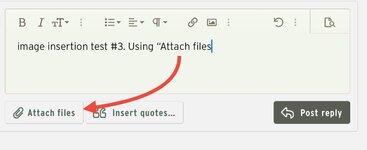
On a computer just hit the attach files at the bottom left of the post screen, then just double click on whatever pic you want.
No need to copy paste from a computer.
Zim
On a computer just hit the attach files at the bottom left of the post screen, then just double click on whatever pic you want.
No need to copy paste from a computer.
Zim
gmann555attnet
Member
- Joined
- Nov 12, 2023
- Messages
- 13
Test image just practicing 
Gogo300
Well-known member
Gogo300
Well-known member
Et=eddie Torres the extra tresticle

Miss the Pontiacs
Well-known member


Last edited:
Miss the Pontiacs
Well-known member



Bad Habit
Well-known member
Success! Can insert from phone again
four.cycle
Well-known member
Las Changueras Mazatlan 01/09
this isn't making any sense. I can upload and post a photo out of an old folder, but not a photo that I just processed this morning out of the "pictures" folder.
this makes no sense. 11/15/25 09:15 PST
Attachments

Last edited:
four.cycle
Well-known member
and... even if I move the new photo into that old "Mazatlan" folder, it still will not upload.
Eric Brown
ALLIANCE MEMBER
- Joined
- Jun 14, 2024
- Messages
- 715
Lately I have been having troubles uploading too. Even tried reducing file size and it still would not take it. Found sometimes if I wait and try again it works.and... even if I move the new photo into that old "Mazatlan" folder, it still will not upload.
four.cycle
Well-known member
Ryan mentioned that MY images (taken with my camera or processed through the photo editing software I am using) are 300 dpi (dots per inch.)
I had to search Google to find out what "DPI" means, and I have no clue as to how to change it.
The photos in old folders seem to upload fine, and photos I've lifted from other websites upload fine.
My "Nikon" photo editing program returns "0 results" when I run a search in it for "DPI" or "dots per inch".
I had to search Google to find out what "DPI" means, and I have no clue as to how to change it.
The photos in old folders seem to upload fine, and photos I've lifted from other websites upload fine.
My "Nikon" photo editing program returns "0 results" when I run a search in it for "DPI" or "dots per inch".
Last edited: