To avoid these ads, REGISTER NOW!

POE cameras in a detached garage

Terry D

Well-known member
Joined
Mar 25, 2015
Messages
2,202
Location
St. Louis, MO.
I have a detached garage with a single cat 6 ethernet cable running from a wireless router in the house to a wireless router in the garage. Im thinking on also adding a POE security camera system. Could I plug a POE switch into the garage router, add 3 cameras on the garage, plug them into the POE switch. Plug the DVR into the house router, I will be adding POE cameras on the house also and can plug those into the DVR. Will this set up Work? If it matters, the cat 6 cable from the house to the garage is an aerial cable with a messenger.
 
To avoid these ads, REGISTER NOW!

Dancing Bear

Well-known member
Joined
Nov 5, 2014
Messages
310
Location
Clearwater, FL
I would say yes, assuming that your existing CAT 6 cable is within the 100m distance guidelines, and the cameras are rated for standard PoE and don't need PoE+ or higher. Sounds like you've got everything you would need, but I'm not a PoE guru so others may say differently.
 

NakeDiesel

Well-known member
Joined
Sep 6, 2007
Messages
2,756
Location
oklahoma
I am doing that with my system. My nvr is in my office in the house. I have 2 poe switches in the house, one at each end for cameras, i use a paired set of antennas to get internet out to my shop, inside it I have another switch which supplies connectivity and wifi. I have a poe switch for the cams in there plugged into the main shop switch. They all record to the nvr.
 

cgrutt

Well-known member
Joined
Mar 4, 2016
Messages
8,448
I think it depends on whether or not your security system supports cameras plugged into remote switches or not. You may also need to assign static IPs to the switch ports so the security system can find the cameras. Is it a DVR or NVR? Does it have LAN ports or just ports for individual cameras?
 
OP
T

Terry D

Well-known member
Joined
Mar 25, 2015
Messages
2,202
Location
St. Louis, MO.
I think it depends on whether or not your security system supports cameras plugged into remote switches or not. You may also need to assign static IPs to the switch ports so the security system can find the cameras. Is it a DVR or NVR? Does it have LAN ports or just ports for individual cameras?
I haven't bought the security system yet. It will be a DVR
 

Innovate1

Well-known member
Joined
Jul 28, 2014
Messages
4,323
Location
Illinois near St. Louis, Missouri
I think it depends on whether or not your security system supports cameras plugged into remote switches or not. You may also need to assign static IPs to the switch ports so the security system can find the cameras. Is it a DVR or NVR? Does it have LAN ports or just ports for individual cameras?
^This. Really depends on the system. If it's zoneminder or blue iris then it's a network recorder and your setup will work fine. There may be commercial systems that work similarly. But some systems expect each camera to have it's own connection to the box. Not sure which is more common these days.
 

NakeDiesel

Well-known member
Joined
Sep 6, 2007
Messages
2,756
Location
oklahoma
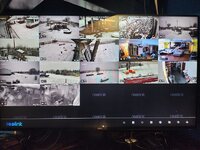
Reolinks nvr works that way. I also have 2 wall powered wifi cams that record on the nvr too inside the house
 

cgrutt

Well-known member
Joined
Mar 4, 2016
Messages
8,448
I haven't bought the security system yet. It will be a DVR

I'm not 100% on this but believe DVRs are older terminology and were used with analog cameras. Most systems that I'm aware of today are called NVRs (Network Video Recorder) that's what you'll need for POE cameras. Again not 100% on this but I think most NVRs will support what you want to do you just need to check that you can address a camera connected on network and not plugged directly into one of the ports on back of the NVR.
 
OP
T

Terry D

Well-known member
Joined
Mar 25, 2015
Messages
2,202
Location
St. Louis, MO.
I'm not 100% on this but believe DVRs are older terminology and were used with analog cameras. Most systems that I'm aware of today are called NVRs (Network Video Recorder) that's what you'll need for POE cameras. Again not 100% on this but I think most NVRs will support what you want to do you just need to check that you can address a camera connected on network and not plugged directly into one of the ports on back of the NVR.
I meant a NVR, typed it wrong. Im looking at the Reolink systems
 

72Anthony

Well-known member
Joined
May 22, 2010
Messages
296
Location
Houston, TX
It should work. Check the manual of the NVR before you buy. I have a Lorex system and the manual has diagrams showing that you can plug the POE cameras directly into NVR or a POE switch.
 

starquestMM

Well-known member
Joined
Jan 7, 2013
Messages
1,092
Location
JC, Missouri
Should work.

You're getting into a lot of switches daisy chained together though. It'll work, but managing all of that when there is an issue might become a pain. I started with unify products this summer and its nice to have the different pieces all show up in one management interface.
 

NakeDiesel

Well-known member
Joined
Sep 6, 2007
Messages
2,756
Location
oklahoma
Should work.

You're getting into a lot of switches daisy chained together though. It'll work, but managing all of that when there is an issue might become a pain. I started with unify products this summer and its nice to have the different pieces all show up in one management interface.
Yeah, ive moved to using the tp link omada system, I can provision new devices quick.
 

wyliesdiesels

Well-known member
Joined
Aug 14, 2012
Messages
20,214
Location
Modesto, CA
I have a detached garage with a single cat 6 ethernet cable running from a wireless router in the house to a wireless router in the garage. Im thinking on also adding a POE security camera system. Could I plug a POE switch into the garage router, add 3 cameras on the garage, plug them into the POE switch. Plug the DVR into the house router, I will be adding POE cameras on the house also and can plug those into the DVR. Will this set up Work? If it matters, the cat 6 cable from the house to the garage is an aerial cable with a messenger.
totally dependent on how you have the router in the garage setup. technically you dont need a router in the garage but if you have it setup on a separate subnet and the router is acting as DHCP server there will be some routing issues and the NVR may not see the cams....
 

wyliesdiesels

Well-known member
Joined
Aug 14, 2012
Messages
20,214
Location
Modesto, CA
I think it depends on whether or not your security system supports cameras plugged into remote switches or not.
cams would just have to be in the same subnet as the NVR
You may also need to assign static IPs to the switch ports so the security system can find the cameras. Is it a DVR or NVR? Does it have LAN ports or just ports for individual cameras?
you dont assign static IPs to switch ports. you assign static IPs to hosts... If its a DVR then it would be analog and IP cams would not connect to it
 

wyliesdiesels

Well-known member
Joined
Aug 14, 2012
Messages
20,214
Location
Modesto, CA
I'm not 100% on this but believe DVRs are older terminology and were used with analog cameras. Most systems that I'm aware of today are called NVRs (Network Video Recorder) that's what you'll need for POE cameras. Again not 100% on this but I think most NVRs will support what you want to do you just need to check that you can address a camera connected on network and not plugged directly into one of the ports on back of the NVR.
that is correct. if he buys an DVR, he will have to run analog coax and power to each cam.
 

wyliesdiesels

Well-known member
Joined
Aug 14, 2012
Messages
20,214
Location
Modesto, CA
Should work.

You're getting into a lot of switches daisy chained together though. It'll work, but managing all of that when there is an issue might become a pain. I started with unify products this summer and its nice to have the different pieces all show up in one management interface.
thats why you use managed switches
 
OP
T

Terry D

Well-known member
Joined
Mar 25, 2015
Messages
2,202
Location
St. Louis, MO.
totally dependent on how you have the router in the garage setup. technically you dont need a router in the garage but if you have it setup on a separate subnet and the router is acting as DHCP server there will be some routing issues and the NVR may not see the cams....
My original plan was just to improve the wifi to my garage. its about 50 ft from the house. I had read on another thread on GJ that just putting another wifi router in the garage and connecting that to the house router would do that. I was planning on running a single Cat 6 Aerial cable, would love to go under ground, but aerial is best right now. Then I'm thinking a few cameras would be nice also. I was looking at the Reolink RLN-36 NVR. It seems to use POE switches eliminating the need to homerun ever camera back to it. The NVR would be in the house. I eventually would add cameras on the house. Is there a way to beef up my wifi to the garage and also add POE cameras at the garage all on a single cat 6 without getting crazy with it. Since I haven't bought or installed anything yet, I could just easily install a 2nd Cat 6 to the garage, one for wifi and one for cameras.
 
Last edited:
To avoid these ads, REGISTER NOW!

NakeDiesel

Well-known member
Joined
Sep 6, 2007
Messages
2,756
Location
oklahoma
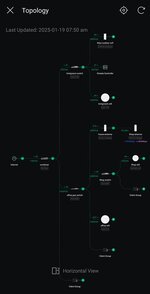
I use a pair of tp link 2.4/5 ghz antennas between my house and shop. Inside the shop I have a tp link Jetstream omada switch which has my reolink poe switch in there plugged into it. I also have a tp link omada wall mount wifi access point.

Here's my omada topology

54275373465_f2fb103af4_c.jpgScreenshot_20250119_075047_Omada by NakeDiesel, on Flickr
 

jblnut

ALLIANCE MEMBER
Joined
Jan 17, 2015
Messages
7,263
Location
In the Middle of MN
I've been a fan of Ubiquiti equipment for a long time. I'd give a good long look at the Unifi line of hardware to do your WiFi and cameras. The equipment and software has come a looooooong way since I first started using it 10yrs ago. You create an account, plug your equipment in and the app on your phone will start asking you to adopt equipment as it finds it. A few days ago I added a pair of G4 Instant WiFi cams into a setup and it took less than a minute to adopt the camera and start streaming.

The Unifi Network application will manage all your networking equipment from switches to WiFi AP's. It's a great system that deserves a good look. I have 29 cameras, 8 switches, 9 AP's, a 7-bay NVR, a 7-bay NAS and a few oddball things like some beta fiber to copper boxes and a couple cameras that didn't make it into production.

I started with unify products this summer and its nice to have the different pieces all show up in one management interface.
Unifi ...... dont' know why that bothers me so much :lol_hitti
 

cgrutt

Well-known member
Joined
Mar 4, 2016
Messages
8,448
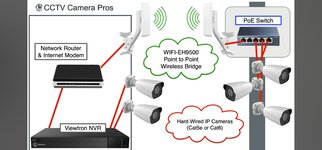
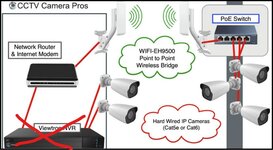
As stated above it is possible to do what you are looking to do without even running a physical cable into your garage using a wireless bridge (pair of antennas), a POE switch and your cameras. You can also add a wireless access point for your wifi in garage but that is not needed for the cameras.

Screenshot_20250119_085805_YouTube.jpg

When I said add static IPs to the port I meant addressing each camera connected to the switch with a static IP so your NVR can find your cameras connected remotely on the network. I'm not a network guy so may have the terminology mixed up but that's what I meant. You can absolutely connect cameras to a switch in garage and have your NVR record them as long as your NVR supports it. Technically you don't even need to use static IPs it's just one way of doing it. Certain NVRs (as well as some routers/switches I think) will act as their own DhCP server (basically assigns IPs to devices connected on its network, again my understanding from a non-IT guy so terminology may be wrong) which adds a layer of complexity in configuring the security system. At end of the day if devices are connected to your network they are addressable via the IP so it can communicate with other devices within the network. In this case your NVR in house and cameras in garage. Configuring a subnet (range of IPs) between NVR and cameras is one way to manage the security system but it's not the only way. One of the benefits of doing it this way is it potentially masks the security system from other devices connected on network. For example you don't want your cameras sitting on same subnet as your wireless network so as to avoid having the cameras hacked. Again, terminology may be off but that's the basic idea I'm trying to convey.
 

SwissMetric

Well-known member
Joined
Dec 28, 2024
Messages
186
Location
Switzerland
PoE is 48 V though many believe it's only 24 V, the usual automation PELV/SELV voltage. One should check the current requirements and voltage drop. I never had any issue but had to check how many ampères (current) could be supplied as that depends on the used devices.

Also not all ports of a PoE supplying device are necessarily PoE-capable. More I can't really remember, I don't touch anything related to computers and networks as long as everything works fine and hasn't to be modified for a *V*E*R*Y* good reason. I absolutely hate Microsoft software but must run Windows as Linux isn't a viable option.
Also I never outsource anything related to computer or networking, so I always know what I have and how it is set up (at least until MS messes it up remotely during some stupid update, indeed that risk is higher than any virus, someone at MS could worldwide crash most computers with Internet access, causing thousands of billions USD (or CHF, EUR) damages).

Cameras may require additional power for IR light, heating, pan and tilt, etc. Just do the math if power requirements are listed in detail.

One should try to get the PDF user manuals first to check how detailed the installation instructions are. If there are networking problems it's very easy to open a Pandora's box when starting to play with settings. Many wannabee network specialists (me included) start editing settings more or less randomly crossing fingers (but I document the initial settings).
Also true network experts are not that easy to find and won't usually staff call centers.

Also here, using widespread products makes it easier to get help from online communities, sounds obvious, I know.
 

NakeDiesel

Well-known member
Joined
Sep 6, 2007
Messages
2,756
Location
oklahoma
Also to note, some of the exterior antennas require higher power that poe switches provide, thus they usually come with their own poe injectors.

These are the injectors for my 3 long distance poe 2.4ghz antennas, area wifi antenna and the house end for the shop/house antenna bridge.

54275164138_516a791657_c.jpg20250118_201024 by NakeDiesel, on Flickr
 

jblnut

ALLIANCE MEMBER
Joined
Jan 17, 2015
Messages
7,263
Location
In the Middle of MN
PoE is 48 V though many believe it's only 24 V ....
I've setup devices with a range of 15v - 57v PoE with power draws from under a Watt to over 90w per device. The most common current consumer voltage is 48v but it is not the only one used. I have lots of older Ubiquiti equipment that uses 24v PoE. Here is a snip of the switch in my steer barn running the cameras and WiFi. The devices displayed with a power draw are using 48v PoE+ and the others are using Passive 24v PoE. The Passive 24v PoE uses the two unused pairs to transfer the power to the devices while the 48v PoE+ devices use the same wires the data travels on. PPoE or PoE++ uses all four pair but most equipment we'll buy to put in our homes or garages will likely not use.
PoE Steer Barn GJ.jpg


Also to note, some of the exterior antennas require higher power than PoE switches provide, thus they usually come with their own PoE injectors.

These are the injectors for my 3 long distance PoE 2.4ghz antennas, area WiFi antenna and the house end for the shop/house antenna bridge.

54275164138_516a791657_c.jpg
Most manufactures send the PoE bricks with as most consumers do not have a PoE switch. It makes their products more saleable. Those bricks usually put out around 12w and the antennas draw about half that or less unless you have really large dish but even those only draw in that 25w area. It's easier to send a PoE brick with for each device so the consumer doesn't have to worry about "what PoE do I need ? What the heck is PoE ? Does my router do PoE ? Do I need a new router to do PoE ?" and many more questions that are avoidable by sending a brick with.
 

SwissMetric

Well-known member
Joined
Dec 28, 2024
Messages
186
Location
Switzerland
I remember cases where PoE was sufficient for wireless point-to-point video, voice and SCADA data transmission over several miles, there are also various power levels depending on the PoE implementation.

Wall warts to supply IP cameras are an annoyance as you've to route a separate DC supply cable, it's more convenient to just crimp RJ connectors. That said your points are absolutely valid, especially as many not even RTFM though manuals are not always well written. Never got it why Chinese manufacturers don't pay more attention to their manuals, some are really hard to to interpret and painful to read (admittingly I don't write well either as English is only my 3rd language after Swiss German/German and French which I speak without accent).

Also there is the problem of power back-up, CCTV including the recorders should be powered by some sort of UPS, either internally or externally. Especially in the U.S. it's fairly easy to shut down the power if the meter is outside the house. Here externally accessible meters are at least in some locked enclosure though there are some issues with the safety of the used cylinders, some use KABA 5000 standard keys which offers no security.
 

NakeDiesel

Well-known member
Joined
Sep 6, 2007
Messages
2,756
Location
oklahoma
Most manufactures send the PoE bricks with as most consumers do not have a PoE switch. It makes their products more saleable. Those bricks usually put out around 12w and the antennas draw about half that or less unless you have really large dish but even those only draw in that 25w area. It's easier to send a PoE brick with for each device so the consumer doesn't have to worry about "what PoE do I need ? What the heck is PoE ? Does my router do PoE ? Do I need a new router to do PoE ?" and many more questions that are avoidable by sending a brick with.
I agree that they do do that to make it easier for those that don't have poe switches, etc... But the long range antennas I'm using will not power via my poe switches, I tried it and also did internet searches to verify they wouldn't work getting power via poe switches. These are long distance antennas, my local area outside antennas (2 of them) are powered via a poe switch. My long range antennas are to get wifi signals to camera's I plan to place a 1/4 mile from the house.
 

NakeDiesel

Well-known member
Joined
Sep 6, 2007
Messages
2,756
Location
oklahoma
Also there is the problem of power back-up, CCTV including the recorders should be powered by some sort of UPS, either internally or externally. Especially in the U.S. it's fairly easy to shut down the power if the meter is outside the house. Here externally accessible meters are at least in some locked enclosure though there are some issues with the safety of the used cylinders, some use KABA 5000 standard keys which offers no security.
Correct, I run a large UPS in my wall rack for all the networking gear in there, the router, 24 port poe switch, reolink poe switch and nvr. I think last power outage they kept running for almost 20 minutes. I use starlink as my primary internet, but I run an AT&T mifi with network jack as my backup internet for bad weather or power outages. I live in the middle of nowhere, so I'm less concerned about someone cutting power, we have severe storms here so it's nice to be able to monitor the weather as well. I have an HD TV antenna going into a HD Homerun box that puts the signals onto my network and we can watch local channels on a pc or tv using our roku and the HDHomerun app. I need to get my generator pad poured, gas lines ran and generator bought along with all the equipment to eventually add solar/batteries for the house, but that's further down the road for right now.
 

moab11

Well-known member
Joined
Nov 22, 2015
Messages
593
Location
Thunder Bay, Ontario
I agree that they do do that to make it easier for those that don't have poe switches, etc... But the long range antennas I'm using will not power via my poe switches, I tried it and also did internet searches to verify they wouldn't work getting power via poe switches. These are long distance antennas, my local area outside antennas (2 of them) are powered via a poe switch. My long range antennas are to get wifi signals to camera's I plan to place a 1/4 mile from the house.
I'd be curious to see what those POE bricks put out for power. Many antennas use 24v as that's a more common telecom voltage, and would explain why your POE switch wasn't powering them.
The only devices I have run across that need higher power are high end outdoor PTZ cameras, using 57v, or very high power licensed spectrum radios.
1/4 mile really isn't long range at all, I have many at work working at a mile, and our main link is 35 miles.

OP, what you have proposed should work, but a POE switch in the garage will also let you power an Access Point (AP) eliminating the need for the second router. As others have said Ubiquiti has a good offering for what you are wanting.
 

jblnut

ALLIANCE MEMBER
Joined
Jan 17, 2015
Messages
7,263
Location
In the Middle of MN
I agree that they do do that to make it easier for those that don't have poe switches, etc... But the long range antennas I'm using will not power via my poe switches, I tried it and also did internet searches to verify they wouldn't work getting power via poe switches. These are long distance antennas, my local area outside antennas (2 of them) are powered via a poe switch. My long range antennas are to get wifi signals to camera's I plan to place a 1/4 mile from the house.
What are they for antennas ? Most consumer grade antennas do not draw enough power to warrant a special switch. They do however mostly use passive 24v PoE and very few switches can supply that. Most of the mid-higher end Ubiquiti hardware will support a variety of PoE output voltages. I have one that is pitting out 24v passive, 48v PoE+ and 57v PoE++. Spendy little guy but worth it to not have all those dang bricks sitting around.

I have a pair of Ubiquiti NanoBeams running an 8 mile link and they pull in that 7w area. They came with a 24v 0.5a PoE brick.

I’ve setup dozens of links using MikroTik QRT 5’s and they draw around 10w. Everything about MikroTik stuff is big and ugly 😖

I’ve setup some TP-Link PtP links and most of them use a 24v 1.0a brick but only pull around 10w.
 

NakeDiesel

Well-known member
Joined
Sep 6, 2007
Messages
2,756
Location
oklahoma
What are they for antennas ? Most consumer grade antennas do not draw enough power to warrant a special switch. They do however mostly use passive 24v PoE and very few switches can supply that. Most of the mid-higher end Ubiquiti hardware will support a variety of PoE output voltages. I have one that is pitting out 24v passive, 48v PoE+ and 57v PoE++. Spendy little guy but worth it to not have all those dang bricks sitting around.

I have a pair of Ubiquiti NanoBeams running an 8 mile link and they pull in that 7w area. They came with a 24v 0.5a PoE brick.

I’ve setup dozens of links using MikroTik QRT 5’s and they draw around 10w. Everything about MikroTik stuff is big and ugly 😖

I’ve setup some TP-Link PtP links and most of them use a 24v 1.0a brick but only pull around 10w.
Yes they are for antennas and they use 24v passive poe which is why they can't be powered by the switches.
 

CoogarXR

Well-known member
Joined
Jan 11, 2016
Messages
6,893
Location
Ohio
Per the OP's original question- if your NVR will allow manual configuration of cameras, yes, that plan will work.

I just set up a similar setup at my new place. NVR in the house, CAT6 to the garage, POE switch out there, and IP Cameras connected to it. My NVR is a Hikvision, and it expects each of it's built-in POE ports to connect to one camera for the "automatic" configuration to work. And the built-in POE ports are on a dedicated subnet that isn't routed to the LAN port. But the system does allow you to add additional/manual LAN/WAN cameras by IP, so I just added the garage cameras to the config manually, and it works just fine.

Granted, this contaminates that branch of my LAN with IP camera traffic for those few cameras, but it's not too bad. Each camera only uses about 4-8mpbs on a 1000mbps pipe, so it's not a huge sacrifice. I could always run a 2nd CAT6 for physical separation if it bothered me, but at the moment it's not causing any problems.
 

wyliesdiesels

Well-known member
Joined
Aug 14, 2012
Messages
20,214
Location
Modesto, CA
But the long range antennas I'm using will not power via my poe switches, I tried it and also did internet searches to verify they wouldn't work getting power via poe switches.
theyre probably 24v POE which isnt a POE standard.

There are switches that can provide dual voltage POE such as the ubiquiti edge switches. or you can get a 48v to 24v POE adapter and power it with a POE switch.


wyliesdiesels

Well-known member
Joined
Aug 14, 2012
Messages
20,214
Location
Modesto, CA
I'd be curious to see what those POE bricks put out for power. Many antennas use 24v as that's a more common telecom voltage, and would explain why your POE switch wasn't powering them.
The only devices I have run across that need higher power are high end outdoor PTZ cameras, using 57v, or very high power licensed spectrum radios.
1/4 mile really isn't long range at all, I have many at work working at a mile, and our main link is 35 miles.

OP, what you have proposed should work, but a POE switch in the garage will also let you power an Access Point (AP) eliminating the need for the second router. As others have said Ubiquiti has a good offering for what you are wanting.
a POE brick that is 802.3 af or at compliant will output 48v only because 24v is not a POE standard.

you can get non-standard POE bricks that output 24v....

and 24v is not a common telecom voltage....

POTs on-hook voltage is -48v DC and off-hook dropping to below 10v with ringer voltage being 100v AC 20hz....
 

wyliesdiesels

Well-known member
Joined
Aug 14, 2012
Messages
20,214
Location
Modesto, CA
The most common current consumer voltage is 48v but it is not the only one used.
48v and 52-57v are the only standard POE voltages. 802.3af (15w) & .at aka POE+ (30w) or 802.3bt aka POE++ (60w)

24v POE does not have a ratified standard and therefore has no handshake or specd wattage.
 

wyliesdiesels

Well-known member
Joined
Aug 14, 2012
Messages
20,214
Location
Modesto, CA
My original plan was just to improve the wifi to my garage. its about 50 ft from the house. I had read on another thread on GJ that just putting another wifi router in the garage and connecting that to the house router would do that. I was planning on running a single Cat 6 Aerial cable, would love to go under ground, but aerial is best right now. Then I'm thinking a few cameras would be nice also. I was looking at the Reolink RLN-36 NVR. It seems to use POE switches eliminating the need to homerun ever camera back to it. The NVR would be in the house. I eventually would add cameras on the house. Is there a way to beef up my wifi to the garage and also add POE cameras at the garage all on a single cat 6 without getting crazy with it. Since I haven't bought or installed anything yet, I could just easily install a 2nd Cat 6 to the garage, one for wifi and one for cameras.
you could get rid of the second wifi router and setup a POE switch and standalone AP instead.
 

crashmtb

Well-known member
Joined
Aug 2, 2006
Messages
93
Location
Winnipeg
I've been a fan of Ubiquiti equipment for a long time. I'd give a good long look at the Unifi line of hardware to do your WiFi and cameras. The equipment and software has come a looooooong way since I first started using it 10yrs ago. You create an account, plug your equipment in and the app on your phone will start asking you to adopt equipment as it finds it. A few days ago I added a pair of G4 Instant WiFi cams into a setup and it took less than a minute to adopt the camera and start streaming.

The Unifi Network application will manage all your networking equipment from switches to WiFi AP's. It's a great system that deserves a good look. I have 29 cameras, 8 switches, 9 AP's, a 7-bay NVR, a 7-bay NAS and a few oddball things like some beta fiber to copper boxes and a couple cameras that didn't make it into production.


Unifi ...... dont' know why that bothers me so much :lol_hitti
what's wrong with, say, keeping an eye on your infinity with unify cameras?

When I built a new garage, I pulled fiber out to it, put my 8 port POE switch in there, a NanoHD AP, a couple of g3 flex, and changed to a UDM-SE in the house from USG+cloudkey.

The instant cameras are really handy, but have become a lot more expensive.
 

jblnut

ALLIANCE MEMBER
Joined
Jan 17, 2015
Messages
7,263
Location
In the Middle of MN
48v and 52-57v are the only standard POE voltages. 802.3af (15w) & .at aka POE+ (30w) or 802.3bt aka POE++ (60w)

24v POE does not have a ratified standard and therefore has no handshake or specd wattage.
If you’re echoing my point, thank you. If not I wasn’t saying anything about the 24v PoE equipment Ubiquiti (and others) have run in the past was anything close to an industry standard. My point was only that 48v is the most common consumer voltage but others (24v) are out there.

Never said 24v was a standard of any kind. Don’t think I did anyway.

what's wrong with, say, keeping an eye on your infinity with unify cameras?

When I built a new garage, I pulled fiber out to it, put my 8 port POE switch in there, a NanoHD AP, a couple of g3 flex, and changed to a UDM-SE in the house from USG+cloudkey.

The instant cameras are really handy, but have become a lot more expensive.
My comment may have been misinterpreted …. It drives me bonkers when people are typing things out trying to sound informed when they can’t even correctly spell the brand name correctly.

Ubiquiti … Unifi … Nary a Y in either of them …..
 
To avoid these ads, REGISTER NOW!
Top Bottom