I used to use Photobucket to host images but now it cost money how do you post images on this form I have tried to Google urls and Flickr url. I'm clicking the little picture icon posting the link after that making sure that I has image before and after

You are using an out of date browser. It may not display this or other websites correctly.
You should upgrade or use an alternative browser.
You should upgrade or use an alternative browser.
Posting an image
- Thread starter Ram9303
- Start date
It always says failed? It looks like the max file size is very small.
You need to edit your pics down to a better size. I use pixlr.com, which is free. You can crop pics, enhance the pics, etc. It's good to learn how to work with images.
Use the X version which is more basic and easier to use.
Here's how to post an image from Flickr.
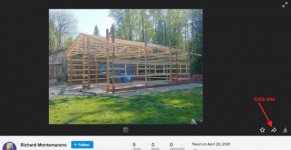
Go to the image you want to share, and click on the right curved arrow in the lower right corner.
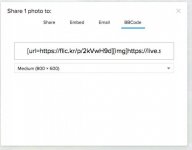
A new window will appear with choices for "Share", "Embed", "Email", and "BBCode". Click on "BBCode" and then select the size of the image you want to share. The text needed to share the image will be in the text window.
Highlight the entire line of text and paste where you want the image to appear. Don't bother with the image tags, as they are already in the link you copied.
This is what the link you copy and paste will look like. It will be different for each image, but will have the same format:
[url=https://flic.kr/p/2kVwH9d][img]https://live.staticflickr.com/65535/51145237184_98d2d71436_c.jpg[/img][/url][url=https://flic.kr/p/2kVwH9d]0420211636_HDR[/url] by [url=https://www.flickr.com/photos/192879473@N04/]Richard Montemarano[/url], on Flickr
Go to the image you want to share, and click on the right curved arrow in the lower right corner.
A new window will appear with choices for "Share", "Embed", "Email", and "BBCode". Click on "BBCode" and then select the size of the image you want to share. The text needed to share the image will be in the text window.
Highlight the entire line of text and paste where you want the image to appear. Don't bother with the image tags, as they are already in the link you copied.
This is what the link you copy and paste will look like. It will be different for each image, but will have the same format:
[url=https://flic.kr/p/2kVwH9d][img]https://live.staticflickr.com/65535/51145237184_98d2d71436_c.jpg[/img][/url][url=https://flic.kr/p/2kVwH9d]0420211636_HDR[/url] by [url=https://www.flickr.com/photos/192879473@N04/]Richard Montemarano[/url], on Flickr