To avoid these ads, REGISTER NOW!

Q for the ethernet gurus

MBfreak

MEMBER EMERITUS
Joined
Dec 10, 2010
Messages
2,301
Location
Linkoping , Sweden
I live in a flat which has a 4 wire telephone fixed outlet in all rooms.
Never used, only use cell phones.
Would like to run an etehrnet signal from the wireless router ( that works perfectly) to my PC. Tired of wireless connection using RJ 45 cable .
A RJ 45 cable has 4 pairs, (8 wires in total ) and I THINK that only 2 pairs(4 wires) are required in a cable between the router to my PC ( sitting in different rooms.

Any input much appreciated,

Ola
 
To avoid these ads, REGISTER NOW!

justsam

Well-known member
Joined
Aug 20, 2010
Messages
1,267
Location
Penngrove, California
First, what is the issue with wireless? If only one room away it should be fine assuming standard construction materials. What speeds does your ISP deliver and what are you seeing via your wireless connection? What router do you have?

You are correct in that the physical layer of home ethernet typically uses two twisted pairs, known as 10baseT or later faster generations. I do not know what cable type was used in Sweden for intrahouse use. If there are two, hopefully twisted pairs, it should work fine, assuming a relatively short distance. Wire up your connectors following a T568A or B standard, and give it a try. There is little to no risk or cost and you may wind up with the secure wired connection working fine for you.
 

dogdog

Well-known member
Joined
Nov 15, 2011
Messages
12,711
Older 10BaseT and 100BaseT only uses 4 of the 8 wires... of pin 1236 but newer 1gbps uses all 8... and the wiring maters ... you just can't have 4 electrical wires and call it a cat5 / cat6... unlike the Telephone stuff that uses 2 wires tip and ring...

I think if you google T568A and T568B is the connector connections for the Cat5 cat6 stuff...

This diagram might help you....

main-qimg-46de3cadf65c8fb7e159606cecb9d5d0-c


I used an app to help me / remind me of the color coding to what pin these days.... CRS is real WTF sometimes.....

At least for the Iphone... there are 2 apps called "Icable" and "Rewire" it's the free version it have ads, it doesn't bother me in this case.
 
Last edited:

Chucktin

Well-known member
Joined
May 24, 2015
Messages
326
Biggest drawback would be that Telco cabling _used_ to be fairly stout in comparison to Cat5 cabling.
 
OP
M

MBfreak

MEMBER EMERITUS
Joined
Dec 10, 2010
Messages
2,301
Location
Linkoping , Sweden
Thanks a lot for the T568 A/B info.

That should solve the issue.

Will wire up tomorrow and try.

The problem with the wifi is that it changes speed from sometimes 150 MBit/s to 1,2 MBit/s for no obvious reason.
Several neigbours have the same problem.
3 months ago everything was perfect .

So, I will not spend time chasing the culprit but change over to hardwired.

Best regards

Ola
 

rlitman

Well-known member
Joined
Oct 18, 2010
Messages
24,587
Location
Long Island
Older 10BaseT and 100BaseT only uses 4 of the 8 wires... of pin 1236 but newer 1gbps uses all 8... and the wiring maters ... you just can't have 4 electrical wires and call it a cat5 / cat6...

Exactly this. Without the proper twisting, figure that your 4 wire cord will work for 100BaseT equipment up to a length of about 1m. You might be able to push that to as much as 10m on your telephone cord, if you had a management switch and card where both could be manually set to use 10BaseT, but most devices that support gigabit will fail on either of these options.
 

GRB

Well-known member
Joined
May 6, 2014
Messages
828
Location
SoCal
I live in a flat which has a 4 wire telephone fixed outlet in all rooms.
Never used, only use cell phones.
Would like to run an etehrnet signal from the wireless router ( that works perfectly) to my PC. Tired of wireless connection using RJ 45 cable .
A RJ 45 cable has 4 pairs, (8 wires in total ) and I THINK that only 2 pairs(4 wires) are required in a cable between the router to my PC ( sitting in different rooms.

Any input much appreciated,

Ola
Phone cabling in the house will be Category 3 cable at best with routing and termination that is far below even Cat 3 standards.
Even if you terminate properly and use the 1-2 & 3-6 pairs you would want to limit the speed to 10Base-T speeds, which means you would need to find an old 10Base-T hub or a managed 100Base-T that allows you to force the speed to 10Mb.

Now if somebody wired the phones with Cat 4 cabling, you might have a chance at 100Mb for short runs.
 

dogdog

Well-known member
Joined
Nov 15, 2011
Messages
12,711
but I think OP is determined... so probably he won't be satisfied without giving it a go..

you'll still needed a crimper and some connectors ...
just pennies for the connectors at least for the CAT5 ones if you find some... cat6 and up are bit more expensive I think... you can find on ebay for $20-ish per 100pc or 50pc don't remember... if you are not that skill in those connectors... they do have those pass through ones for a bit more... that you can for sure the wires are proper before it is crimped

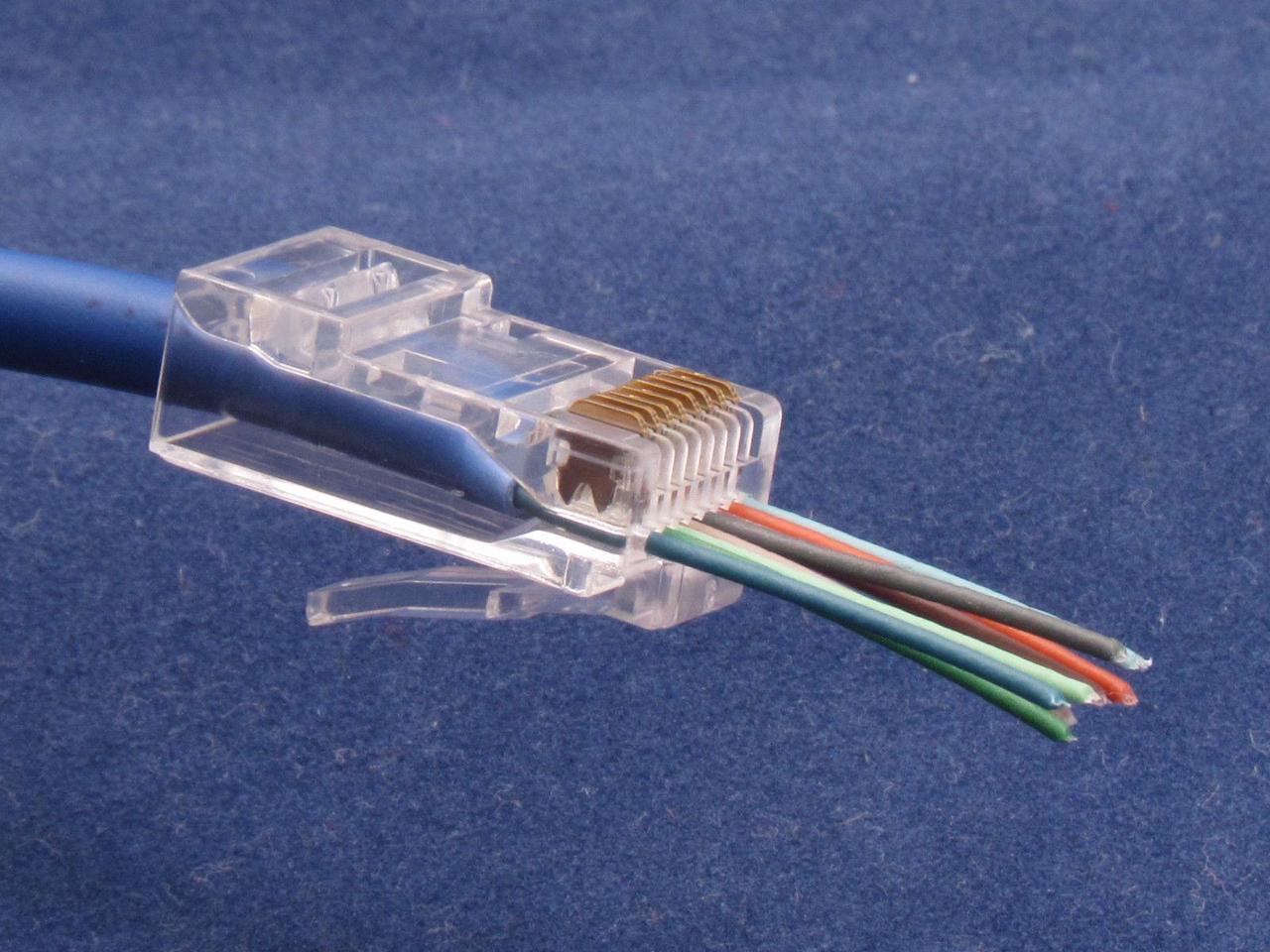
Pass through ones are something like this, there are also shield and non-shield... sheild one have a metal clip, non-shield ones doesn't like the one in the pic.

A30R_1_20170711301919158.jpg
 
Last edited:

matt_i

Well-known member
Joined
Mar 14, 2008
Messages
10,725
Location
SE Michigan
Its a project that is worthwhile, perfect connectivity, no speed reductions due to the "blockage" of the wifi signal.

But, to do it right, have to get into the attic and fish some actual Cat 5 wires. Its a thankless job, there are very few good days to work in the attic. But once completed everything will work flawlessly at top speed.

I pulled one thru the attic last weekend, 50F and a rainy day, homerun between my new main router location and the remote access point in the shop.
 

nehog

Well-known member
Joined
Jan 2, 2010
Messages
7,935
Location
Jaffrey, NH
Telephone wire is CAT-2 wire. Computer ethernet is CAT-5, CAT-5e, or CAT-6. You would not get much performance with networking through telephone wires. Go with a good quality WiFi setup and you will be happy.
 

PCustoms

Well-known member
Joined
Jul 23, 2011
Messages
22,404
Location
VT
The problem with the wifi is that it changes speed from sometimes 150 MBit/s to 1,2 MBit/s for no obvious reason.
Several neigbours have the same problem.
3 months ago everything was perfect .

Change your channel, you've got interference.
 
OP
M

MBfreak

MEMBER EMERITUS
Joined
Dec 10, 2010
Messages
2,301
Location
Linkoping , Sweden
So here is the outcome.
Phone cable was a 4 core no twisted pair type. Thru the central junction box i wired directly between the source and the PC. Guess about 15 m. Got connection but speed was only around 1 MBit/s, so you guys were right.
Experiment canned.
PCustoms. I believe you are right about the interference. How do I go about changing channel?

best regards

Ola
 

HenryAZ

MEMBER EMERITUS
Joined
Sep 18, 2012
Messages
1,054
Location
South Congress AZ
Phone cabling in the house will be Category 3 cable at best
That's true for older construction. All newer houses I've seen built in the US are using at least cat5e for everything. Easier just to stick to one type. Cat3 is even hard to find anymore.

To the OP, is the wall jack 6 wires (RJ-11) or 8 wires (RJ-45). You might have to replace the jack to an RJ-45, because the patch cable you use from jack to computer will be RJ-45. Pull out the old jack far enough to see what type of cable you have. It should be marked on the cable. If it is cat3, you probably won't get good results. If it is cat5, cat5e, or cat6, wire it according to the diagram above. If the T568A schematic doesn't work, then try T568B (switch the orange and green pairs in the diagram. We've always used the "B" style where I've worked, but it is not necessarily the preferred standard, it could be either. It won't matter which way you wire the jack, with respect to the patch cable you use from jack to computer. What matters is that both ends of the wire in the wall are wired to the same standard. Exception is for newer computers, which will detect crossover wiring and adapt.
 
Last edited:

Jinks

Well-known member
Joined
Aug 28, 2012
Messages
2,885
Location
Daytona Beach
Just a thought. Before changing channels, have you looked at possible interference? My wireless would support almost any computer, but when I added TIVO for television I developed problems. The TIVO had a signal strength ranging from 50% to 70% & seemed to work. But soon it began to drop out. At times signal strength dropped to 30% to 50%.

Doing a little testing I found that I had appliances & motors between my router & the TIVO. I simply relocated the router (to a higher shelf) & now run a consistent 85% to 95% signal. No more drop outs.
 

Platonic Solid

Well-known member
Joined
Nov 29, 2014
Messages
3,587
Location
CT-USA
I decided to go with house 220 V wiring and dongles at each end.
Saw a system at a friends, 50 MBit/s
No hassle,

Ola
Huh. I didn't know that was a thing. Googled it and sure enough. Now I feel silly for running uninterrupted Cat5 from one end of the house to the other (though that was over 15 years ago).
 

grantw

Well-known member
Joined
Nov 10, 2016
Messages
249
Location
Bay Area, CA
Hi, without reading too much replies, I can tell you about my experience using old telco for ethernet in my old apartment complex.

3 tenants including myself went in 1/3's on a business internet connection in our building. Our apartment super let us put the cable modem in the building telco closet, and patch in to our apartment telco lines (also in that closet). Each apartment had 4 pairs pre-wired, due to 2 for telco, and the old door intercom system (removed).

We decided that for a 150Mb/s shared connection, we would not attempt gigabit to each apartment. We decided to use 4/8 of the wires open to us. As we connected and rewired each of our apartments for ethernet, we used a iperf speed test to test up/down speed.

One apartment had HORRIBLE TX performance at ~2Mb/s. We ended up swapping the tx pair twice, and ultimateally mixing and matching wires to find a TX rate of ~95Mb/s. The other apartments were not as much of a headache.

Each apartment was about a hundred feet (~34m) from the telco closet.

you CAN use ****** non-twisted telco wire for ethernet, but don't expect the same wire speed as a dedicated cat6 cable will give you. Also, I should note, non-twisted wire is really susceptible to outside interference like microwaves, or just other phone lines ringing.
 

wyliesdiesels

Well-known member
Joined
Aug 14, 2012
Messages
19,994
Location
Modesto, CA
I realize im a little late to the party but id like to add my expertise and adive since i do this for a living and i see no one has gone real in depth with regards to the wifi issue and how to solve it

Biggest drawback would be that Telco cabling _used_ to be fairly stout in comparison to Cat5 cabling.

Wire may be stout but the biggest problem is its not twisted pair which is the most important thing for ethernet wiring to get decent speeds...

Old telco wiring is not twisted pair. In newer neighborhoods or some existing that have Uverse, the B2 pairs to the demarc have been upgraded to twisted pair. But the problem remains with the inside wiring...

Thanks a lot for the T568 A/B info.

That should solve the issue.

Will wire up tomorrow and try.

The problem with the wifi is that it changes speed from sometimes 150 MBit/s to 1,2 MBit/s for no obvious reason.
Several neigbours have the same problem.
3 months ago everything was perfect.


So, I will not spend time chasing the culprit but change over to hardwired.

Best regards

Ola

will not solve the issue because its not twisted pair. the resultant speeds will be the same as the poor wifi speeds....

lets try to solve your wifi issues.

I do this for a living...

while the issue may not be obvious to you, it is actually quite common on 2.4Ghz wifi. since you were good 3 months ago, its quite probable that one of your neighbors got a new device or access point and its now on the same channel as yourself. Or it could be an ISP with a neighborhood WAP on a pole that is using all the spectrum (all 3 non overlapping channels; more on this later, and ive seen comcast do this)...

What youre experiencing is interference. with wifi you can liken it to 4 or more people talking to each other in a small area without any kind of walls. No one can hear each other because its just a bunch of noise. need to separate each conversation by adding walls.

In the case of wifi, you do this by checking the spectrum and in-use channels then switching to an available channel or less crowded channel. with 2.4ghz this can be quite hard since there is only 3 non overlapping channels- 1, 6, and 11. The other channels in between (1-11) all overlap channels next to them. If you have 5.8ghz wifi its a little easier since there is more channels and spectrum...

In order to start diagnosing your problem, you need some equipment, which most people already have. Do you have an android device? if so download wifi analyzer. open it up after you install it and check to see which channels are in use. you may find theyre all in use. in that case you need to find a channel where the nearby APs signal is in the -80db RSSI level or lower(higher number is lower power signal meaning weaker)....

Next you need the username and password of your AP.

Are you using ISP equipment or your own?

Another issue is that some ISP hardware has real crappy AP signal strengths. you may want to get your own AP and piggy back it with your internet service.

Phone cabling in the house will be Category 3 cable at best with routing and termination that is far below even Cat 3 standards.
Even if you terminate properly and use the 1-2 & 3-6 pairs you would want to limit the speed to 10Base-T speeds, which means you would need to find an old 10Base-T hub or a managed 100Base-T that allows you to force the speed to 10Mb.

Now if somebody wired the phones with Cat 4 cabling, you might have a chance at 100Mb for short runs.

cat4 will not satisfy his speed needs...

So here is the outcome.
Phone cable was a 4 core no twisted pair type. Thru the central junction box i wired directly between the source and the PC. Guess about 15 m. Got connection but speed was only around 1 MBit/s, so you guys were right.
Experiment canned.
PCustoms. I believe you are right about the interference. How do I go about changing channel?

best regards

Ola

see my response above

I would like to know the answer to "the interference" also.

see my response to the OP above...

Hi, without reading too much replies, I can tell you about my experience using old telco for ethernet in my old apartment complex.

3 tenants including myself went in 1/3's on a business internet connection in our building. Our apartment super let us put the cable modem in the building telco closet, and patch in to our apartment telco lines (also in that closet). Each apartment had 4 pairs pre-wired, due to 2 for telco, and the old door intercom system (removed).

We decided that for a 150Mb/s shared connection, we would not attempt gigabit to each apartment. We decided to use 4/8 of the wires open to us. As we connected and rewired each of our apartments for ethernet, we used a iperf speed test to test up/down speed.

One apartment had HORRIBLE TX performance at ~2Mb/s. We ended up swapping the tx pair twice, and ultimateally mixing and matching wires to find a TX rate of ~95Mb/s. The other apartments were not as much of a headache.

Each apartment was about a hundred feet (~34m) from the telco closet.

you CAN use ****** non-twisted telco wire for ethernet, but don't expect the same wire speed as a dedicated cat6 cable will give you. Also, I should note, non-twisted wire is really susceptible to outside interference like microwaves, or just other phone lines ringing.

the problem with what you did is when a phone co tech or someone else comes in to do work and messes with your wiring.

Are you all on the same level? If so, i wouldve done wireless point to points. you would get all the speed youre paying for.

The other big interference issue is electrical noise from adjacent wiring...
 
Last edited:
To avoid these ads, REGISTER NOW!

b-boy

Well-known member
Joined
Oct 2, 2013
Messages
2,155
Location
Buffalo NY
Huh. I didn't know that was a thing. Googled it and sure enough. Now I feel silly for running uninterrupted Cat5 from one end of the house to the other (though that was over 15 years ago).

I have one of these. They are a little touchy sometimes. They either work or they don't.

I have problems using it on some of the circuits in my house. The vendor just says to try a different circuit.

You're better off with Cat6.
 

Platonic Solid

Well-known member
Joined
Nov 29, 2014
Messages
3,587
Location
CT-USA
I have one of these. They are a little touchy sometimes. They either work or they don't.

I have problems using it on some of the circuits in my house. The vendor just says to try a different circuit.

You're better off with Cat6.
So for best performance sounds like I should be switching the Cat5e cable out for Cat6.
 

grantw

Well-known member
Joined
Nov 10, 2016
Messages
249
Location
Bay Area, CA
...

the problem with what you did is when a phone co tech or someone else comes in to do work and messes with your wiring.

Are you all on the same level? If so, i wouldve done wireless point to points. you would get all your speed youre paying for.

The other big interference issue is electrical noise from adjacent wiring...


The ethernet lines from the business modem to the building punch down were tagged. Not that the pac-bell tech would respect it.

Sharing 150Mb/s 3 ways at 100Mb/s each was a cheap and fair way we all agreed on not hogging it all at once. Also, wireless speeds at the time were 54Mb/s range for the price we were willing to pay.

Electrical noise was killer... yes.
 

wyliesdiesels

Well-known member
Joined
Aug 14, 2012
Messages
19,994
Location
Modesto, CA
So for best performance sounds like I should be switching the Cat5e cable out for Cat6.

nope. you wont gain anything

The ethernet lines from the business modem to the building punch down were tagged. Not that the pac-bell tech would respect it.

Sharing 150Mb/s 3 ways at 100Mb/s each was a cheap and fair way we all agreed on not hogging it all at once. Also, wireless speeds at the time were 54Mb/s range for the price we were willing to pay.

Electrical noise was killer... yes.

how long ago was this? If within the last couple yrs, you couldve done a 5.8Ghz wireless point to point utilizing 2 radios. Im not talking about using the 2.4ghz wifi...
 

justsam

Well-known member
Joined
Aug 20, 2010
Messages
1,267
Location
Penngrove, California
I have one of these. They are a little touchy sometimes. They either work or they don't.

I have problems using it on some of the circuits in my house. The vendor just says to try a different circuit.

You're better off with Cat6.

The OP should not have the same problem of selecting different circuits when using his Power Line Carrier Ethernet. He is in Sweden, and they do not use the center tapped split 240VAC that we use here. There is only one "leg". at 220VAC I believe.
 
OP
M

MBfreak

MEMBER EMERITUS
Joined
Dec 10, 2010
Messages
2,301
Location
Linkoping , Sweden
Just sam.
The Swedish ( and most European) LVAC standard is 3phase 400V 50 Hz.
And most dwellings( flats, villas) have a distribution board with an incoming 3 pole isolator switch, followed by an Earth Fault unit.
The three phases ( 400/ sqrrt3 V) are then distributed , a typical 100 sqm flat has 3 off three phase groups ( Stove, Laundry and Spare) and about 20 single phase groups 230V.
So for PLC in a flat to work well you may need to rearrange the feeders so that your PLC plug in and out points are on the same phase, and preferably on the same MCB.
All wiring since 25 years must be 5 wire, ie L1, L2, L3, N and PE.
Also all single phase outlets must have Lx, N and PE

There are about one residential electricity fatality a year on 10 M people.
All are caused by substandard "modifications" by people whou should stick to changing lightbulbs on the car.

Ola
 

justsam

Well-known member
Joined
Aug 20, 2010
Messages
1,267
Location
Penngrove, California
Ola,
Thanks for the education on Swedish residential power distribution. So if you stay within that "20 single phase 230v group" all is well I suspect. I have little to no experience with newer PLC systems, sounds like this one did the trick. What model did you use?

My time in Sweden was watching my grand daughter play soccer in the Gothia Cup, but I did sneak off to the Volvo museum!
 

grantw

Well-known member
Joined
Nov 10, 2016
Messages
249
Location
Bay Area, CA
...
how long ago was this? If within the last couple yrs, you couldve done a 5.8Ghz wireless point to point utilizing 2 radios. Im not talking about using the 2.4ghz wifi...

This was early 2000s. I did have a set of 600mW 5.8G with 28dBi gain dishes, but they were not that great to place in the apartments. I should also mention, that the coax from the mpoe to each unit was shady as... Comcast wanted $200 each unit to run exterior cable, which the super didn't want to let happen. The telco wiring + hopes and prayers for ~90Mbps each was cost effective for everyone involved, and blessed by the super.

it was a while ago. But the point of the whole story is to say that ethernet is pretty robust when it comes to not using cat5 / 5e / 6. Just expect some line noise to limit transmission rates.
 
OP
M

MBfreak

MEMBER EMERITUS
Joined
Dec 10, 2010
Messages
2,301
Location
Linkoping , Sweden
justsam

AV600 Powerline Adapter . Model TL PA-4010
SEK 390 ( appr $49) for the pair.
Plug and play, no probs.

Gothia cup is a real nice arrangement for football kids.
My son played it 4 times when he was 10-15.
Loads of fun.

Ola
 

theoldwizard1

Well-known member
Joined
Feb 22, 2011
Messages
43,109
Location
SE MI
Exactly this. Without the proper twisting, figure that your 4 wire cord will work for 100BaseT equipment up to a length of about 1m. You might be able to push that to as much as 10m on your telephone cord, if you had a management switch and card where both could be manually set to use 10BaseT, but most devices that support gigabit will fail on either of these options.

I go back to the Ethernet days of the "orange hose" ! I even did "ThinNet".

What a lot of people do NOT KNOW, is that Ethernet does an automatic "self check/re-transmit". Few computer systems report this, but with the wrong wire, you could be spending a lot of time re-transmitting data that got "garbled".
 

rlitman

Well-known member
Joined
Oct 18, 2010
Messages
24,587
Location
Long Island
I go back to the Ethernet days of the "orange hose" ! I even did "ThinNet".


What a lot of people do NOT KNOW, is that Ethernet does an automatic "self check/re-transmit". Few computer systems report this, but with the wrong wire, you could be spending a lot of time re-transmitting data that got "garbled".


Yep, exactly this. Ethernet does retransmission. So does TCP, and so do many other higher layers. But retransmitting garbled data will kill your bandwidth, in unpredictable ways.
 

Engineer61

Well-known member
Joined
Oct 26, 2012
Messages
225
Location
Colorado
Just had 1 Gb fiber installed at my house and the tech couldn't get the 1 Gb speed inside the house. Ran an extension cord so she could hookup the router outside directly to the new fiber box and had 1 Gb speed no problem. She spent a couple hours trying to get it to work, making and re-making the cable to the inside. Finally called in the experts and left it to them, who determined that her crimp tool had a dull blade and wasn't getting the cable cut correctly when she crimped on a new terminal. The cable would work ok at 100 Mb speed, but not work at all at 1 Gb until they used a different crimp tool to put on the terminal ends and then it all worked correctly. Today's fast network signals can get really weird.
 
OP
M

MBfreak

MEMBER EMERITUS
Joined
Dec 10, 2010
Messages
2,301
Location
Linkoping , Sweden
Now solved. Considerable amount of eggs in face.:lol_hitti

The problem was the cordless keyboard/mouse dongle.
After having switched over to PLC, I was working with some mathcad stuff, while ordering train tickets at the same time thru an app on my smartphone , connected to my wifi.
No communication , the smart phone said.
WTF
Pulled out the wifi dongle for the keyboard/mouse, and all was well. :beer:
Ordered my train ticket, dumped the cordless keyboard/mouse with its dongle
Installed my old USB keyboard/mouse, disconnected the PLC RJ 45 and reinserted the wifi dongle to my home wifi.
All well, download 110 Mbiy/s, upload 18 Mbit/s.
End of story!

Ola
 

rlitman

Well-known member
Joined
Oct 18, 2010
Messages
24,587
Location
Long Island
Wow. Good catch. As you discovered, lots of equipment works in the same narrow radio band as WiFi.
 

theoldwizard1

Well-known member
Joined
Feb 22, 2011
Messages
43,109
Location
SE MI
Just had 1 Gb fiber installed at my house and the tech couldn't get the 1 Gb speed inside the house.
About 10 years ago, I set up an a new computer system for a friend. New CPU, new gigabit switch, new gigabit NAS. A linked with Cat 6. Computer would NOT go gigabit. Tech support said, "So what ! The cable coming into your house it way less !!" CLUELESS !!
 
To avoid these ads, REGISTER NOW!
Top Bottom