To avoid these ads, REGISTER NOW!

RG6 Home network for TV —Future proof—

PurdueSD

Well-known member
Joined
Mar 25, 2006
Messages
1,577
Location
Indiana
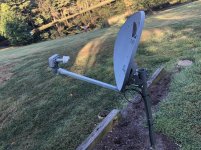
I currently have Directv with DVR/ 2 wireless genies supporting my home. The dish outside, then a inline connector at the house. After that, an rg6 run on my basement ceiling joists to another in-line connector under my Living room tv where the main dvr sits.

I am getting ready to finish my basement, drywall walls and ceiling, so I would like to set myself up for future flexibility and i also need to add additional TVS to the system.

1. I would like access in my detached shop. 75ft from house
2. Need 2 additional Basement TVs - i can move a wireless genie down there for one of them.

My thinking is:

Since my future access is limited, i should run some RG6 anywhere i may need it in the future. (all TV areas) This really isn't a big job, i just need help on the plan. Looking like i should place a splitter in my Utilities room where it will be accessible and make all the runs throughout the house i need.

For the shop, I am thinking of running out there with some RG6 direct burial in one a 1' deep trench. Can i make the connection at my LNB outside? -as it is about half the distance as it would if i come off a splitter i add in the house.

I also will throw some direct burial cat 6 in the trench to my shop for LAN internet.

Thoughts and advice appreciated!

Or should i just pay direct tv to come out? Im pretty sure they will provide the cable and splitter if i pay another installation fee.
 

Attachments
  • C6CDD515-5C38-41E5-A731-6E7A06BA7DAC.jpg
    C6CDD515-5C38-41E5-A731-6E7A06BA7DAC.jpg
    147.5 KB · Views: 56
  • 2169327E-0EF1-4D46-A7D9-3740130DEF37.jpg
    2169327E-0EF1-4D46-A7D9-3740130DEF37.jpg
    146.3 KB · Views: 60
Last edited:
To avoid these ads, REGISTER NOW!

wyliesdiesels

Well-known member
Joined
Aug 14, 2012
Messages
20,013
Location
Modesto, CA
The run to the shop may require coax bigger than RG6.

Also, dont use splitters on a satellite system. You will create a dead short.
 

Git

Well-known member
Joined
May 18, 2008
Messages
6,894
Location
S Cal
Don't take this wrong - but why in the hell are you still using Satellite TV, especially since it appears you have internet?

Do your self a favor and look into some of the streaming services
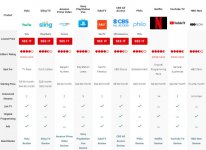
https://www.pcmag.com/roundup/336650/the-best-video-streaming-services

attachment.php
 

Attachments

  • GR8-II-030.jpg
    GR8-II-030.jpg
    69.5 KB · Views: 373

theoldwizard1

Well-known member
Joined
Feb 22, 2011
Messages
43,166
Location
SE MI
In general, anytime you split coax cable you lose some percentage of the signal. I always recommend an amplified splitter like this.

Capture.JPG

You CAN run Ethernet over coax, but you need a MoCA adapter.
 

Falcon67

Well-known member
Joined
Jun 11, 2009
Messages
18,371
Location
Merkel, TX
The run to the shop may require coax bigger than RG6.

Also, dont use splitters on a satellite system. You will create a dead short.

I run RG6 to the shop, total run around 190 feet. No signal issues with Dish. Agree - using Dish, you only come off their splitter engineered for the system to one of their endpoints (Joeys). To copy signal to another TV, I use an HDMI splitter after the Joey or DVR.

I don't remember how Direct does theirs, we threw all the junk in the trash.

Run two ethernet cables plus your coax to every end point. Wireless is fine, I use it a lot. Part of my job is wireless engineer. Wired is always going to be better. If there is a network choice, wire it.

>Don't take this wrong - but why in the hell are you still using Satellite TV,
>especially since it appears you have internet?

Because pretty quick you end up spending more $$$ and a big hassle trying to find whatever you might want to watch. $4.95 for this, $19.95 for that, $23.95 for another, have to get a membership with PBS to find any recent stuff, TCM streaming *****, oh want to watch the Rangers play ball - not on MLB, you gotta add a sports package that includes Fox Sports Southwest on XYZ that's another $$.$$ - pretty soon it's over the Dish bill. Now you have to buy a DVR, maybe for local channels you'll need one that does streaming plus OTA, now you need an antenna on the house. Been there done that. I pick up one remote and have 200 channels plus YouTube of nothing worth viewing. Streaming takes 30 minutes of hunting through various half-*** and completely different user interfaces trying to look for something worth casting.

We have a gig of bandwidth over fiber coming into the house and can stream the hell out of everything on the internet. We use Dish, don't even have Netflix anymore.

>I currently have Directv with DVR/ 2 wireless genies supporting my home.
Having been on Direct recently, you have my sympathies. :lol:
 
Last edited:

KC8FLB

New member
Joined
Sep 6, 2019
Messages
1
Location
Grosse Ile, Michigan
Running coax still can be useful for distributing antenna Over the Air (OTA) signal to tuners on TV's or distributing cable TV.

Most future TV will come over the network cable, so I would recommend also running network cable (structured cable that you wire to keystone jacks in the wall)

I have a hybrid system at home with antennas in the attic-->preamp in attic--->coax to distribution amplifier--->coax to one TV and coax to 4 tuner network amplifier-->network cable--->home network--->all network connected devices that can decode tv tuner info.
 
OP
P

PurdueSD

Well-known member
Joined
Mar 25, 2006
Messages
1,577
Location
Indiana
Don't take this wrong - but why in the hell are you still using Satellite TV, especially since it appears you have internet?

Do your self a favor and look into some of the streaming services

MY home doesn't have broadband access. FML! Yes it ***** but it is what it is for now. Rural life. The cell based router (grandfathered unlimited plan) gets us by. I took the sim card out of a hotspot and put it in a better router. Its enough for web access, some single point streaming/ netflix USUALLY and that's about it.

Thats why we have direct tv.
 
Last edited:
OP
P

PurdueSD

Well-known member
Joined
Mar 25, 2006
Messages
1,577
Location
Indiana
I run RG6 to the shop, total run around 190 feet. No signal issues with Dish. Agree - using Dish, you only come off their splitter engineered for the system to one of their endpoints (Joeys). To copy signal to another TV, I use an HDMI splitter after the Joey or DVR.

I don't remember how Direct does theirs, we threw all the junk in the trash.

Run two ethernet cables plus your coax to every end point. Wireless is fine, I use it a lot. Part of my job is wireless engineer. Wired is always going to be better. If there is a network choice, wire it.

>Don't take this wrong - but why in the hell are you still using Satellite TV,
>especially since it appears you have internet?

Because pretty quick you end up spending more $$$ and a big hassle trying to find whatever you might want to watch. $4.95 for this, $19.95 for that, $23.95 for another, have to get a membership with PBS to find any recent stuff, TCM streaming *****, oh want to watch the Rangers play ball - not on MLB, you gotta add a sports package that includes Fox Sports Southwest on XYZ that's another $$.$$ - pretty soon it's over the Dish bill. Now you have to buy a DVR, maybe for local channels you'll need one that does streaming plus OTA, now you need an antenna on the house. Been there done that. I pick up one remote and have 200 channels plus YouTube of nothing worth viewing. Streaming takes 30 minutes of hunting through various half-*** and completely different user interfaces trying to look for something worth casting.

We have a gig of bandwidth over fiber coming into the house and can stream the hell out of everything on the internet. We use Dish, don't even have Netflix anymore.

>I currently have Directv with DVR/ 2 wireless genies supporting my home.
Having been on Direct recently, you have my sympathies. :lol:

I don't really have any complaints with Direct TV other than cost and the wireless genies are kind of laggy. The cable company at my last house was way crappier than this directv stuff though.

I also do like having all my tv in one place... Not hulu for this, you tube for that etc. But, don't want to be tied to direct Tv for the extended future so i am just kind of planing my way to avoid that with a strong infrastructure backbone for the house.

Yes, part of my plan already is to run cat6 throughout the whole house or at least extra runs to accessible places for future. I will also run Cat6 out to the shop as well. So i should be covered there if one day i do get broadband.

My questions were how should i design the satellite/ cable network (RG6) efficiently to support my home.
 
Last edited:

SGKent

Banned
Joined
Feb 12, 2010
Messages
1,959
Location
Citrus Heights CA
Technologies change. We assume that RG6 will be the best cable. 10 years ago the cable Co here, Comcast, told me to run RG59. Now I have to do it again next time I renew the lawn and can dig up the conduits, and pull new cable. Then there is all the RG59 in the house that will have to be replaced - that I have never used. Right now we use DSL from Consolidated then CAT5e to everything. DSL modem to router, and switches.

My 2 cents worth. Put in conduit and cord to ready to pull cable. That way whatever is needed you can pull later - or change. Fiber and 5G may change everything. OTA frequencies are changing again too very soon as companies sell their frequencies back to the FCC. Technology model is in flux.
 

wyliesdiesels

Well-known member
Joined
Aug 14, 2012
Messages
20,013
Location
Modesto, CA
MY home doesn't have broadband access. FML! Yes it ***** but it is what it is for now. Rural life. The cell based router (grandfathered unlimited plan) gets us by. I took the sim card out of a hotspot and put it in a better router. Its enough for web access, some single point streaming/ netflix USUALLY and that's about it.

Thats why we have direct tv.

Any WISPs(wireless internet service providers) in your area?

Technologies change. We assume that RG6 will be the best cable. 10 years ago the cable Co here, Comcast, told me to run RG59. Now I have to do it again next time I renew the lawn and can dig up the conduits, and pull new cable. Then there is all the RG59 in the house that will have to be replaced - that I have never used. Right now we use DSL from Consolidated then CAT5e to everything. DSL modem to router, and switches.

My 2 cents worth. Put in conduit and cord to ready to pull cable. That way whatever is needed you can pull later - or change. Fiber and 5G may change everything. OTA frequencies are changing again too very soon as companies sell their frequencies back to the FCC. Technology model is in flux.

10yrs ago Comcast was using RG6 out here.

Mustve been longer than that...
 

Git

Well-known member
Joined
May 18, 2008
Messages
6,894
Location
S Cal
Because pretty quick you end up spending more $$$ and a big hassle trying to find whatever you might want to watch. $4.95 for this, $19.95 for that, $23.95 for another, have to get a membership with PBS to find any recent stuff, TCM streaming *****, oh want to watch the Rangers play ball - not on MLB, you gotta add a sports package that includes Fox Sports Southwest on XYZ that's another $$.$$ - pretty soon it's over the Dish bill. Now you have to buy a DVR, maybe for local channels you'll need one that does streaming plus OTA, now you need an antenna on the house. Been there done that. I pick up one remote and have 200 channels plus YouTube of nothing worth viewing. Streaming takes 30 minutes of hunting through various half-*** and completely different user interfaces trying to look for something worth casting.

I have had just the opposite experience. DTV customer for about 12 years, got tired of them treating new customers better than their old loyal customers. Switched to Dish - their 'Genie' or whatever you call it sucked. Never worked. After 1 year I paid the early termination fee (I think it was about $240 out of my pocket) and never looked back

PlayStation Vue carries most of the things I am interested in. We have their basic plan for $50 a month which covers just about anything we would want to watch - cable news, local channels, etc. That also includes their 'cloud dvr' service - I hate having to sit through commercials. Netflix is $15 and we also have Amazon Prime so anything there is just gravy. Compare that to the $150 I was paying to DTV or Dish and it was a no brainer to change

Now if you don't have a decent internet connection, ya, I could see why you would still use satellite
 

dogdog

Well-known member
Joined
Nov 15, 2011
Messages
12,711
1) you can not split Direct TV singals for different boxes using standard cable splitters or those AMPLIFIERS... not the same thing. ... but you can mux in 2x4 or 4x8 configurations ... the different satellites signals to be send down stream, but still requires dedicated coax to the dish... I believe in general it supports up to 3 different satellites, and 4 receivers per dish... those are not call splitters... they are call diplexers, and they are not the same as MOCA splitters for cable TVs... Just FYI before you go all gunhoe into getting splitters and it won't work for your direct TV...

2) if you are looking for future proof.. Conduits maybe and plan for a centralized network cabinet ? Who knows what if Fibers will catch on or those Cat 10000s standard that would come up... right now it's Cat6 and Cat6As... but I wouldn't go chasing bleeding edge tech...
 
Last edited:

dogdog

Well-known member
Joined
Nov 15, 2011
Messages
12,711
In general, anytime you split coax cable you lose some percentage of the signal. I always recommend an amplified splitter like this.

Capture.JPG

You CAN run Ethernet over coax, but you need a MoCA adapter.


these thing does not work for satellite signals.
 

Falcon67

Well-known member
Joined
Jun 11, 2009
Messages
18,371
Location
Merkel, TX
OT, but we have been with Dish for several years and went with Direct for one year on a two year plan. AT&T tried to screw us by doubling the Direct billing after the first 12 months of the contact. We terminated the contact and had to take some action that stretched over several months and eventually got our termination fee refunded.

The Dish Hopper/Joey setup is superior IMHO to the Direct components. Also the user interface, remotes and DVR functions are "better". Are they perfect and work all the time - no. Any issues with the equipment over the years has been remedied without hassle.

"got tired of them treating new customers better than their old loyal customers. "

They all do this and are now immune to the "I'll take my business elsewhere" threat to get a better deal. It is what it is. They are pretty much now "if you don't like it, sorry".
 

Git

Well-known member
Joined
May 18, 2008
Messages
6,894
Location
S Cal
OT, but we have been with Dish for several years and went with Direct for one year on a two year plan. AT&T tried to screw us by doubling the Direct billing after the first 12 months of the contact. We terminated the contact and had to take some action that stretched over several months and eventually got our termination fee refunded.

The Dish Hopper/Joey setup is superior IMHO to the Direct components. Also the user interface, remotes and DVR functions are "better". Are they perfect and work all the time - no. Any issues with the equipment over the years has been remedied without hassle.

"got tired of them treating new customers better than their old loyal customers. "

They all do this and are now immune to the "I'll take my business elsewhere" threat to get a better deal. It is what it is. They are pretty much now "if you don't like it, sorry".

I disagree on all accounts

Dish Hopper was junk - always having connection/network errors and they wanted you to run around your house unplugging everything and then plugging it back in

Cut the Cord:
Plenty of options out there for streaming services along with free telephone (Google Voice). Most of the services usually have a free trial period - have you ever tried it?

https://vue.playstation.com/subscription

I mentioned earlier, I paid $240 early termination fee to get out of Dish. Broke even about 5 months later and have been saving money ever since


Where do you think all these people are going?

  • AT&T: Lost 544,000 DirecTV and U-Verse subscribers, versus 187,000 in Q1 2018 (DirecTV also lost 83,000)
  • Dish Network: Lost 266,000 satellite TV subscribers, versus 185,000 in Q1 2018 (Sling TV gained 7,000)
  • Charter: Lost 145,000 TV subscribers, versus 111,000 in Q1 2018
    Comcast: Lost 121,000 TV subscribers, versus 96,000 in Q1 2018
  • Verizon: Lost 53,000 TV subscribers, versus 22,000 in Q1 2018
  • Altice: Lost 10,000 residential TV subscribers, versus 30,000 in Q1 2018

attachment.php
 

Attachments

  • GR8-II-049.jpg
    GR8-II-049.jpg
    87.6 KB · Views: 235

mobiledynamics

Well-known member
Joined
Mar 14, 2010
Messages
5,037
Location
Gotham City
Cable Company steered you wrong. 10 years ago, RG6 was already the defacto..

OP "Since my future access is limited, i should run some RG6 anywhere i may need it in the future. (all TV areas) This really isn't a big job, i just need help on the plan. Looking like i should place a splitter in my Utilities room where it will be accessible and make all the runs throughout the house i need. "

Personally if you have the budget (coax is not expensive), I would pull dual runs of RG6 per location. Granted, many of my locations are feeding just a a single RG6 for the video provider, some area's I do have the Rabbit Ears OTA connected via the secondary RG6. I don't use this *source input much*, but FWIW, it's uncompressed video so it's ~as true~ as the signal one can get.
 
To avoid these ads, REGISTER NOW!

ripperd

Well-known member
Joined
Jul 2, 2014
Messages
2,047
Location
Twin Cities, MN
Rabbit Ears OTA connected via the secondary RG6. I don't use this *source input much*, but FWIW, it's uncompressed video so it's ~as true~ as the signal one can get.

FWIW, OTA now uses ATSC digital broadcasts. The streams are actually encoded and compressed with an MPEG variant.

That is why you can get 2+ digital, HD channels in the same RF space as a single old analog 480i channel.
 
OP
P

PurdueSD

Well-known member
Joined
Mar 25, 2006
Messages
1,577
Location
Indiana
Cable Company steered you wrong. 10 years ago, RG6 was already the defacto..

OP "Since my future access is limited, i should run some RG6 anywhere i may need it in the future. (all TV areas) This really isn't a big job, i just need help on the plan. Looking like i should place a splitter in my Utilities room where it will be accessible and make all the runs throughout the house i need. "

Personally if you have the budget (coax is not expensive), I would pull dual runs of RG6 per location. Granted, many of my locations are feeding just a a single RG6 for the video provider, some area's I do have the Rabbit Ears OTA connected via the secondary RG6. I don't use this *source input much*, but FWIW, it's uncompressed video so it's ~as true~ as the signal one can get.

Thanks! I appreciate you addressing one of my questions. Lots discussion about directv vs dish vs streaming... not really helpful here.

I just want to set up my home so its flexible -ish for the next 20 years before i finish my basement ceiling.

The consensus so far is run 2 Cat6 runs everywhere there is a tv viewing area. And run 1 or 2 RG6. I supposes i will run them back to the storage room where i have a drop ceiling.

So i still don't have a firm understanding on how hookup / split/ etc. RG6 network, looks like it maybe one type of splitter for Direct tv, a different one for dish, and maybe another for cable if that's an option one day. Thats fine, i can swap splitters one day if needed. Am i on the right path?
 

timmayw21

Member
Joined
Mar 16, 2014
Messages
16
I do about 10 or so installs a year very similar to your situation. A couple of things to consider:

- run at least 2 rb6 and 2 cat5e or cat6a to each location that you might want a tv or computer setup (don't bother with plan cat6 if your going to spend the extra money over cat5e get cat6a).
-The more locations the better, the wire is cheap and your buying it typically 500ft or 1000ft at a time so use it up.
-When running the wire stay 6in to 12in from any electrical wires and if you have to cross one do it at 90 degrees and no direct contact.
-A 75ft run to your shop should not be a problem for RGB6 or cat6a. Just use the proper wire that is rated for burial and even better run it in conduit.
-Get the proper low voltage boxes or mud rings, don't try to use standard electrical boxes.
-Everything should be run back back to a central location where you can also get a direct feed from your satellite/over the air antenna/phone line.
-Use the compression fittings for the RG6, the twist on fittings are garbage. you can buy a tool kit with everything you need to cut, trim, and terminate RB6 for about $20. Same goes for the ca5e/cat6a get good keystone ends and a patch panel, both should be rated for the same or better grade of wire that you install.
-You don't necessarily need to get a splitter for the RGB6 lines right away, the wires can just be tied in a bundle until they are needed. If you direct tv or cable of some sort installed to those locations they will supply one that will work with their equipment.
-Conduit is the ultimate "future proofing." If you go this route use the grey plastic electrical conduit with the wide sweep 90s, the biggest diameter you can get away with, and keep the bends to a minimum.
 
OP
P

PurdueSD

Well-known member
Joined
Mar 25, 2006
Messages
1,577
Location
Indiana
I do about 10 or so installs a year very similar to your situation. A couple of things to consider:

- run at least 2 rb6 and 2 cat5e or cat6a to each location that you might want a tv or computer setup (don't bother with plan cat6 if your going to spend the extra money over cat5e get cat6a).
-The more locations the better, the wire is cheap and your buying it typically 500ft or 1000ft at a time so use it up.
-When running the wire stay 6in to 12in from any electrical wires and if you have to cross one do it at 90 degrees and no direct contact.
-A 75ft run to your shop should not be a problem for RGB6 or cat6a. Just use the proper wire that is rated for burial and even better run it in conduit.
-Get the proper low voltage boxes or mud rings, don't try to use standard electrical boxes.
-Everything should be run back back to a central location where you can also get a direct feed from your satellite/over the air antenna/phone line.
-Use the compression fittings for the RG6, the twist on fittings are garbage. you can buy a tool kit with everything you need to cut, trim, and terminate RB6 for about $20. Same goes for the ca5e/cat6a get good keystone ends and a patch panel, both should be rated for the same or better grade of wire that you install.
-You don't necessarily need to get a splitter for the RGB6 lines right away, the wires can just be tied in a bundle until they are needed. If you direct tv or cable of some sort installed to those locations they will supply one that will work with their equipment.
-Conduit is the ultimate "future proofing." If you go this route use the grey plastic electrical conduit with the wide sweep 90s, the biggest diameter you can get away with, and keep the bends to a minimum.

Thank you so much.. Everything i needed!
 
OP
P

PurdueSD

Well-known member
Joined
Mar 25, 2006
Messages
1,577
Location
Indiana
I do about 10 or so installs a year very similar to your situation. A couple of things to consider:

- run at least 2 rb6 and 2 cat5e or cat6a to each location that you might want a tv or computer setup (don't bother with plan cat6 if your going to spend the extra money over cat5e get cat6a).
-The more locations the better, the wire is cheap and your buying it typically 500ft or 1000ft at a time so use it up.
-When running the wire stay 6in to 12in from any electrical wires and if you have to cross one do it at 90 degrees and no direct contact.
-A 75ft run to your shop should not be a problem for RGB6 or cat6a. Just use the proper wire that is rated for burial and even better run it in conduit.
-Get the proper low voltage boxes or mud rings, don't try to use standard electrical boxes.
-Everything should be run back back to a central location where you can also get a direct feed from your satellite/over the air antenna/phone line.
-Use the compression fittings for the RG6, the twist on fittings are garbage. you can buy a tool kit with everything you need to cut, trim, and terminate RB6 for about $20. Same goes for the ca5e/cat6a get good keystone ends and a patch panel, both should be rated for the same or better grade of wire that you install.
-You don't necessarily need to get a splitter for the RGB6 lines right away, the wires can just be tied in a bundle until they are needed. If you direct tv or cable of some sort installed to those locations they will supply one that will work with their equipment.
-Conduit is the ultimate "future proofing." If you go this route use the grey plastic electrical conduit with the wide sweep 90s, the biggest diameter you can get away with, and keep the bends to a minimum.


Is there any issue with cat6a (not plenum rated) being ran in the same conduit as RG6?
 

dogdog

Well-known member
Joined
Nov 15, 2011
Messages
12,711
Pletnum I think it's the rubber / plastic shielding (jacket) when burned as oppose to PVC, it won't give off toxic gas. it is not the Electromagnetic shields... in STP VS UTP...
 

mobiledynamics

Well-known member
Joined
Mar 14, 2010
Messages
5,037
Location
Gotham City
fwiw, I've seen DB both ways.....with the icky sticky poo gel ;-0, and the latter with some sort of powder on it. I prefer the latter for obvious reasons.
 

Falcon67

Well-known member
Joined
Jun 11, 2009
Messages
18,371
Location
Merkel, TX
Everybody should note that 6A cable is pretty dang thick and doesn't bend all that well. You're basically pulling 4 RG6 size cables to your end points.

Dish Hopper was junk - always having connection/network errors and they wanted you to run around your house unplugging everything and then plugging it back in

Interesting as we've not had any issues like that and were on Dish for many years - 12 when we tried out Direct. We're late in year 1 of a two year on Dish and no issues like you describe at all. I'm quite sure those things happen, just that we've not had any here.
 

Git

Well-known member
Joined
May 18, 2008
Messages
6,894
Location
S Cal
I don't remember all the details - but this was back in 2016. We had I think a Hopper 3 a couple of Joeys and one super Joey or something like that. So we had four devices, but only one of them actually had a hard drive versus DirecTV where all of our devices had a hard drive. Our Dish setup was constantly having network issues were one of the devices couldn't connect to the main device, thus no recordings. Just like when your troubleshooting a computer, what do they tell you to do - turn it off to reset it. That got really old, they finally acknowledged the problem with that generation of equipment and offered to give us the next best super duper generation of equipment that no longer had those issues if we would just sign up for another 2-year contract extension... That's when we bailed

We have had PlayStation Vue ever since - they have a 'cloud DVR' so the only thing you need is a streamer (like a Roku, firestick etc). Rarely have we had any problems and we are extremely pleased with the price, available channels and the quality. I would highly recommend the service - sign up for the free 1-week trial

https://vue.playstation.com/subscription/
 

Falcon67

Well-known member
Joined
Jun 11, 2009
Messages
18,371
Location
Merkel, TX
I'm now reminded we did indeed have some issues with the first gen DVRs and external hard drives, Hopper included.
 

iowa4x4dieselman

Well-known member
Joined
Dec 5, 2012
Messages
224
Best way to future proof it would be like stated use conduit, or "smurf tube" the flexible conduit(ENT). It can be connected directly to low voltage brackets which are used instead of standard electrical boxes. its fairly inexpensive (3/4" x 100' ~$45)

In our current house build, we are having a set run to our main living area TV, so the components can be hidden in a closet.
 

ripperd

Well-known member
Joined
Jul 2, 2014
Messages
2,047
Location
Twin Cities, MN
In our current house build, we are having a set run to our main living area TV, so the components can be hidden in a closet.

Also add a 1.5" or 2" smurf tube from the network closet/distribution area to the attic. And leave a pull string in it.

I've already use that smurf tube we put in for 2 more runs to the 2nd floor and an OTA antenna in the attic. Made life much easier.
 

mobiledynamics

Well-known member
Joined
Mar 14, 2010
Messages
5,037
Location
Gotham City
Also add a 1.5" or 2" smurf tube from the network closet/distribution area to the attic. And leave a pull string in it.

I've already use that smurf tube we put in for 2 more runs to the 2nd floor and an OTA antenna in the attic. Made life much easier.


Depends how big the tube is and how many corners or not those runs are.....
Much easier pulling it all at once and dealing with pulling wire if necessary...

Straight shots no problem. Add 2 corners.....well, not so much fun. Especially with the corrugated walls
 

ripperd

Well-known member
Joined
Jul 2, 2014
Messages
2,047
Location
Twin Cities, MN
Well yeah. Of course you do what you anticipate. But adding the tube is future proofing that allows you to run pretty much anything you want at a later date.

If its during construction you can make it pretty much a straight vertical shot, no problem with curves.
 
To avoid these ads, REGISTER NOW!
Top Bottom