To avoid these ads, REGISTER NOW!

Security Camera layout

roguegts

Well-known member
Joined
Aug 1, 2013
Messages
189
I didn't want to **** up Penright's thread, so starting my own.

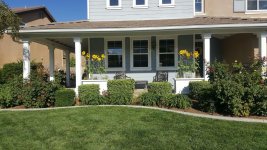
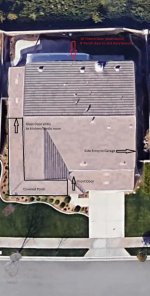
This house layout seems simple enough, but we have this huge covered front porch and i'm not sure how to approach getting adequate coverage.

Not sure I want to dive head first into a blue iris setup, but something with a really good interface for remote viewing (via android app, computer, etc) is mandatory. Planning on POE IP cams unless someone can recommend something better.

How hard is it to make the system viewable from various TVs in the house?

Attached is a marked up overhead shot along with a front view of the porch area. Any feedback from guys with a little experience would be hugely appreciated!
 

Attachments

  • FRP.jpg
    FRP.jpg
    66.7 KB · Views: 51
  • 20170910_090352.jpg
    20170910_090352.jpg
    151.2 KB · Views: 43
To avoid these ads, REGISTER NOW!

TerryH

Well-known member
Joined
Dec 8, 2012
Messages
2,248
Location
Springdale, AR
The other thread is way over my head technically. No clue if this is and real help but this is my experience as a total security camera newbie. I had a local guy do my system. All the equipment is Samsung. 16 spot DVR. 7 cameras at the moment but I'll probably add more at some point. 5 on the house. Views of the driveways and along the front and rear of the house so I can see anything going on with all the doors and windows. One on the house so I get a complete front view of the shop and one on the shop looking toward the back of the house. Helps to have a ranch (ie:rectangular) house and shop. Shop is 100 ft behind the house.

Ran multiple Cat cables to the shop so all the cameras are wired and I have dedicated data line in the shop as well. Handy that I have landscaping along one side of the property so just ran the cables in there. It was done in stages including a wifi access point in the attic and a Skybell door bell camera system to cover the front door. Have the tv in the great room as the main. Use a app called Wise View to see the cameras on my phone. The app works great. We use the same app at my work and at my mother's house so I can see all of those on my phone. Not sure about using more tv's to monitor. I just wanted the one.

A pic I just took of the tv screen...

 
Last edited:

Tmart86

Well-known member
Joined
Jul 12, 2017
Messages
151
Location
Cedar Rapids Iowa
Do you have a budget?
Do you want to a DIY install?
I know you can use a App on a roku device to stream IP/onvif streams on any TV and most cameras systems will worK on IOS and android

use the covered porch to your advantage it will keep the cameras dry. the bigger question is cable access from the eves of the porch.
 
OP
R

roguegts

Well-known member
Joined
Aug 1, 2013
Messages
189
Do you have a budget?
Do you want to a DIY install?
I know you can use a App on a roku device to stream IP/onvif streams on any TV and most cameras systems will worK on IOS and android

use the covered porch to your advantage it will keep the cameras dry. the bigger question is cable access from the eves of the porch.

Budget: will $2,500 get it done? I'm not looking to spend crazy $$ to eek out a 5% performance gain but have no problem spending if it's justified. My wife is shopping for Wolf ranges currently so yeah... if it nickles and dimes another $1k I won't lose any sleep over it.

I would very much prefer to DIY it and am very comfortable with the physical installation, pulling wires, etc. I'm reasonably proficient with network setup, so as long as it doesn't require any crazy custom programming I can probably handle it. I have a home NAS to host my private email, file backup, media streaming, etc, so this won't be my first rodeo.

Cable access is actually very good around the porch eaves. The wall next to the front door is shared with the garage that has a small access space above the ceiling. Already pulled a CAT6 wire for a wifi access point that's mounted in the garage. The peak under the porch is vaulted and about 11' high so if I need to tuck some metal conduit up there it's no big deal, and will be easy to conceal behind trim boards.

I already have the porch lights on motion sensors so if anyone enters the porch from either side at night all 6 wall sconces brighten to 100% dimmer (typically set to 50% as background lighting). Would additional lighting be preferable? separate infrared lights shining toward the house (opposite the wall sconces)?
 
Last edited:

Tmart86

Well-known member
Joined
Jul 12, 2017
Messages
151
Location
Cedar Rapids Iowa
$2500 is doable for sure with nice equipment. Do you have available Space on the NAS to use that for storage instead of a stand alone NVR etc?

Lighting helps. if the lights on motion sensors are LED you are probably fine. alot of newer cameras are able to hold a Color image at a pretty low light level. only down side of lights can be glare and they attract bugs so camera placement is important to take advantage of the light but not introduce glare or bugs living on the lens.
 
To avoid these ads, REGISTER NOW!
OP
R

roguegts

Well-known member
Joined
Aug 1, 2013
Messages
189
$2500 is doable for sure with nice equipment. Do you have available Space on the NAS to use that for storage instead of a stand alone NVR etc?

I do. It's a QNAP 4 bay, each loaded with 4TB WD Red drives, (8TB storage with full redundant backup). But honestly, I think i would prefer a dedicated NVR. The NAS has 4 camera licenses included, and I can expand that, but i'm not sure it has the capacity for the frame rate/resolution on a full 8 camera setup.

This is what i'm running for the NAS
https://www.qnap.com/en-us/product/ts-453a

Lighting helps. if the lights on motion sensors are LED you are probably fine. alot of newer cameras are able to hold a Color image at a pretty low light level. only down side of lights can be glare and they attract bugs so camera placement is important to take advantage of the light but not introduce glare or bugs living on the lens.

Yes they are LED bulbs. I put up a little ring stickup cam and you're spot on, the lights do create hotspots and a fair bit of glare, but it's less than a high end camera.
 

Tmart86

Well-known member
Joined
Jul 12, 2017
Messages
151
Location
Cedar Rapids Iowa
I do. It's a QNAP 4 bay, each loaded with 4TB WD Red drives, (8TB storage with full redundant backup). But honestly, I think i would prefer a dedicated NVR. The NAS has 4 camera licenses included, and I can expand that, but i'm not sure it has the capacity for the frame rate/resolution on a full 8 camera setup.

This is what i'm running for the NAS
https://www.qnap.com/en-us/product/ts-453a


I have used the Qnap 453 and 453 pro in the past. if you can set aside 1-2 TB you will get weeks of high frame rate 15-20FPS and full resolution image. If im not mistaken the 453 has multiple Ethernet ports so you can dedicate one port for video and not really have to worry about bandwidth issues.

I have never used the Qnap VMS software. FOr the INstalls using a NAS I was using Axis Companion and then the customers Did not want a dedicated Server/ viewing PC at first but wanted large amounts of storage and then eventually scaled to Axis Camera station or a Milestone VMS depending on the needs of the system.
 

89GLH

Well-known member
Joined
Mar 24, 2011
Messages
1,057
Location
Westminster, MD
Or run an Arlo and save yourself $1800. I have the Pro 2 cameras on my house, front door, back door, garage, and one covering my equipment shed. Works like a charm.
 

Tmart86

Well-known member
Joined
Jul 12, 2017
Messages
151
Location
Cedar Rapids Iowa
Or run an Arlo and save yourself $1800. I have the Pro 2 cameras on my house, front door, back door, garage, and one covering my equipment shed. Works like a charm.


arlo is a great simple solution if you want to rely on motion only recording and remember to change your batteries. also I think only arlo pro has any kind of local storage so if you dont go that route and your internet drops out you dont get any recordings
 
OP
R

roguegts

Well-known member
Joined
Aug 1, 2013
Messages
189
arlo is a great simple solution if you want to rely on motion only recording and remember to change your batteries. also I think only arlo pro has any kind of local storage so if you dont go that route and your internet drops out you dont get any recordings

And I have no interest in wifi cameras. Without a doubt i'd get it all setup and still be shopping a big boy system in a few months.

Moving that kind of data i'd rather just POE CAT6 and be done with it. If I do this right it should be good to go for 10 years.

I'm not the type that over-does security and all the perceived threats, but I've never understood why people 'cheap out' on things like this. :headscrat My budget is 1/2 the sales tax on a semi-decent car. Priorities I guess.
 

Tmart86

Well-known member
Joined
Jul 12, 2017
Messages
151
Location
Cedar Rapids Iowa
if I was going to give a simple solution using your Nas it would be the following equipment.

Axis M2026-LVE $340 (duplicate for how ever many cameras you want us M3106-LVE if you want turrets but they are more money)
Ubiquiti Tough Switch pro $180
box of sheilded cat 5e and connectors $160ish upgrade to cat 6a if you want

run axis companion until you want more functionality and then upgrade
 
To avoid these ads, REGISTER NOW!
Top Bottom