To avoid these ads, REGISTER NOW!

security cameras

kaffine

Well-known member
Joined
Dec 13, 2009
Messages
3,610
Location
Henderson, NV
I am wanting to start putting security cameras up around my shop and house. I would like to keep the initial price under $1500. I want to start with 4 cameras 3 outdoor 1 indoor. I want the system to be expandable to at least 10 cameras. It will not be connected to the internet for a while however I do want the ability to connect it and have email alerts / remote monitoring when I do get an internet connection.

It would be nice if it only required one cable to the cameras that supplies both the power and video connection however it is not a requirement.

Any recommendations on either complete systems or what components to piece together? Thank you.
 
To avoid these ads, REGISTER NOW!

Fastback

Well-known member
Joined
Oct 5, 2010
Messages
518
Location
Indy
I have a spendy commercial piece with armored camera housings, but after owning it and having the pains of getting it to be accesed by our smart phones I would give the Samsung pre-built system at SAMs club a good hard look, a lot of bang for the buck there.
 

Kevin C

Well-known member
Joined
Aug 4, 2011
Messages
1,653
Location
Portland OR

One thing to consider is where you are mounting them.

I have had cameras for a while. Generally I left the indicator light on as a deterrent. I figured that thieves would see the camera and find another target.

This guy seems to have figured out I have one and how not to get his face on camera.

That is $175 in text books that he took off with.


This video gives us a clue why the chicken crossed the road....


Now I have a clue where my news paper went. I'm sure this guy lives pretty close to me.

I'm starting to think that hidden / camouflaged is the way to go. It's possible that more things would have happened... But for the handful of incidents the person was either totally unwary or hid their face.

I'm also considering a lower camera angle to get a better view of the persons face. The downward angle does not seem to work as well.


This is a shot from an upward looking camera. Seems like he sees the camera and I got a clear shot of his face.

I don't know if this influences what you end up buying or not. For the front I'm thinking low mounted and hidden.

Kevin
 

pinoyesv6

Member
Joined
Nov 30, 2010
Messages
19
A have installed my fair share of surveillance systems over the past few year and I am just now getting to installing one for my own home.

For cable, I only pull cat5 now. If the cameras use POE, I will just crimp on a rj45 and call it a day. For cameras with bnc connector, they make converters for under $10 and I will terminate the cat5 with one of those. Plus by using cat5 instead of coax, I can grab a pair off the same cable and run power and only have to run 1 cable. Alot of kits come with pre-terminated cables and I tend to not use though since its easier for me to drill a small 3/8" hole and run cat5 through that instead of drilling a 1" hole and push a bnc connector through that and then push the power connector also. Pulling cable is the hardest part for me. The cameras I have now use bnc connector but if I ever wanted to upgrade, I can just ditch the converters and since I am using cat5, I would just have to crimp on rj45s and plug them into a POE camera.

For $1500 you are probably gonna get a unit with a standalone dvr. Almost all units now should be networkable and you can access from a remote computer, smartphone, tablet etc etc. I saw a unit at microcenter that was under $100 that did that. Storage will be an issue so look at not only the amount of storage the dvr has but also how much you can upgrade it to. Depending on your settings and equipment you might get a month or two worth of video with a 4 camera setup but with 10 cameras that hard drive might get you 3 weeks. Look at the recording quality of the dvr. Alot of dvrs will claim they do X resolution but if you read the fine print, alot of lower end units will do X resolution on 1 or 2 channels and then a lower resolution on the rest of the channels.

After reading hundreds of reviews on DVRs, one of the most common negative feedback I read was that the image quality *****. With that said you have to understand that the DVR at best can only reproduce the image that it receives from the camera. If you have a crappy cameras, a good dvr might be able to digitally enhance it but don't expect a DVR to output 1080p quality image with a $40 camera.
 

nehog

Well-known member
Joined
Jan 2, 2010
Messages
7,935
Location
Jaffrey, NH
Good cameras are worth their weight in gold, so to speak. I just (last week) bought a Lorex 16 DVR (came with eight cameras which I may use four of them) The DVR and eight cameras was under $500 at BJs. I have a bunch of Pelco cameras that are in critical areas where I need detail, and use the crappy ones mostly as motion detectors to trigger an alarm, and for up close video (they work well to protect a doorway for example, but not a big area like my shop.)

Avoid, avoid like the plague, wireless cameras. They are not secure (my backup video in the Hummer picks up a bunch every drive--stores, homes, etc.) As well, they already poor video quality is degraded greatly with the wireless option, and why bother: you still have to plug 'em in to make them work.

Personally I would recommend an eight channel DVR for most applications, 16 only if you really want to have a lot of cameras spread around.
 

Scott H.

Member
Joined
Jan 3, 2013
Messages
5
Location
South Carolina
Here's what a former employer of mine did when they put up security cameras at work because of employee theft:

They put up dummy cameras with the battery powered blinking red light in most of the expected places and put the rest of the operational cameras in hidden areas.

You wouldn't believe how many people would turn their head away from the dummy cameras because they didn't want to be on camera, just to look straight into the real cameras and not even know it. :lol:

-Scott H.
 

Daedalus

Well-known member
Joined
Sep 28, 2009
Messages
5,954
My advice is get a good recorder. D1 (4CIF) resolution @ 30 frames/sec on all channels while RECORDING (not just monitoring). Also, get a unit with a pre-record feature. This allows you to get x seconds of video before the actual trigger event. Then you get to see more of the story and not "surprised" half-videos after the fact. My first DVR did not have these features. The next 2 did. Big difference.

Cameras are cheaper and you have a lot more choices. I never had much issue with cameras. They are wear items. The image sensors eventually go out and they will need replacing. Keep the sun off them and they'll last longer. Not always possible.
 

432bullet

Well-known member
Joined
Dec 2, 2012
Messages
70
Post signs that you have video surveillance, Then hide the cameras. If they can,t see the cameras they will look else where. My answer to anyone who asks about the cameras is the truth you can get a camera to look like anything you want. Works for me :)
 

BillB99SVT

Member
Joined
Mar 30, 2006
Messages
7
Location
Alabama
Check out supercircuits.com - they have a great selection of good quality stuff. Have been around for years; great tech support.
 

Stainless169

Well-known member
Joined
Feb 22, 2012
Messages
211
Location
Fort Smith, AR
I bought a few of these a while back for less than 200. Foscam FI8910W IP Cameras. Since I already use a wireless network for my computers, the only thing I had to do with these was mount them and hook 110v to them.

We view them from our phones anytime we want. We can also pan/tilt them from our phone as well. They have IR for seeing somewhat decent in the dark. The picture I'm attaching isn't the best since it's pitch black outside right now. I'll post another one up tomorrow to show the quality in the daylight.

I turned one of my computers into a dvr basically. It's on all the time anyways. I use free software called Ispy. It's pretty extensive and has lots of options like setting recording zones and notifications.

This probably isn't what your looking for but others reading this may benefit.

Here's a link to the cameras I bought:
http://www.amazon.com/dp/B006ZP8UOW/?tag=atomicindus08-20
 

Attachments

  • Screen_shot.jpg
    Screen_shot.jpg
    104.6 KB · Views: 342

lilscorpion

Well-known member
Joined
Mar 15, 2010
Messages
3,599
Location
Colorado
I second the Foscam. I have three of the 8918's and have been pleased with them. The software that comes with them is good enough to alert you when motion is detected. The setup wasn't completely intuitive however a quick google search found a guy who did a write-up that documented all of the gotchas which flew me through it. They run about $65 or so a piece so they're fairly inexpensive when compared to other solutions. I have mine set to text message my phone on motion and email pics. I've tested it, I get the text about 30 seconds after motion. Not bad.
 

AndyL

Well-known member
Joined
Feb 22, 2012
Messages
1,371
Location
Vancouver
I've got a mix...

Foscam, IPcam and Wanscam - all but one on wifi (it was an easy cable route). The cheaper ones - are cheaper... It shows, but they're also in places it doesn't really matter. (and honestly at 1/2 the price...)

Currently upgrading, there's suddenly a few 720p (1280x1024) cameras available for reasonable prices, so even the 'cheap' ones are more useable, recordings at 640x480 or 320x240 are pretty useless for anything besides some vague pixelated idea of what happened...

Oh, and a recent "**** why didn't I think of that" moment... Don't use your home wifi network. Cameras take up a lot of bandwidth. Run a 2nd router just for them linked to a PC for recording / internet access. A big wind storm recently made me wonder why we were down in the 1200baud modem speeds - pulled an old router out gave them a second network... World is a wonderful place!
 

Kevin C

Well-known member
Joined
Aug 4, 2011
Messages
1,653
Location
Portland OR
Run a 2nd router just for them linked to a PC for recording / internet access. A big wind storm recently made me wonder why we were down in the 1200 baud modem speeds -

Good point... My old router had a hard time keeping up. When I upgraded I went with a dual band with multiple networks.

My Netgear WNDR4000 has two frequencies and each one also has a guest network. That gives you four independent WIFI channels. One dedicated to the repeater in the garage (5 Ghz). I use one 2.4 Ghz network for phones, laptops etc. The guest network 2.4 gHz is dedicated to the cameras.


The guest 5 Ghz network is disabled... No current need for it.

Everything else is hardwired.
Its been working really well for the past six months.
 

AndyL

Well-known member
Joined
Feb 22, 2012
Messages
1,371
Location
Vancouver
I'm just using a wrt54g, with dd-wrt no encryption just mac address filtering. difference between wpa or wep and open is about 10fps with 6 cameras...

Between software on the pc and router, even if one spoofed mac and connected - they couldn't do or connect to anything anyway... If they really wanted to see what's on the cameras, well they're all visible, and intentionally pointed in directions they won't see anything inside the house.

You Don't need to spend a fortune dx.com has some decent cameras for cheap
 

NCAudi

Well-known member
Joined
Oct 27, 2012
Messages
123
Location
Eastern North Carolina
I have been using these Logitech cameras for almost a year now;
http://www.logitech.com/en-us/video-security-systems/master-systems

I have been very satisfied with their performance. Only one CAT 5 wire to run for both power and data, connects to a router through the power cables in your house. Their App allows viewing a live feed on almost any smart phone and allows you to take screen shots at the same time with your phone. The software lets you set up various alerts and will email when an alert is triggered.

Oh, and a recent "**** why didn't I think of that" moment... Don't use your home wifi network. Cameras take up a lot of bandwidth. Run a 2nd router just for them linked to a PC for recording / internet access. A big wind storm recently made me wonder why we were down in the 1200baud modem speeds - pulled an old router out gave them a second network... World is a wonderful place!

Great idea with the second router, I am going to take a look at doing this with the cameras mentioned above. I haven't had any issues, but keeping things separate can only help.
 

Fskof

Active member
Joined
Jan 17, 2010
Messages
25
Location
New Berlin, WI
A friend of mine just purchased this unit from Sams club
http://www.samsclub.com/sams/revo-1...hard-drive/prod6070671.ip?sprodId=prod6070671

He choose this unit because the system can be viewed live on most smart phones or any internet PC/MAC. It will also automatically notify you with Push Notifications when any or all of the cameras detect motion. Also You don't have to pay a penny for that service all you need is the internet connection.

He plans on installing it himself this week
 
Last edited:
To avoid these ads, REGISTER NOW!
OP
K

kaffine

Well-known member
Joined
Dec 13, 2009
Messages
3,610
Location
Henderson, NV
Thanks for the suggestions.

Looks like the idiots that broke into the house were more persistant that I thought. They tried to get in through a small pet door it is blocked from the inside. Then they tried to get in from where a door used to be. I removed the door and put plywood up but haven't gotten the siding replaced yet. Well I have foam insulation in that wall they pulled a piece of the plywood off and tried to get through the foam but gave up. They managed to get through a window by poping the lock. The only thing they took was some copper. They couldn't open any of the doors to get out since I have deadbolts on them that require a key from both sides. I was lucky that they only took copper I have a lot of tools laying around the house as I am doing some work on it. I will be buying the cameras this week and hope to have them installed shortly.

I am going to start by putting a few cameras in plain sight then add a few more that are hidden. Trying to find a good place in the front to hide them. The back I have a good place to hide a few. I figure having the cameras in plain sight should act as a deterrant. I have also installed better lighting on the outside of the house. Not sure if that would help deter them or help them by letting them see what they are doing.
 

Burtonrider10022

Well-known member
Joined
Oct 20, 2012
Messages
695
Location
Chicago, IL
I bought a few of these a while back for less than 200. Foscam FI8910W IP Cameras. Since I already use a wireless network for my computers, the only thing I had to do with these was mount them and hook 110v to them.

We view them from our phones anytime we want. We can also pan/tilt them from our phone as well. They have IR for seeing somewhat decent in the dark. The picture I'm attaching isn't the best since it's pitch black outside right now. I'll post another one up tomorrow to show the quality in the daylight.

I turned one of my computers into a dvr basically. It's on all the time anyways. I use free software called Ispy. It's pretty extensive and has lots of options like setting recording zones and notifications.

This probably isn't what your looking for but others reading this may benefit.

Here's a link to the cameras I bought:
http://www.amazon.com/dp/B006ZP8UOW/?tag=atomicindus08-20

Wow, this looks like a really great set-up for the price. Now I need to find a few indoor cameras of equal quality but less money (without the PTZ is fine. The others will just be door monitoring)


Thanks for the suggestions.

Looks like the idiots that broke into the house were more persistant that I thought. They tried to get in through a small pet door it is blocked from the inside. Then they tried to get in from where a door used to be. I removed the door and put plywood up but haven't gotten the siding replaced yet. Well I have foam insulation in that wall they pulled a piece of the plywood off and tried to get through the foam but gave up. They managed to get through a window by poping the lock. The only thing they took was some copper. They couldn't open any of the doors to get out since I have deadbolts on them that require a key from both sides. I was lucky that they only took copper I have a lot of tools laying around the house as I am doing some work on it. I will be buying the cameras this week and hope to have them installed shortly.

I am going to start by putting a few cameras in plain sight then add a few more that are hidden. Trying to find a good place in the front to hide them. The back I have a good place to hide a few. I figure having the cameras in plain sight should act as a deterrant. I have also installed better lighting on the outside of the house. Not sure if that would help deter them or help them by letting them see what they are doing.

You can always use dummy cameras as the hi-visibility ones and then spend the saved money on better quality hidden ones. i.e. put a dummy up high & left above the front door so that the thief will look down and to the right, which is straight into the hidden camera you have over there!!!

For the outdoor lighting, the key is MOTION lighting. Everyone becomes complacent, even of your 2,000 watt hollywood premier flood lamps in your yard. However, at o'dark-thirty when the neighbor-lady gets up to tinkle and your normally dark yard is lit-up like an NFL stadium on game night, she will be more inclined as to WHY your motion lights went off. So now, you ARE lighting up the house for the crook to see better, but more importantly you're lighting it up so that he either flees or Mrs. Tinybladder next door can give an accurate description to the dispatcher.

Lastly, remember that your security is only as strong as your weakest link. Instead of spending a ton of $$$ on cameras, spend a bit on lighting, a bit on locks, a bit on an alarm system (WITH monitoring AND cellular back up!!! Phone lines are super easy to cut!), and very importantly, a bit on "fortification" of the home. You can put a $300+ deadbolt on your door like oh so many people do, but that bump-proof, pick-proof lock means NOTHING if the crook can just walk up and kick the door and bust your door jamb out.

Err... lastly, again, is another security feature often overlooked. Have a way to power some of these items in a power failure. Have a small, solid state HDD, the alarm system, and a few critical cameras on a battery back up system. If you can, get LED motion lights for the exterior, and have those on a back-up as well. A generator would be the obvious best option if you can afford it. A thief, during a power outage, is not likely to rob a house with bright LED motion lights shining down on him in the middle of a pitch-black neighborhood.


Whew, sorry for the long post...
 
Last edited:

Air_Cooled_Nut

Well-known member
Joined
Mar 28, 2007
Messages
492
Location
Portland, Oregon
Motion sensors can be bypassed or circumvented so make sure you place all motion sensors and lights up high so they can't be tampered with. Many of them are heat-sensing and I know from personal experience that when I'm all bundled up for the cold the sensor in my garage doesn't trigger until I'm almost right up on it. In the summer, when I'm in a t-shirt and shorts, I barely walk out the door and it triggers.

Me and the local sheriff's are in the camp of dusk-to-dawn lighting. A well-lit property is less appealing than all the dark ones around you ;) And, again, lights are out of reach, requiring a ladder to access them.
 

Peterjwa

Member
Joined
Dec 20, 2012
Messages
11
Hi,
I install cameras for offices.

There are 2 major types of cameras:
1) Analog (like those Costco Lorex et al)

2) IP (meaning over ethernet or WiFi)

I can strongly recommend IP cameras if you want to build something that will last and most importandly can be used for actual identification.

All IP cameras have their own "brain" and some can even record onto their own memory, SD cards like used in digital cameras.
Those are which I recommend.
You don't need a PC or any unit to look at them, they take care of that themselves.

I used many different brands like Q-See, Eyecam, Sharx, Foscam, IPcam and Wanscam and whatnot, all have their benefits and drawbacks.

All of these actually use the same basic innards, some chips made specifically for IP cameras.

However, the difference is their mechanical build quality and the support they give to you.
Especially for rainig/freezing places, you want to use a really watertight cameras.

For cameras which are out of reach and for DIYselvers who don't mind spending for quality and reliance, I recommend Sharx, they have the best outdoor cameras and the best support.

If you don't want to spend much, any Wanscam, Foscam, IPcam will do. Don't use Foscam's outdoor cameras, they fail in bad weather or where it's hot (Palm Springs in CA).

I too recommend to use ethernet instead of WiFi where possible.
 

Peterjwa

Member
Joined
Dec 20, 2012
Messages
11
More Than A Dozen Brands Of Security Camera Systems Vulnerable To Hacker Hijacking

I logged in just to make you aware of another issue with these cheapo Costco/Frys cameras like Lorex, Q-see, Foscam etc.

http://www.forbes.com/sites/andygreenberg/2013/01/28/more-than-a-dozen-brands-of-security-camera-systems-vulnerable-to-hacker-hijacking/

forbes.com/sites/andygreenberg/2013/01/28/more-than-a-dozen-brands-of-security-camera-systems-vulnerable-to-hacker-hijacking

It turns out that all these are manufactured with the same kernel, which has that backdoor.

Through that backdoor they can get into your (private) network and next to those mentioned things like watching, deleting etc, they can also read your password.

This is important because most people use the same password for most stuff.

This is a classical trojan, just that it is remote controlled.

They found over 200K cameras already, and they estimate it is just the tip of the iceberg.

You really get what you pay for.
 

Vinci

Well-known member
Joined
Oct 30, 2012
Messages
136
If you set up your cameras on an isolated network (which is a good idea), then this would be irrelevant. I doubt most people do that, though.

EDIT: I just read that the exploit requires an attacker to be able to access the device via port 9000, which shouldn't be available when this is used in most home settings. On a corporate network that isn't configured correctly, this is a lot more of a concern.
 
Last edited:

Jsf721

Well-known member
Joined
Dec 23, 2012
Messages
4,124
Location
LI, NY
Check out wire path cameras and dvr. In process of looking for these myself. I got a quote on 9 cameras, a dcr all wired and installed, hooked up to Internet for 2,800 plus tax. I have not pulled the trigger yet as a new camera for wire path is due out end of month. Hoping to save a few bucks. A self install is out for me. I have too many other projects going and it will not get done.

Thanks.
 

cincinnati_kid

Well-known member
Joined
Dec 26, 2011
Messages
218
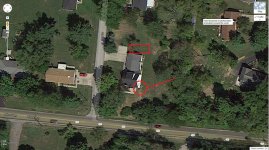
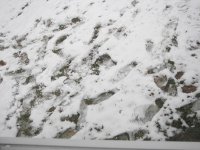
Well I think it is time for me to get cameras. The fiance was at the house today with the 1 year old girl she watches 3 days a week. She saw some kids walk thru our yard (line) and then she heard a noise. She thought it was the dog so didnt think much of it. She went into the dining room a few minutes later and saw a lot of footprints in the snow out back (where the circle is) I am not sure if they were trying to look in the windows or what. I just bought a 20ft enclosed trailer and keep it on the far side of the garage (where the box is). This is an unlighted area and I would like to keep an eye on it. I live in a good area but there are always bad people. What do you guys think? I would like a camera with good night vision and records in a higher resolutuion or at least the option to.

property is 1 acre

property.jpg

Where they came from

001.jpg

footprints by the house

002.jpg

003.jpg
 

Air_Cooled_Nut

Well-known member
Joined
Mar 28, 2007
Messages
492
Location
Portland, Oregon
Next time anyone hears a noise go look (preferably with a shotgun over your shoulder...leaves an impression on kids), don't always assume...and why isn't the dog barking if strangers come onto the property?

Hell yeah get decent cameras with night vision. Mount them high enough so they can't be messed with.
 

cincinnati_kid

Well-known member
Joined
Dec 26, 2011
Messages
218
Well the dog is only a 4 month old lab and she doesnt understand yet. but i def do want cameras.
 

Peterjwa

Member
Joined
Dec 20, 2012
Messages
11
I wish it was as you wrote.

But if you read more, you'll see that those cameras conveniently open those ports from "inside" via UPNP.

Since about 2008 UPNP is enabled in most home style routers by default.

This is why these cameras are so scary.

In light of these issues, I strongly recommend NOT to get those bundles with simple analog cameras and DVRs you'll find at Costco and Walmart and such.

In fact, they have either pulled those cameras or posted large warning signs.

But the security firms have much stock and try to shove them to uneducated people with a "reduced" price.

It is unclear when (if ever) a patch or update will be available. The credentials are burned into the ROM of those DVRs, and from the 23 DVrs they have meanwhile checked, none allow an update/flash of the ROM.

For now, get IP cameras only.

cincinnati_kid, I'd recommend the Sharx SCNC3605 or SCNC3606 for you. But call them up first and explain your scenario, thay are really good with their recommendations. And shop around for other brands, too.

Good luck, all

If you set up your cameras on an isolated network (which is a good idea), then this would be irrelevant. I doubt most people do that, though.

EDIT: I just read that the exploit requires an attacker to be able to access the device via port 9000, which shouldn't be available when this is used in most home settings. On a corporate network that isn't configured correctly, this is a lot more of a concern.
 

SGTJIM

Member
Joined
Jul 28, 2010
Messages
9
All of these are great ideas...One more for you might be the direction I took. I went with ADT Pulse. They have a variety of packages to suit your budget, and you have the ability to monitor your property 24/7 from anywhere you have access to a computer (or phone). I have inside/outside cameras that have the ability to record video or still pictures. They can be motion-triggered and have night vision capabilities. What's nice is, they come in, assess your needs, then build your system to suit. All for a little more or less money than you're looking to spend, depending on what you decide you need.
 

trythis

Well-known member
Joined
Dec 6, 2009
Messages
348
Location
st louis
Great place to learn about CCTV:

http://www.cctvforum.com/viewforum.php?f=5

Good guy to buy stuff from:

http://nellyssecurity.com

The stuff this guy sells is better quality than the stuff you can buy in box stores. He doesnt carry a huge variety, but what he does carry is good equipment that you wont feel like an idiot for buying.

I prefer the box cameras that you can change the lenses on, because the fixed lens units are just too limited. http://nellyssecurity.com/cameras/box-cameras.html
The box cameras in the housings are much more intimidating, at least to me. If you buy a DVR, get your own 2TB (or higher) hard drive its cheaper than having them do it.
The domes prevent them from knowing where your camera is pointing, but getting into PTZ cameras will blow your budget.
 

Peterjwa

Member
Joined
Dec 20, 2012
Messages
11
Good guy to buy stuff from:

http://nellyssecurity.com

The stuff this guy sells is better quality than the stuff you can buy in box stores. He doesnt carry a huge variety, but what he does carry is good equipment that you wont feel like an idiot for buying.

Those are EXACTLY the DVRs which can be hacked.
This "guy" as you call him does not produce the DVRs, he is just a reseller.
It uses the exact same core mentioned in the article, just a different label on it.

No comment on your '..you wont feel like an idiot for buying'..
 

jeffmoss26

Well-known member
Joined
May 25, 2011
Messages
12,851
Location
Cleveland, Ohio
Re: More Than A Dozen Brands Of Security Camera Systems Vulnerable To Hacker Hijackin

I logged in just to make you aware of another issue with these cheapo Costco/Frys cameras like Lorex, Q-see, Foscam etc.

http://www.forbes.com/sites/andygreenberg/2013/01/28/more-than-a-dozen-brands-of-security-camera-systems-vulnerable-to-hacker-hijacking/

forbes.com/sites/andygreenberg/2013/01/28/more-than-a-dozen-brands-of-security-camera-systems-vulnerable-to-hacker-hijacking

It turns out that all these are manufactured with the same kernel, which has that backdoor.

Through that backdoor they can get into your (private) network and next to those mentioned things like watching, deleting etc, they can also read your password.

This is important because most people use the same password for most stuff.

This is a classical trojan, just that it is remote controlled.

They found over 200K cameras already, and they estimate it is just the tip of the iceberg.

You really get what you pay for.

EXACTLY why I will not work on any of these brands! I had a customer who wanted to buy a system from Costco and have me install it; instead I sold them what they needed, purchased from my local distributors.
 

Angelfire

Well-known member
Joined
Mar 22, 2012
Messages
1,367
Location
New Mexico and Ireland
I'm tossing around the idea of putting cameras up as well. The Sharx brand as mentioned earlier, I hadn't seen before. Kind of quiet on what the specs are (at least thier website doesn't seem to show much). I've also seen another supplier that perhaps might fit the bill:

www.securitycameraking.com Found them via another forum I visit. Seem to have decent prices particularly on their DVR setups.

Of course the Axis, ACTI, etc... cameras would be ideal but $$$$. I hate to buy something that I'd only want to be upgrading in a couple of years so am looking at IP, HD, etc...

There's no point having cameras that you can't actually identify people with. Too many of the big box store setups are exactly that. Yeah you'll see someone but good luck indentifying who they are.
 

happy2rv

Well-known member
Joined
Apr 19, 2012
Messages
147
Location
Huntsville, AL
It's not a solution for everyone, but those who don't mind getting their hands dirty might want to look at ZoneMinder www.zoneminder.org. It's Linux based DVR software. You can run it stand alone or access it remotely if its attached to a network.

The upside is it's highly configurable and once properly configured it's dependable. The down side is it's highly configurable and takes some knowledge to get the hardware and software configured. It's definitely not a plug it in and forget it set up. But once you've got it set up right, it doesn't take much care and feeding.

It will work with IP cameras or analog cameras plugged into video capture card(s). There are cheaper solutions, especially if you have to buy a PC to dedicate, but as others have noted sometimes cheaper isn't better. The software is free (although they encourage donations). How much computer is needed is dependent on the number of cameras and their type. An older computer often works quite well for this application. I believe that I've run 8 analog cameras on 2 4-port capture cards on a P4 with 2G of RAM without problems.
 

Peterjwa

Member
Joined
Dec 20, 2012
Messages
11
Yes, the actual quality is a big problem of those 'big box store setups' as you call them.

And the other problem is the accessibillity of specific data. It's a horror with them, as you cannot even access their internal drive over the network!
I spent hours trying to extract a certain footage from a Lorex, I went so far to remove the harddrive and try getting the data myself. No luck, as they have a proprietary partition.

And let me be frank with '..upgrading in a couple of years..'.
Unfortunately this will be the case, well, not couple of years, but a few. Just look at your electronics, TV, PC etc.
The exception are security systems, they haven't changed much, but are a joke, really. All those ADT etc system can be bypassed in seconds.

I was installing Axis in larger companies, but as you mentioned, they are just too expensive for homes or small businesses.

I checked your securitycameraking.com, but have to tell you that they are just resellers, too. They don't produce their own stuff, thus have no control over those products. They use those same hackable DVRs, too.

It is very simple, really, just check out www.alibaba.com and search for 'security camera' and you will find all those DVRs and Foxcam and Qsee and whatnot units.

Given these recent developments, I too only recommend IP cameras.

Regarding HD, there are a few HD cameras, but they eat up the drive 4 times as fast and you do need a 4Mbit connection (UPLOAD!!).


I'm tossing around the idea of putting cameras up as well. The Sharx brand as mentioned earlier, I hadn't seen before. Kind of quiet on what the specs are (at least thier website doesn't seem to show much). I've also seen another supplier that perhaps might fit the bill:

www.securitycameraking.com Found them via another forum I visit. Seem to have decent prices particularly on their DVR setups.

Of course the Axis, ACTI, etc... cameras would be ideal but $$$$. I hate to buy something that I'd only want to be upgrading in a couple of years so am looking at IP, HD, etc...

There's no point having cameras that you can't actually identify people with. Too many of the big box store setups are exactly that. Yeah you'll see someone but good luck indentifying who they are.
 
To avoid these ads, REGISTER NOW!
Top Bottom