To avoid these ads, REGISTER NOW!

Security cameras

Reit38

Well-known member
Joined
Nov 12, 2011
Messages
626
Location
Iowa
School me on security cameras. I know of nobody with any. We recently have had a few break in, in my area. Between that and seeing where the dog is running around the house.

What I'm thinking I would like

4 cameras
100ft range would be more then enough
Day and night viewing
DVR or something similar
Phone App for viewing
Viewing on tv
Wi-Fi would be handy but not necessary


Under $1000

Sent from my SM-G930R4 using Tapatalk
 
To avoid these ads, REGISTER NOW!
Joined
Jul 24, 2016
Messages
3,371
Easy to do. I have a Lorex wireless that does all of the above and cost less than $500. I recently installed another camera system that was less than $300 by Arlo.
 
OP
R

Reit38

Well-known member
Joined
Nov 12, 2011
Messages
626
Location
Iowa
How is viewing. Can you read a lisc plate at say 100ft

Sent from my SM-G930R4 using Tapatalk
 

ddawg16

Well-known member
Joined
Jul 11, 2008
Messages
21,005
Location
S. California
You have 3 basic flavors....

1. Coax - Pretty cheap right now
2. Wireless - big $$ if you want HD....don't expect smooth motion
3. POE (Power Over Ethernet) - Really the best way to go for cost and performance.

A note on Wireless....2 types...wall wart powered or battery. A couple of co-workers have a battery powered wireless system and they get about 3 weeks before they have to recharge.

I have a Lorex NVR system with 6 HD POE cameras. It works *****'n. They have a good app that lets me monitor my house on my phone from anywhere.
 

4xdog

Well-known member
Joined
Aug 18, 2012
Messages
5,595
Location
Santa Fe, NM
I'm pretty happy with my Arlo (Netgear) wireless (battery+wifi) cameras. In daylight the quality is near HD. Using the camera's IR LED, the image is OK, but nowhere near as detailed as daylight.

I could probably read a license plate at 30+ feet in daytime. I'm not sure I could read one at all at night due to high IR reflectance from the plate and the camera's night vision settings.

The new ones have a rechargeable battery vs the older C123 lithiums. I'll typically get 6+ months out of either style before needing to charge/replace.

I have mine set to record 30 seconds after the motion detector is tripped between 12 midnight and 6 am. The motion detection is *very* sensitive. I have to point mine into my drive because if I point it toward the road it trips when cars 40-60 feet away pass across the field of view, even at or near the lowest sensitivity setting.

Arlo has a good app, that works perfectly on PC, Macbook, iPad, and iPhone. I can watch my driveway live from a continent away (and do exactly that). The motion is a little jerky, but really more than good enough for what I need.

Here's an example of a daytime view of the driveway alongside my house.
i-kL4hdVc.jpg
 

Git

Well-known member
Joined
May 18, 2008
Messages
6,894
Location
S Cal
The only way I have found to actually be able to read a license plate is to have the proper camera AND the proper conditions

For example, I live near a turn in the roadway and I have a dedicated camera zoomed in just to catch license plates. It is not good for anything else and it is not until the license plate is 90 degrees to the camera that it really becomes legible, especially at night. When it is dark out - the feed from this camera is totally black, it will only show something when a car comes along

POE is the way to go either with a DVR or a computer running BlueIris software (that is what I use) constantly recording and not just using 'motion activation' or something.

Here is a garbage truck from today and a car from last night as they make the turn. This is about 80' from the camera which is mechanically zoomed in 5x

edited to add - I had to manually set the shutter speed on this camera to 1/250 so it would have enough light yet would not be overexposed along with tweaking some other settings. I don't think that is something you can do with the wireless camera's
 

Attachments

  • 020.jpg
    020.jpg
    112 KB · Views: 517
  • 021.jpg
    021.jpg
    31.4 KB · Views: 549
Last edited:
Joined
Jul 24, 2016
Messages
3,371
How is viewing. Can you read a lisc plate at say 100ft

Sent from my SM-G930R4 using Tapatalk

Possibly. Not at night though even with the infra red. I know my Lorex set up allows you to explode the view of any segment of the video screen, but of course with the expansion, you loose resolution.
 

Bretny

Well-known member
Joined
Jul 31, 2017
Messages
3,918
Location
Dutchess county NY
Of you want to read license plates get a IP based system and you will have to aim it very close to where the plate will be. You do have the right idea though. The cops can do alot more with a lecense plate number than a persons picture.
Also if you think you want 4 cameras get a 8ch dvr with 4 cameras.
 

Git

Well-known member
Joined
May 18, 2008
Messages
6,894
Location
S Cal
Possibly. Not at night though even with the infra red. I know my Lorex set up allows you to explode the view of any segment of the video screen, but of course with the expansion, you loose resolution.

I have found that in 'real life', trying to digitally zoom in on something really does not work well. You really need to have a mechanical zoom - especially at greater distances

As I mentioned, I have one camera dedicated to just license plates and a second camera is right beside it that covers the front of the house on that side. Here is the a pic of the same garbage truck I posted above from the second camera, digitally zoomed in (which I think your are calling 'explode the view')

Note, this is a 4 megapixel camera. The more pixels you have the more you could actually digitally zoom in, but that would also require more bandwidth which really does not work that well with a wireless camera

Digital zoom
attachment.php


Mechanical zoom
attachment.php
 

Attachments

  • SNAG-0206.jpg
    SNAG-0206.jpg
    67.5 KB · Views: 2,329
  • 020.jpg
    020.jpg
    112 KB · Views: 2,346
OP
R

Reit38

Well-known member
Joined
Nov 12, 2011
Messages
626
Location
Iowa
I was looking at the Blink XT system. They claim up to 2yrs on battery life

Sent from my SM-G930R4 using Tapatalk
 

cspcrx

Well-known member
Joined
May 2, 2014
Messages
608
Location
Phoenix, AZ
Seems to better cameras also have the ability to setup zones in the field of view of the camera to ignore or focus on. This helps with false triggers.
 

Git

Well-known member
Joined
May 18, 2008
Messages
6,894
Location
S Cal
Most of my camera's are Hikvision which have known security flaws (backdoor exploit) which can be fixed by updating to the latest firmware.

https://ipvm.com/reports/hik-exploit


In fact, they just passed a bill banning the US Government from using Hikvision or Dahua products. (Hikvision and Dahua are OEM's for a lot of different brands of cameras, like Lorex, Swann, etc)

https://ipvm.com/reports/us-house-5515

Here is a map of hacked Hik camera's - its a little old, but there is a pic of what each camera covers (it's not a live feed)

https://ipvm.com/reports/hik-hack-map
 

Git

Well-known member
Joined
May 18, 2008
Messages
6,894
Location
S Cal
It's actually an off-brand that I read about on the forum at ipcamtalk.com

I ordered it directly from China and it is made by Huisun. I have the version 1 but people started having problems with later versions. One of the main moderators on that forum thinks they are junk but mine has worked very well so far. It has a 10x zoom and I am usually around 5x

https://ipcamtalk.com/threads/huisun-10x-lpr-license-plate-reading-settings.6961/

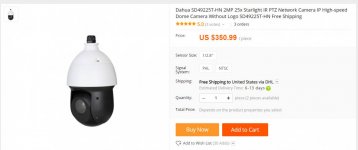
When this dies (and I have had it for a couple of years now) I will probably go to something like the Dahua 25x zoom or something that is varifocal. (There is a contact on that forum - Andy who sells them directly. The 25x is a lot bigger than what I have now, but it would be cool to play around with that level of a zoom

A varifocal zooms in but you have to manually focus it for just one spot. The 25x is a pzt which means you can move it around and zoom in and out remotely.

I haven't really kept up on things - I would have to do a lot of reading on ipcamtalk to figure out exactly what to buy at this point
 

Attachments

  • 022.jpg
    022.jpg
    54.7 KB · Views: 189

Pluribus

Well-known member
Joined
Dec 16, 2012
Messages
2,143
Location
Skagit County, WA
Interesting discussion, and there are some ideas I haven't seen in previous posts on this subject. The stuff on license plates is especially helpful and interesting.
 
OP
R

Reit38

Well-known member
Joined
Nov 12, 2011
Messages
626
Location
Iowa
Anyone using Blink XT system?

Sent from my SM-G930R4 using Tapatalk
 

BruceMc

Well-known member
Joined
Jan 17, 2015
Messages
2,164
Location
Fairbanks, AK
I'm pretty happy with my Arlo (Netgear) wireless (battery+wifi) cameras. In daylight the quality is near HD. Using the camera's IR LED, the image is OK, but nowhere near as detailed as daylight.

I could probably read a license plate at 30+ feet in daytime. I'm not sure I could read one at all at night due to high IR reflectance from the plate and the camera's night vision settings.

The new ones have a rechargeable battery vs the older C123 lithiums. I'll typically get 6+ months out of either style before needing to charge/replace.

I have mine set to record 30 seconds after the motion detector is tripped between 12 midnight and 6 am. The motion detection is *very* sensitive. I have to point mine into my drive because if I point it toward the road it trips when cars 40-60 feet away pass across the field of view, even at or near the lowest sensitivity setting.

Arlo has a good app, that works perfectly on PC, Macbook, iPad, and iPhone. I can watch my driveway live from a continent away (and do exactly that). The motion is a little jerky, but really more than good enough for what I need.

Based on some earlier threads here at GJ I just invested in 4 camera Arlo Pro system last month, to replace a NestCam, and my experience is just the opposite. I really have buyers remorse at this point. The motion detection has very limited range, is unreliable, and the zone feature is crudely implemented compared to other software/brands. The Android app feels like a beta version.

The problems with motion detection seem to have cropped up this summer -

https://community.netgear.com/t5/Arlo-Pro/Arlo-pro-motion-detection-problem/td-p/1622701 .

On the camera I have pointed down the driveway, my 3/4 ton truck will be detected maybe 1 in 3 times. I have 3 of the cameras set up with overlapping fields of view, and while moving steadily though all three usually only one or two will trigger. If motion detection is something you want, I would strongly suggest avoiding Arlo until they get these things sorted out.
 

ole442

Well-known member
Joined
Jan 28, 2018
Messages
153
Location
Way freakin too close to the city
I'm pretty happy with my Arlo (Netgear) wireless (battery+wifi) cameras. In daylight the quality is near HD. Using the camera's IR LED, the image is OK, but nowhere near as detailed as daylight.

I could probably read a license plate at 30+ feet in daytime. I'm not sure I could read one at all at night due to high IR reflectance from the plate and the camera's night vision settings.

The new ones have a rechargeable battery vs the older C123 lithiums. I'll typically get 6+ months out of either style before needing to charge/replace.

I have mine set to record 30 seconds after the motion detector is tripped between 12 midnight and 6 am. The motion detection is *very* sensitive. I have to point mine into my drive because if I point it toward the road it trips when cars 40-60 feet away pass across the field of view, even at or near the lowest sensitivity setting.

Arlo has a good app, that works perfectly on PC, Macbook, iPad, and iPhone. I can watch my driveway live from a continent away (and do exactly that). The motion is a little jerky, but really more than good enough for what I need.

Here's an example of a daytime view of the driveway alongside my house.
i-kL4hdVc.jpg

Yes, I am 98 percent happy with my Arlo Pro system. Easy to install and get working. Storage capability is adequate. I can see front door, back door and inside my new garage and it notifies me via phone if the camera sees motion. It records the event and you can download a copy within a certain timeframe. I will most likely get a 4th camera for the inside of the house when I'm on a trip. Since adding a detached garage, the one I used inside the house when I'm gone is now being used inside my garage. Buy the better mounts for cameras outside so perps can't just come up behind, reach up (out of site) and take off with the camera.
 
To avoid these ads, REGISTER NOW!

Kaervak

Well-known member
Joined
May 12, 2010
Messages
826
Location
Cleveland, OH
I have two Amcrest IP3M-943B Wifi cameras in my garage. Setup was pretty easy and they work well. They have optional internal storage via microsd (which is what I'm using) or the ability to connect to a DVR or cloud storage. The range is pretty impressive on them. My garage is detached and probably 50ft+ from where my router is in the house, yet looking at their signal strength through my router they're both consistently 60%. Picture quality during the day is very good, the IR quality is decent but could be better with a more expensive camera. The feed isn't choppy or stuttery either, quite smooth. The motion triggers work extremely well, sensitivity isn't too overboard and the trigger time is fast enough that the IR will catch bugs flying past the camera.

The biggest plus to me is the Amcrest phone app. I get motion alerts sent directly to my phone wherever I am and can always bring up the live feed and recorded motion triggers. There's a google chrome plugin that gives you more control over the cameras. You get more detailed playback controls, the ability to download the recorded motion triggers, you can have the cameras automatically delete old footage after certain number of days, tons of options.
 

DriftlessOne

Member
Joined
Mar 21, 2018
Messages
24
Location
Minnesota, USA
I’m using Security Camera Warehouse. They are an American company, so you actually get support from a real life American. I’m guessing the product is still made overseas though.

All my cameras are POE, which is the way to go, unless it isn’t possible to run the cable. I planned ahead when I built my house. I’ll also be running fiber to my detached garage so I can add cameras to it as well and run it back to the NVR in my house.

Most of my cameras are 4MP fixed, but I have a couple PTZ cameras with auto tracking. Pretty cool feature for watching the property entrance.
 

BruceMc

Well-known member
Joined
Jan 17, 2015
Messages
2,164
Location
Fairbanks, AK
One example of the Arlo system not being quite what it's touted as - one of the features they advertise is the ability to plug a USB HDD into the router to record events, giving you the impression that the unit can function as a DVR and will work independent of the cloud based storage.Turns out, though, that you can't actually access the local storage while it's connected to the router. There's no way to check the status to even see if it's recording without ejecting the HDD, physically disconnecting it and then plugging it into your PC and using something like VLC to view the files. IOW, it functions on the same level as any game camera with an SD card.
 

Alchase

Well-known member
Joined
Jan 2, 2016
Messages
187
Location
Harrah, Oklahoma
Why would you have to plug a USB into your router?
You can watch the videos live on your cell phone, Ipad, or PC. And you have 10 GB free on their Cloud, and the videos stay for ten days. Gives you ample time to send them to Dropbox or PC/Ipad, or cellphone. I have a NAS setup, but have not even had to use it once.
I have had my Arlo setup for three years. It has worked fantastic. My Cameras are on battery. They need to recharged about every six months. What I like most is "not" having to have a DVR and LCD to watch or record what my cameras see.
The one drawback is during power outage, if you need you can run off an APC.
I have not had that need in the three years I have had them.
 

BruceMc

Well-known member
Joined
Jan 17, 2015
Messages
2,164
Location
Fairbanks, AK
Why would you have to plug a USB into your router? You can watch the videos live on your cell phone, Ipad, or PC. And you have 10 GB free on their Cloud, and the videos stay for ten days.

Because a cloud-based security camera dependent on an internet connection and with limited storage means you're SOL if you lose that connection? I have DSL. Phone lines go down; providers have outages. I have lived with cloud-only storage for 3+ years and didn't like it. Call me old fashioned for wanting to have a more reliable option.
 

nh_yota

Well-known member
Joined
Mar 10, 2015
Messages
4,075
Location
Seacoast New Hampshire
I have two of these Amcrest PTZ cameras in my house:

https://www.amazon.com/dp/B01M0IHF9K/?tag=atomicindus08-20

One is in the living room facing the front door and the other is in the kitchen facing the porch and the back door. I have small house so the PTZ feature helps with being able to scan the room and find my cat. The Amcrest apps work pretty well and I have them configured to email me pictures when motion is detected. I don't have them set up with NVR/cloud/card storage yet so I use them for live viewing only (plus the emailed pics).

POE is definitely the way to go but I wanted to try the wifi cameras first so I could experiment and get an idea of how I should build out my system.
 

dclassical

Well-known member
Joined
Sep 25, 2008
Messages
1,130
I have one Amcrest camera as well, to took an eye on my dogs when I am not home, and I really like it. A little bit annoying to set up (seems to lose correct time often). Their software is alright, I prefer to use Synology Surveillance station. It creates files that can be uploaded to the cloud (in my case a private server I have outside my home).
 

Tmart86

Well-known member
Joined
Jul 12, 2017
Messages
151
Location
Cedar Rapids Iowa
School me on security cameras. I know of nobody with any. We recently have had a few break in, in my area. Between that and seeing where the dog is running around the house.

What I'm thinking I would like

4 cameras
100ft range would be more then enough
Day and night viewing
DVR or something similar
Phone App for viewing
Viewing on tv
Wi-Fi would be handy but not necessary


Under $1000

Sent from my SM-G930R4 using Tapatalk


Stick to hardwire. And a onsite dvr with 24/7 recording. The rest will depend on what you are trying to do. What part of iowa?
 

lml999

Well-known member
Joined
Oct 18, 2016
Messages
153
Location
Cape Cod, MA
Anyone using Blink XT system?

I'm using two Blink XTs, one as a trail camera about 100 feet from the house, and a second as a floater, sometimes inside to watch the dog :)

Good cameras, easy to set up and use, they work best in daylight, and aren't nearly as sharp at night.

Buy a set from Amazon, play with them for a couple of weeks, return if they don't do the job. No wiring required...
 

cspcrx

Well-known member
Joined
May 2, 2014
Messages
608
Location
Phoenix, AZ
Been looking at the Lenox 4k 8mp POE systems with NVR. Seems like the bullet cameras are huge though and to get a smaller camera the quality drops off. I have a single story home and am concerned these things are going to scream look at me on the house.
 

JackAndy

Well-known member
Joined
Apr 4, 2017
Messages
130
Location
Minneapolis
Been looking at the Lenox 4k 8mp POE systems with NVR. Seems like the bullet cameras are huge though and to get a smaller camera the quality drops off. I have a single story home and am concerned these things are going to scream look at me on the house.

I have a big camera and lots of little Samsung ones. They're very small, neat and polite looking. Not obtrusive or menacing at all but let me tell you, some people are just going to have a problem with being watched period. The best thing to do is place them behind the gutter downspots so they're partially obscured from some angles. Most guests/visitors will never notice.

My cameras have been pretty useful for missing packages. I check them sometimes from my phone to see if the garbage has been taken out or if its raining. I also have a little havahart trap for pesky rabbits and I can see if I've trapped one or not with the camera.

I've had them for a year and mostly they record nothing interesting at all. The DVR just runs and everything is working. I don't know how long the DVR will last so I'm expecting that I'll have to get it refurbished at some point.
 

Bad Habit

Well-known member
Joined
Mar 19, 2014
Messages
1,978
Location
Chumstick WA
I'm using two Blink XTs, one as a trail camera about 100 feet from the house, and a second as a floater, sometimes inside to watch the dog :)

Good cameras, easy to set up and use, they work best in daylight, and aren't nearly as sharp at night.

Buy a set from Amazon, play with them for a couple of weeks, return if they don't do the job. No wiring required...

I have a couple at my other house. Their motion activation isn't that great beyond say 15-20'. You can call up any camera and view, but you can't tell it to record. Have 1 mounted on my garage watching the driveway(~10' up), didn't notice the 1 ton dually parked there all day and my buddy doing some work for me. Knew he was there so was waiting for the notification but it never came. Doesn't seem to miss any wasps in the area though
 

DadGarage

Member
Joined
Aug 21, 2017
Messages
6
+1 on the arlo pro. If you want an option where you can yell at the burglar while you're away, arlo has it. We like its night vision too. The only problem I have with it is the battery. I have been charging it every after a month which is quite too soon compared to the previous months, we waited for about 5months until it's lowbat.
 

goat1252002

Member
Joined
Mar 20, 2012
Messages
11
Original Arlo system Here. I’ve been happy with the system, features and the app. But battery life ***** I try to charge monthly they’re expensive rechargeable batteries are a must. Arlo pro 2 looks like a better camera with more features I probably upgrade it’s been a good system.
 

kbs2244

Well-known member
Joined
Nov 11, 2006
Messages
14,065
The big thing to remember about camera is that they tell you what HAS happened.
Other than scare value, they are not preventive.

If you are trying to protect something that is easily resold or sold for parts it may not be worth it.

I am a cat person, but every cop I talk to recommends a big, loud, dog.
 

Negen

Well-known member
Joined
Jul 15, 2015
Messages
1,909
Location
Seatltle WA
The big thing to remember about camera is that they tell you what HAS happened.
Other than scare value, they are not preventive.

If you are trying to protect something that is easily resold or sold for parts it may not be worth it.

I am a cat person, but every cop I talk to recommends a big, loud, dog.
Camera's also tell you what IS happening. Via motion detection and instant sms messages. I can view my cameras via ip from anywhere in the world that has internet and then police call if needed. Police do take 10 minutes to reach me residence though.

Sent from my G8141 using The Garage Journal mobile app

Edit: forgot to mention that phones are a good way to view cameras ip. Camera are the easier type to setup but other types can use a sever type software to view cameras that use typically video feedsfeeds
 
Last edited:

macdabs

Well-known member
Joined
Sep 22, 2007
Messages
195
The most affordable way to do cameras is go analog and several DVRs with a Ethernet output. You can then tie as many DVRs and view from a smartphone if needed cause most manufactures offer cloud base software. This also makes for a closed network if needed. When you get into IP only cameras all the software is proprietary and the cost triples and your using their cameras only. You will get more bang for your buck and have a better selection now and in the future going this route. A huge distributor like ADI has everything you would need and supplies the majority of the contractors in the east coast .

The reason for several DVRs is you can place a 4 channel or 8 channel in a garage one in your house and home network back to a cloud base software for remote viewing or pull it off your home network when on site. This way if a DVR goes bad your not loosing the whole system not to mention the cost or running wires a great distance.


Mac
 

Tmart86

Well-known member
Joined
Jul 12, 2017
Messages
151
Location
Cedar Rapids Iowa
Blue iris software is like $35 and will run any IP camera you choose including aome of the really cheap China cameras. This is a good option and only requires a pretty basic PC to run. Milestone also overs a pretty well featured free software
 

Negen

Well-known member
Joined
Jul 15, 2015
Messages
1,909
Location
Seatltle WA
The most affordable way to do cameras is go analog and several DVRs with a Ethernet output. You can then tie as many DVRs and view from a smartphone if needed cause most manufactures offer cloud base software. This also makes for a closed network if needed. When you get into IP only cameras all the software is proprietary and the cost triples and your using their cameras only. You will get more bang for your buck and have a better selection now and in the future going this route. A huge distributor like ADI has everything you would need and supplies the majority of the contractors in the east coast .

The reason for several DVRs is you can place a 4 channel or 8 channel in a garage one in your house and home network back to a cloud base software for remote viewing or pull it off your home network when on site. This way if a DVR goes bad your not loosing the whole system not to mention the cost or running wires a great distance.


Mac
I am not sure this is correct. I have at least three different brands of ip camera's. All use onvif and or RTSP. There is no need for proprietary software most open source software is good enough. Blue Iris being a highly recommended software both free or paid. Zone minder is one I use. Onvifer is what I use on my phone to view my cameras. Lots of options.

Sent from my G8141 using The Garage Journal mobile app
 
To avoid these ads, REGISTER NOW!
Top Bottom