To avoid these ads, REGISTER NOW!

Security Cameras

kwb

Well-known member
Joined
May 1, 2009
Messages
1,769
Location
PNW
I have read some of the prior threads and been looking at the latest gizmos and apps out there. What I haven't seen is an answer to my challenge.

My situation - the closest point of the shop is about 75' away from my Wifi Access Point. I currently get spotty service from it on my phone when in the shop. So I am planning to run some Cat6 out there (should have run cat5 when I built).

The question is if I go with POE camera and a switch in the shop am I going to be able to get it back to the brain box (DVR)? Or would I be better off to add another wifi access point in the shop use wifi cameras for the system?

The way I see it either way I am stringing wire - either Cat6 or some sort of low voltage to the cameras.

I want to have the brain box for recording, I do not want to go with a system that has a monthly cost and pay for cloud storage.

I expect I will probably only have 4 cameras in the whole system. On the house POE or wifi is a toss up. I am leaning towards POE because of reliability of wire over the routers but out at the shop if I go through a switch I don't know if the camera will be "seen" by the box.
 
To avoid these ads, REGISTER NOW!

infinkc

Well-known member
Joined
Jan 19, 2012
Messages
862
Do you already have a POE system on the house? if so all you do is run a cat5/6 from that to a POE switch, from that switch you connect POE cameras to.

You can also go wireless, run the cat5/6 from your router to the building to an access point. You would then connect the cameras wireless to that.

i would go full POE, that is what i am running at my house, that single ethernet cable to the cameras is a game changer.

last option is to run a wireless repeater from the house to the shop instead of the physical cable. they have POE ones, you would just plug one end to the DVR, the other to a POE switch in the garage https://www.amazon.com/dp/B07GNQWF52/?tag=atomicindus08-20
 

rok_hunter

Well-known member
Joined
Apr 10, 2020
Messages
153
Location
home
I'm considering an Ubiquiti Unit similar to the one referenced to get my internet coverage to a shop about 200' from the house, they look like pretty solid systems.

Sent from my Pixel 2 XL using Tapatalk
 
OP
K

kwb

Well-known member
Joined
May 1, 2009
Messages
1,769
Location
PNW
Currently I have nothing in the way of cameras so other than the work to hook it all up I am not tied to a technology.
POE on the house will be a bit more work to home run the wires v. just grabbing power but not a huge deal.
 

Raymond_B

Well-known member
Joined
Jan 2, 2012
Messages
62
Location
TX
In my experience I would definitely hard wire the cameras vs wifi. Believe me when you hear a noise or get an alert you want a nice clear lag free picture of what's going on at that camera. Streaming multiple video feeds really needs to be cabled. POE is a good choice as you have to run a cable to the camera in some shape or form anyway.

Ubiquiti is good gear, I use their wifi APs and range extenders (not for cameras though :)) in my 1950's house which has been a challenge to get good wifi in every room. They also have nice POE switches
 

dcg9381

Well-known member
Joined
Jun 20, 2018
Messages
11,627
Location
Austin, TX
Cameras will saturate wifi pretty quickly. We use Wyse for wifi cameras, as they can hold images and push them when bandwith is available.

POE cameras, wired, are a far better option. I've done "remote POE" that pushed data back to the house via Ubiquiti, but it would eat most of the 2.4 Ghz bandwidth.

Mesh systems will help, but if you want a solid camera system, it needs to be wired POE.
 

aggie113

Well-known member
Joined
Jul 22, 2015
Messages
464
Location
San Antonio, TX
Currently I have several IP POE cameras that go back to a Synology NAS that handle the camera's functions. The idea was to stay away from cameras that require storing video in a Cloud as I just don't trust that to stay private. It makes monitoring the video away from home more complicated (vpn connection to home network), but knowing I'm the only one who can access it is more important. The POE switch is a POE+ to support a wider range of cameras with features like pan/tilt/zoom. My garage is still under construction but the idea is to run a 200ft external cat 6 to the garage. Since I'll have multiple devices in the garage I'll be putting in a smaller POE+ switch in it as well.

If you don't care about who can access the video you can get some descent setups from Costco or Amazon with packages of x number of cameras. If you want your own setup, Reolink has some great products for the value. Always try to get the highest resolution you can afford.
 

Raymond_B

Well-known member
Joined
Jan 2, 2012
Messages
62
Location
TX
Good point on the storage. The OP will need to think about how they want to handle it. I too do not want my stuff in the cloud. My cameras all have 64GB micro SD cards which they log to continuously while also writing back to my Synology using their over priced Surveillance Station. I used to have a Blue Iris virtual machine, looking back I wish I would have kept it, the Synology NVR app is nice, but I feel not as full featured as Blue Iris.
 

Mwaters

Active member
Joined
May 30, 2020
Messages
29
Location
Washington
I would echo those supporting the use of POE or POE+ CAT6. I'd probably run that out to a POE switch in the garage for your cameras. Also put in a another wireless access point as a repeater off of the one in your house so you can keep the same SSID in both places. You will want the wifi for your phones and laptops. You will have a greater range of options with hard-wired cameras than with wireless ones.

I would also consider a computer running BlueIris. It's very flexible and loaded with features... and cheap. I think it goes for something like $70. Your only limitation would be the size of the hard drive you put in the computer for the video storage. Use a separate drive for that and not the OS drive. I use it at work across 3 campuses and about 20 cameras spread out about 30 miles . It has great alerting and motion detection capabilities and includes a very usable web UI to see what's going on quickly when you don't want to log on to the computer and fire up the program. You can set the program to run as a service so it stays running whether you are logged on or not. The developer is very responsive to questions.
 
OP
K

kwb

Well-known member
Joined
May 1, 2009
Messages
1,769
Location
PNW
I don't think I want to put this on a dedicated PC. - After a lot of reading I am leaning towards a NVR box that I can put into my IT closet that houses all the other connections. I see access to it either through HDMI on the TV or phone app 99% of the time. Currently I have 4 desktops and 3 laptops, I don't need another especially one that needs a ton of processor just to store video. Blue Iris is pretty cool looking but I just don't see needing that level of customization needed for my setup.

I will probably have 2 POE switches and 2 home runs back to the NVR. One out to the shop and the other out to front of house. Direct bury Cat6 cable is on the way but the nano stations would have been a good option if the path across the yard wasn't going to be so easy. https://www.flyteccomputers.com/pro...AC-loco-Loco5ac-with-2-x-Gigabit-PoE-adapter-
 

Poltax

Well-known member
Joined
Mar 23, 2007
Messages
223
Location
UT
I would agree on the POE cables. You will have constant images. We just sold our home and I had a Wifi camera set up. Sometimes the cameras would work and sometimes they would not. If I parked my truck by one camera the wifi signal would be blocked by the truck and never get to the main box. Our new home which we are building will have POE cables at each corner of the house, and then some.

Wire your set up to add more cameras then you think you need now. Get an NVR box so you can add more cameras later on if you want to.

IP Cam Talk is a great resource for security cameras.
 
To avoid these ads, REGISTER NOW!
OP
K

kwb

Well-known member
Joined
May 1, 2009
Messages
1,769
Location
PNW
....

Wire your set up to add more cameras then you think you need now. Get an NVR box so you can add more cameras later on if you want to.

IP Cam Talk is a great resource for security cameras.

Complete left turn. Did you used to be on SnoWest Forums in the late 90's early '00's?
 

ddurrett896

Well-known member
Joined
Mar 29, 2015
Messages
994
Location
VA
I had a wired Swann. Cameras were junk, interface with iPhone was worse.

Just switched to NEST and they are awesome. Each camera needs to be within 25' of an outlet to plug in and everything else is over wireless. Easy to install and they just reduced the yearly fee to $120 which covers ALL cameras.
 

MrSurly

Well-known member
Joined
Jan 15, 2014
Messages
1,671
Location
East Texas
I (Just last week) began my trek down the PoE path and it will lead to ip cams.
i have a bunch of Yi wifi cams, paying for cloud service (though their cams WILL work without the cloud using TF cards) primarily for their off site storage and push notifications.
My shop is too far from the router for reliable wifi so I just ran cat5e to the shop, installed a TP Link access point out there, added a TP Link controller (a hdwe device) to support the AP without a dedicated PC running; added a PoE 8-port switch at the router. The AP is there to support wifi cams/ wifi deadbolt (U-Bolt) and three MyQ controlled door openers. I will also be putting a streaming smartTV out there as well.
The wifi AP does its job well and I get great connect speeds in (and out of) the shop, now.
The next thing is the stupid Yi cameras. I've picked up a couple at a time until I now have too many, which is silly because despite a decent app and paying for services, I remain disappointed in their performance. The problem is what ALL wifi systems suffer: sketchy response, especially when you need actual security duty from them, they seem to sense the urgency and buffer,buffer,buffer. The app is limited as well, having no ability to show multiple cams at once and switching cam to cam to, say, follow someone walking around is useless because of how slow the switch takes place.
My next step will be ip PoE cams and I'm looking for recommendations.
 
Last edited:

thoyer

Well-known member
Joined
Feb 26, 2007
Messages
80
Location
Warminster PA
After lots of reading and info overload I ended up going with Reolink 4 camera system. The cameras are POE and connect to the NVR which is in the garage.

I then installed a switch and a separate WiFi unit in the garage. The switch allows me to connect the garage to my router (Verizon Fios) in the house via about a 100' run of CAT5. I used the direct bury CAT5 cable. I can monitor all cameras real time from the computer in the house. I have not set up the phone app yet.

Right or wrong the system is working well and I have solid WiFi in the garage.

Tom
 

BruceMc

Well-known member
Joined
Jan 17, 2015
Messages
2,163
Location
Fairbanks, AK
The problem is what ALL wifi systems suffer: sketchy response, especially when you need actual security duty from them, they seem to sense the urgency and buffer,buffer,buffer. The app is limited as well, having no ability to show multiple cams at once and switching cam to cam to, say, follow someone walking around is useless because of how slow the switch takes place.
My next step will be ip PoE cams and I'm looking for recommendations.

If you have an Android phone or tablet, check out Tinycam Pro. I'm running a mix of 8 PoE cameras (Lorex/Dahua) and 4 Arlo Pros, and it works better than either of the manufacturer's apps. I can monitor everything at once if I want (my eyeballs aren't that good anymore with a small screen).

https://www.tinycammonitor.com/

https://play.google.com/store/apps/details?id=com.alexvas.dvr.pro&hl=en_US
 
Last edited:

MrSurly

Well-known member
Joined
Jan 15, 2014
Messages
1,671
Location
East Texas
If you have an Android phone or tablet, check out Tinycam Pro. I'm running a mix a 8 poe cameras (Lorex/Dahua) and 4 Arlo Pros, and it works better than either of the manufacturers app. I can monitor everything at once if I want (my eyeballs aren't that good anymore with a small screen).


https://www.tinycammonitor.com/


https://play.google.com/store/apps/details?id=com.alexvas.dvr.pro&hl=en_US


That’s good to know, now I need to find an iOS equivalent.


Sent from my iPhone using Tapatalk
 

aggie113

Well-known member
Joined
Jul 22, 2015
Messages
464
Location
San Antonio, TX
Reolink has a nice iOS/Android app that you can use with their cameras. It's independent of whatever your DVR is. I find it quicker than using the Synology app to load up video.
 
OP
K

kwb

Well-known member
Joined
May 1, 2009
Messages
1,769
Location
PNW
So is the consensus to put cameras in plain sight or try to hide them?

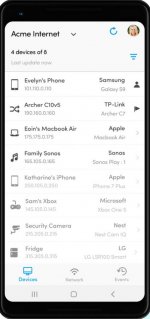
Also any good network mapping software out there to get all the IP and subnet mask info for setting up the NVR for the cameras that are out on the separate switch?
 

e36jon

Well-known member
Joined
May 2, 2013
Messages
237
Location
San Francisco CA
So is the consensus to put cameras in plain sight or try to hide them?

Strangely, possibly because my cameras are all mounted above eye level, people don't seem to notice them.

When I mounted a new camera on the front of my place to watch the front yard I went ahead and painted it to match the wall behind it and it basically disappeared. Made me happy at least.

My experience in the past with break-ins is that pro-thieves don't care about cameras at all, so no deterrent there. Amateurs, at least around here, are usually too stoned / drunk to pay attention. In both cases, pro and amateur, the police just shrug and say "You'll never see your stuff again and there's nothing we can do.".
 

Git

Well-known member
Joined
May 18, 2008
Messages
6,894
Location
S Cal
Fing

They have an app for cell phones or PC. Since my wifi is on a different subnet than my plan, I use both

https://www.fing.com/

attachment.php
 

Attachments

  • TRI - 033.jpg
    TRI - 033.jpg
    43.2 KB · Views: 366

TJMtl

Well-known member
Joined
Nov 8, 2018
Messages
247
Location
Montreal
I have full Unifi, 6 wired POE cameras in and around my garage, NVR in furnace room in server cabinet, connected to a Ubiquiti Industrial switch in garage, it provides POE+ and POE++ to all the cameras and the other items in garage.

I had alarm.com wifi cameras, took them all out because if I needed to check camera footage, chances were that it didn't record that day etc.IMG_4325.jpeg
 

aggie113

Well-known member
Joined
Jul 22, 2015
Messages
464
Location
San Antonio, TX
I would update my info to say I regret running ethernet to the garage. Lightning hit the transformer pole that runs between the house and garage and which the ethernet cable ran right past. It fried several networking devices. I redid the run with fiber and no issues from switching to that except having to purchase a run of outdoor rated conduit for it to run across the ground on (not trenching it).
 
To avoid these ads, REGISTER NOW!
Top Bottom