To avoid these ads, REGISTER NOW!

Server racks for home use. Basic info please.

Whitworth

Well-known member
Joined
Dec 26, 2011
Messages
2,082
I'm looking at adding a rack for basic home network use with plans to upgrade slowly as need be.

This issue currently is a jumble of components and wires I want to wall mount in a closet, included would be modem and router (internet provider equipment) Ethernet hub, maybe storage (hard drives) later on, etc.

I'm confused by the myriad of products available priced from about $60 to several hundred dollars. All advertised for home networks. Open versus closed, closed needs a fan for ventilation but open rack gets dusty, but all that stuff gets dusty sitting on the floor so is it that important? Again, basic beginner home networking needs.

Thanks for any info.
 
To avoid these ads, REGISTER NOW!

sdwalter

Well-known member
Joined
Aug 28, 2015
Messages
46
Location
South East Wisconsin

Attachments

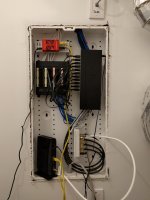
  • 8b8d1a27d81d98170144464b80ef6446.jpg
    8b8d1a27d81d98170144464b80ef6446.jpg
    109.2 KB · Views: 5
Last edited:

Ed Devinney

Well-known member
Joined
Nov 29, 2006
Messages
68
A lot may depend on what you ultimately want to do. I like racks for audio but don't find them compelling for computer hardware. To get a reasonably clean network setup, I used a Leviton structured wiring box in the house we just built.

It's still a work in progress and is doing the job, but I should have spec'd it all out beforehand to understand how pricey the Leviton-only bracketry and accessories can get.

The box now contains a 24 port cat-6 patch panel, 18 port ethernet switch, a hardware firewall, 8 port cable patch and the cable modem. In the end an $80 box with about $350+ in Leviton accessories.

So far the firewall, switch, and modem don't get too hot with the cover loosely attached.

Additional hardware sits on a high ahelf in a closet that was wired for the purpose.

OP: Do you anticipate a lot of network wiring?
 

Attachments

  • IMG_20170723_205905.jpg
    IMG_20170723_205905.jpg
    131.7 KB · Views: 221
Last edited:

JazzBlueRT

Well-known member
Joined
Jun 11, 2017
Messages
1,215
I'm looking at adding a rack for basic home network use with plans to upgrade slowly as need be.

This issue currently is a jumble of components and wires I want to wall mount in a closet, included would be modem and router (internet provider equipment) Ethernet hub, maybe storage (hard drives) later on, etc.

I'm confused by the myriad of products available priced from about $60 to several hundred dollars. All advertised for home networks. Open versus closed, closed needs a fan for ventilation but open rack gets dusty, but all that stuff gets dusty sitting on the floor so is it that important? Again, basic beginner home networking needs.

Thanks for any info.

You need to ensure the closet has proper ventilation and temp/humidity control. Especially if you end up putting a small server in there.
 

Jawn

Well-known member
Joined
Jul 29, 2011
Messages
3,594
Location
Stuck in traffic, GA
A lot may depend on what you ultimately want to do. I like racks for audio but don't find them compelling for computer hardware. To get a reasonably clean network setup, I used a Leviton structured wiring box in the house we just built.

It's still a work in progress and is doing the job, but I should have spec'd it all out beforehand to understand how pricey the Leviton-only bracketry and accessories can get.

The box now contains a 24 port cat-6 patch panel, 18 port ethernet switch, a hardware firewall, 8 port cable patch and the cable modem. In the end an $80 box with about $350+ in Leviton accessories.

So far the firewall, switch, and modem don't get too hot with the cover loosely attached.

Additional hardware sits on a high ahelf in a closet that was wired for the purpose.

OP: Do you anticipate a lot of network wiring?

I got one of those too. With a Mikrotik gigabit switch, Moto cable modem, ObiHai phone interface, misc stuff and power injector for wifi, it doesn't get too hot closed up. Then again, I do have conduit going up the wall acting like a radiator. But be careful about conduit passing through multiple spaces, it can end up collecting condensation which could run back down and ruin things inside.

Just how much gear do you have that is designed for rack mount? You can rack up about anything that will fit between the rails, but if the majority of your gear isn't designed for rack mount, you might be better off mounting it in a Leviton SMC or similar, or even just flat onto a piece of plywood attached to the wall.

If you do go rack mount, be aware not all threaded rack rails use the same thread pitch/size, and many will even be unthreaded round or square holes requiring additional hardware to mount equipment.
 

wyliesdiesels

Well-known member
Joined
Aug 14, 2012
Messages
19,983
Location
Modesto, CA
OP- You really need to think about what you will be putting in there in the future.

Full size server?

POE switches? Some stick out pretty far and need larger racks.

Dont forget wire managers...
 

ForceFed70

Well-known member
Joined
Apr 27, 2010
Messages
3,441
Location
BC, Canada
Very few people would use a server rack in their home and actually rack mount equipment inside of it. Are you sure you don't just need a shelf or a cabinet?
 

kj_mustang

Well-known member
Joined
Feb 9, 2011
Messages
1,212
Location
Harrisonburg, VA
If you have many cat wiring runs in your home than a patch panel mounted on a small open wall mount rack makes it very easy to terminate and keep neat those wiring runs.
 
OP
W

Whitworth

Well-known member
Joined
Dec 26, 2011
Messages
2,082
Very few people would use a server rack in their home and actually rack mount equipment inside of it. Are you sure you don't just need a shelf or a cabinet?

That's a good point, right now I've got two components (router and modem) and a jumble of wires. I planned on adding an Ethernet hub for connecting printers and a second wireless router remotely placed. (Wireless printers are something I'm always having trouble with.)

In the future I was planning on adding storage for my home network and DVR storage for entertainment systems. And maybe security systems as well.

The physical constraints are a small closet with limited wall space so I envision something vertical like a server rack. Shelves would do but running wires across multiple shelfs would likely be a hassle and not as tidy as my wife would like.
 

Ed Devinney

Well-known member
Joined
Nov 29, 2006
Messages
68
If you already have a closet set aside, consider wall mounting the network equipment and putting the NAS and other devices on a shelf or two. A nice patch bay and some effort organizing and dressing the cables would go a long way to making it look presentable.
 

pcmeiners

Well-known member
Joined
Aug 13, 2009
Messages
7,826
Location
In the only town in Pennsylvania, Bloomsburg.
"but all that stuff gets dusty sitting on the floor so is it that important?"
Nice to have a nice neat setup, but the most important is air flow, and to get the devices off the floor. In offices, warehouses homes etc, the worst area for dust is within the first 2 feet of the floor.
 

75gmck25

Well-known member
Joined
Jul 21, 2014
Messages
1,313
Location
Alexandria, VA
I assume you don't want a true 19" server rack, since they are usually built for commercial use, and therefore quite expensive.

Some suggestions for getting started:
- Figure out how you are going to get enough airflow in the closet/cabinet. You might have to put high and low vents in the door, or even point an HVAC vent into the closet. Use natural airflow (heat rises) as much as possible.
- Determine where you want the equipment, and then screw down a piece of 3/4" plywood (into studs) that goes from near the ceiling down to about 2 feet above the floor. This gives you flexibility in mounting components, and no further need to find studs or use inserts in sheetrock. You could paint the wood the same color as the closet wall to make it blend in.
- Plug in a large power strip with at least 8 outlets, including some that are spaced for transformers, and mount it on the plywood.
- For certain key components, consider mounting a small UPS on the board so that they will not shut down if you lose power.
- If they have mounting ears or brackets, mount components directly to the plywood. Group them logically (e.g., network hub next to cable modem network connection, etc.) on the board to reduce wiring runs.
- Install 2 or 3 of those Close Maid vertical standards that just mount on the plywood. The reason for using 3 is that you may want both full width shelves and 1/2 length shelves.
- Buy a few of the short shelves (12") and brackets, and install the shelves at a convenient height. Put the remaining components on the shelves. Include space for books or documentation on all the components.
- Buy velcro wire ties, including some with a button or screw that you can put into the plywood.
- Run your wiring as neatly as possible, and use the velcro ties to keep it flat to the board or running along the shelf front or sides. Neatness and logical routing counts, so plan ahead and make it look good.
Make sure you write down all the connections used, and how to configure all items, and put it with the documentation in the closet. If you have a few configuration items that are used more frequently (like figuring out which network jack is the one in the family room behind the TV, or the password for the cable company's WiFi), laminate that sheet and staple it on the plywood for quick reference.
- Run it that way for a while to see how you like, and then adjust accordingly.

Bruce
 

jeffmoss26

Well-known member
Joined
May 25, 2011
Messages
12,851
Location
Cleveland, Ohio
I have a ~5ft RCA sound rack circa 1957 in my basement.
It holds a patch panel, 2 switches, a 70V amplifier, and my file server. Modem/router are upstairs, I ran a Cat 5e cable outside several years ago and haven't had any issues.
The top of the rack holds part of my padlock collection :)
 

grantw

Well-known member
Joined
Nov 10, 2016
Messages
249
Location
Bay Area, CA
You can find a decent quality APC netshelter rack in my area for ~$400 at most places that will sell the stuff. The problem is with a good quality rack, is you will pay quality prices. Most wire managers and PDUs that are direct fit for 19" racks are pretty pricey new.

I recently picked up 4 APC metered "0U" PDUs for $30 each from one of my local surplus / e-waste places. 24 5-20 outlets on 2x 20A banks. L5-30 plug.

Sometimes you can get a few great deals from a local e-waster, otherwise, if you had to buy a PDU or even a shelf online, it's expensive. Check ebay first as second hand gear for racks is perfectly fine, and a lot cheaper.
 

Falcon67

Well-known member
Joined
Jun 11, 2009
Messages
18,371
Location
Merkel, TX
I thin a piece of 3/4 ply on a closet wall works better. I'm a network guy and I don't want that much hackery in the house. I get all I need at work.
 

CoogarXR

Well-known member
Joined
Jan 11, 2016
Messages
6,844
Location
Ohio
I thin a piece of 3/4 ply on a closet wall works better. I'm a network guy and I don't want that much hackery in the house. I get all I need at work.

Me too.

I wired my last 3 houses for CATV, Phone, and TV cable in nearly every room. I don't think I'll do it again if I move again. With the improvements in WiFi, I only use one of my Cat5 jacks anymore. I use the Roku app and other devices for watching my cable, so I don't need actual cable drops anymore either. My wife and I have cell phones, so I don't need the landline anymore either.

I still have a magic jack for a landline, but that's just because my wife prefers using the old phone when talking for hours to her family, lol.

But my formerly-stuffed 19" rack in my basement now only has the cable modem, router, CCTV stuff, media server, and UPS.

I am considering whacking the media server too, and just going with a USB>NAS adapter. I'd probably save a little on the electric bill.
 
To avoid these ads, REGISTER NOW!

EOC_Jason

Well-known member
Joined
Jun 25, 2012
Messages
11,388
Location
Bentonville, AR
Your biggest issue will be cooling... I had a decent sized closet that just had a couple switches, router, DSL modem, and a DVR and even though it had an air duct (I closed it in the winter) it would still get awfully warm in there in the summer... No way would I consider putting a NAS in there without some sort of exhaust fan...
 

grantw

Well-known member
Joined
Nov 10, 2016
Messages
249
Location
Bay Area, CA
Me too.

I wired my last 3 houses for CATV, Phone, and TV cable in nearly every room. I don't think I'll do it again if I move again. With the improvements in WiFi, I only use one of my Cat5 jacks anymore...

I'm wiring my new place for cat6 / rg-6 in every room + eaves for future SAT and PoE IP cameras. All of the walls are open, so it's easy to include.

But my formerly-stuffed 19" rack in my basement now only has the cable modem, router, CCTV stuff, media server, and UPS.

I am considering whacking the media server too, and just going with a USB>NAS adapter. I'd probably save a little on the electric bill.

I tried to reduce my power footprint as much as possible. My rack now has a 48 port poe+ switch, NVR, cable modem, "router" and a few Smart-UPS. I'm under 2A draw continuous.This is including 4 PoE cameras and a few IP phones, and AP all PoE powered.

My "router" is actually a laptop running ESXi and a few pfsense VMs.

I used to have a full getup for my internet needs, but paying for 5A of continious draw adds up over time.
 

rlitman

Well-known member
Joined
Oct 18, 2010
Messages
24,578
Location
Long Island
...If you do go rack mount, be aware not all threaded rack rails use the same thread pitch/size, and many will even be unthreaded round or square holes requiring additional hardware to mount equipment.

I've seen 10-32, 10-24, 12-24, M5 and M6 in threaded holes. Then you have the round or the square punched holes you find in 4-post cabinets.

Also, be aware that racks are designed to fit equipment sized in Rack Units (U's). Each U takes up three holes and is 1-3/4" tall. But you can't go putting devices anywhere you want. The boundary between rack units is the narrower space between screws. If you offset your equipment, the holes will no longer line up correctly.
 

nmk_61802

Well-known member
Joined
Mar 6, 2008
Messages
965
Location
Central IL
I built a wood rack system to hold my house hold components. Switch, Media Server, Security Server, Remote Power system, ETC. I then used these to transform it into a U system:

Rack Rails

Got the idea from another member here, but cannot remember the thread.
 

grantw

Well-known member
Joined
Nov 10, 2016
Messages
249
Location
Bay Area, CA
A nice plywood board works too. My place is under construction at the moment, but I plan on having, catv, cat6, alarm, etc landed to a central panel in the garage. I got a wall mount "vertical" 3u Rack, and used some unistrut brackets to mount it horizontal. This is my temp setup to provide the contractor with wifi and me with streaming video of the construction site.

http://i.imgur.com/8nefVyc.jpg
 

tedo2007

Well-known member
Joined
May 19, 2014
Messages
104
I built a wood rack system to hold my house hold components. Switch, Media Server, Security Server, Remote Power system, ETC. I then used these to transform it into a U system:


Rack Rails


Got the idea from another member here, but cannot remember the thread.


If you happen to remember which thread I'd be interested


Sent from my iPhone using Tapatalk
 

nmk_61802

Well-known member
Joined
Mar 6, 2008
Messages
965
Location
Central IL
Dang


Sent from my iPhone using Tapatalk


Yeah, Like many on here, I like overkill. I built the original rack years ago but RattleSnake's thread inspired me to upgrade when I built my CCTV server.

Just realized, I didn't have a finished pic when I added blanks and Switch.

Not shown to the right is a large LV panel housing cable and phone systems. It also has a patch panel and my old switches in that I still need to extend the wiring on and migrate to my new switch. I currently have them jumpered
 

jjminch

Well-known member
Joined
Jan 23, 2014
Messages
56
Location
Bastrop TX
I just picked up a Middle Atlantic 21u rack off craigslist for $120 bucks. Retail was around $1000 for it included the power distribution.

I use it for my AV equipment. Previously used and still have a knockdown rack from a Star Tech. That was an open 42u rack that you assemble. They had smaller ones and would be worth looking into.
 

ard

Well-known member
Joined
Feb 16, 2015
Messages
4,391
Location
Sierra Foothills... California
I have a piece of oak cabinet plywood on the wall, with a couple of wood shelves- combined with a 'metro' wire shelf unit for a few items. (Server w 4 drivebays, router, switches.)

I have a PBX, so everything for that terminates in punchdown blocks. I've got a cross-connect for RJ45 for the network connections as well.

However, MOST of my internet and telecom components are not rack mount items. (I've got racks for the AV system, in a different location). The telephone and Internet stuff would be 10-20% rack and 80% 'other'. (If I went out and tried to only buy rack mount items.). It just felt like setting up racks, then having the bulk of the stuff not in the rack was kind of pointless. Plywood seems like a much better way to manage these small little items. Some attached to the wall, some on little shelves attached to the plywood.
 

tedo2007

Well-known member
Joined
May 19, 2014
Messages
104
Yeah, Like many on here, I like overkill. I built the original rack years ago but RattleSnake's thread inspired me to upgrade when I built my CCTV server.

Just realized, I didn't have a finished pic when I added blanks and Switch.

Not shown to the right is a large LV panel housing cable and phone systems. It also has a patch panel and my old switches in that I still need to extend the wiring on and migrate to my new switch. I currently have them jumpered


While I do enjoy the way it looks I don't feel I could have it tucked away in an attic or similar I change things out far too often which is why mine is in the basement


Sent from my iPhone using Tapatalk
 

grantw

Well-known member
Joined
Nov 10, 2016
Messages
249
Location
Bay Area, CA
Those pictures reminded me of an old server I had installed in a rental house years ago. The crawlspace access panel in the office closet was a perfect 19" wide and I was able to "floor mount" my server to exhaust the hot air in to the crawlspace. :)
 

freekwonder

Well-known member
Joined
May 14, 2014
Messages
56
Location
University Place, WA
I just picked up a rack from newegg, holds my modem, switch and network storage. I'd like to get some better ventilation for it someday, right now just has two computer case fans on the top of the case keep air moving.

I've got another one in my shop I acquired when one of our buildings at work was getting remodeled. Just has a wireless access point and my computer in it.
 

Attachments

  • 1620509_10204704397425694_1684719696261586507_n.jpg
    1620509_10204704397425694_1684719696261586507_n.jpg
    57.7 KB · Views: 57
To avoid these ads, REGISTER NOW!
Top Bottom