Hey guys, we just did a MASSIVE server upgrade. I think I have everything pretty well tested, but if any problems or bugs pop up post them here!

You are using an out of date browser. It may not display this or other websites correctly.
You should upgrade or use an alternative browser.
You should upgrade or use an alternative browser.
Server Upgrades
- Thread starter Ryan
- Start date
Musicinabottle
Banned
- Joined
- Jul 24, 2016
- Messages
- 3,371
Just glad the door is open once again!
dkroth
Well-known member
Acknowledged, and thank you.

.
.
Last edited:
Outlander
Well-known member
Mrs Outlander is tired of chatting with me. She asks that the GJ be returned
jblnut
ALLIANCE MEMBER
Thanks for keeping it all up to date !!
The nosy SOB in me is wondering what was all upgraded ?? Hardware, software ... do tell if able
The nosy SOB in me is wondering what was all upgraded ?? Hardware, software ... do tell if able
OP
Thanks for keeping it all up to date !!
The nosy SOB in me is wondering what was all upgraded ?? Hardware, software ... do tell if able
Hardware... Brand spanking new server... Software will come later this year when I switch the forum from VB to Xenforo.
kwschumm
Well-known member
Seems to be even faster than before! Thanks for staying on top of it!
bctexas
Well-known member
Thanks Ryan!
lakeroadster
Well-known member
danke schoen
dkroth
Well-known member
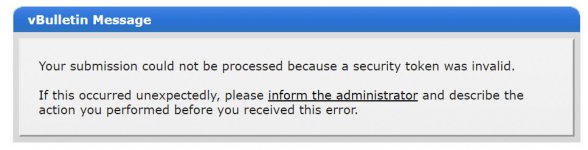
Tried to 'mark forums read' and got this

Git, I've been getting that for years!
Looking forward to the Xenforo switch.
.
Ok, I just replied to a post and I can 't find it?
HOTFR8
Banned
Hardware... Brand spanking new server... Software will come later this year when I switch the forum from VB to Xenforo.
So we will be on the same format as the HAMB? This will be a good thing.
I'm glad I remembered my password.
I wonder who we will lose due to password needing input.
Yeah, I was wondering why I had to log back in. I thought maybe we had more problems than I originally thought.
It was odd as I had been working on a issue at home with the LAN not working to the Blu-Ray player. I put two new ends on the Cat5e to the thing and it still won't connect to the internet. I'll have to work on that Monday. The wife is going to be without Netflix for a bit.
1/2 Cup
Member Emeritus
Noted, that when you reply to a post it does not always come up in the Search Forums now yet if you go to the actual forum that you posted in, it is there.??
Dustball
Well-known member
Posts are not being marked as read after I've read them.
kwschumm
Well-known member
When viewing "New Posts", and then clicking on "Go to first new post" button, it often takes me to the FIRST post of the thread. Clicking back, and then again on "Go to first new post" then works as expected. IOW, it works the second time on a thread when it didn't work the first time. It happens a lot but not always.
wyliesdiesels
Well-known member
Every thread I have read or seen before the upgrade is now bold again as If i never opened it.
This is annoying because that is how i can tell if I am caught up on the thread.
It also appears they are not being marked as read even after reading them.
Keep having to login even with remember me checked and having been logged in before the upgrade.
This is annoying because that is how i can tell if I am caught up on the thread.
It also appears they are not being marked as read even after reading them.
Keep having to login even with remember me checked and having been logged in before the upgrade.
bczygan
Well-known member
Ryan,
Thank God you're back!!!
I was starting to get the Delirium Tremens from the withdrawl!
Bill
Thank God you're back!!!
I was starting to get the Delirium Tremens from the withdrawl!
Bill
HOTFR8
Banned
Every thread I have read or seen before the upgrade is now bold again as If i never opened it.
This is annoying because that is how i can tell if I am caught up on the thread.
It also appears they are not being marked as read even after reading them.
Keep having to login even with remember me checked and having been logged in before the upgrade.
I had the same issue. For the present just do not look at anything that is dated before you last logged onto the forum and when you leave and come back next time you should be back to normal. Re check the keep me logged on should also fix your problem.
astrohip
Well-known member
Hardware... Brand spanking new server... Software will come later this year when I switch the forum from VB to Xenforo.
Another forum I am very active in made the switch to Xenforo about six months ago. There was a learning curve, but it has made that forum better than ever. So many easier, more efficient, user-friendly ways to interact now.
Good news! And thanks for this forum.
Richard Cranium
Well-known member
thanks for the info.
PugetDude
ALLIANCE MEMBER
Thanks for the update; had to log back in, but no issues since.
1/2 Cup
Member Emeritus
I had the same issue. For the present just do not look at anything that is dated before you last logged onto the forum and when you leave and come back next time you should be back to normal. Re check the keep me logged on should also fix your problem.
HOTFR8, I always check the keep me logged in box and still have the same issue..
HOTFR8
Banned
HOTFR8, I always check the keep me logged in box and still have the same issue..
Once I found I was logged out I logged in checked the box and all was OK. I had to then check back to my last log on time to make sure I did not read any posts prior to that. I marked all read and left the forum for about an hour. When I came back all was again as it should be.
I can see Ryan is heading towards the forum change over to the same as the HAMB and once that happens all will be good. Expect a few may not be familiar with the change but once we all adjust the GJ will run much more smoothly.
Outlander
Well-known member
I was a bit surprised when the forum was down, ie. there was no advance warning was there?
OP
I was a bit surprised when the forum was down, ie. there was no advance warning was there?
Nope. I got a wild hair up my *** and just went for it... Impulse decision.
No one has ever accused me of being professional in such things - that much is certain!
Outlander
Well-known member
Nope. I got a wild hair up my *** and just went for it... Impulse decision.
No one has ever accused me of being professional in such things - that much is certain!
Well, you are in charge around here

PelicanPines
ALLIANCE MEMBER
Everything is FASTER'er... well done.
Was scared the format was gonna change. Old people don't like too much change...
Was scared the format was gonna change. Old people don't like too much change...
Lassen Forge
Well-known member
Thanks Ryan, the new turbo seems to be working just fine, tho because of the upgrade I ended up cleaning off my workbench of 3 months of winter clutter while it was down. Bah! 
Posts are not being marked as read after I've read them.
Same issue for me, do we have a fix?
OP
That's a propagation problem that will hopefully fix itself in the next day or so.
That's a propagation problem that will hopefully fix itself in the next day or so.
Thanks for the quick update
Ole Slewfoot
Well-known member
Probably related, but 'new posts' is not cutting off at theend of new posts.
vavet
Well-known member
I'm at work now where I have my passwords saved on my browser. Using my iPad at home yesterday, I tried the "reset password" link. The page went white, but it never took me to the page to allow me to input my email or username to get a reset link.
There might be others who are locked out...but can't tell you.
There might be others who are locked out...but can't tell you.
OP
I'm at work now where I have my passwords saved on my browser. Using my iPad at home yesterday, I tried the "reset password" link. The page went white, but it never took me to the page to allow me to input my email or username to get a reset link.
There might be others who are locked out...but can't tell you.
This was fixed last night.