To avoid these ads, REGISTER NOW!

Share your Google Sketchup Projects!

To avoid these ads, REGISTER NOW!

48windsor

Well-known member
Joined
Jan 24, 2013
Messages
407
Location
Olympia ,Wa.
First post, been lurking for a while figured I'd share what I have been working on.
Buildingpic.png

Buildingpic2.png

Buildingpic3.png

That is nice ! thanks for sharing
 

Albiemanmike

Well-known member
Joined
Jan 11, 2013
Messages
138
Location
CT.
stupid question but how do I post my stuff? Did you do a screen cap/print screen and edit it down?

Sketchup has an Export utility under the File Menu. Select Export 2D image and it will export whatever is on your screen to a .jpg file that you can then share.
 

Modoc

Well-known member
Joined
Jan 25, 2014
Messages
167
Location
SE Oregon
Downloaded sketch up to try putting my garage I'm planning. I've drawn it to scale on paper and after reading this post I thought that's pretty cool so I'll giver a whirl, ****** HELL what a pain in the **** ! I ain't much on computers so I watched some of the tutorials but I ain't got the patients to learn the ****** thing. Any shared wisdom from another computer challenged individual would be greatly appreciated.

If ya can't fix it with a hammer it's an electrical problem !
 

Motorhead Extraordinaire

Well-known member
Joined
Jun 21, 2009
Messages
372
Location
Chelmsford, MA
Modoc,

SketchUp is a very powerful 3D visualization tool that, like any other highly creative piece of software, has a learning curve. However; the learning curve on SketchUp is a lot easier that AutoCAD, Solid Works, or other engineering solutions.

Yes, SketchUp requires patience; so much that I spent all of yesterday working out some small details. I have learned a lot about SketchUP building Lista based work spaces but I have only touched on the capabilities I want to explore.

Post a sketch of what you want to draw in SketchUp and I'll take a crack at drawing it for you. I can set it up so that you can log into my computer and see what I am doing. Maybe this will help you get over the initial learning hump.

Regards,
Joe
 

KELLHAMMER

Well-known member
Joined
Nov 20, 2006
Messages
222
Location
south eastern pennsylvania
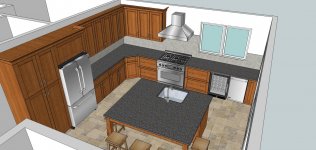
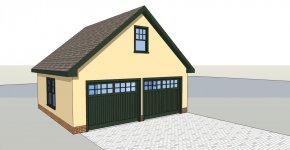
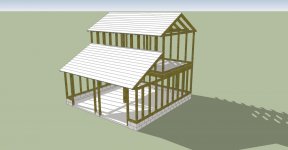
I work with Sketchup just about everyday. One of the best things about it is you can get started right away doing simple models. And as you improve you can make them increasingly detailed as you need. The other is you can model anything from a baseball to the entire city of Rome.
 

Attachments

  • Jamaica St Kitchen 1.jpg
    Jamaica St Kitchen 1.jpg
    153.1 KB · Views: 117
  • TWO CAR GARAGE.jpg
    TWO CAR GARAGE.jpg
    102.7 KB · Views: 89
  • 2 story 2 car garage section.jpg
    2 story 2 car garage section.jpg
    129.1 KB · Views: 95
  • 2 story TWO CAR GARAGE.jpg
    2 story TWO CAR GARAGE.jpg
    90.4 KB · Views: 89
  • 20X20GARAGE.jpg
    20X20GARAGE.jpg
    87.8 KB · Views: 94
  • 20X20GARAGE2.jpg
    20X20GARAGE2.jpg
    91.4 KB · Views: 82
  • 20X20GARAGE3.jpg
    20X20GARAGE3.jpg
    92 KB · Views: 80
Last edited:

KELLHAMMER

Well-known member
Joined
Nov 20, 2006
Messages
222
Location
south eastern pennsylvania
Modoc
Sit down with it when you have time to commit a hour to it. Go to Sketchup.com for their beginners tutorials. Or better yet buy one of the books available, such as sketchup for dummies. Sketchup for dummies also has tons of getting started videos online. Without a doubt there is no other program that create high quality 3d models as easily. I own several cad programs, and they simply can't match Sketchup
 
Last edited:

Modoc

Well-known member
Joined
Jan 25, 2014
Messages
167
Location
SE Oregon
Joe, thanks for the reply and offer, I know a program like that will have a fairly steep learning curve to say the least. My problem is computers just don't hold my attention, great for doing research which is how I found this site. I have to spend so much time with new technology already the last thing I want to do is have to learn another detailed tech. I don't mean to come across as negative cause I ain't I'd rather be building or welding some thing, give me a PT6A or an M22 or a restoration and I'm good ta go.
 

Modoc

Well-known member
Joined
Jan 25, 2014
Messages
167
Location
SE Oregon
Thanks for the advise hammer. I will it's just finding the time and the discipline to do it I watched the first getting started tutorial when I downloaded the program and thought this won't be to bad and seeing all the posts on here that had been done.
 

Modoc

Well-known member
Joined
Jan 25, 2014
Messages
167
Location
SE Oregon
What I am planning is a 32'x40'x14' stick built 2"x6" slab on grade with a hydronic heated floor and a two post lift. It will match the house but be detached. It will have two doors on the front which will be the 32' side one 10'x12' and a 14'x12' with a 10'x12' on the back with at least one man door.
 

Keithinsc

Well-known member
Joined
Feb 13, 2011
Messages
1,129
Location
Sandhills of SC
How do you get the guy out of the middle of the screen to start with ?

When you start, select him with the pointer tool. Once he is highlighted, click on the eraser icon in the tool bar. Click on him with the eraser to delete him.
Bonus points if you use an Evil Villian laugh when you do so.
Muhaahahhaa....:D
 

Modoc

Well-known member
Joined
Jan 25, 2014
Messages
167
Location
SE Oregon
Keithinsc, now ya tell me, I gauged him, can't see him at all now but need a new computer... Ehhhhhh !
 

Modoc

Well-known member
Joined
Jan 25, 2014
Messages
167
Location
SE Oregon
Will try that tomorrow and see if I can get a little more proficient with it. Thanks for the tip.
 

Modoc

Well-known member
Joined
Jan 25, 2014
Messages
167
Location
SE Oregon
I have drawn it on Graf paper to scale, having a hard time putting the lift in with out loosing space.
 

Motorhead Extraordinaire

Well-known member
Joined
Jun 21, 2009
Messages
372
Location
Chelmsford, MA
What I am planning is a 32'x40'x14' stick built 2"x6" slab on grade with a hydronic heated floor and a two post lift. It will match the house but be detached. It will have two doors on the front which will be the 32' side one 10'x12' and a 14'x12' with a 10'x12' on the back with at least one man door.

Are the door dimensions WxH or HxW?

Joe
 
To avoid these ads, REGISTER NOW!

muidaq

Well-known member
Joined
May 13, 2010
Messages
61
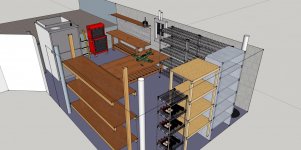
Cool wine cellar. Show some more angles if you don't mind.

I've been playing with the layout of my RC hangar. I have some workbenches to build.
 

Attachments

  • image.jpg
    image.jpg
    150.1 KB · Views: 176

Motorhead Extraordinaire

Well-known member
Joined
Jun 21, 2009
Messages
372
Location
Chelmsford, MA
Modoc,

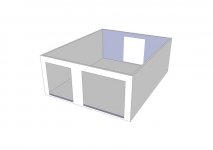
The doors are all WxH and I also centered the back door. Where is the entry door going and what type of roof do you want to do? Which direction is the ridge? The pitch? How about windows? With just a little more info, the basic structure of a building can be established.

There is nothing better than a good 3D visualization to determine if the proposed project is actually what you want. You can have the opportunity to expand greatly to actually fill up the building with your stuff. I've seen projects get totally turned around once the reality of a 3D model is used.

I've uploaded the Sketchup file to my server. If you, or anyone else wants to download it, click on: http://www.motorheadextraordinaire.com/MEsketchup/GJ-Modoc.skp

Maybe you, I, and others can continue to contribute to your Sketchup project. I'll upload updated versions as they become available.

Spend 10 minutes with this tutorial and you will feel less intimidated with Sketchup. http://www.sketchup.com/learn/videos?playlist=58 I try to follow along as much as possible.

Joe
 

Attachments

  • GJ-Modoc_1.jpg
    GJ-Modoc_1.jpg
    17.3 KB · Views: 45

Modoc

Well-known member
Joined
Jan 25, 2014
Messages
167
Location
SE Oregon
Joe, thanks for the help. I messed with sketch up some today, finally figured how to get rid of the guy standing in the middle when you open the program, thanks to one of the posts. The man door will be on the right side about 12' from the back wall I'm thinking a 4/0 man door. The ridge line will run the 40' length and I believe the roof will be 4/12 pitch but if code allows I'd like to go 3/12 to keep the height down a little. I'm probably going to have to go 14' on the walls to get the height for a lift other wise I'd have to put it in the center which is restrictive.
 

Modoc

Well-known member
Joined
Jan 25, 2014
Messages
167
Location
SE Oregon
Spent time on the county web site today looking at code we require a 25lb snow load but I believe they increased it to 40lb a few years ago, still looking in to that. We also require a 115mph wind load.
 

kcarter13

Active member
Joined
Dec 30, 2013
Messages
25
My first post haha. I have been reading this forum for the past few months and love what you all have done. Its an inspiration for sure. Since I am getting more and more into woodworking I thought I would plan out my next build in the Garage. Here is the start of it.

garage.jpg
 

Motorhead Extraordinaire

Well-known member
Joined
Jun 21, 2009
Messages
372
Location
Chelmsford, MA
Joe, thanks for the help. I messed with sketch up some today, finally figured how to get rid of the guy standing in the middle when you open the program, thanks to one of the posts. The man door will be on the right side about 12' from the back wall I'm thinking a 4/0 man door. The ridge line will run the 40' length and I believe the roof will be 4/12 pitch but if code allows I'd like to go 3/12 to keep the height down a little. I'm probably going to have to go 14' on the walls to get the height for a lift other wise I'd have to put it in the center which is restrictive.

Modoc,

I uploaded an updated model: http://www.motorheadextraordinaire.com/MEsketchup/GJ-Modoc.skp

I added the roof, side door, siding and roof shingles. I left off the gable ends to make it easy to look inside.

Download the model to play around with Sketchup.

Joe
 

kcarter13

Active member
Joined
Dec 30, 2013
Messages
25
Looks good. I like the wrenches hanging on the back of the bench.

Joe

Thanks sir. This is the first time I have used Sketchup. Watched a couple little tutorials and its pretty easy. Actually really nice if you are going to build your own cabinets because you can actually put the elements together right in the program and then use that to plan your sheet cuts.
 

McKay

Well-known member
Joined
Apr 16, 2010
Messages
111
These were my first sketches of my build. Started a little over a year ago. Will try and get a current pic of the progress shortly. Is slow as I am building as I have cash flow. Looks really close to this except for I changed a few of the hips on the front to gables.
WithTextrues1.jpg

WithTextures3.jpg

WithTextures2.jpg


This is a photo from the end of this summer. Exterior is now 99% complete except doors as I still need to do slab on grade. Hopefully I will be finishing concrete come this summer. Roof and all Brickwork is complete.
photo.jpg


Sorry that is the best most recent pic I have. Need to do better at taking pics.
 
Last edited:

oxmanwi

Well-known member
Joined
Dec 30, 2013
Messages
63
Location
Milwaukee, WI
Going to overhaul my 3.5 garage this spring and I've been planing out how it's going to look. Mostly electrical, insulation and drywall with lots of storage is where most of the money is going to be spent. I'm begging the wife for a MaxJack though, wish me luck, lol.

Here are a few drawings.

garagesk2_zpse3d18276.jpg


garagesk_zpsd28c5c25.jpg


garagesk3_zpsad55d0b5.jpg


weld_zps09e17e63.jpg


Rolling on 20's this year! JK, not really, coolest rims I could find.

grtbird_zps82d11813.jpg
 
Last edited:

Lightyear68

Active member
Joined
Sep 14, 2013
Messages
36
Location
Bel Air, Maryland
Here's an attachment of my latest revision.

I love to try out new ideas with Sketchup and then see them come to life.

I might even frame a few Skethup images in the garage after it's complete :bounce:
 

Attachments

  • Garage 2014.jpg
    Garage 2014.jpg
    158.6 KB · Views: 97

Modoc

Well-known member
Joined
Jan 25, 2014
Messages
167
Location
SE Oregon
http://www.motorheadextraordinaire.com/MEsketchup/GJ-Modoc.skp

Joe I was unable to open your link on my iPad, will try it on the computer in the morning, been a long day and kinda whooped this evening. Really appreciate all your input and work on this project. I don't know if I will ever get all the details worked out on this project, I'm to detail oriented and picky for my own good some times, but I believe in doing it once and I want all the details worked out before I start this. Placing the lift is a bit of a challenge with the clearances and the pex in the floor. Again thanks for yours and everyone else's input and advice on this project.
 

nolimits76

Well-known member
Joined
Jul 11, 2013
Messages
959
Location
Oklahoma
I've been running CAD on & off for 20+ years. Used it on a daily basis the first few years of my job. Then I got promoted and it's been an "accessory software" I can't let go despite not really requiring it everyday. Even have a version at the house. But the majority of my work has been 2D.

Anyhow, 3D can be time consuming in ACAD so I decided to try Sketchup. Once I figured out how to make objects PRECISE, I've started enjoying it.

How are you guys getting the air compressors, cabinets, garage door rails, cars, motorcycles, etc? I'm assuming they are object imports -- just not sure where to find them.
 
To avoid these ads, REGISTER NOW!
Top Bottom