LeeG
Well-known member
I have spent a considerable amount of time over the past several years trying to find the perfect software for me to inventory my shop. I write software for a living, and finally resigned myself to having to write my own. I had it pretty much completely spec'ed out and then I found an app called MyStuff2 by Maddysoft. It was pretty close to being exactly what I was going to write, and it was only cost a few dollars. I have been using it now for over three years, and wanted to share what I have discovered.
First, I will tell you that this app is IOS only. If you don't have an IOS device, it will not work. The author has no plans for making a web, desktop, or Android version. The application itself is allows for complete customization, thus it can take a while to set up, but you can be up and running with it quite quickly.
The app is organized around Categories and Locations. A category is a type of thing you want to inventory. Each category has its own fields. Categories can be divided into sub-categories, and sub-sub-categories and so on. Locations are defined the same way.
Here is what my database looks like when I open it.
View media item 87498
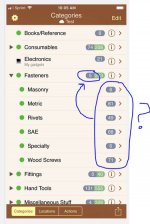
The numbers to the right show how many items are in that category (grey) and all sub categories (green). So for Fasteners, I have 5 items listed under Fasteners, and 283 in sub-categories under fasteners.
If I click the arrow on the left of Fasteners, I can see my sub-categories
View media item 87500
Pressing on the Masonry subcategory, I can see all of the fasteners in that sub-category (I added two items between the two screenshots)
View media item 87501
Finally, selecting one of the fasteners in the list will show me all of the fields I have defined for that category.
View media item 87502
If I go back to the previous screen, I can click the Sigma symbol to get a summary of that sub-category.
View media item 87503
The fields in the categories, what gets summed up in the filters, and even the sort and headers are all custom, and you can define several different ones and save them.
Locations are organized similar. Here are my top level locations.
View media item 87499
Each location can be subdivided as much as you want. For example, I have the following location defined.
House->Garage->North Wall->Red Craftsman->Upper Chest->Top Drawer
You can move a location from one place to another, and all of its contents will move with it. You can export reports to excel, or PDF. You can add multiple photos to any item or location. It supports bar code scanning and Amazon lookup. There is an entire set of Action commands that I don't use, but appear to be very versatile.
Typing a lot of data into a phone or tablet can be annoying, although you can import data from excel. The one feature it does not have that I would like is to be able to have a 'thing' also be a location. For example, I use individual toolboxes as locations. It would be nice to not have to enter them in separately to keep track of them. It does take some time to set up a comprehensive database, but I just did it one category at a time, starting with my more expensive items.
Overall, this has been a great asset to me. It allows me to keep track of less commonly used tools, keep track of what consumables I have, and have a more complete list of what I own for insurance purposes.
First, I will tell you that this app is IOS only. If you don't have an IOS device, it will not work. The author has no plans for making a web, desktop, or Android version. The application itself is allows for complete customization, thus it can take a while to set up, but you can be up and running with it quite quickly.
The app is organized around Categories and Locations. A category is a type of thing you want to inventory. Each category has its own fields. Categories can be divided into sub-categories, and sub-sub-categories and so on. Locations are defined the same way.
Here is what my database looks like when I open it.
View media item 87498
The numbers to the right show how many items are in that category (grey) and all sub categories (green). So for Fasteners, I have 5 items listed under Fasteners, and 283 in sub-categories under fasteners.
If I click the arrow on the left of Fasteners, I can see my sub-categories
View media item 87500
Pressing on the Masonry subcategory, I can see all of the fasteners in that sub-category (I added two items between the two screenshots)
View media item 87501
Finally, selecting one of the fasteners in the list will show me all of the fields I have defined for that category.
View media item 87502
If I go back to the previous screen, I can click the Sigma symbol to get a summary of that sub-category.
View media item 87503
The fields in the categories, what gets summed up in the filters, and even the sort and headers are all custom, and you can define several different ones and save them.
Locations are organized similar. Here are my top level locations.
View media item 87499
Each location can be subdivided as much as you want. For example, I have the following location defined.
House->Garage->North Wall->Red Craftsman->Upper Chest->Top Drawer
You can move a location from one place to another, and all of its contents will move with it. You can export reports to excel, or PDF. You can add multiple photos to any item or location. It supports bar code scanning and Amazon lookup. There is an entire set of Action commands that I don't use, but appear to be very versatile.
Typing a lot of data into a phone or tablet can be annoying, although you can import data from excel. The one feature it does not have that I would like is to be able to have a 'thing' also be a location. For example, I use individual toolboxes as locations. It would be nice to not have to enter them in separately to keep track of them. It does take some time to set up a comprehensive database, but I just did it one category at a time, starting with my more expensive items.
Overall, this has been a great asset to me. It allows me to keep track of less commonly used tools, keep track of what consumables I have, and have a more complete list of what I own for insurance purposes.