To avoid these ads, REGISTER NOW!

Simple on/off switch for a VFD

grannyknot

Well-known member
Joined
Feb 13, 2021
Messages
84
Location
Toronto
I'm trying to wire up a simple off/on switch for a VFD powering a 3ph motor on my drill press.
I don't need reverse, just forward.
In this photo the start contacts are at the top, white wire is going to+24v, black wire is going to forward.
So hitting the stop button on the bottom of the switch is just disconnects the +24v from FWD

I don't want to turn the power off to the VFD, just looking for on/FWD and off for the motor.
Will this work?
Thanks
 

Attachments

  • DSC00338.JPG
    DSC00338.JPG
    436.5 KB · Views: 23
To avoid these ads, REGISTER NOW!

Davefr

Well-known member
Joined
Jan 7, 2010
Messages
11,835
Location
OR
I'm trying to wire up a simple off/on switch for a VFD powering a 3ph motor on my drill press.
I don't need reverse, just forward.
In this photo the start contacts are at the top, white wire is going to+24v, black wire is going to forward.
So hitting the stop button on the bottom of the switch is just disconnects the +24v from FWD

I don't want to turn the power off to the VFD, just looking for on/FWD and off for the motor.
Will this work?
Thanks
You really need to refer to your VFD manual. It should provide all info you need. You might also have to program the VFD to enable that feature. I believe on my L510 VFD I can choose from momentary start stop or maintained start stop by setting the specific parameter. This is an example of why good documentation is so important when choosing a VFD.

P.S. I would also urge you to keep a written log of every VFD parameter you program in.
 
Last edited:

rocksnstumps

Well-known member
Joined
Mar 20, 2024
Messages
157
Yes even if the chinglish wording of the documentation is hard to follow there should still be a basic wiring diagram that at least shows where to wire in your switch. BTW the two different vfds I have both require one of the switch wires to go to the vfd ground terminal. And as mentioned above a software parameter is set to accept an external control input. Once set the vfd keyboard on/stop button(s) are disabled and only external switching works.

What make model vfd do you have?
 
OP
G

grannyknot

Well-known member
Joined
Feb 13, 2021
Messages
84
Location
Toronto
You really need to refer to your VFD manual. It should provide all info you need. You might also have to program the VFD to enable that feature. I believe on my L510 VFD I can choose from momentary start stop or maintained start stop by setting the specific parameter. This is an example of why good documentation is so important when choosing a VFD.

P.S. I would also urge you to keep a written log of every VFD parameter you program in.
Not what I want to hear, programing:eek:
Yes even if the chinglish wording of the documentation is hard to follow there should still be a basic wiring diagram that at least shows where to wire in your switch. BTW the two different vfds I have both require one of the switch wires to go to the vfd ground terminal. And as mentioned above a software parameter is set to accept an external control input. Once set the vfd keyboard on/stop button(s) are disabled and only external switching works.

What make model vfd do you have?
DURApulse GS21-22PO
 
To avoid these ads, REGISTER NOW!

rocksnstumps

Well-known member
Joined
Mar 20, 2024
Messages
157
Hmm. That model has a bucket load of parameters to play with.

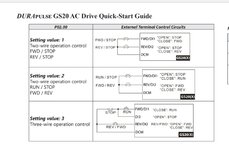
This wiring diagram is basically telling you like my comment above
Screenshot_20240929-224602.png

One of the switch wires is connected to FWD and the other goes to drive ground. You also have to set parameter P00.21 = 1 for external (REMOTE?) control. The default for that is P00.21 = 0 which is to use the keypad.

Another screen shot from parameters

Screenshot_20240929-231059.png

These are likely not the only parameters that need to be checked unless Automation Direct makes all sorts of assumptions about drive application for a US customer. For instance some drives default to 50 Hz instead of 60 Hz input. Not sure about this exact one but mine were set for 50 Hz initially. In total I had to change about 1/2 doz settings including accel and decel rates.

Good luck!
 

rocksnstumps

Well-known member
Joined
Mar 20, 2024
Messages
157
That part of the quick start guide is actually for a different parameter and purpose. P02.00 already defaults to the setting needed to make the FWD/stop operate properly. But without resetting P00.21 = 1 his added switch is not recognized. P02.00 really gets into the rabbit hole of more flexibility with control options but the default basic mode is all that the OP wanted.
 
OP
G

grannyknot

Well-known member
Joined
Feb 13, 2021
Messages
84
Location
Toronto
I counted 64 parameters in the "Quick start guide"
Fortunately, not all of them have to be set up as you guys mentioned, the factory chose the most common set up for all of them and you alter the ones you need to.
Just waiting for a magnetic contactor to arrive now before I can start playing with it.

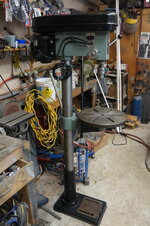
I've cleaned up the 17" drill press that I've been using for the past 30yrs, hoping I can get a couple hundred bucks for it.
They are still selling the same model as this today for $800
 

Attachments

  • DSC00317.JPG
    DSC00317.JPG
    786.5 KB · Views: 10
To avoid these ads, REGISTER NOW!
Top Bottom