Charles (in GA)
Well-known member
If you have huge pics from your camera, and don't want to bother hosting elsewhere, you can easily resize them, one at a time, or en-masse using a simple pic resizer that MS has available. You download the resizer installation program, save it to your desktop and then double click on it to do the installation. Once that is done, you can right click on the installer icon and delete it.
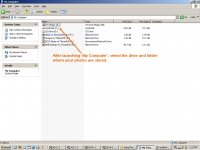
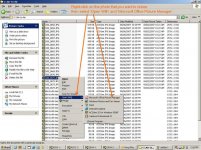
After you have done this, all you need to do is find the pics using Windows Explorer (the file manager program that all Windows systems have), or anywhere the file name is displayed and you right click on it and select "resize picture".
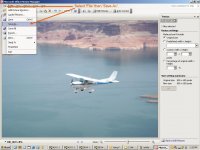
You receive options, pics that will display on 640x480 (small) screen, pics that will display on a 800x600 screen (medium), pics that display on a 1024x768 screen (large) and pics that will display on a handheld 320x240.
Most of your audience probably has a 800x600 screen, few people are still using 640x480, and GJ allows pics up to 146K in file size. If you select medium, you get 800x600 pics, easily viewable, and generally 60 to 100K in size depending on the file. As usual, the pics show up in your posts as thumbnails but will appear as 800x600 when clicked on.
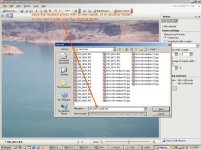
This is an easy fast way to resize pics. Your original files WILL NOT be altered or damaged, they remain as is, a new file is created in the same directory, with the same file name but with the word small, medium, or large added after the file name to make it different.
Go to.........................
http://www.microsoft.com/windowsxp/downloads/powertoys/xppowertoys.mspx
and scroll down to "Image Resizer" and look to the right of the screen to click on the link. You will get the usual prompts and click to save to your computer. Install as I describe above, saving the installer and deleting it when done.
This will generally eliminate someone else having to scroll left and right and up and down to view your pics.
Charles
After you have done this, all you need to do is find the pics using Windows Explorer (the file manager program that all Windows systems have), or anywhere the file name is displayed and you right click on it and select "resize picture".
You receive options, pics that will display on 640x480 (small) screen, pics that will display on a 800x600 screen (medium), pics that display on a 1024x768 screen (large) and pics that will display on a handheld 320x240.
Most of your audience probably has a 800x600 screen, few people are still using 640x480, and GJ allows pics up to 146K in file size. If you select medium, you get 800x600 pics, easily viewable, and generally 60 to 100K in size depending on the file. As usual, the pics show up in your posts as thumbnails but will appear as 800x600 when clicked on.
This is an easy fast way to resize pics. Your original files WILL NOT be altered or damaged, they remain as is, a new file is created in the same directory, with the same file name but with the word small, medium, or large added after the file name to make it different.
Go to.........................
http://www.microsoft.com/windowsxp/downloads/powertoys/xppowertoys.mspx
and scroll down to "Image Resizer" and look to the right of the screen to click on the link. You will get the usual prompts and click to save to your computer. Install as I describe above, saving the installer and deleting it when done.
This will generally eliminate someone else having to scroll left and right and up and down to view your pics.
Charles
Last edited: