

Denwood
Well-known member
This is a copy/paste from my garage thread, but should prove useful to a few folks here. My brother took on about $40K worth of basement damage on a sump failure, getting me thinking towards integration of fire and water warnings into our SmartThings automation setup. On the water front, the system is also active, meaning it will shut off the main water valve to the house. That's another post.
For now, I found a very tidy solution to getting Smoke and CO alerts via our smartphones should the house or garage system go off. This way we can call neighbours to check on the cats, call 911 etc. should something go awry when we're away.
I recently replaced our four direct wire, interconnected smoke/CO alarms with the Kidde Model 900-0119 which give you three chirps followed by a voice warning of "Fire" or four longer chirps followed by a voice warning "Carbon Monoxide". These smoke/CO detectors are direct wire, interconnected and have a front loading battery backup system using two AA cells. If any one unit detects smoke or CO, they all report together.
There are currently no Zwave direct wire smoke/CO sensors out there, although First Alert makes a battery powered one: https://www.amazon.com/dp/B00KMHXFAI/?tag=atomicindus08-20 These can connect directly to many automation hubs...but again may fail to meet code standards depending on your application.
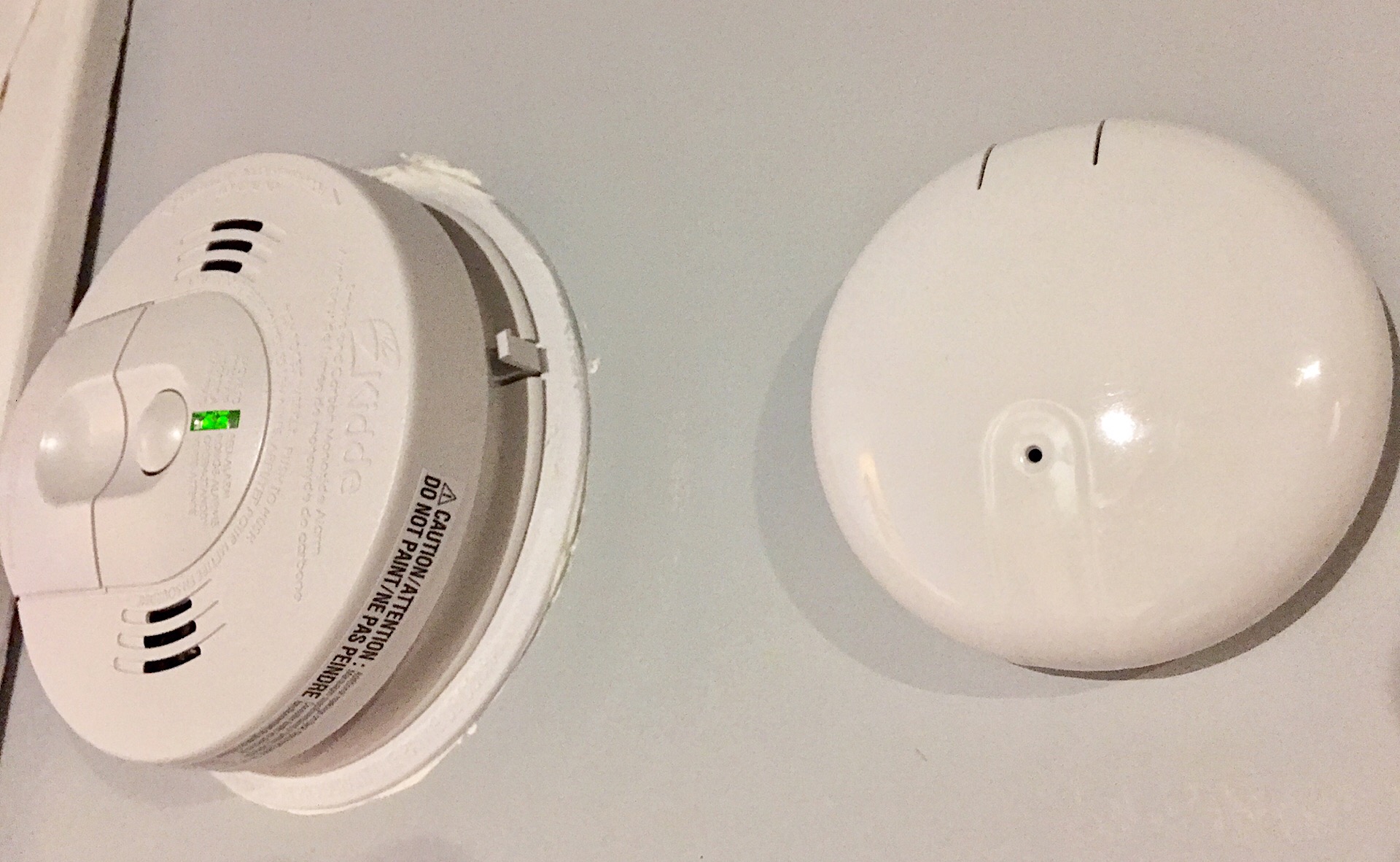
Code for our home here requires direct wire, hard wire interconnected alarms. Fortunately Ecolink makes a solution for this. The Ecolink Firefighter is an audio sensor, tuned to detect Smoke and CO alarms. It sits a few inches from one of your hardwired alarms and detects alarms. With interconnected alarms, $40 will buy one sensor to cover your entire home or garage...and you can leave your existing hardwired system in place. The sensor connects to most automation hubs using the wireless Zwave Plus protocol.
These are the new hardwired and interconnected smoke/CO alarms.

Out of the box, SmartThings detects the Ecolink as an audio sensor, which won't work nicely with SmartThings Home Monitor, so you want to switch over to this custom device handler. The Ecolink initially detected nothing when testing the alarms. I called Ecolink and they were unable to assist, although I am waiting for a call back. The tech fellow I was talking with informed me that the Ecolink Firefighter listens for at least three cycles of the "Temporal 3" Smoke Alarm ( 3 short chirps + pause) or three cycles of the "Temporal 4" CO alarm (4 long chirps + pause) alarms. There is apparently a standard that UL approved smoke and CO detectors should be adhering to.
I did get the unit working by changing modes as described below. I removed it from SmartThings and rejoined to the hub after doing the following:
> C0 Alarm Detection
> In addition to Smoke Alarm detection, the device can detect the presence of a carbon monoxide alarm. By default, the
> sensor is not guaranteed to detect a CO alarm. The device can be configured to more reliably detect a CO alarm in
> exchange for a reduced battery life. This mode can be changed by holding down the tamper switch and learn button for
> 10 seconds. The device should then be reset ( remove battery and replace ) in order to determine the current device
> setting.
> RED + GREEN = Device will not reliably detect CO, but standard battery life
> RED + RED + GREEN = Device will more reliably detect CO, but with reduced battery life.
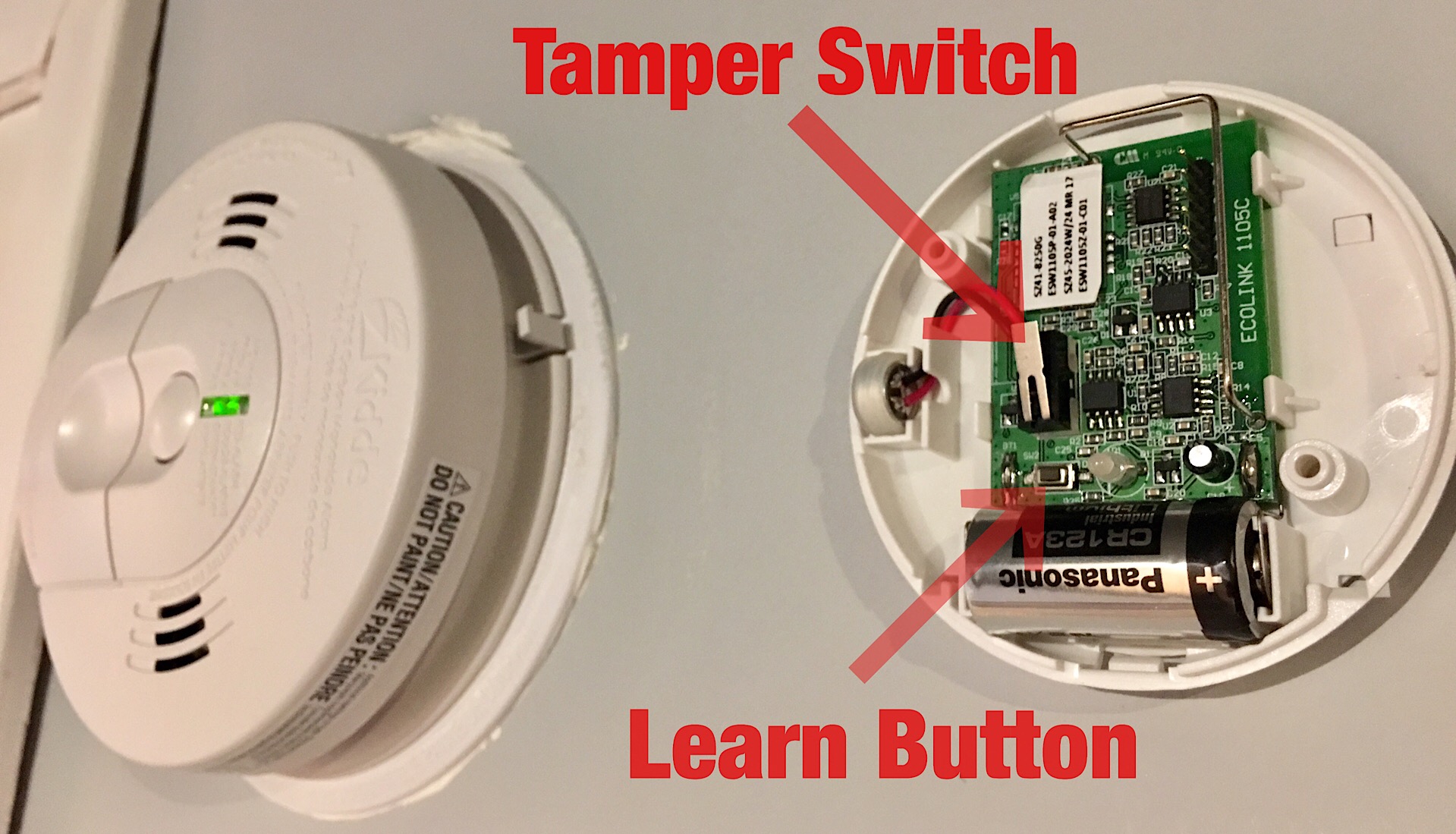
Btw, when you pull the cover, note that the tamper switch is not the learn button. The printed documentation unfortunately does not make that clear:
Once the unit mode is changed, you can perform the steps to add the sensor to SmartThings (press learn mode once, and then put ST hub into + device mode.)
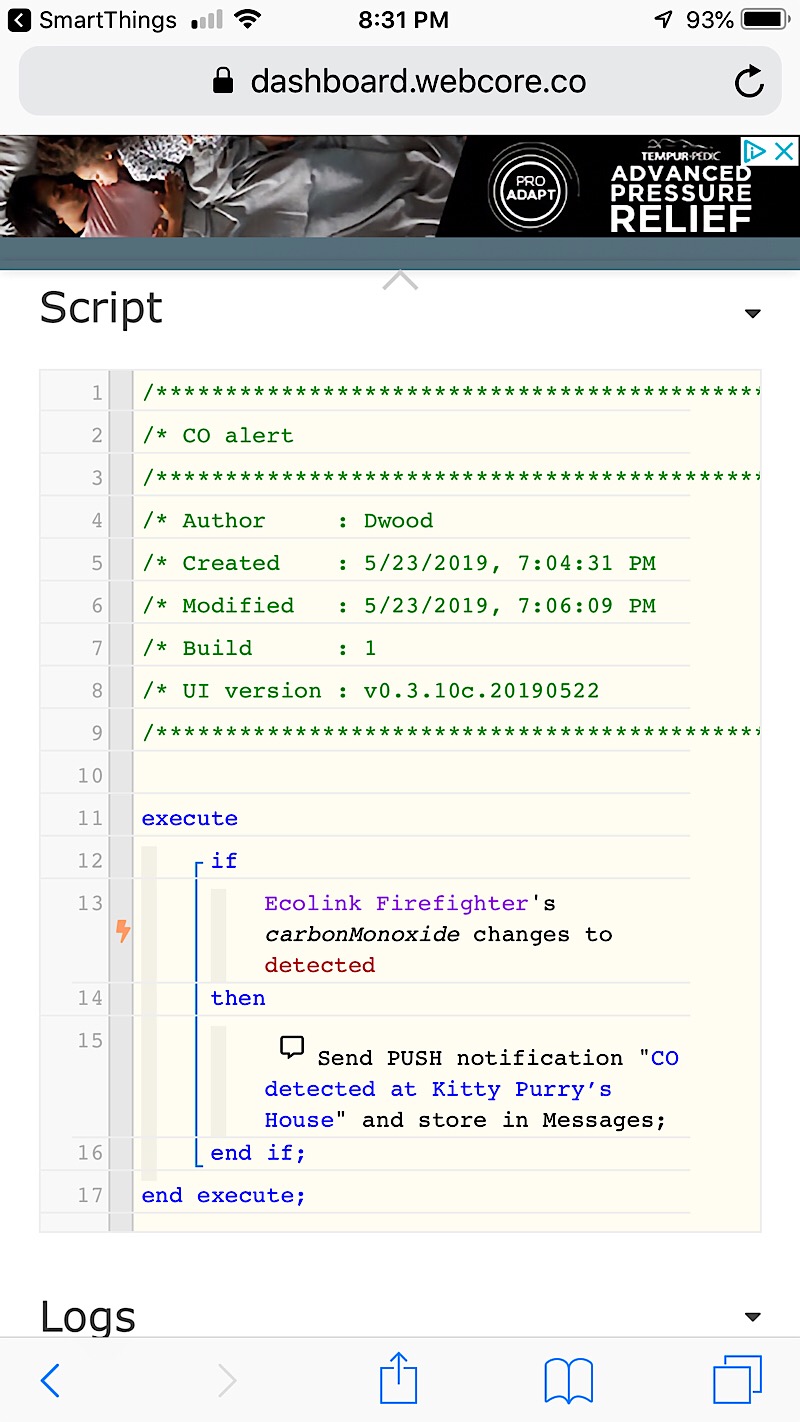
SmartThings can be then set up via Smart Home Monitor to report smoke alarms via text and Push notifications. It won't trigger on CO alarms, however WEBCORE works fine for that.
There you go. For about $40, you can integrate your old school smoke and CO alarms into the internet of things.
For now, I found a very tidy solution to getting Smoke and CO alerts via our smartphones should the house or garage system go off. This way we can call neighbours to check on the cats, call 911 etc. should something go awry when we're away.
I recently replaced our four direct wire, interconnected smoke/CO alarms with the Kidde Model 900-0119 which give you three chirps followed by a voice warning of "Fire" or four longer chirps followed by a voice warning "Carbon Monoxide". These smoke/CO detectors are direct wire, interconnected and have a front loading battery backup system using two AA cells. If any one unit detects smoke or CO, they all report together.
There are currently no Zwave direct wire smoke/CO sensors out there, although First Alert makes a battery powered one: https://www.amazon.com/dp/B00KMHXFAI/?tag=atomicindus08-20 These can connect directly to many automation hubs...but again may fail to meet code standards depending on your application.
Code for our home here requires direct wire, hard wire interconnected alarms. Fortunately Ecolink makes a solution for this. The Ecolink Firefighter is an audio sensor, tuned to detect Smoke and CO alarms. It sits a few inches from one of your hardwired alarms and detects alarms. With interconnected alarms, $40 will buy one sensor to cover your entire home or garage...and you can leave your existing hardwired system in place. The sensor connects to most automation hubs using the wireless Zwave Plus protocol.
These are the new hardwired and interconnected smoke/CO alarms.
Out of the box, SmartThings detects the Ecolink as an audio sensor, which won't work nicely with SmartThings Home Monitor, so you want to switch over to this custom device handler. The Ecolink initially detected nothing when testing the alarms. I called Ecolink and they were unable to assist, although I am waiting for a call back. The tech fellow I was talking with informed me that the Ecolink Firefighter listens for at least three cycles of the "Temporal 3" Smoke Alarm ( 3 short chirps + pause) or three cycles of the "Temporal 4" CO alarm (4 long chirps + pause) alarms. There is apparently a standard that UL approved smoke and CO detectors should be adhering to.
I did get the unit working by changing modes as described below. I removed it from SmartThings and rejoined to the hub after doing the following:
> C0 Alarm Detection
> In addition to Smoke Alarm detection, the device can detect the presence of a carbon monoxide alarm. By default, the
> sensor is not guaranteed to detect a CO alarm. The device can be configured to more reliably detect a CO alarm in
> exchange for a reduced battery life. This mode can be changed by holding down the tamper switch and learn button for
> 10 seconds. The device should then be reset ( remove battery and replace ) in order to determine the current device
> setting.
> RED + GREEN = Device will not reliably detect CO, but standard battery life
> RED + RED + GREEN = Device will more reliably detect CO, but with reduced battery life.
Btw, when you pull the cover, note that the tamper switch is not the learn button. The printed documentation unfortunately does not make that clear:
Once the unit mode is changed, you can perform the steps to add the sensor to SmartThings (press learn mode once, and then put ST hub into + device mode.)
SmartThings can be then set up via Smart Home Monitor to report smoke alarms via text and Push notifications. It won't trigger on CO alarms, however WEBCORE works fine for that.
There you go. For about $40, you can integrate your old school smoke and CO alarms into the internet of things.
Last edited:
