To avoid these ads, REGISTER NOW!

Smart Home devices

ryolse

Well-known member
Joined
Jan 30, 2014
Messages
166
Location
Colorado
Smart Home Automation

I'm sure I'm not the only one on here that has a "Smart Home" such as SmartThings or Wink. What hubs and devices have you guys been enjoying and how have you been tying them together? Bonus credit goes towards how have you incorporated them into the garage theme that this forum is mostly about?

I've been using SmartThings for dimmers in our kitchen, living room and shop vac in the garage with plans for bathrooms, and backyard with couple of 2 way switches for the front lights and another that I turned into a "3-way" through software that controls a backyard light who's switch is in the garage by using one of the backyard dimmers that's in the house. I've also got some ready for Christmas lights both inside and out which will be great for not needing timers everywhere as well as some of our summer string lights.

Later plans will be to get something going which can control a couple of ceiling fans and it's light separately so that when you turn on the light switch that goes to the fan you don't have to use the pull chains to turn on/off the fan. I've seen these before, however don't like the idea of loosing the control when we move and potentially take all of the switches with us or when our internet is out for some reason.

I also need get a thermostat, but I'm not in love with the ones out there that are "Smart" compatible. The Amazon Echo also looks like something on my list of future devices. As well as the Harmony hub to go with my existing remote.
 
Last edited:
To avoid these ads, REGISTER NOW!

paranoid56

Well-known member
Joined
Dec 18, 2008
Messages
1,596
Location
San Diego, Ca
mine is almost setup the same as yours lol. bunch of switches to turn on and off outside lights on timers, some internal mood lights and to monitor my solar. i want to add a pool temp setup and some other things.
 
OP
R

ryolse

Well-known member
Joined
Jan 30, 2014
Messages
166
Location
Colorado
I really wish I had it setup last year when I fractured a vertebrae and was confined to a recliner for 22 hours of out the day for 2 straight months. My wife gave me lots of **** when I started putting them in until she started enjoying the ability of dimming the lights while already comfy on the couch or not walking into a dark house when she gets home.

I'm still on the fence if I should get this irrigation system this year or wait one more year to improve.
 

kwschumm

Well-known member
Joined
Feb 13, 2016
Messages
1,220
Location
Olympia, WA
We replaced an old Toro sprinkler controller with a Hydrawise. Works great, much easier to use and control than the Toro and it's cool changing settings from the smartphone. Also have an Almond+ but haven't yet tried automating lights, that will come. In the last house we had a fully automated one with the hardwired HAI OmniPro, loved that system but Leviton seemed to suspend all development when they bought HAI so the technology is way too old to install now, especially for retrofit in existing homes.
 
OP
R

ryolse

Well-known member
Joined
Jan 30, 2014
Messages
166
Location
Colorado
Also have an Almond+ but haven't yet tried automating lights, that will come.

My only regret with the SmartThings hub is that they don't have a similar wall controller, or one like the Wink Relay Wall Controller which looks pretty cool. I guess linking it to the Echo would serve a similar purpose however, but with more flexibility and options once you've memorized the commands.

My only dislike so far is using our phones as the presence sensors due to the phones themselves not always reporting correctly. I've considered putting one of these in my wife's purse, but they wouldn't work for me as I have separate personal and work cars which are on different key chains. The other option would be a bunch of motion sensors which after they have all timed out would indicate "presence", but all of those use batteries and I hate batteries.
 

Denwood

Well-known member
Joined
Sep 22, 2014
Messages
4,191
Location
Thunder Bay, Ontario, Canada
I've been working with a Vera Edge, as well as a Smarthings V2 hub.

At the business site, the Vera Edge talks to the security system, Ecobee 3 thermostats (there are 9 of them) and seven Aeon Smart plugs which cut power to laser printers etc. when the system is armed. That took some time, coding (cut and paste) and a few web forum questions, however it is working flawlessly.

At home, I'm using the Smarthings hub with about 20 LED bulbs (GE Link and Hue white) as well as ten PAR20 "Ecosmart" (from Home Depot) LED downlights, Kwikset deadbolts, ST motion sensors and multipurpose sensors for doors, including the garage. I'm also using a Zwave switch and LFM20 zwave relay to control a small ERV. Presence sensing has been working very well for us, so the lights come on etc. when we arrive home at night.

A few notes on the Smarthings setup:

1. Unless you have neutral wires in your boxes, you'll be better off just automating the bulbs themselves. Yes, operating the wall switch may leave the light off with no automation, but in our application, this is ok.

2. The Philips Hue (white) bulbs are pretty much the value leader at $14 (CAD) but you do need to add a Hue hub to make them work with Smarthings. If you're doing quite a few bulbs, this will save you some dollars over using Cree or GE-Link bulbs ($20 CAD). One reviewer had the GE-Link bulbs at 90 CRI (although they are rated at 83) so you might argue their color rendering should be better. They do run hot though.

3. The Smarthings motion sensors have been working very well to turn lights on/off. I've been integrating them slowly to trigger lights, then turn them off when no one is present.

4. The Kwikset 910 Z-wave locks work nicely within Smarthings if you follow this process to install the "Lock Code Manager": https://community.smartthings.com/t/lock-code-manager/12280 Once you've done this you can add up to 30 codes, users and schedules for the locks. I'm using this to give our cleaning lady access, but only on the given day and hours. If you don't use that custom app, you can only set 2 codes on the lock, and you'll have no idea which code/user accessed the door.

Although the Smarthings app is pretty limited, you can log into the developers web site with your smart app login, and publish apps and custom device types to yourself. This is how I got the Home Depot Ecosmart LED lights working correctly (they are excellent lights!)

5. If you just want a simple timer to shut lights off after x minutes, this works quite well: https://github.com/bravenel/SmartThings/blob/master/Turn off after some minutes
Again, you have publish an app to yourself on the web site. A simple overview of the process is here: https://community.smartthings.com/t/faq-an-overview-of-using-custom-code-in-smartthings/16772

6. Electronic dimming of the smart bulbs is about the best "dimmer" device I've ever used. There is no buzzing (you may need to remove old wall dimers and replace with a simple switch) and the lights run a lot cooler when dimmed. Using the motion sensors to trigger lights makes it easier to dim them as you can both trigger and dim them from the built in Smart Lighting app. In a few instances the lights are too bright (eg. in our Tv room) but they dim right down to 10% with zero buzzing/flickering etc.

The nice thing about Smarthings is that the app pretty much provides a built in security system which makes a lot of sense if you're using the multi-purpose door sensors and motion sensors. In essence, you're installed your own security system, which you have can monitored professionally if you'd like. You can arm in in Home (disables internal motion) or Away modes which is pretty slick.

For home use, most will find Smarthings very good, particularly if you take the time to learn how to publish custom code to yourself. This is pretty much just copy/paste so not complicated at all. The app is a bit of a mess, but again OK once you figure it out.
 
Last edited:
OP
R

ryolse

Well-known member
Joined
Jan 30, 2014
Messages
166
Location
Colorado
Re: Smart Home Automation

I decided to add my vacuum to a switch. I typically use the VAC for sucking up dog hair in the house, so instead of having the 1st world problem of going downstairs and into the garage to turn it on/off I can now just do it with this fob or my phone.


OP
R

ryolse

Well-known member
Joined
Jan 30, 2014
Messages
166
Location
Colorado
At the business site, the Vera Edge talks to the security system, Ecobee 3 thermostats (there are 9 of them) and seven Aeon Smart plugs which cut power to laser printers etc. when the system is armed. That took some time, coding (cut and paste) and a few web forum questions, however it is working flawlessly.
How have you been liking the Ecobee3? I'm still trying to decide which stat to go with. I really like the temperature and Outdoor weather layout of the Honeywell ones, but they don't work with SmartThings.
 
Last edited:

Denwood

Well-known member
Joined
Sep 22, 2014
Messages
4,191
Location
Thunder Bay, Ontario, Canada
Ryolse, the Ecobee3 stats are in my opinion the best on the market based on pre-purchase research and using them for two months now. I did a little review here. Have a look and post up any questions you have: http://www.garagejournal.com/forum/showthread.php?t=317886

By making use of extra occupancy/temp sensors, aggressive setbacks and data logging, we cut nearly 25% of our gas consumption in the first month. We did not set back temps in our working areas at all.

ecobeefollowup1.jpg


If you want to automate and trigger events using Smarthings and the Ecobee3, you'll likely want to install this code/device handler for yourself: https://community.smartthings.com/t...source-ecobee-device-type-and-smartapps/34335

I decided to use Vera at the office specifically because I was able to integrate both our security system and Ecobee3 stats to it. This way I can leverage all the security system sensors to do things like turn off AC when a window is opened.

Td, once automation is set up, you don't need a phone, a light switch or otherwise to manage lights. My single largest reason to add some home automation was to turn lights on and off with zero user intervention. I'll have an idea in a month or so in terms of the savings. If you use bulbs like the GE-link, your switch still works exactly as it did before. I am very good at turning off lights. My wife and two daughters...not so good :)
 
OP
R

ryolse

Well-known member
Joined
Jan 30, 2014
Messages
166
Location
Colorado
Re: Smart Home Automation

Thanks for the input. I only wish our Andover/Schneider Electric stuff didn't cost so much, then I would just use it for endless possibilities.

As for lights, I've been using almost all LEDs at our house for the past year and based on my spreadsheet the savings have been noticeable.
 
To avoid these ads, REGISTER NOW!

bzinsky

Well-known member
Joined
Oct 27, 2014
Messages
5,565
I've been working with a Vera Edge, as well as a Smarthings V2 hub.

At the business site, the Vera Edge talks to the security system, Ecobee 3 thermostats (there are 9 of them) and seven Aeon Smart plugs which cut power to laser printers etc. when the system is armed. That took some time, coding (cut and paste) and a few web forum questions, however it is working flawlessly.

At home, I'm using the Smarthings hub with about 20 LED bulbs (GE Link and Hue white) as well as ten PAR20 "Ecosmart" (from Home Depot) LED downlights, Kwikset deadbolts, ST motion sensors and multipurpose sensors for doors, including the garage. I'm also using a Zwave switch and LFM20 zwave relay to control a small ERV. Presence sensing has been working very well for us, so the lights come on etc. when we arrive home at night.

A few notes on the Smarthings setup:

1. Unless you have neutral wires in your boxes, you'll be better off just automating the bulbs themselves. Yes, operating the wall switch may leave the light off with no automation, but in our application, this is ok.

2. The Philips Hue (white) bulbs are pretty much the value leader at $14 (CAD) but you do need to add a Hue hub to make them work with Smarthings. If you're doing quite a few bulbs, this will save you some dollars over using Cree or GE-Link bulbs ($20 CAD). One reviewer had the GE-Link bulbs at 90 CRI (although they are rated at 83) so you might argue their color rendering should be better. They do run hot though.

3. The Smarthings motion sensors have been working very well to turn lights on/off. I've been integrating them slowly to trigger lights, then turn them off when no one is present.

4. The Kwikset 910 Z-wave locks work nicely within Smarthings if you follow this process to install the "Lock Code Manager": https://community.smartthings.com/t/lock-code-manager/12280 Once you've done this you can add up to 30 codes, users and schedules for the locks. I'm using this to give our cleaning lady access, but only on the given day and hours. If you don't use that custom app, you can only set 2 codes on the lock, and you'll have no idea which code/user accessed the door.

Although the Smarthings app is pretty limited, you can log into the developers web site with your smart app login, and publish apps and custom device types to yourself. This is how I got the Home Depot Ecosmart LED lights working correctly (they are excellent lights!)

5. If you just want a simple timer to shut lights off after x minutes, this works quite well: https://github.com/bravenel/SmartThings/blob/master/Turn off after some minutes
Again, you have publish an app to yourself on the web site. A simple overview of the process is here: https://community.smartthings.com/t/faq-an-overview-of-using-custom-code-in-smartthings/16772

6. Electronic dimming of the smart bulbs is about the best "dimmer" device I've ever used. There is no buzzing (you may need to remove old wall dimers and replace with a simple switch) and the lights run a lot cooler when dimmed. Using the motion sensors to trigger lights makes it easier to dim them as you can both trigger and dim them from the built in Smart Lighting app. In a few instances the lights are too bright (eg. in our Tv room) but they dim right down to 10% with zero buzzing/flickering etc.

The nice thing about Smarthings is that the app pretty much provides a built in security system which makes a lot of sense if you're using the multi-purpose door sensors and motion sensors. In essence, you're installed your own security system, which you have can monitored professionally if you'd like. You can arm in in Home (disables internal motion) or Away modes which is pretty slick.

For home use, most will find Smarthings very good, particularly if you take the time to learn how to publish custom code to yourself. This is pretty much just copy/paste so not complicated at all. The app is a bit of a mess, but again OK once you figure it out.

good info

question, hows the battery life on the lock?

I want to install a similar system, but at a location that replacing batteries would be a huge hassle. I could deal with it if it was every few years, but I know battery powered mixed with wifi is a recipe for dead batteries.

Just seems like all of the good "internet" locks out there are designed for homeowners, and they are all battery powered.
 

Pwrgeek

Well-known member
Joined
Oct 18, 2015
Messages
288
Location
Texas USA
Re: Smart Home Automation

I've been a z-wave guy for a while. Started out with a Vera Lite. Now on a Vera Edge that I hate. The Lite just worked. The edge stops working if it can't access the Internet which is a deal breaker for me.


Sent from my iPhone using Tapatalk
 

David Paul

Well-known member
Joined
Jul 11, 2014
Messages
677
Location
Western New Jersey
Re: Smart Home Automation

"so instead of having the 1st world problem of going downstairs and into the garage to turn it on/off"

How true....:lol_hitti
 

Denwood

Well-known member
Joined
Sep 22, 2014
Messages
4,191
Location
Thunder Bay, Ontario, Canada
good info

question, hows the battery life on the lock?

I want to install a similar system, but at a location that replacing batteries would be a huge hassle. I could deal with it if it was every few years, but I know battery powered mixed with wifi is a recipe for dead batteries.

Just seems like all of the good "internet" locks out there are designed for homeowners, and they are all battery powered.

Kwikset says the batteries will last 1 yr with 15 open/close cycles per day. Using AA lithium would likely last longer. These are Zwave locks, so much lower power consumption than wifi. They also have them in Zigbee flavor. The lock of course works with a key if all else fails..and you can check on battery life remotely via Smarthings etc. You would need a Smarthings hub or similar to manage these locks. If you set them up using the custom app, you can add up to 30 users, restrict access times etc.

How the lock is mounted is likely very important to battery life. Kwikset uses a tapered bolt which was a big sell point for me as it ***** the door in to make a good seal on the weatherstrip. You want to make sure there is no binding in the install as the motor will have to work harder.

It would likely be very simple (not sure why they haven't already) to mount a small solar panel on the outside of the door, throw in four low discharge rechargeable AA and call it a day.

One nice thing about the Kwikset locks is that they have the "SmartKey" feature so if you have Weiser "SmartKey" locks you can key the bolt to match your knob set if required. I wasn't aware they were the same and was surprised to find I could just re-key them onsite.
 
OP
R

ryolse

Well-known member
Joined
Jan 30, 2014
Messages
166
Location
Colorado
Re: Smart Home Automation

why the double cyclone setup?
After reading reviews and watching videos of the 2 I couldn't decide which to get. The Dust Deputy AXD001004 typically got everything but had issues clogging with larger objects, while the Dust Right 45556 was the opposite.

So after my 1st world problem of some of the junk getting past the Dust Right I just got annoyed from still cleaning the filter after doing normal car/Garage stuff with just the Dust Right. So I spent the extra $50 on the Dust Deputy and now there's only a very fine film on the hose between the vacuum and Deputy from cleaning up things like dry wall dust or dirt while all of the bigger dust that the Dust Right misses gets captured in the Deputy.

Based on my highly calibrated Magnehelic measuring in "inches until cheek pull" I'm not noticing much more of a pressure drop of face suckage between the 2 on their own or with both on. But there is a slight drop with either one of them versus without.

I got my first 40' of 2-1/2" hose last night and unfortunately it did bring it down some more. It still does a good job around the house, but it won't **** small children up from across the room like the vacuum would on it's own. Who knows, maybe it's time to go all Tim "the Toolman" Taylor on the project and look into a higher capacity Dust Collector. My biggest complaint there is I'm already short on space and was hoping that the Shop VAC would be more useful and still fit all of my wants. The current shop VAC that I have is this Ridgid WD1680, but I might start looking into a Central-Machinery 31810.

The end results is the Ridgid WD1680 ***** a bunch without any of the Cyclones but not enough with either of them on their own or together. Meanwhile the Central-Machinery 31810 really *****, literally, at 660 cfm versus the shop vacs 167 cfm. Unfortunately neither of the Cyclones are rated for the higher CFMs that the 31810 is capable of. The Dust Deputy AXD001004 is only rated at a "max" of 150 cfm and I was unable to find the max CFM of the Dust Right 45556. However it does state everywhere they are made for Shop VACs while their larger 4" 34367 model is often shown/stated to be used with "Dust Collection systems". So now I'll have to figure out how to cram not only the Air compressor in the closet but also the larger dust collector and I'll probably just start out with the Super Dust Deputy AXD002030A with a large space taking drum and either find a place to store the existing cyclones in case I happen to use them again or just sell them.
 
Last edited:

Denwood

Well-known member
Joined
Sep 22, 2014
Messages
4,191
Location
Thunder Bay, Ontario, Canada
Roll up Garage Door SmartThings Automation

From my garage thread:

About 11:30 on Thursday I got a call at work from my very awesome neighbor Joe asking if I wanted my garage door closed. It was open for several hours...not cool. This is the second time this has happened as the roll up door senses load and will reverse if it thinks something is amiss. Normally I wait and watch, but evidently I missed it reversing. Apparently this was on display for a few hours:

rd5.jpg


Because I have been adding lights and door automation using SmartThings, I figured it was time to tackle some automation and added security for the shop.

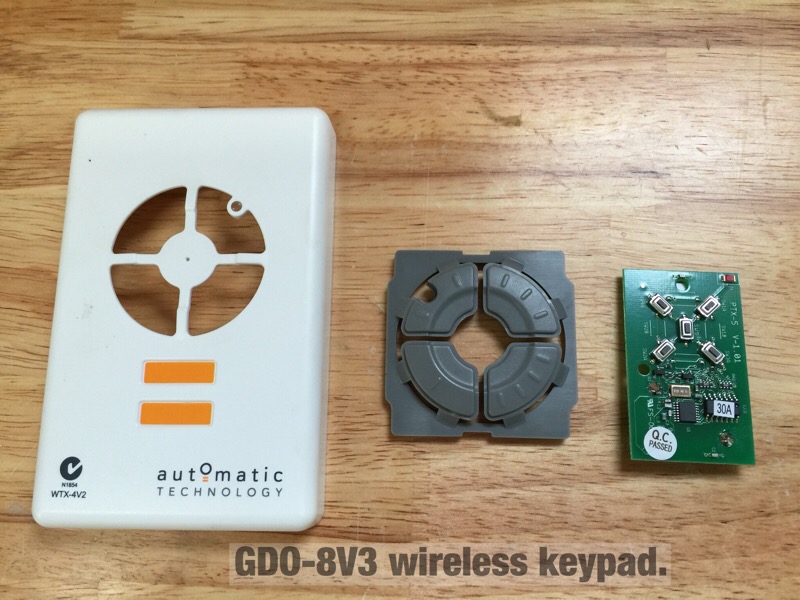
My roll up door came from www.smartgarage.ca with the GDO-8V3 direct drive opener from Automatic Technologies in Australia. This opener has no wired open/close switches, using wireless only. It detects load, and will reverse if it senses an obstruction. It also has a safety beam to stop the door. This means adding a relay switch to open and close the door is not so easy as there are no provided contacts on the motor drive unit. I was able to find a way around this without touching the drive motor or electronics.

garage_st1.jpg


SmartThings uses two wireless mesh technologies, namely ZigBee and Zwave. This makes it a lot easier to mix and match components. I am using the $99 SmartThings V2 hub which is a requirement for these automations. With nearly 50 devices on the hub (lights, locks, sensors etc., I'm quite impressed with it so far.

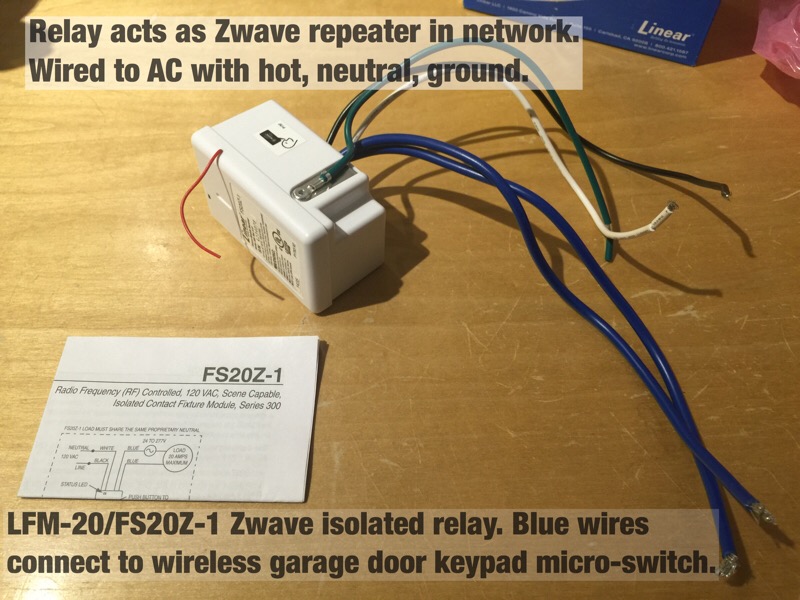
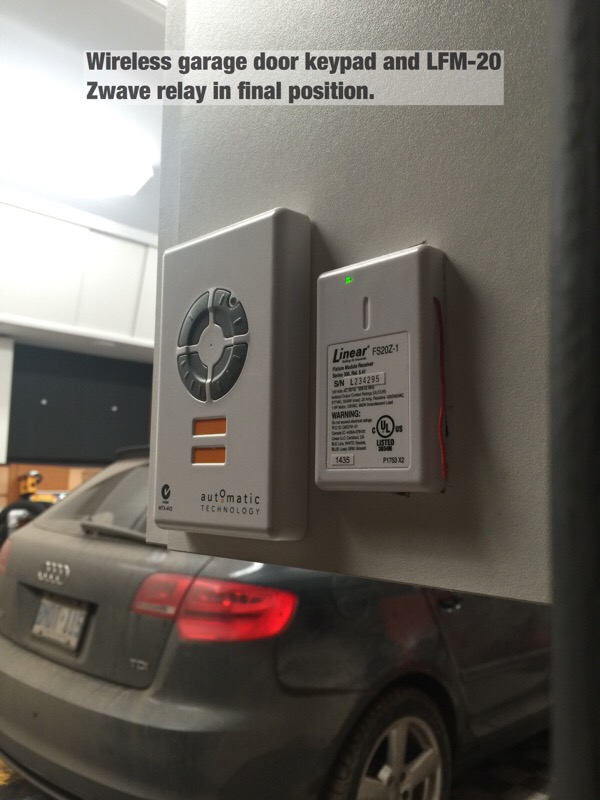
This relay, commonly known as the LFM-20 is perfect for this job. You wire it like any 110 AC device (it draws about 1 watt). It's also sold as the FS20Z-1 for $35 on Amazon. The blue wires provide an isolated relay which is simply on/off and can manage a wide range of loads and voltages. Once you install one, it functions as a node repeater for your Zwave network to increase range.

garage_st2.jpg


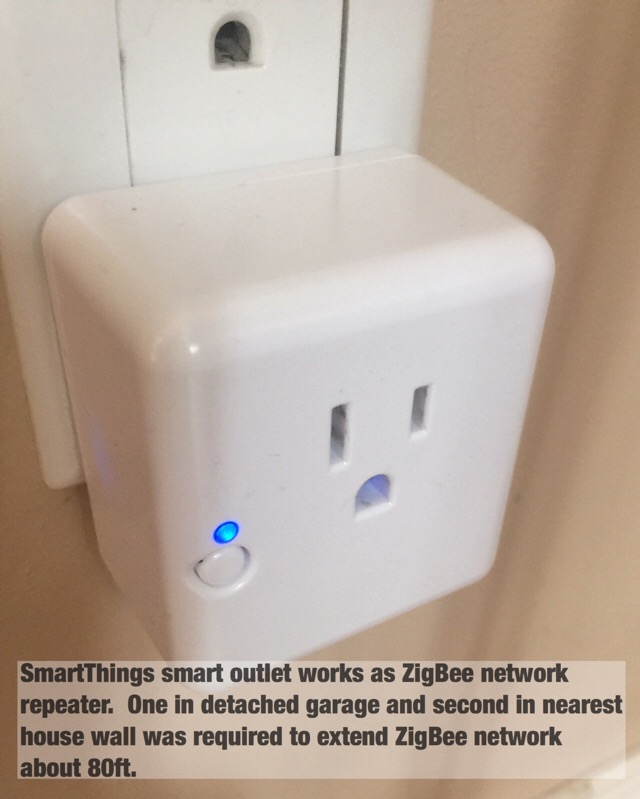
Because I'm using ZigBee SmartThings motion and contact sensors, I needed to add one of these SmartThings outlets into the shop, and another inside our kitchen to extend the ZigBee network 80 ft or so to the detached garage. Zigbee and Zwave use different radios and technology but are similar in that both form a mesh network. Battery operated sensors don't typically work as network repeaters as that would kill battery life. This is why you may need powered Zwave or Zigbee devices to extend a network.
garage_st3.jpg


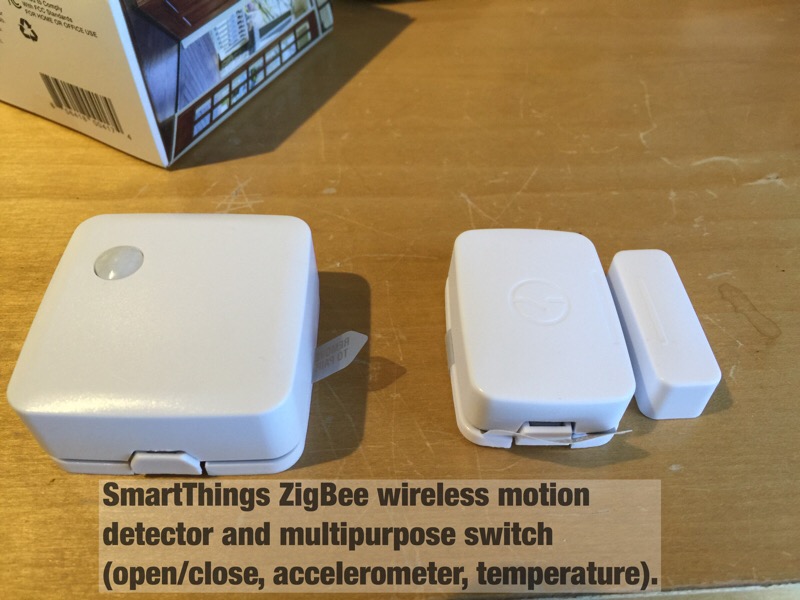
These SmartThings sensors are quite nice. The motion sensor responds very quickly, and also reports temperature. The multipurpose sensor on the right works like a contact switch, but also reports temperature. The multipurpose sensor also hosts an onboard accelerometer which reports both motion and position making it quite handy. With a conventional garage door, you can mount this sensor directly to your door and configure it to report the door position. Door closed, the sensor would be vertical, and open, the sensor would be horizontal. This is not so easy with a roll up door, so I've set it up a bit differently.

garage_st4.jpg


With no way to wire a relay into the motor, I took the wireless keypad apart and noted it used micro-switches. This controller is a bit different as there is no discrete up/down switch. Press once, the door goes up. Press again, it stops. Press again, it lowers. There are four buttons there in case you have multiple doors (up to four) to control.

garage_st5.jpg


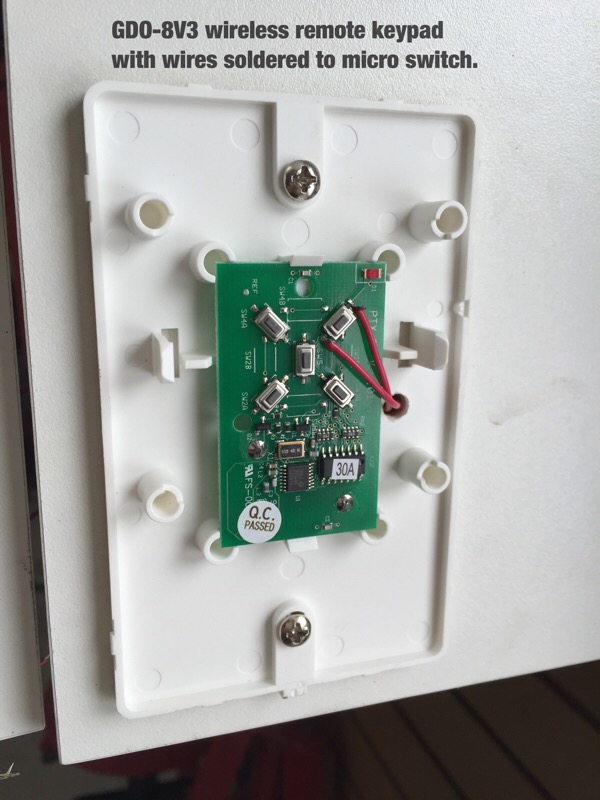
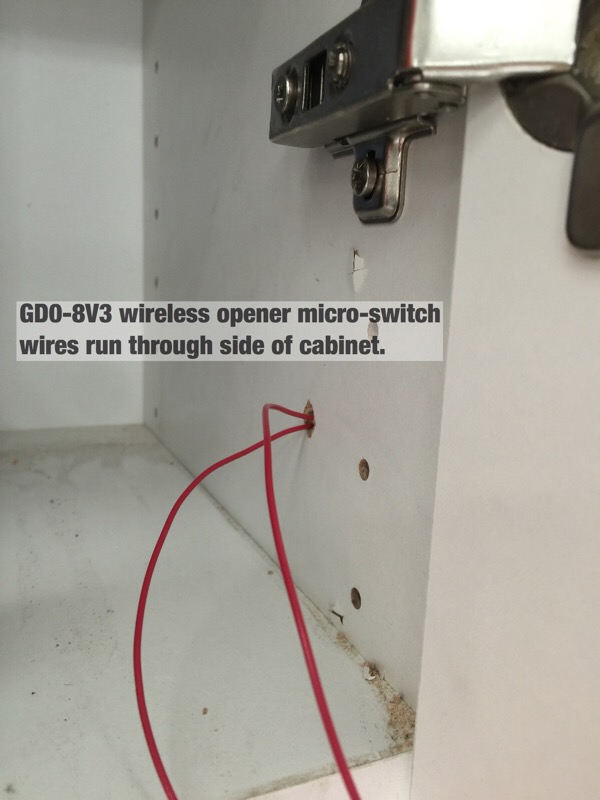
I carefully soldered on some light gauge wires and mounted the keypad back in position. A hole drilled into the mounting plate allows the wire to pass through the cabinet hosting the switch. Touching the wires together is essentially the same as pressing a button on the keypad. The LFM-20 relay will do this for us.

garage_st6.jpg


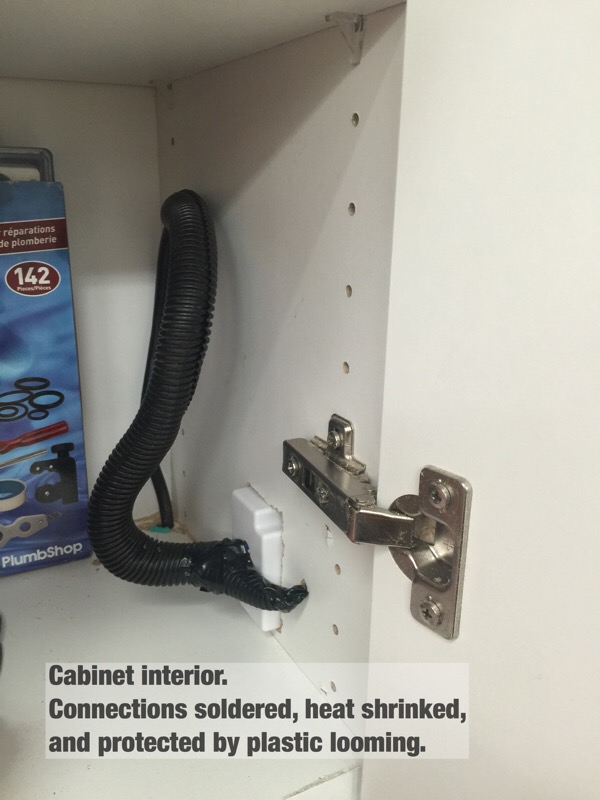
Inside the cabinet. These red wires connect to the LFM-20 blue wires.

garage_st7.jpg


Power comes to the LFM-20 from an extension cord running from a GFCI outlet. The connections are soldered, heat shrinked, and protected by looming.

garage_st8.jpg


After cutting a hole for the LFM-20, the end result is nice and clean.

garage_st9.jpg


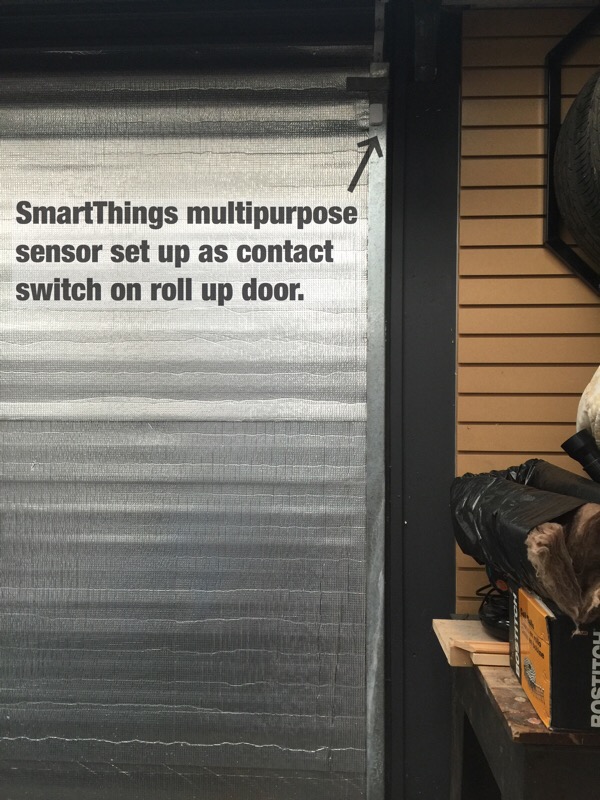
The other important component is a sensor to indicate if the door is open or closed. This is where the SmartThings multipurpose sensor comes in handy. It also reports temperature, so can drive alerts if desired for low or high temps.

garage_st10.jpg


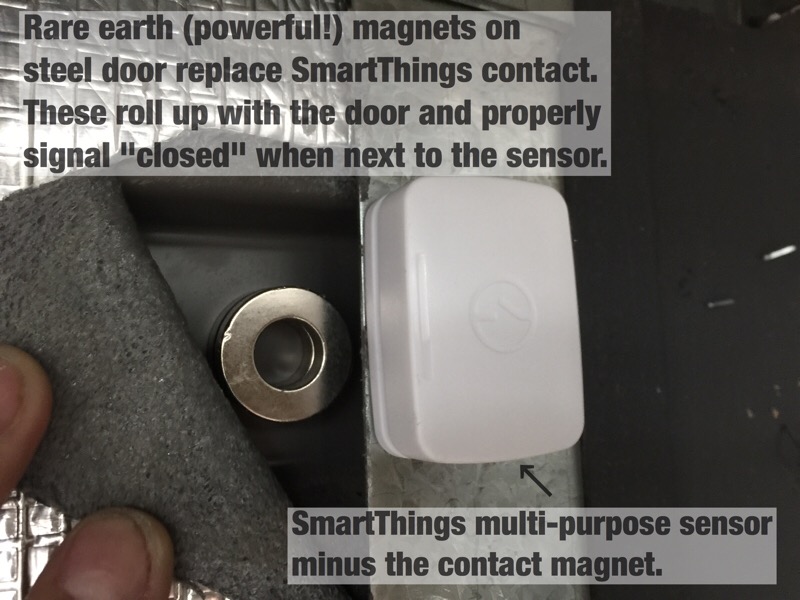
The ST sensor has two components when used as a contact switch. The smaller 2nd bit is just a magnet, that normally needs to line up with the sensor quite closely to indicate open/close. In this case, I'm getting the same effect (note that the magnets sit below the sensor) by using some powerful ring magnets, stuck to the door. They sit nestled in a door corrugation, so can roll up with the door and clear the door stop right above them.

garage_st11.jpg


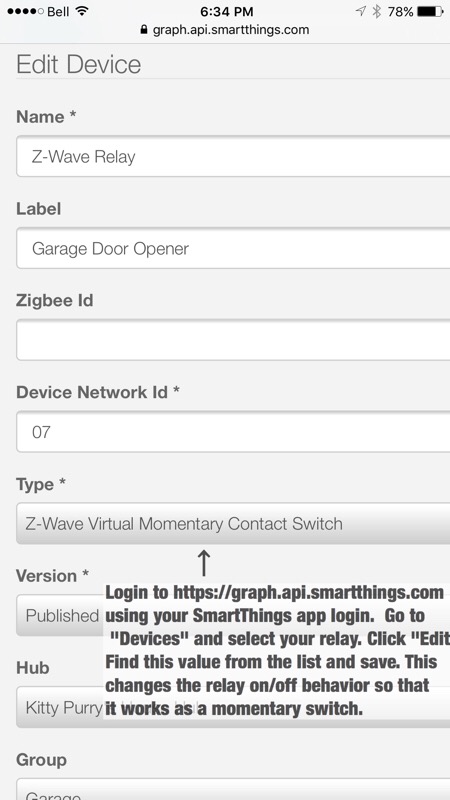
Once you include the relay and sensors into your network, there is one step left to change the behaviour of the LFM-20 relay from on/off to a momentary switch. The SmartThings app is used to manage your network and automations from a smartphone, however to get under the hood like this, you log into their developer web site using your SmartThings app login. This lets you customize code, devices etc. You can also publish third part automation "apps" to yourself, which then show up on your smartphone.


garage_st12.jpg


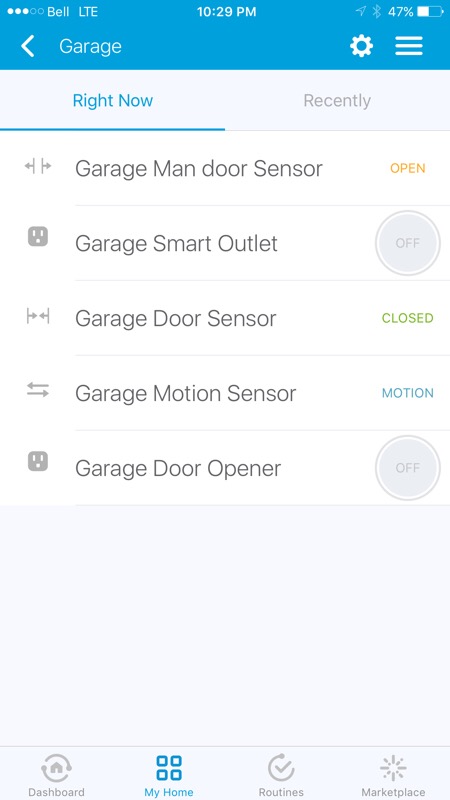
Now, you can see the shop is all set with a few sensors. Touching the "Garage Door Opener" button sends a command to the door relay which will open or close the door anywhere you have a data connection for your phone.


garage_st13.jpg


By setting up alerts in the SmartThings app, I now get notifications on my phone if I've left the house (using geo-fencing built in to the app) and the door is open. Arming the security function also sends a notification if any defined door is open, another way to check. One could also use geo-fencing to disarm the system and open the garage door if a family member returns to the house. I use this feature right now to turn on the entry lights if it's night, and my wife has arrived at the house.

By adding the motion sensor for security, you can leverage its operation to do quite a few things, like turn on any your overhead lights (and turn them off if no motion for say 10 minutes) etc. As I mentioned to JohnnieMo in his thread, you could use the multipurpose sensor output to manage a furnace using this same relay (on/off) and therefore get around the low temp limit most thermostats are limited by.
 

NTxAg

Active member
Joined
Nov 10, 2015
Messages
33
Location
Tyler, TX
Re: Smart Home Automation

I haven't gotten deep into it yet, I run a Aeon stick, but really like how easy to learn InControl has been. I like like the idea of putting a motion sensor or two on the front of the house and having them trigger all the outside security lights at one time.

Sent from my SM-G920V using Tapatalk
 

AirJunky

Well-known member
Joined
Dec 6, 2012
Messages
841
Location
Priest River, ID
After changing a bunch of lights in our house to LEDs, we noticed a drop in the range of our garage door openers. I tried putting incandescent bulbs back in the garage but there was no improvement in the remotes range. I didn't troubleshoot it much more than that so I'm not 100% sure the LEDs were the cause. About that time I found GarageDoorBuddy.com. They sell a remote app for both the IPhone and Android. Plus an app that detects the door position & notifies you any time they go up or down. Everything was under $100 & it works pretty well. If you setup DDNS the range is limited only by your internet service.

We are Dish TV subscribers. Their phone & tablet apps are awesome with tons of integration options tieing them to your TV's. I love the ability to watch something on the phone, or setup a DVR recording from the phone.

And our Yamaha amp has a phone app. Pretty cool ability to play music from the phone, or just to control the audio/video playback. Almost eliminates the need for a remote.
 
Last edited:

Denwood

Well-known member
Joined
Sep 22, 2014
Messages
4,191
Location
Thunder Bay, Ontario, Canada
For anyone looking to replicate the door opener tweaks, there's a great little free app (written by a user, like most of them!) that really adds some intelligence to the system. This basically syncs the smartphone app with the door if you manually open/close it, and adds a lot of intelligence to the system so that SmartThings treats the garage door like a switch. In other words, if the door reversed for some reason, the app will figure this out. Additionally, you can "arm" the system when it detects your smartphone has left your property (the GPS based geofencing works in a ~500ft radius) and have it toggle the momentary relay..but only if it detects that the door is actually open. This is good...a highly recommended tweak if you go this route.

st_garagedevice.jpg


Also, it would an $80 alternative to use one of the sensors temp output to manage your furnace using an LFM20 relay (On=heat, off=no heat). Most stats have a low temp limit around 45F, which would not be an issue using a sensor.

stemp1.jpg
 
To avoid these ads, REGISTER NOW!
Top Bottom