To avoid these ads, REGISTER NOW!

Snap On John Bean Balancer Loose Hub Issue

Michael86

Member
Joined
Jan 30, 2018
Messages
20
Hello,

Buddies "eewb502A" balancer keeps giving him a loose hub error when it's not loose. The bearings were going and he ended up replacing them thinking the error would go away and it hasn't. He's tried tons of steps from the service manual but can't seem to figure out what's going on as no error codes are being thrown. Anyone on here serviced these machines before and know what can cause "loose hub" issues when it's not actually loose?

Any thoughts on this are appreciated.

Thanks,
 
To avoid these ads, REGISTER NOW!
OP
M

Michael86

Member
Joined
Jan 30, 2018
Messages
20
Sorry for the late reply - just noticed this. He ended up buying a second machine to try to swap components to narrow down the issue. But...the new machine has a newer version of the encoder / codestrip. He swapped all the parts he could (most were the same) to see so basically narrowed it down to the encoder system itself. I'm still trying to diagnose it but have done some additional tests with an oscilloscope on the encoder. If you still have your machine send me a PM and we can have a better discussion on it.
 
Joined
Jan 29, 2025
Messages
5
Sorry for the late reply - just noticed this. He ended up buying a second machine to try to swap components to narrow down the issue. But...the new machine has a newer version of the encoder / codestrip. He swapped all the parts he could (most were the same) to see so basically narrowed it down to the encoder system itself. I'm still trying to diagnose it but have done some additional tests with an oscilloscope on the encoder. If you still have your machine send me a PM and we can have a better discussion on it.
Hi Michael86, I'm having the same problem with my John Bean VPI 2. Los (Loose) Hub on start up. I'd very much appreciate any information you've found on this problem... if you would, please. Thank you. Happy New Year.
 
OP
M

Michael86

Member
Joined
Jan 30, 2018
Messages
20
I took the hub apart and did all kinds of things. I am now waiting on a new belt. I took the old one off and it was clearly out of round. I could notice it when manually spinning the hub. I took it inside and let it warm up for a few days then put back on and it worked for a small while. So I bought a new belt but have not yet installed.

The manuals point to belt tension being important but never mention this code. If your bearings are going then a new belt won't fit it though. You'll need new bearings and a belt.

Let me know if you look into the belt and the belt tension. Some of the manuals give a tightening spec.
 
Joined
Jan 29, 2025
Messages
5
I took the hub apart and did all kinds of things. I am now waiting on a new belt. I took the old one off and it was clearly out of round. I could notice it when manually spinning the hub. I took it inside and let it warm up for a few days then put back on and it worked for a small while. So I bought a new belt but have not yet installed.

The manuals point to belt tension being important but never mention this code. If your bearings are going then a new belt won't fit it though. You'll need new bearings and a belt.

Let me know if you look into the belt and the belt tension. Some of the manuals give a tightening spec.
Hi Micheal86, thank you for the reply. In my search for information I did not come across a belt tension spec... But I did try different tensions. I thought that if I tightened the belt really tight it would pull on the shaft pulley to keep it from being loose. Nothing made a difference. I even spun the motor with the belt removed and it still gave the LOS HUB error. On your machine do you ever see the weight/shaft location LEDs lit up?? I know they light up when you first turn on the machine, but mine are never lit after that no matter what I try. I pulled the encoder off the shaft with the cable still attached and turned on the machine. I didn't get any error codes and I could see the red LED on the encoder board lighting up. Did you cover the opening where the encoder sits on the shaft??? Too much light can interfere with the red LED. Try it if you haven't. My hub looks great with no dents or wobble in it. My bearings are a little noisy, but they spin spin easily and smoothly. Again, I get the LOS HUB even with the HUB not turning at all. I hope your new belt fixes your machine. Please let me/us know how it goes. Thanks.
 
Joined
Jan 29, 2025
Messages
5
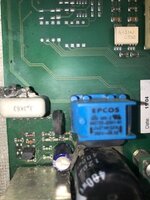
Hi Michael86, I wanted to share with you some findings I had today. I removed the encoder pcb and inspected the encoder ring, for the second time under a magnifying glass, on the shaft. The rubber underneath the ring was squishing up a very little bit between the slots. I used some brake cleaner, Isopropyl alcohol, and my fingernail to remove the rubber. I put it back together. To my surprise the motor turned several times before giving me the LOS HUB message. Progress for sure. So I removed the encoder again and looked at the LED and sensors. There were several specs of dust on the lens. I brushed them off with a Q-Tip and then blew them off with compressed air. I put it back together. This time I positioned the encoder carefully in the center of the tiny slot on the tube. (If you turn off all the lights you can see the red LED glowing through the pcb) I entered the rim diameter and closed the lid. The rim kept spinning and stopped with a readout of the weights and my weight location LEDs working!!!! WOW! I FIXED IT! ....... NOT! I didn't change any weights and spun it again to see if I could repeat for accuracy.................... midway through the spin cycle a "magical **** of smoke" emerged from the supply board. I scrambled to pull the power cord!! Oh no.... that can't be good. I pulled the power supply board and looked for what went up in smoke. The 3u3k63 capacitor had puked its guts out its side. Please see picture if I can upload it. So, to recap. I don't think it's our loose hub or bearings. It's the encoder, ring, or circuit. If your encoder ring is extremely clean, no dust on the led and sensor, and you can see the red led glowing in the dark....... maybe we should replace all the 20 yr old capacitors on the supply board and start again. I'm going to check the other components around the blown capacitor and replace the old capacitors and parts. On another problem I'm having... could you please send me a picture of your supply board with the blue capacitors.. please?? This poor machine was left in the sun with the weight tray off and the numbers on the top of most components are fading off. Thank you very much!!!!
 

Attachments

  • IMG_9333.jpg
    IMG_9333.jpg
    48.4 KB · Views: 17
  • IMG_9331.jpg
    IMG_9331.jpg
    65.8 KB · Views: 18
To avoid these ads, REGISTER NOW!
OP
M

Michael86

Member
Joined
Jan 30, 2018
Messages
20
Hey so sorry for the late reply. I had to take a long break from this project and am hoping to start back up soon. Were you able to fix it? I'm planning on taking apart the power supply board as I was wondering if there were issues with that. I had thought that the previous owner did some work with that but apparently not. So I wanted to see if the capacitors showed any issues.
 
OP
M

Michael86

Member
Joined
Jan 30, 2018
Messages
20
My board is different than yours. 1000010399.jpg
 

Attachments

  • IMG20251010181906.jpg
    IMG20251010181906.jpg
    555.7 KB · Views: 8
Joined
Jan 29, 2025
Messages
5
Hi Michael86- I hope you're doing well and your VPI is working now. I, too, just got back on this project. Thank you so much for sharing those pictures of your pcb!! It confirmed that my 3.3uf 63V was not the right component in that position. I had blown up two other 63V capacitors before I just stuffed a 3.3uf 250V polypropylene capacitor there and it stopped blowing up. I'll replace it with the one you have on your board. Thanks, again! I'm still fighting with my machine though. The motor is now turning slowly. I tested the main capacitors and they test fine. So I'm looking at the IGBT (motor control circuit) and switches. I did discover that if I run the machine with no tire mounted I get the Loose Hub message. But when I put pressure on the shaft with my foot and run it I'll get the weight measurements and weight position lights on. I'll be pulling the board soon to check those components out. Please let me know if you got yours working. Thanks.
 
OP
M

Michael86

Member
Joined
Jan 30, 2018
Messages
20
Did some work recently then had to put aside. But tearing into it again. I'm trying to identify the signal between the main box and the display for incrementing the shaft.

I have a slightly newer machine as well now which is working. Trying to get this one going though. I'll update more when I can.

I can now pull the calibration files and modify and reflash the units eeprom though. Which is helpful.
 

djbmw

Well-known member
Joined
Jun 20, 2013
Messages
1,129
Location
Ottawa, Ontario, Canada
I would have thought it uses the piezo ceramic transducers to detect a "loose hub",... no? There's two.. one mounted to a vertical bolt that connect to the hub assembly/shaft, and one that connects to a horizontal bolt that also connects to the hub assembly/shaft.

The wheel position sensor cant provide any data aside from shaft position...

I did a walk through of this on my old RAV G120 balancer:
 
OP
M

Michael86

Member
Joined
Jan 30, 2018
Messages
20
Great video and I agree - start with the piezo's.

One of the things I tried originally was measuring the signals on my scope from the Encoder PCB. In december I made a new test cable and instead of plugging into the Encoder PCB - I plugged into the Pwr board directly. This has the encoder cables as well as the transducers.

When I was scoping this I noticed that sometimes one of them would get no signal and I would get the "loose hub" error. I ended up ordering the parts and remade the entire cable. Be careful with the transducer connections. pull the black cap from each wire, pull up evenly on both sides of the wire, then put the new one in and press down with the black cap to pierce. Also ensure you get the correct wire on the piezo so your signal isn't backwards.

This seems to be a common theme though - the cables are getting older and the contacts might be starting to corrode. I've now also ordered a cable to redo the display connection. I also just replaced the 40pin board cable and connector from the PWR supply to the processor board.

My current issue (which might just be because it's not programmed) is that when I turn on, I'm not getting ANY movement on the display when I'm in the F menu. Normally, when you go into that menu you can use the display Up or Down arrows OR rotate the shaft and it will increment. I'm not getting the increment.

When I try to go into programming, I spin the wheel and the motor screams up to an overamperage condition and shuts down because the encoder signals are not being processed. So that is my primary concern at the moment.

It's either a dead chip on the board or maybe because the factory calibration was lost, it can't be reprogrammed in the field. This seems odd though because there are clear instructions on how to do this in all of the manuals. So I'm leaning towards another issue.

I currently have 3 of these machines. I picked up 2 with unknown issues hoping they wouldn't have the same issue. Unfortuately, after fixing the easy issues I determined that my 2nd identical machine (the A version) has the same issue. Whereas the newer (B) machine is working now. But this machine has the newer encoder as well as the newer power supply board. So isn't as helpful for my diagnosis.

As for the EEPROM - I plan on resetting my machine to blank again, then doing individual programming and pulling the files one by one to compare and find out where in the data each type of calibration is stored. That way, I hope to flash an incorrect "calibration" file to the machine to see if having an actual calibration would help my specific issue. It will also give me confidence in the future if I need to blank my machine or if I have other issues as I'll have a copy of the eeprom data.

There is alot of information on my current issues on the badcaps forum in a post titled hofmann geodyna 6300 wheel balancer. It's actually talking about a 9300. But our wheel balancers were sold under multiple names. As such, the longer we wait (not helpful I know) the more information should be coming out online on how to fix them.

There are also some posts online about the power side of the PCB - Can't remember where I found them. They might even be linked to in here. But all my caps appear to be within tolerance.

If you make a new cable and that fixes it please let us know! Or if you have a scope and want to check first then make an adapter cable with test wires so you can check for that signal. Though the parts are so cheap on ebay. Probably just worth remaking the cable first.
 
Joined
Jan 29, 2025
Messages
5
I would have thought it uses the piezo ceramic transducers to detect a "loose hub",... no? There's two.. one mounted to a vertical bolt that connect to the hub assembly/shaft, and one that connects to a horizontal bolt that also connects to the hub assembly/shaft.

The wheel position sensor cant provide any data aside from shaft position...

I did a walk through of this on my old RAV G120 balancer:
Thank you for sharing your video. Good information.
 
To avoid these ads, REGISTER NOW!
Top Bottom