To avoid these ads, REGISTER NOW!

The Everything 3D Printer Thread

kaymccampbell

Well-known member
Joined
Feb 27, 2015
Messages
29,420
Location
Upstate New York
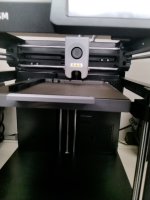
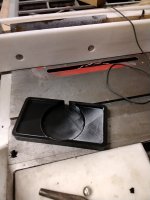
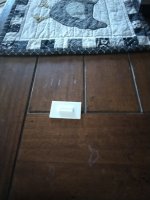
I'm enjoying my Flashforge Adventurer 5M. So far evolved from the old Ender. I love how it's often the smallest part of the production chain from CAD to useable part. The white thing is a shim foot for the icemaker, that I pumped out in 15 minutes, cause it was sagging. Right now the Adventurer is churning out the first upper shell piece. The one I remixed for a better screen position. I swapped from Flashprint to Orca to get selective fuzzy skin, which I had so much fun applying. It should cover a multitude of sins.
IMG_20260311_132934.jpgIMG_20260311_213359.jpg
 
To avoid these ads, REGISTER NOW!

WildBill

ALLIANCE MEMBER
Joined
Aug 20, 2021
Messages
1,977
Location
PNW

kaymccampbell

Well-known member
Joined
Feb 27, 2015
Messages
29,420
Location
Upstate New York
Which case are you printing? I did the factory one on my first 5M but did this one on my next two, faster print using less material. This guy also has a bunch of other nice pieces for the 5m. https://www.printables.com/model/1130485-flashforge-adventurer-5m-ad5m-minimal-diy-enclosur
I'm printing the factory case. I saw the one you printed, but I hate the angled screen mount. All I see is glare. So I remixed the factory Riser A to hold the screen vertical, so I can stare right into it without glare.
 

WildBill

ALLIANCE MEMBER
Joined
Aug 20, 2021
Messages
1,977
Location
PNW
I'm printing the factory case. I saw the one you printed, but I hate the angled screen mount. All I see is glare. So I remixed the factory Riser A to hold the screen vertical, so I can stare right into it without glare.
I get that, they definitely should have made it adjustable. My upper rack ones are kinda hard to see sometimes. I am surprised nobody has designed an adjustable mount for them.
 

mike93lx

ALLIANCE MEMBER
Joined
Dec 9, 2013
Messages
37,373
Location
Richmond, VA
I want to get my printers out of the guest room and into the garage, but they need a cabinet to do that, so I've been messing around in Fusion and came up with this. 62" W, 24" D, 84" H

Each printer will be on a storage/poop catcher (https://makerworld.com/en/models/13...nter-storage?from=recommend#profileId-1389787), which will all be on a platform with full extension drawer slides to allow accessing the back of the printers.

On the right will be a stacked AMS setup (https://makerworld.com/en/models/903076-dual-ams-sliding-rack-bowtie-assembly#profileId-2727752)

Printer 3 will be on the middle shelf. If/when I grab an H series printer, it would go here and one of the P1S's would go away.

Power switching will be done with a rackmount PDU and I'll have a little over 2 feet of workbench to keep a laptop, tools and some form of filament storage. The UPS is a 1500VA APC

thoughts?

1773451971428.png
 

WildBill

ALLIANCE MEMBER
Joined
Aug 20, 2021
Messages
1,977
Location
PNW
As kaymccampbell mentioned having them down low might be irritating. I have six printers on a heavy garage rack and even though I raised the shelves as much as possible the three on the bottom shelf are only about 2ft off the floor, and it constantly bugs me to do anything with them. Makes every little thing somehow way harder.
 

mike93lx

ALLIANCE MEMBER
Joined
Dec 9, 2013
Messages
37,373
Location
Richmond, VA
I definitely hear that. Problem is floor space. I just don't have the room to get it all up at a nice height

The hope here is that the bottom two printers just churn out stuff without nozzle changes or manually feeding anything. Load up the AMS and let them eat. Messing around would be with the top one.

I'll give it some more thought and see if I can come up with something... 10ft of counter space is a lot for my little garage
 

ER70S-2

Well-known member
Joined
Jan 2, 2015
Messages
797
I had my H2D on the floor for a few weeks before putting it on a table. It sucked on the floor. It's now on the 25" tall table which is perfect.
 
To avoid these ads, REGISTER NOW!

mike93lx

ALLIANCE MEMBER
Joined
Dec 9, 2013
Messages
37,373
Location
Richmond, VA
It's why I have only 1 printer.
It definitely complicates things a bit, but I'm treating it as a fun problem to solve.

I need to clean out and organize the garage and I want this printer setup to be nice to use. I know that I can accomplish that, just need to figure out how.

One other consideration on height is that I am trying to have my kids involved, particularly in these wheelchairs, so having them at a more accessible height is helpful
 

ER70S-2

Well-known member
Joined
Jan 2, 2015
Messages
797
Are you going to push filtered air into the cabinet? I could never put a printer in my garage. The stuff it would ingest...
 

cody1325

Well-known member
Joined
Apr 17, 2024
Messages
1,075
Location
Southwest Virginia
I feel like an idiot. My A1 had started with a clicking extruder and terrible first layers. I had assumed "clog".

First of all, nozzle. Multiple cold pulls--it was fine. No clogs.

Extruder gear--some residue from the black TPU I use for tires, but fine.

AMS and the PTFE--it still clicked with the simple top mount spool holder.

I also blamed it on a spare tube clip/organizer I'd printed that had smaller diameters than the injection molded ones in the box, but no, it still clicked.

But guess what it was--I had put the buckle on wrong over a month ago, and put it back wrong multiple times after that. It was causing the nozzle to sag some, and of course cause the extruder to click due to not feeding filament correctly.

Here's a diagram off Bambu's troubleshooting for bad first layers, but not nozzle clicking.

I'd had it installed the second way. It's now the first way, and my first layers are back to normal.

Hours and hours to troubleshoot something I should've noticed off the bat, and a 5 minute fix.

Screenshot from 2026-03-14 18-41-59.png
 

mike93lx

ALLIANCE MEMBER
Joined
Dec 9, 2013
Messages
37,373
Location
Richmond, VA
OK, I'm pivoting off the cabinet idea and am looking to kill two birds with one stone. I need a bigger tool chest anyway, so I'm thinking 72-84" and put the printers on that. I'm looking at 80/20 for a DIY hutch

They'll all be at a nice working height and I'll triple my tool storage, which I desperately need
 

mike93lx

ALLIANCE MEMBER
Joined
Dec 9, 2013
Messages
37,373
Location
Richmond, VA
I feel like an idiot. My A1 had started with a clicking extruder and terrible first layers. I had assumed "clog".

First of all, nozzle. Multiple cold pulls--it was fine. No clogs.

Extruder gear--some residue from the black TPU I use for tires, but fine.

AMS and the PTFE--it still clicked with the simple top mount spool holder.

I also blamed it on a spare tube clip/organizer I'd printed that had smaller diameters than the injection molded ones in the box, but no, it still clicked.

But guess what it was--I had put the buckle on wrong over a month ago, and put it back wrong multiple times after that. It was causing the nozzle to sag some, and of course cause the extruder to click due to not feeding filament correctly.

Here's a diagram off Bambu's troubleshooting for bad first layers, but not nozzle clicking.

I'd had it installed the second way. It's now the first way, and my first layers are back to normal.

Hours and hours to troubleshoot something I should've noticed off the bat, and a 5 minute fix.

Screenshot from 2026-03-14 18-41-59.png
Won't make that mistake again!
 

kaymccampbell

Well-known member
Joined
Feb 27, 2015
Messages
29,420
Location
Upstate New York
OK, I'm pivoting off the cabinet idea and am looking to kill two birds with one stone. I need a bigger tool chest anyway, so I'm thinking 72-84" and put the printers on that. I'm looking at 80/20 for a DIY hutch

They'll all be at a nice working height and I'll triple my tool storage, which I desperately need
That's more like.
 
To avoid these ads, REGISTER NOW!
Top Bottom