To avoid these ads, REGISTER NOW!

The Everything 3D Printer Thread

laser3kw

Well-known member
Joined
Nov 17, 2012
Messages
7,276
Location
northen IL
Just impressed myself. I did my first part in Fusion 360 and lo and behold, Fusion has a built in link to recognize my Cura slicer! One click and it opens and imports my model where I can then manipulate it's position and the tweek the settings for the printer.
 
To avoid these ads, REGISTER NOW!

purplezr2

Well-known member
Joined
Jun 1, 2010
Messages
5,290
Location
Central MN
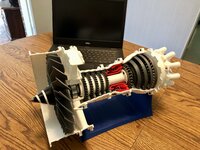
I love gas turbine engines so I found this model of a Rolls Royce Trent engine on Thingiverse from Catiav5ftw. The Bambu churned through the 40+ parts without a single issue.
IMG_E6524.JPG
I feel like I need to print this, any recommendation on how you did it?
 

tlevan03

Well-known member
Joined
Oct 24, 2011
Messages
264
Location
Chesapeake, VA
I messed something up. I added the BL Touch to my ender 3 V2 and I downloaded the firmware update. Saved it to a clean formatted card per the instructions. Now I have a blank blue display screen. I unplugged the machine and let it sit and it’s the same. Please help!!!


Never mind. I re flashed it and I fix!


Well, I thought it was fixed since my screen turned back on but now I have another issue. The printer acknowledges when an SD is removed or inserted but on the menu it says, "no TF card". I had deleted the bin file and reformatted the card back to defaults. Everything else seems to work but the screen is a little glitchy. I believe that I probably installed a non-compatible firmware. I will try what @Poolshark314 has recommended. I'm stumped since this really isn't my area of expertise.
 

loganb

ALLIANCE MEMBER
Joined
Dec 29, 2011
Messages
5,495
Location
Omaha, NE
I've been printing a lot of organizer bins recently...some standard cubes, some custom sized to fit an existing bin...right now it's these blue bins to fit into some existing Husky organizers to divide the bins up for denser storage:
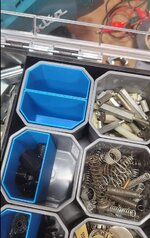
bin.jpg

The inside of the gray husky bin is roughly 2.5" so these are sized to drop down snugly inside

I've got a fair number I want to print so have been speeding up the Prusa in order to try and run them faster and was hitting a limit that no matter what I did to settings I couldn't get past around 50mm/s speed. I had primarily been printing a single pair at a time as I finalized sizing then was testing results of speed increases but this shows the "visualizer" of speed it was printing at:

auto cooling on.jpg

The max speed settings are set far higher, and the hot end volumetric limit wasn't close to being hit either until I stumbled on a post online(thanks Reddit) reminding about auto cooling:
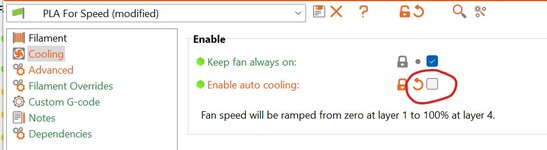
auto cooling.jpg

Boom....light bulb clicked. The print time per layer, which was made worse by trying to go faster and only printing (2) bins was throttling down the machine so that there was more time for the layer to cool before the next layer was piled on. PLA needs a lot more cooling than some filaments, so that made it worse as well

Uncheck auto cooling and boom....

auto cooling off.jpg


Went from 56 min to 41 min with a single click...nice! These aren't cosmetic parts so they won't be as good of results as had I kept it slower, and I'm running a .6 Bondtech CHT nozzle at an elevated temp(225) to allow greater total filament flow to allow to max this out like is shown...but for what this is it's a nice improvement and close to 2x as fast as at stock settings with a .4mm nozzle.

It's not Bambu X1 speed....but I hope to give it a try in the Voron here soon and see what it can do :)
 

loganb

ALLIANCE MEMBER
Joined
Dec 29, 2011
Messages
5,495
Location
Omaha, NE
Quick follow up....I tried to get some pictures of slower then faster bins to show the quality difference. These are taken in very harsh light conditions and trying to show the layer differences...in normal viewing they look really good and shows they could definitely go faster on a faster machine.


This is at approx 55mm/s print speed

before bin.jpg

And this is at the maxed out 100 mm/s. In this case this is hitting both the machine max of 100mm/s and the volumetric hot end limit as well so it's going to start to get diminishing returns(on this machine) to try and go faster

after.jpg

This one shows a bit more ringing or artifacts in the print and not as consistent of a surface. These are also tapered sides to match the draft of the container they go into, so that's not just a straight wall which makes it a bit more complicated as well but may also help to improve appearance.

I'm probably going to call this good for now in terms of speed quest....but if I push this anymore I'll probably see about swapping to a 1.0 nozzle size and seeing if I can slow it down and print the perimeter in a single pass instead of the (2) passes it's set on right now.

On a semi related note....if anyone is interested in getting into printing, my brother ordered a Bambu X1C that shows up on Friday and will be selling his Prusa MK3+ and assuming the Pi that goes with it for easy web access. Think it's 4 years old, very well cared for...just doesn't need 4 of them so assuming the X1C does what he wants will sell the Prusa and his baby Voron v0. DM me if interested and I'll put you in touch....FB Marketplace values seem to put them in that 500 to 600 range depending on how many build plates and other things it comes with but I don't know what he'll be asking....but it'll be in that range. Located in Manhattan KS but would ship.
 

LS1-IROC

Well-known member
Joined
Aug 6, 2011
Messages
173
Location
Grand Rapids MI
I feel like I need to print this, any recommendation on how you did it?
Download the model files off Thiniverse and go to town. There is a complete BOM list included with the files you download. It's alot of files but pretty straight forward. I printed it all from PLA using the generic settings in Bambu slicer.
 

draco_1967

Well-known member
Joined
Jan 3, 2021
Messages
205
Location
Utah
I gave up on the Priline CF PLA+. It constantly either clogged the nozzle/hotend, or skipped in the extruder. I designed some brackets to hang a new fender on my mutant Ninja dual sport. I started printing in PETG when I had it with the CF filament. The top brackets are done, and they look nice. There is a little stringing, but nothing major. A pass with a lighter will clean it up.

pNfVTFPIp979KaB9EQvQ3Yq3tAu5N2nTaN5v02MZ_QwR=w2400.jpg
 

jeepxj

Well-known member
Joined
Mar 2, 2008
Messages
17,831
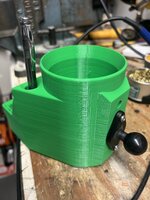
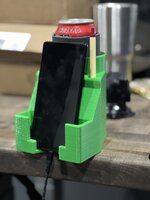
@jblnut This green enough?

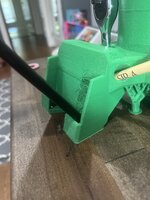
no idea how the library lady jacked up the top of the phone area but meh. this is for fitment more than anything. It feels large and in charge thats for sure.

2023-05-07 14.26.03.jpg2023-05-07 14.35.05.jpg

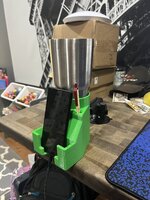
but thats the whole entire point here. phone holder with cable in that doesnt have to get undone every time you pick it up/put it down.
2023-05-07 14.38.18.jpg
 

jeepxj

Well-known member
Joined
Mar 2, 2008
Messages
17,831
@jeepxj looks good enough to me !!!!!

in making is lean back like that it really increases the size. im also worried about it bouncing back and forth going over the field. what do you think about making it more like a slot the phone drops into. harder to see from the seated position tho. right now the phone slot is a full inch in size. my iphone with a decently thick case on it is about .55 thick. thinking of going down to .65 to .75 in slot. this is what makes 3d printing interesting to me. cause now I can make these changes and readily see how it feels.
 

jeepxj

Well-known member
Joined
Mar 2, 2008
Messages
17,831
I think an inch is way to wide. 0.65 should fit most phones I'd think :dunno:

yea i'm thinking of making it more tidy and slotting in neatly vertically. but still with sliders to get it into its home without looking at it for when the auto steer kicks off.
 

jeepxj

Well-known member
Joined
Mar 2, 2008
Messages
17,831
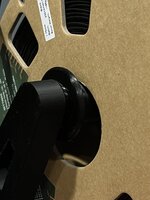
already modding things. made a sleeve to prevent the cardboard from squeaking on the filament stand

2023-05-10 14.17.21.jpg
 
To avoid these ads, REGISTER NOW!

WoodsTruck

Well-known member
Joined
Jan 12, 2013
Messages
1,019
I made GPS receiver mount that suction cups to my windshield in front of the mirror. When we had our heat dome event in 2021 it got super hot in the cab and the thing warped a little bit so the Garmin receiver wouldn't fit. I haven't had any issues with instability besides that super heated event.
 

jeepxj

Well-known member
Joined
Mar 2, 2008
Messages
17,831
I made GPS receiver mount that suction cups to my windshield in front of the mirror. When we had our heat dome event in 2021 it got super hot in the cab and the thing warped a little bit so the Garmin receiver wouldn't fit. I haven't had any issues with instability besides that super heated event.

pla or petg?
 

WoodsTruck

Well-known member
Joined
Jan 12, 2013
Messages
1,019
PETG. I started my printer up on PLA, but it sounded like it was more susceptible to environmental issues so I have only purchases PETG since.
 

jayz66ragtop

Well-known member
Joined
Sep 11, 2009
Messages
1,521
Location
SoCal
Had something interesting happen with the XC-1 over the last couple of weeks and finally got to fixing it.


TLDR; Somehow a small piece of filament was plugging the top of the hot-end but not far enough into it to melt. This prevented filament from feeding into the hot-end. I tried to use the little "poker" to clear it from the bottom but to no avail. I Had to R&R the hot-end, pop the plug out and all was good.


Symptoms: Printed with PP but wasn't happy with the design so I decided to switch to PLA until it was satisfactory and then reprint in PP. I had the AMS unload PP and load PLA but never printed anything. Decided to switch back to PP and print something else BUT when I tried to load the filament it would go in about an inch and then you could hear the extruder struggle to feed further. Tried it multiple times and even tried other filament both through the AMS and hand feeding it but same thing, could feel the filament hitting something and not feed further.


I tried using the little "poker" to clear out the hot-end multiple times but no luck. Thinking I could maybe melt whatever was in the way I heated the hot-end up to 300c and poked around again with no luck. Was concerned the extruder broke a gear or something but pressed on. I hadn't taken the hot-end apart just yet so was a little intimidated to take it apart. Had a small issue with one of the screws but was able to get past that. With the screws removed I tugged on the hot-end assemble a couple of times but it seemed stuck and though I missed a screw but eventually it popped loose. Inspecting the hot-end I noticed a small piece of grey filament plugging the top side of the hot-end. Weird as the last two filaments I'd printed with were both black. I scraped my fingernail across this plug and it came right out. Tried pushing a small cutoff of filament into the hot-end and seemed to go in just fine so I proceeded to put everything back together. Did a test print and all was right in the world again.

Not sure how that little bit of filament was still stuck in there and why it didn't melt but going to chalk it up to a fluke but keep it in the back of my mind if it happens again. Since the last time I printed grey filament was both PLA and ABS I'm not sure which material it was.

As to the hot-end screw issue, when I went to remove them I noticed the head of one of the screws didn't look in great shape and tried to use the provided allen key to take it out but nothing doing and was afraid of really screwing up the head. Grabbed a quality allen key and pushed it in as far as I could, when I pulled the allen key out a bur fell off the head which really scared me because I didn't pull the screw all the way out and thought the head fell off. Thankfully it was just "extra" material that was what made it not look well and all is good again.
 

jeepxj

Well-known member
Joined
Mar 2, 2008
Messages
17,831
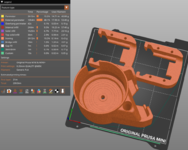
Little worried about the flip out possibility banging across end rows or a badger hole.

h
2023-05-17 09.01.54.jpg


height increased.
pen hole guide since everyone seems to struggle getting it in the hole... or so im told.
Screenshot 2023-05-17 at 9.43.35 AM.png
 

jeepxj

Well-known member
Joined
Mar 2, 2008
Messages
17,831
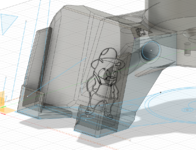
Added secondary bolt hole in size up to 3/8" Should allow for aiming the phone screen however you sit in the tractor seat.
Screenshot 2023-05-17 at 9.49.37 AM.png
 

jeepxj

Well-known member
Joined
Mar 2, 2008
Messages
17,831
Are these for tractor cabs or??? I thought I saw end rows mentioned?

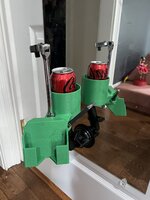
Indeed they are sir. Got more ideas for it i'm missing?

V60591 hitting the printer today.

- slightly larger main hole to accommodate the emergency harbor freight 38 ratchet
- Left side pencil holder.
- where the hell is the dang coffee can with the shear bolts shear bolt holder.
- cable clip mounts
 
To avoid these ads, REGISTER NOW!
Top Bottom