To avoid these ads, REGISTER NOW!

The Everything 3D Printer Thread

Jehannum

Well-known member
Joined
May 3, 2012
Messages
1,348
Location
Albuquerque, NM
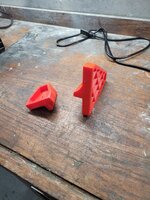
The boy knocked out replacement crossfeed and compound handles for my old Atlas lathe in tinkerCAD.

They'd been on my "to do" list for a while, but he wanted to have a go yesterday and I won't say no to that.

5a10dbab-8ca9-4c3e-bcca-fece436af3e1.jpg

The old zamak ones were (common theme here) broken. He doesn't really know slicer settings for anything but PLA, so I'll print them up in ABS or Taulman 910 and replace the old ones. Probably also do Tubalcain's big dials too, as mine are pretty unreadable.

In case anyone needs to make their own (instead of paying $20 a pop on eBay for the same thing): https://www.thingiverse.com/thing:6311085
 
To avoid these ads, REGISTER NOW!

Xti04

Well-known member
Joined
Nov 11, 2016
Messages
2,285
So far we are still trying to get Linux onto my sons chromebook so we are currently limited to what we can print off the Bambu app. There are all kinds of things for him to print out and he has been making minecraft characters for him and his buddies. I think once we get his computer situated and he can install a slicer and pull files from thingiverse or design his own things it will open up a lot more for us both. So far he is happy with what he can lookup now. I want to print some of those boxes for Christmas presents !
 

Cruzan80

Well-known member
Joined
Jul 22, 2015
Messages
4,163
Location
Denver, CO
Just to make sure you are aware...

While Thingiverse is an amazing resource, not all of the files there are designed for 3D printing (and even of those which are designed for printing, not all of themre designed WELL). Some of them are more for rendering software and animation. So if you get a file, and it is having trouble printing, check the comments and "Finished prints" tab to see if it is an issue with the file, or with your slicing/printer. Just before you start chasing your tail over something that ultimately isn't your issue.
 

Xti04

Well-known member
Joined
Nov 11, 2016
Messages
2,285
Just to make sure you are aware...

While Thingiverse is an amazing resource, not all of the files there are designed for 3D printing (and even of those which are designed for printing, not all of themre designed WELL). Some of them are more for rendering software and animation. So if you get a file, and it is having trouble printing, check the comments and "Finished prints" tab to see if it is an issue with the file, or with your slicing/printer. Just before you start chasing your tail over something that ultimately isn't your issue.
We have noticed even on the Bambu appcthat not everything prints out great. So we look for designs that have lots of good comments to help us along there, but thanks for the tip! I will make sure I stay on top of him and what designs and prints he is trying to do.
 

Jehannum

Well-known member
Joined
May 3, 2012
Messages
1,348
Location
Albuquerque, NM
Just to make sure you are aware...

While Thingiverse is an amazing resource, not all of the files there are designed for 3D printing (and even of those which are designed for printing, not all of themre designed WELL). Some of them are more for rendering software and animation. So if you get a file, and it is having trouble printing, check the comments and "Finished prints" tab to see if it is an issue with the file, or with your slicing/printer. Just before you start chasing your tail over something that ultimately isn't your issue.
I only publish things that I've used successfully.

So, you've got that goin' for you.

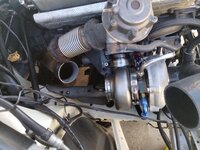
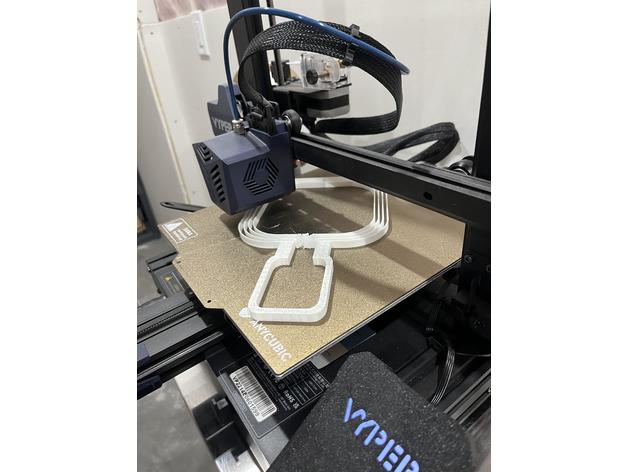
On my printer right now are a bunch of 3" mandrel bends to mock up the modifications to the downpipe I have to make for my Audi's new turbo.
 

draco_1967

Well-known member
Joined
Jan 3, 2021
Messages
205
Location
Utah
How are you getting that carbon fiber weave texture on some of the prints? Is that kind of like the ironing setting on the top layer?
 

Snip's

Well-known member
Joined
Apr 29, 2017
Messages
1,847
Location
Ohio
I've been following 3D printing developments for a few years now... Haven't pulled the trigger yet...
It's almost like waiting to buy a computer... Hold off for the next model because it's going to be better than the current one...
You end up never taking the plunge... Just watch time go by...
Since I retired 2 years ago, I'm thinking now is the time to jump in... Something to keep "the little gray cells active"...
Want something hassle free, so to speak, to get my feet wet and then move on to something better after a while...
While I ran my own business I also did 2D CAD drawings for the shop, so I'm guessing my learning jump to 3D CAD won't be difficult for me...
At this point I'm thinking the Creality Ender 3 V3 KE will be the one I'll get when it's released... Unless something better comes out (JK)

Hope to contribute to this thread in the future...
 

purplezr2

Well-known member
Joined
Jun 1, 2010
Messages
5,290
Location
Central MN
Just to make sure you are aware...

While Thingiverse is an amazing resource, not all of the files there are designed for 3D printing (and even of those which are designed for printing, not all of themre designed WELL). Some of them are more for rendering software and animation. So if you get a file, and it is having trouble printing, check the comments and "Finished prints" tab to see if it is an issue with the file, or with your slicing/printer. Just before you start chasing your tail over something that ultimately isn't your issue.
I have had no issue with printing things from Thingiverse, have to use common sense when pulling down files.
 

LeonardY

Well-known member
Joined
Apr 16, 2011
Messages
5,022
Location
Southern California
Not that you asked for advice but I thought this might help.

Since I retired 2 years ago, I'm thinking now is the time to jump in... Something to keep "the little gray cells active"...
I also retired a couple of years ago. When is the right time to jump in? Always "now." Puzzling over something is always good for the brain.
I debated over getting one for years. Since I was a designer and model maker at work, I really didn't have a need. I could always use one of the machines at work. But in reality, I either didn't have the time or the machines were running for work. Having one at home was a big plus. BTW. I now have three.
I also did 2D CAD drawings for the shop, so I'm guessing my learning jump to 3D CAD won't be difficult for me...
It takes more time than you would think. You're working with solids rather than lines. I would get a program now and start before you get your printer. There are a lot of programs out there for free. Find one now that you like the interface. I use FormZ. There is a free version of it.

You will also have to learn slicing software.

There will be a myriad of things to keep the "the little gray cells active."
 

Snip's

Well-known member
Joined
Apr 29, 2017
Messages
1,847
Location
Ohio
Not that you asked for advice but I thought this might help.


I also retired a couple of years ago. When is the right time to jump in? Always "now." Puzzling over something is always good for the brain.
I debated over getting one for years. Since I was a designer and model maker at work, I really didn't have a need. I could always use one of the machines at work. But in reality, I either didn't have the time or the machines were running for work. Having one at home was a big plus. BTW. I now have three.

It takes more time than you would think. You're working with solids rather than lines. I would get a program now and start before you get your printer. There are a lot of programs out there for free. Find one now that you like the interface. I use FormZ. There is a free version of it.

You will also have to learn slicing software.

There will be a myriad of things to keep the "the little gray cells active."
Thanks for the suggestion... I appreciate you jumping in with your advise...
It's always better to get directions from someone that's been down the road before...
I did get the free FormZ a while back, but I probably need to digest some more of the tutorials...
Thanks again...
 

shortykorte

Well-known member
Joined
Sep 1, 2014
Messages
8,034
Location
Tallahassee, Fl
I've been following 3D printing developments for a few years now... Haven't pulled the trigger yet...
It's almost like waiting to buy a computer... Hold off for the next model because it's going to be better than the current one...
You end up never taking the plunge... Just watch time go by...
Since I retired 2 years ago, I'm thinking now is the time to jump in... Something to keep "the little gray cells active"...
Want something hassle free, so to speak, to get my feet wet and then move on to something better after a while...
While I ran my own business I also did 2D CAD drawings for the shop, so I'm guessing my learning jump to 3D CAD won't be difficult for me...
At this point I'm thinking the Creality Ender 3 V3 KE will be the one I'll get when it's released... Unless something better comes out (JK)

Hope to contribute to this thread in the future...
One of the good (or bad) things about Fusion 360 is you start with a 2d sketch then build from there. I was a CAD tech then played around with Sketch Up. There is a learning curve but if you work in 2d of 3d objects you probably are familiar with 3d. Also, a lot of great video series on Fusion.
Yes, take the plunge on a printer, you’ll learn so much and it will help you decide if you want to do this and what do I need going forward
 
To avoid these ads, REGISTER NOW!

jeepxj

Well-known member
Joined
Mar 2, 2008
Messages
17,831
One of the good (or bad) things about Fusion 360 is you start with a 2d sketch then build from there. I was a CAD tech then played around with Sketch Up. There is a learning curve but if you work in 2d of 3d objects you probably are familiar with 3d. Also, a lot of great video series on Fusion.
Yes, take the plunge on a printer, you’ll learn so much and it will help you decide if you want to do this and what do I need going forward

i agree. i learned autocad 98 in school. that basis from decades ago came in handy learning fusion360. once i figured out planes it was easy.
 

NBraun

Well-known member
Joined
Sep 14, 2020
Messages
158
Coming from someone who had zero experience with CAD modeling, fusion wasn't terrible to learn. I would say the hardest part is thinking in terms of 2d sketches like the others said. However, once I learned it It's pretty easy to use (I'm still terrible at it, but I know enough to get things figured out).

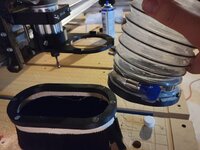
Speaking of modeling, here are some things off my X1C. This thing has made 3d printing a joy compared to the ender. 95% of the prints that come off of it are perfect. I've had one nozzle clog which meant replacing the hotend, but with just about 200 hours on it i'd say the working on it to printing with it ratio pretty good.

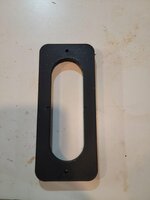
Here is a 2" to 4" vacuum adapter I designed.
KAy6Nvxl.jpg

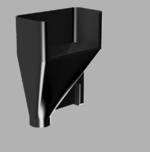
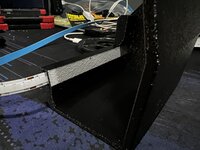
When I learned that made the dust collector all but useless I designed a new dust collection boot.
1LlAHWCl.jpg
MKpZ110l.jpg

A router guide for a window sash roller.
e4yAf0Jl.jpg

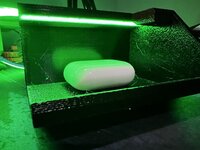
This was a DIY NAS case that I printed. Haven't got around to buying any actual hardware for it yet though.
EEtyj07l.jpg
 

Xti04

Well-known member
Joined
Nov 11, 2016
Messages
2,285
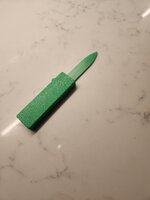
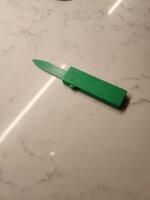
Boy shoved this in my face yesterday after asking for some rubber bands. I was barely awake and he was slashing this arou d showing me what he made 20231116_193106.jpg
Pretty cool file he found. He made me one to show some knife guys at work. They thought it was an awesome way to get kicked out of an airport!
 

Attachments

  • 20231116_193108.jpg
    20231116_193108.jpg
    243.1 KB · Views: 25

jeepxj

Well-known member
Joined
Mar 2, 2008
Messages
17,831

kppolich

Well-known member
Joined
Apr 7, 2020
Messages
344
Location
Eastern Iowa
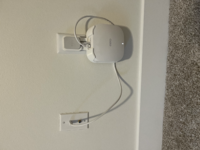
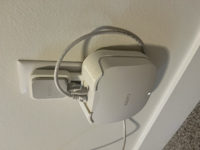
Saw these on Amazon and thought I could recreate something similar in an hour or so to mount a few Eero Pro 6's using some existing thingiverse files.


Here's mine, still a WIP as I need to leave more room between the grooves in the back for cable management and maybe extend the whole mount a bit to give more room for the cords to come in from behind.

Here's my v1

I used this mount as a starting point and then added on the power brick mount and wiring channels.

The file got pretty big (44mb) in Tinkercad so I need to something about that, because it is so slow to edit it now.
 

Attachments

  • tempImageMe7AYJ.png
    tempImageMe7AYJ.png
    5.9 MB · Views: 19
  • tempImageb4lpVB.png
    tempImageb4lpVB.png
    6.2 MB · Views: 16
  • tempImageEqZtTf.png
    tempImageEqZtTf.png
    4.7 MB · Views: 22
  • tempImagejYpNCM.png
    tempImagejYpNCM.png
    4.4 MB · Views: 51

sh944

ALLIANCE MEMBER
Joined
Jan 1, 2014
Messages
291
Location
Linwood, KS
Guess i am hitting Microcenter today. We have had our X1C in constant production when we got it and can't keep up... I might grab a second one for the house, my Qidi is a good bit slower than the X1C, although its been a rock solid machine.
 

Cruzan80

Well-known member
Joined
Jul 22, 2015
Messages
4,163
Location
Denver, CO
@purplezr2 I was researching the same thing. The X1C seems to have a better quality of build, and sturdier materials. My guess is it would come down to how much you may feel the need to tinker/adjust, or handled ongoing maintenance.

For us, it is for a HS, so we need it stable and running, we have enough ongoing maintenance as it is. $400 means less downtime for us/students.

We don't have one yet, but everything I read seemed to indicate both can produce similar levels of results, just one is built to a better standard.
 

sh944

ALLIANCE MEMBER
Joined
Jan 1, 2014
Messages
291
Location
Linwood, KS
For what its worth, I think the X1C is the better deal. Its a more robust unit, and is adaptable to more filament types. When you are first starting out, you might not recognize the advantage but between the hardened nozzle (and yes, you can upgrade the P1S), higher bed temp and enclosure, you might not see it. Until the first time that you actually need it.

The X1C is a production quality machine, I know it for a fact as I have been using one for a while. I am not sure the P1S is.
 

jmdirk

Well-known member
Joined
May 4, 2015
Messages
695
Question of the day X1C with AMS or P1S with AMS...About 400 dollar difference
I went with the P1S. If you want to do engineering materials like ABS or Carbon Fibre based materials, you can get the hardened extruder gears and nozzles for the P1S for pretty cheap. But if I recall the X1 can run a little bit hotter temperatures.

Both other than that, the X1 has the touch screen and Lidar for things like spaghetti detection. But honestly, I haven't felt myself wishing that I had bought the X1C.
 

purplezr2

Well-known member
Joined
Jun 1, 2010
Messages
5,290
Location
Central MN
I appreciate the real world feedback. How much do you run your machine? Mine is running at least 18 hours a day, every day.
I would say my usage goes in spurts due to time to do the modeling.

Two weeks ago my current printer(Flashforge GuiderII) ran most of the weekend printing camera mounts for my skidsteer. it has sat idle since as I have had other things on my plate. I have a list a mile long of things to print.

I would like to do multi color print hence a new printer. My current one has been great otherwise.

I would like to print ABS.
 

sh944

ALLIANCE MEMBER
Joined
Jan 1, 2014
Messages
291
Location
Linwood, KS
I would say my usage goes in spurts due to time to do the modeling.

Two weeks ago my current printer(Flashforge GuiderII) ran most of the weekend printing camera mounts for my skidsteer. it has sat idle since as I have had other things on my plate. I have a list a mile long of things to print.

I would like to do multi color print hence a new printer. My current one has been great otherwise.

I would like to print ABS.
I might suggest trying ASA instead. It has similar properties (printing heat range in particular) but I find ASA to be easier to get good results (at least, in my experience) with and it yields a better final product. It certainly smells better than ABS.
 

Poolshark314

Well-known member
Joined
Jul 5, 2021
Messages
658
Location
MD
If there is any complaint I have about the X1 so far, it's all the testing it does before every print. It takes about 8 minutes before it begins a print. I think I will mod the start g-code and remove some of the testing. They are all tests that should be performed periodically, not before every job
 

sh944

ALLIANCE MEMBER
Joined
Jan 1, 2014
Messages
291
Location
Linwood, KS
For what its worth, I had an employee try to buy an X1C at Microcenter today. Apparently, they are sold out. Hopefully they get more but we tried to place an order and they wouldn't let us.

The Bambu site has them in stock, I ordered from there.
 
Last edited:

Black300zx

Well-known member
Joined
Apr 8, 2019
Messages
781
Location
Elkton, Md
About 1 year later my Ender 3 Max Neo is still treating me well, but there have been two primary nuisances that were structural in nature:
  • The x/y base framework lacked torsional stability and tended to rack a bit. Most reviews note this. If it wasn't on a dead flat surface, any slight shift of the base would throw off the vertical alignments
  • The z-axis structure, even with the bolts torque down hard, had some slop it in and was tough to get (and keep) perpendicular. This would show up as decreased print quality as part height increased. Most of my prints are 1-2" tall or less, so it generally didn't hinder me much, but it still bugged me.
I finally sat down and measured/modeled/printed some gussets for the upper structure which also ended up stiffening up the base structure as well. Eager to print something tall to see how it performs. I wish I had realized that the display can slide forward, as I could have doubled the size of the right gusset.
 

Attachments

  • 20231121_144642.jpg
    20231121_144642.jpg
    1.2 MB · Views: 48
  • 20231121_165350.jpg
    20231121_165350.jpg
    876 KB · Views: 48
  • 20231121_165405.jpg
    20231121_165405.jpg
    852.6 KB · Views: 48
Last edited:
To avoid these ads, REGISTER NOW!
Top Bottom