To avoid these ads, REGISTER NOW!

The Everything 3D Printer Thread

Oldude

New member
Joined
Nov 1, 2019
Messages
2
Location
On the ground
I did not read the 70 pages in this thread. I recently purchased two used Prusa i3's a MK2 and an MK2 upgraded to MK2.5S

The upgraded one does not work and I'm looking for a forum where I can get info on how to fix it. I'm new to 3D printing but I'm an engineer so pretty good at fixing things.

So if someone can suggest a forum that would have some Prusa experts, or if someone here has some expertise that would be great. I posted on the Prusa forum, but have had no response to my question.

 
To avoid these ads, REGISTER NOW!

tclark

Well-known member
Joined
Feb 23, 2016
Messages
71
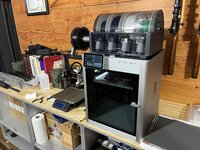
Total nube to 3d printing here but looking to get my son one for Christmas (he's 13). Looking at the Bambu Labs A1 Mini; any feedback on that one? Looking for something that's not terribly expensive and is pretty easy to setup and use out the gate.
 

jayz66ragtop

Well-known member
Joined
Sep 11, 2009
Messages
1,521
Location
SoCal
Total nube to 3d printing here but looking to get my son one for Christmas (he's 13). Looking at the Bambu Labs A1 Mini; any feedback on that one? Looking for something that's not terribly expensive and is pretty easy to setup and use out the gate.
No experience with that model but one of the first to have a XC1 and it's been fantastic even for a new person to 3D printing. In my opinion Bambu labs hit it out of the park and keeps making things better.
 

F-22

Well-known member
Joined
Jan 23, 2022
Messages
1,830
Bambu is amazing. I support Prusa mainly because it's so open source and made in Europe and they were "the first" and aren't much worse. But undoubtedly the Bambu labs took the idea and refined and polished it into the finished product it is today.

Still, the mk3 i3 I preordered when it was released hasn't ever let me down.
 

Black300zx

Well-known member
Joined
Apr 8, 2019
Messages
781
Location
Elkton, Md
Total nube to 3d printing here but looking to get my son one for Christmas (he's 13). Looking at the Bambu Labs A1 Mini; any feedback on that one? Looking for something that's not terribly expensive and is pretty easy to setup and use out the gate.
Honest question - do you KNOW it's something he wants? I've seen several coworkers get their early-teen kids 3D printers for birthdays or Christmas and they print one or two downloaded files and then it sits unused.
 

tclark

Well-known member
Joined
Feb 23, 2016
Messages
71
Honest question - do you KNOW it's something he wants? I've seen several coworkers get their early-teen kids 3D printers for birthdays or Christmas and they print one or two downloaded files and then it sits unused.
Yes, he's asked for one the last couple of years, and after seeing his uncle's P1P a few weeks ago he's still pretty interested. Worst case I'll just use it(I'd like one myself, albeit one with larger capacity and able to do abs) or sell it. I just want it to be as user friendly as possible to avoid him getting frustrated with it and wind up not using it.
 

Black300zx

Well-known member
Joined
Apr 8, 2019
Messages
781
Location
Elkton, Md
Yes, he's asked for one the last couple of years, and after seeing his uncle's P1P a few weeks ago he's still pretty interested. Worst case I'll just use it(I'd like one myself, albeit one with larger capacity and able to do abs) or sell it. I just want it to be as user friendly as possible to avoid him getting frustrated with it and wind up not using it.
Good stuff. In that case, it sounds like a win/win to get a known low-hassle printer like a Bambu. Your son will be less likely to get frustrated and you get better capabilities.
 

Xti04

Well-known member
Joined
Nov 11, 2016
Messages
2,286
My 11 year old asked for one and he has used it every day since he got it. Hes made all kinds of crazy stuff on it my favorites being the OTF knife and these hexagonal things that expand in and out. Im moving it up to his room today hopefully he wont stay up all night messing with it. I have no regrets getting it for him, and he loves it so far. I think his interest will really grow as we begin to design our own stuff.
 

tclark

Well-known member
Joined
Feb 23, 2016
Messages
71
My 11 year old asked for one and he has used it every day since he got it. Hes made all kinds of crazy stuff on it my favorites being the OTF knife and these hexagonal things that expand in and out. Im moving it up to his room today hopefully he wont stay up all night messing with it. I have no regrets getting it for him, and he loves it so far. I think his interest will really grow as we begin to design our own stuff.
The A1?
 

Xti04

Well-known member
Joined
Nov 11, 2016
Messages
2,286
I got him a P1P. I looked at the A1 and the AMS lite is nice for the price. The build size was why I got the P1P instead not knowing what he would want to make. We are already looking at adding AMS to it so he can do multi color prints. My thought was to get as I big as I could afford so Im not limited later.
 

tclark

Well-known member
Joined
Feb 23, 2016
Messages
71
I got him a P1P. I looked at the A1 and the AMS lite is nice for the price. The build size was why I got the P1P instead not knowing what he would want to make. We are already looking at adding AMS to it so he can do multi color prints. My thought was to get as I big as I could afford so Im not limited later.
Yeah that's my dilemma. Trying not to blow the budget but not limit capabilities too much either.
 

loganb

ALLIANCE MEMBER
Joined
Dec 29, 2011
Messages
5,497
Location
Omaha, NE
I did not read the 70 pages in this thread. I recently purchased two used Prusa i3's a MK2 and an MK2 upgraded to MK2.5S

The upgraded one does not work and I'm looking for a forum where I can get info on how to fix it. I'm new to 3D printing but I'm an engineer so pretty good at fixing things.

So if someone can suggest a forum that would have some Prusa experts, or if someone here has some expertise that would be great. I posted on the Prusa forum, but have had no response to my question.


Here or the Prusa forums on Reddit will probably get you what you need. Lot of mk3's represented in the user's here....myself included
 

Oldude

New member
Joined
Nov 1, 2019
Messages
2
Location
On the ground
Here or the Prusa forums on Reddit will probably get you what you need. Lot of mk3's represented in the user's here....myself included
Thanks, I have mostly sorted this out. The PO upgraded to MK2.5, when I figured that out I loaded correct firmware and it now breezes through the XYZ calibration.
 

kppolich

Well-known member
Joined
Apr 7, 2020
Messages
344
Location
Eastern Iowa
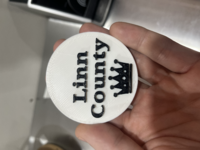
First time printing in 2 colors on myAnycubic Vyper. Nailed it on the 2nd attempt making these game winner tokens for Rummikub.
Our family likes to crown the winner after each game as the 'Rummikub King/Queen of whatever County' we happen to be playing in. Here's the first one, I have 3 more to print today for 3 more counties.
 

Attachments

  • tempImagegemahS.png
    tempImagegemahS.png
    4.3 MB · Views: 78
  • tempImageyYvoDQ.png
    tempImageyYvoDQ.png
    6.3 MB · Views: 31
  • tempImageElYVag.png
    tempImageElYVag.png
    4.1 MB · Views: 37

Jehannum

Well-known member
Joined
May 3, 2012
Messages
1,348
Location
Albuquerque, NM
Because Amazon had an 8GB Raspberry Pi 4 on sale for $60 for a hot minute on Friday, I ended up picking one up and putting together an Octoprint controller for the **** of Theseus.

Now hanging off the back of the bed, I have a webcam to monitor prints remotely. I also used one of the GPIO pins on the Pi and a relay to replace the switch on the PSU, so I can turn it on and off remotely as well.

After taking care of some of my dodgier wiring, it's fired off a benchy from Octoprint.

Once I'm comfortable with octoprint, I'll probably try and get klipper working.

messages_0(15).jpeg
 

Poolshark314

Well-known member
Joined
Jul 5, 2021
Messages
658
Location
MD
Because Amazon had an 8GB Raspberry Pi 4 on sale for $60 for a hot minute on Friday, I ended up picking one up and putting together an Octoprint controller for the **** of Theseus.

Now hanging off the back of the bed, I have a webcam to monitor prints remotely. I also used one of the GPIO pins on the Pi and a relay to replace the switch on the PSU, so I can turn it on and off remotely as well.

After taking care of some of my dodgier wiring, it's fired off a benchy from Octoprint.

Once I'm comfortable with octoprint, I'll probably try and get klipper working.

messages_0(15).jpeg
Not sure if you are aware or not, but OctoPrint and Klipper are different animals. OctoPrint is more of a web interface that assists in remotely controlling the printer running Marlin, whereas Klipper uses the RPi's processing in addition to the printer's processing to increase calculating power. This is what enabled Klipper to print jobs much faster. Klipper requires imaging the RPi and imaging the firmware on the printer to Klipper as well. Just wanted to clarify their differences since knowing OctoPrint wouldn't really give you an advantage with Klipper. If you are already aware of this, apologies.
 

Jehannum

Well-known member
Joined
May 3, 2012
Messages
1,348
Location
Albuquerque, NM
Not sure if you are aware or not, but OctoPrint and Klipper are different animals. OctoPrint is more of a web interface that assists in remotely controlling the printer running Marlin, whereas Klipper uses the RPi's processing in addition to the printer's processing to increase calculating power. This is what enabled Klipper to print jobs much faster. Klipper requires imaging the RPi and imaging the firmware on the printer to Klipper as well. Just wanted to clarify their differences since knowing OctoPrint wouldn't really give you an advantage with Klipper. If you are already aware of this, apologies.
I'm aware. I installed the klipper libraries and system daemons on the rpi when I was setting it up, and got octoprint to work with it, and also compiled the firmware for the board in my printer, and started working on a printer config for it, but I wanted to actually use the thing today without troubleshooting, so I decided to get octoprint working well with marlin and go with that until things slow down and I can take a closer look at the changes that need made to the way I slice, preamble gcodes, bed leveling and whatnot.
 

AirMech#406

Well-known member
Joined
Sep 29, 2021
Messages
142
First time printing in 2 colors on myAnycubic Vyper. Nailed it on the 2nd attempt making these game winner tokens for Rummikub.
Our family likes to crown the winner after each game as the 'Rummikub King/Queen of whatever County' we happen to be playing in. Here's the first one, I have 3 more to print today for 3 more counties.
Nice! I have a soft spot in my heart for the Vyper. It was my first printer and introduced me to the hobby. I now run a X1C with an AMS.
 
To avoid these ads, REGISTER NOW!

draco_1967

Well-known member
Joined
Jan 3, 2021
Messages
205
Location
Utah
I needed a way to attach my heated controller for to my motorcycle so I could actually see it. I modeled up a base and TPU strap in F360. The base is printed in PETG, and I'll be redoing it in ASA after a few tweaks to the design. The PETG was stringing badly, so I think I need to dry it out. It's been open for a while, and even in the storage bin with desiccant, it's probably sucked up some moisture. I need a real filament drying solution...
The TPU had only slight stringing. I really like printing with this stuff!
vqUT54g7KWEsB2dIhH1_OzYbmHCQdjf1GUxFl0Qly9H2j=w800.jpg
 

Bessy

Well-known member
Joined
Dec 18, 2012
Messages
992
Location
Ontario, Canada
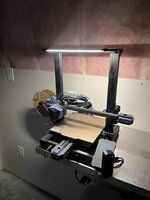
I think I've tried sitting down to write this post at least five times now and always get interrupted or sidetracked, but finally I have some updates to share, 3D printing related. All I can say is the universal truth of 3D printers, in my completely-objective-and-not-at-all-periodically-rage-induced opinion, is "man, when they work they are indispensable, but when they don't, they're infuriating".

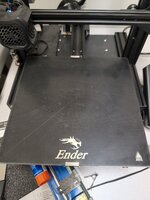
All that to say, I finally got the Ender 3v2 dialed in (at least for middle of the bed prints, I haven't tried loading the build plate up significantly) to the point where it's printing without the need for glue. A minor but of elephants foot going on with the first layer that I need to sort out, but ultimately I've been making parts just ever so slightly larger or smaller depending on inner vs outer diameter fitment. All in all, I'm a happy printer as of recently, at least with one machine.

Among the projects on the go:
1) Dust collection. Printed a handy adapter so that I could reverse one of my blast gates to accommodate the over-blade dust collection for my table saw. Turns out the gate was just loose enough that the vacuum sucked it shut, so I printed a lock out key that prevents that next. A couple of minor changes I'll make to the lockout for gates that are placed in the horizontal position (where the key would be inserted in a vertical orientation) will happen in v1.3.

I'm just starting my holidays this weekend and plan to get the Ender 5+ back up and running after having re flashed the silent board. When I installed the 2.2 board, apparently the one I bought was flashed with firmware that automatically defaulted back to Hanzi characters even after selecting English on the menu. Now that I've reflashed the firmware with Kersey Fabrication's firmware (that centers the bl touch on the bed instead of the nozzle) the printer again reads in English (hooray!).

Once I get the bed trammed and mostly dialled in, I'll begin cranking out a whole bunch of Gridfinity components for tool and hardware storage, as well as mounts for my DeWalt and Rigid batteries and tools so that I can dismantle my tool tower.

Out with the wife this weekend but I'll be back at it Monday!
 

Attachments

  • IMG-20231210-WA0002.jpeg
    IMG-20231210-WA0002.jpeg
    144.5 KB · Views: 41

Black300zx

Well-known member
Joined
Apr 8, 2019
Messages
781
Location
Elkton, Md
All that to say, I finally got the Ender 3v2 dialed in (at least for middle of the bed prints, I haven't tried loading the build plate up significantly) to the point where it's printing without the need for glue. A minor but of elephants foot going on with the first layer that I need to sort out...
What build plate are you using?
 

Poolshark314

Well-known member
Joined
Jul 5, 2021
Messages
658
Location
MD
@Black300zx, I'm just using the stock glass bed that came on the machine. It's got a very light texture to it. I think I need to move the nozzle just a few 10ths of a mm up because my first layer quality was meh.
I actually had better luck using the glass plate upside-down so it was totally smooth, but a PEI sheet wouldn't require any glue if you are looking to achieve that
 

Black300zx

Well-known member
Joined
Apr 8, 2019
Messages
781
Location
Elkton, Md
@Black300zx, I'm just using the stock glass bed that came on the machine. It's got a very light texture to it. I think I need to move the nozzle just a few 10ths of a mm up because my first layer quality was meh.
Is it the glass with a greyish coating like This? That's the bed type i have on my ender3 max and i literally have never had to use any type of adhesion promoter or release agent. I set up my height like this:
  1. Turn off motors, move the printhead to the middle of the bed. Set the z-height to 0 and adjust the offset so that a piece of paper just barely drags when slid between the nozzle and bed
  2. Slide the bed forward so that the nozzle is at the rear center of the bed. Check nozzle-to-bed with paper. If it's too tight, adjust both rear corners of the bed down until paper just barely drags.
  3. Move printhead to rear left corner, adjust that corner so paper just drags. Move printhead to right rear, adjust height. Move back to center and confirm that spot is still good.
  4. Move bed back so printhead is front-center. Adjust bed height in the center and then each corner.
  5. Recheck rear center, rear-left, rear-right. Probably will need some small tweaks.
  6. Recheck front-center, front-right, front-left. If good, confirm center, center-left, center-right are still good.
  7. If your ender has the CR Touch auto-levelling, run it.
  8. Load a filament that has good contast to the bed (ie: white, red, NOT black). Queue up a print that has a skirt. Ideally something with a large footprint to cover a good portion of the bed. Watch the first layer closely. While it's warming up, move into the z-offset setting so that you can tweak on the fly based on what you're seeing.
  9. Watch the purge lines as a good initial indication. If the filament is getting squeezed out really thin, you're too low. If you see the filament barely touching the bed as the purge progresses, you'probably too high.
  10. Now watch the skirt print closely, particularly as curved portions of the brim print. You should get 2 or 3 laps around the skirt, so you'll have the ability to make offset adjustments and observe the change. The extruded filament should squeeze into an oval-ish cross-section. If the straight sections of the skirt are barely flattened and you observe the extrusion not sticking around corners, adjust the offset to lower the nozzle (i usually adjust 0.02 or 0.03mm at a time). You probably will need to exit the setting dialog for the adjustment to actually apply. Watch the next row of thr skirt print and see if adhesion improves. If you see improvement, take the adjustment a bit further and see if it improves more (or not). If the skirt finishes with good adhesion, watch the first layer print to see how adhesion looks, making small adjustments if needed. If you don't have good adhesion on the first layer, cancel the job, restart it, and continue z-offset tweaks. In my experience, if I can't get good adhesion with the coated glass bed after 2 rounds of z-offset tweaks, releveling of the bed is needed.
Sorry for the novel. Hope some of this helps.
 
Last edited:

Bessy

Well-known member
Joined
Dec 18, 2012
Messages
992
Location
Ontario, Canada
Is it the glass with a greyish coating like This? That's the bed type i have on my ender3 max and i literally have never had to use any type of adhesion promoter or release agent. I set up my height like this:
  1. Turn off motors, move the printhead to the middle of the bed. Set the z-height to 0 and adjust the offset so that a piece of paper just barely drags when slid between the nozzle and bed
  2. Slide the bed forward so that the nozzle is at the rear center of the bed. Check nozzle-to-bed with paper. If it's too tight, adjust both rear corners of the bed down until paper just barely drags.
  3. Move printhead to rear left corner, adjust that corner so paper just drags. Move printhead to right rear, adjust height. Move back to center and confirm that spot is still good.
  4. Move bed back so printhead is front-center. Adjust bed height in the center and then each corner.
  5. Recheck rear center, rear-left, rear-right. Probably will need some small tweaks.
  6. Recheck front-center, front-right, front-left. If good, confirm center, center-left, center-right are still good.
  7. If your ender has the CR Touch auto-levelling, run it.
  8. Load a filament that has good contast to the bed (ie: white, red, NOT black). Queue up a print that has a skirt. Ideally something with a large footprint to cover a good portion of the bed. Watch the first layer closely. While it's warming up, move into the z-offset setting so that you can tweak on the fly based on what you're seeing.
  9. Watch the purge lines as a good initial indication. If the filament is getting squeezed out really thin, you're too low. If you see the filament barely touching the bed as the purge progresses, you'probably too high.
  10. Now watch the skirt print closely, particularly as curved portions of the brim print. You should get 2 or 3 laps around the skirt, so you'll have the ability to make offset adjustments and observe the change. The extruded filament should squeeze into an oval-ish cross-section. If the straight sections of the skirt are barely flattened and you observe the extrusion not sticking around corners, adjust the offset to lower the nozzle (i usually adjust 0.02 or 0.03mm at a time). You probably will need to exit the setting dialog for the adjustment to actually apply. Watch the next row of thr skirt print and see if adhesion improves. If you see improvement, take the adjustment a bit further and see if it improves more (or not). If the skirt finishes with good adhesion, watch the first layer print to see how adhesion looks, making small adjustments if needed. If you don't have good adhesion on the first layer, cancel the job, restart it, and continue z-offset tweaks. In my experience, if I can't get good adhesion with the coated glass bed after 2 rounds of z-offset tweaks, releveling of the bed is needed.
Sorry for the novel. Hope some of this helps.
Here is the bed I'm running, more-or-less stock Ender 3v2, only upgrades are the metal extruder, and capricorn tubing.

Scarring on the bottom layer is about the only issue I'm having currently with the way I've got it set up.
 

Attachments

  • 17027632916698843309969408217372.jpg
    17027632916698843309969408217372.jpg
    719.1 KB · Views: 33
  • 17027634217636870054060833413519.jpg
    17027634217636870054060833413519.jpg
    710 KB · Views: 31

Xti04

Well-known member
Joined
Nov 11, 2016
Messages
2,286
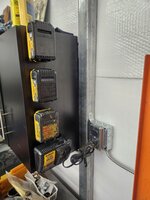
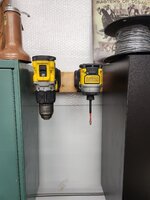
Had the boy print out a bunch of battery holders for my dewalt batteries. Got the first few installed and have another three to tack up. Also printed the reciprocal tool holders as well. Those will be going onto the bottom of my loft once assembled to allow them to hang out of the way. Heres 2 of them in a temp space for now. 20231205_141643.jpg20231203_161957.jpg
 

manwithtools

ALLIANCE MEMBER
Joined
Aug 24, 2015
Messages
13,645
Location
Lebanon, TN
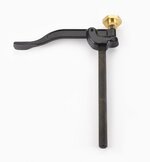
A member in another forum I'm part of had a workbench hold down that has a brass knob that he felt was too small to be comfortable to tighten adequately. So I had him send me the knob and then I designed and printed a larger knob that fits over it. I printed in ABS and while it was still warm, I slid it over the brass knob, when it cooled it has a nice tight fit. I'll be mailing it back to him today.

05G1401-veritas-hold-down-f-69.jpg

PXL_20231221_151059991.jpg

PXL_20231221_151051073.jpg
 
Last edited:

Bessy

Well-known member
Joined
Dec 18, 2012
Messages
992
Location
Ontario, Canada
I've been busy this first week of vacation getting both the printers up and running reasonably ok and printing some bins for my Gridfinity set up in the USG cart. Still having some first-layer issues, so rather than continue to mess with that, I'm taking a step back to get my raspberry Pi up and running. My main PC is on the main floor, printers are in the basement and it's really not that far to go, but I inevitably forget the SD card either downstairs or up, it's just never in the place I need it. The solution, same as in our previous place is to set up Octoprint and send files remotely. I've got two more RPi4b that just arrived for other projects, but the first one I bought pre the major price increase (still kicking myself for not buying more when they were like $40).

Next on my list are corner brackets for the E5+ printer - I found one cracked at some point - and wire/cable management, more Gridfinity components to organize my printing area better, and battery/tool mounts. My wife wants a transition printed to fit the automatic litter box (no clue how I'm going to design that yet) to keep the litter from getting underneath the drum. First world problem, so I'll need some time to think through the design process there.
 

manwithtools

ALLIANCE MEMBER
Joined
Aug 24, 2015
Messages
13,645
Location
Lebanon, TN
A member in another forum I'm part of had a workbench hold down that has a brass knob that he felt was too small to be comfortable to tighten adequately. So I had him send me the knob and then I designed and printed a larger knob that fits over it. I printed in ABS and while it was still warm, I slid it over the brass knob, when it cooled it has a nice tight fit. I'll be mailing it back to him today.


PXL_20231221_151051073.jpg
I've since made 9 more of these knobs for other woodworkers on the forum.
 
To avoid these ads, REGISTER NOW!
Top Bottom