To avoid these ads, REGISTER NOW!

The Everything 3D Printer Thread

To avoid these ads, REGISTER NOW!

jeepxj

Well-known member
Joined
Mar 2, 2008
Messages
17,831
How are you liking the aftermarket build plates? Do you have to acknowledge the non matching build plate error on every print?

p1s doesnt have that feature so nothing to do. really liking them for the cost. super cheap on aliexpress
 

niget2002

Well-known member
Joined
Oct 2, 2012
Messages
11,115
Location
Josephine, TX
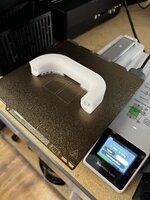
Got a successful print on the pet sheet with Petg. I need to add an aluminum bed to this printer now. Without the glass, the heat bed and pei sheet sag in the middle. The mesh bed leveling accounts for this, so the print succeeded, but I'm sure it would be better if it was flatter. I have some 1/4 aluminum plate I can cut down and make work. I'll probably have to order another magnetic build plate as the first one is stuck to the heat bed.

I really didn't think that through.

1000002423.jpg
 

Cruzan80

Well-known member
Joined
Jul 22, 2015
Messages
4,168
Location
Denver, CO
Yeah, I set up the two we got at work, and found a roll of leftover ABS at my house. At least 5+yo filament. Loaded it in, and it is (mostly) working right out of the box. PEI Textured plate, basic settings. If it failed a print, it let me know. Only once out of about 15-20 prints did it "blob" around the nozzle, and probably 75-80% of them worked first try.

If that isn't point n shoot easy, I don't know what is. PLA has been flawless (maybe under 5% failures, almost all spagetti, which it stops and has me check). And the print times are running less than half what Ideamaker's Raise 3D's are, with stock values for both (matched infill/layer height).
 

XJSuperman

Well-known member
Joined
Jan 26, 2018
Messages
3,086
Location
Central Iowa
Yall are killing me. Im trying to figure out how to justify a bambu!:unsure:
I can honestly tell you I am not sure if I am justifying this purchase fully or not. My thought before clicking "confirm" was that I have a lot of things I need to print for parts and tool organization, and some other projects. Its not going to get done with what I have, and if I am buying a new printer, it will be this, so spend the money and I'll justify it later. This will allow me to do holiday gifts, paying jobs, and anything I want for my projects and it seems like most of the headache will be eliminated so that makes it worth it to me.
 

jmdirk

Well-known member
Joined
May 4, 2015
Messages
695
I'll second on stocking up on some filament to get you started, though it's nice that the discount program is now unlimited and open to everyone for when you want to reorder.

When you are buying the printer, a lot of the accessories are offered at a pretty good discount from the printer page, expand the list for more stuff. But a couple of nozzles and filament is all you should need from there to get you started. Then you can get a feel for the hobby and see what other things you want(filament dryer, desiccant, different filaments, etc)

Yeah, the discount program isn't really a discount program anymore. They've just lowered the price of the basic filaments (PLA/PETG/ABS). It's now pretty comparable to what you can find on Amazon. Up here in Canada they've had issues with being sold out of a lot of stuff, but that seems to have mostly been resolved. The only issue now is that it takes about a week for delivery of filament. Compared to Sunlu or eSun or various other off Amazon are normally 1 or 2 days max.

But with the AMS, the Bambu filaments with the RFID are really convenient. Though there does seem to be an issue in Bambu Studio where if you have custom profiles for a filament, it defaults to the stock one, so you're still having to manually select the profile each time you load a new filament. So the only real advantage you get from the RFID is the colour.
 

Poolshark314

Well-known member
Joined
Jul 5, 2021
Messages
658
Location
MD
But with the AMS, the Bambu filaments with the RFID are really convenient. Though there does seem to be an issue in Bambu Studio where if you have custom profiles for a filament, it defaults to the stock one, so you're still having to manually select the profile each time you load a new filament. So the only real advantage you get from the RFID is the colour.
It does that with any filament, and it's pretty annoying. They need a way to store custom profiles on the printer so that when you sync it back to the studio, it doesn't get overridden.
 

XJSuperman

Well-known member
Joined
Jan 26, 2018
Messages
3,086
Location
Central Iowa
My p1s showed up yesterday. I took my time getting it out and set up, and then started playing with prints last night. The scraper first, which came out ok, but didn't want to screw together right, and had a little trim peel off on the base layer after I assembled it.
Then a honeycomb wall out of the black pla I already had on hand. It seems fine, now I just need to understand how to utilize it the way I see it done. Much of my night was spent understanding the AMS and how to load/unload and get prints to print with the correct filament. Im not sure I have that nailed down yet, but I learned a lot along the way.
Today will be more of the same, except I have that black loaded, so any files I wanted redone in black from my last excursion are the priority. So converting stls to 3mfs is this morning's chore. QUESTION: Do I need a converter program for that, or does Bambu have something for it?
Then I'd like to optimize some settings to speed it up a little, even though its so much faster than my Ender was. So if anyone is in a sharing mood to save me some serious experimental time, a set of paramenters would be greatly appreciated. Pretty please?

I am loving the app on both the pc and the phone. Sending files via wifi and control of the printer is a game changer for me for a few hardware reasons. I also find it pretty quiet, loud enough I know its working, but quiet enough to fall asleep without issue.
 
To avoid these ads, REGISTER NOW!

Poolshark314

Well-known member
Joined
Jul 5, 2021
Messages
658
Location
MD
My p1s showed up yesterday. I took my time getting it out and set up, and then started playing with prints last night. The scraper first, which came out ok, but didn't want to screw together right, and had a little trim peel off on the base layer after I assembled it.
Then a honeycomb wall out of the black pla I already had on hand. It seems fine, now I just need to understand how to utilize it the way I see it done. Much of my night was spent understanding the AMS and how to load/unload and get prints to print with the correct filament. Im not sure I have that nailed down yet, but I learned a lot along the way.
Today will be more of the same, except I have that black loaded, so any files I wanted redone in black from my last excursion are the priority. So converting stls to 3mfs is this morning's chore. QUESTION: Do I need a converter program for that, or does Bambu have something for it?
Then I'd like to optimize some settings to speed it up a little, even though its so much faster than my Ender was. So if anyone is in a sharing mood to save me some serious experimental time, a set of paramenters would be greatly appreciated. Pretty please?

I am loving the app on both the pc and the phone. Sending files via wifi and control of the printer is a game changer for me for a few hardware reasons. I also find it pretty quiet, loud enough I know its working, but quiet enough to fall asleep without issue.
Bambu Studio is the slicer you should be using for Bambu prints
 

Poolshark314

Well-known member
Joined
Jul 5, 2021
Messages
658
Location
MD
Yeah, I got that lol. But it doesn't appear to be opening or recognizing any stl files I already have. So does it have the ability to convert them or do I need a converter program?
Existing 3MF files made in other slicers may have quirks getting imported to Bambu Studio, but if they are truly STL files, you just add them like you would have in Cura, Orca, Prusa, etc.

To clarify further, you should start a new project, and then add the STL to the plate using this button:
1712421788541.png
 

XJSuperman

Well-known member
Joined
Jan 26, 2018
Messages
3,086
Location
Central Iowa
Update: things are going well. Very happy with this purchase for those waffling on a decision. Already cranking out pieces I couldn't have dreamed of in my last one. I love the app monitoring when I'm out in the garage or yard.
Only downside that keeps getting me is that infill is defaulted to 0. It messed up a couple pieces and almost got a couple more. I need to ensure it doesn't keep happening.
20240406_184345.jpg
 

Poolshark314

Well-known member
Joined
Jul 5, 2021
Messages
658
Location
MD
Update: things are going well. Very happy with this purchase for those waffling on a decision. Already cranking out pieces I couldn't have dreamed of in my last one. I love the app monitoring when I'm out in the garage or yard.
Only downside that keeps getting me is that infill is defaulted to 0. It messed up a couple pieces and almost got a couple more. I need to ensure it doesn't keep happening.
20240406_184345.jpg
The default infill should be 15%. In either case, you can create your own profile with whatever default settings you want
 

XJSuperman

Well-known member
Joined
Jan 26, 2018
Messages
3,086
Location
Central Iowa
The default infill should be 15%. In either case, you can create your own profile with whatever default settings you want
I can assure you it does absolutely not default to 15% when opening .stl parts from random places. And it changes if you have a 3mf file from someone depending on their specs. I believe I have my own settings remembered now, assuming I understand the concept of Bambu's "process" profile.
 

jmdirk

Well-known member
Joined
May 4, 2015
Messages
695
I can assure you it does absolutely not default to 15% when opening .stl parts from random places. And it changes if you have a 3mf file from someone depending on their specs. I believe I have my own settings remembered now, assuming I understand the concept of Bambu's "process" profile.

The STL is more of the raw model file. You will also find places that provide a STEP file. But it's really just the 3D shape of the object. It contains no detail about infill, wall, supports etc. All that is in the 3mf file. So you import the STL, tune all your setting in the slicer including filament, printer, infill, wall count, support etc. and then you can save the project as a 3MF file. But when you go to open a project in Bambu Studio, it doesn't let you choose stl files, because it only contains a portion of the info.

I've only seen MakerWorld where they mostly have 3MF files for download. Printables, Thingiverse and the other repositories are often only STL files.

For choosing filament, once you have sync'd with the AMS and/or selected the filament type for each slot, you can right click on the object on the build plate, and then choose "Change filament" Or if everything on the plate uses the same type, you can choose it from the pop-up when you go send it to the printer. You can also use the color painter from the top toolbar if you want to use multiple colors in the same object
 
To avoid these ads, REGISTER NOW!
Top Bottom