
You are using an out of date browser. It may not display this or other websites correctly.
You should upgrade or use an alternative browser.
You should upgrade or use an alternative browser.
The Everything 3D Printer Thread
- Thread starter BoilermakerFan
- Start date

Other than build volume, what benefits does a $500 printer offer over a $200 printer like the Bambu Lab A1 mini?
enclosure usually. better temp regulation for warping. able to do abs/asa/etc.
Ok, using the Mini as the reference, what can we do better? I'll start by saying what I think the Mini isn't going to be significantly improved upon.Other than build volume, what benefits does a $500 printer offer over a $200 printer like the Bambu Lab A1 mini?
Speed and print quality using PLA aren't likely to see significant improvements as you go up in price. Also you get the very good Bambu workflow which is generally as good as it gets, especially if you want to print from their website via your phone. If you want to use a thumb drive, I don't like that Bambu printers typically use micro SD vs USB.
Ok, so what could be better? Bigger build area obviously. Adding a multi material unit (IE color). Finally, better ability to handle materials that are harder to print and benefit from an enclosure. To a lesser extent, some delicate designs will print better on a Core XY because the part doesn't move as much during printing.
Poolshark314
Well-known member
I decided to start a separate thread for filament deals in case anyone is interested:
 www.garagejournal.com
3D Filament Deal Thread
List deals on 3D filament here. Printers are probably also fine to list here, but most people seem focused on "reloading" I generally get PLA/PETG when I find it under $10/kg, assuming it isn't something special like glow in the dark or multi color
www.garagejournal.com
bugnut
ALLIANCE MEMBER
Headlight mounting system for the baja project. Consuming a lot of time and materials as there is no symmetry from the metal parts and I lack a 3d scanner.
Attachments


We might need a sub topic on tips for establishing dimensions and shapes from random objects for use in 3d print models. In the past I've even resorted to holding a part in front of my computer and eyeballing the shape (with success in that case).Headlight mounting system for the baja project. Consuming a lot of time and materials as there is no symmetry from the metal parts and I lack a 3d scanner.
Angles tooIn the past I've even resorted to holding a part in front of my computer and eyeballing the shape (with success in that case).

Yankeefarmer
Well-known member
Photograph it, import the image into your modeling program of choice, trace it in a sketch, scale it to proper size.We might need a sub topic on tips for establishing dimensions and shapes from random objects for use in 3d print models. In the past I've even resorted to holding a part in front of my computer and eyeballing the shape (with success in that case).
XJSuperman
Well-known member
I just got done attempting that the other day actually, and I was rather disheartened to find that not a single hole in my scanned part came out as a perfect circle, even though they're supposed to be. Nothing wanted to line up. Its still on my to-do list to get sorted out.
kaymccampbell
Well-known member
We might need a sub topic on tips for establishing dimensions and shapes from random objects for use in 3d print models. In the past I've even resorted to holding a part in front of my computer and eyeballing the shape (with success in that case).
Angles too
Calipers, dividers, square, angle square, protractor, rule, french curve rule. Sometimes I'll scan a complex face on the flat scanner, but I usually find my measurements are more accurate.I just got done attempting that the other day actually, and I was rather disheartened to find that not a single hole in my scanned part came out as a perfect circle, even though they're supposed to be. Nothing wanted to line up. Its still on my to-do list to get sorted out.
Here's how this guy did it...I just got done attempting that the other day actually, and I was rather disheartened to find that not a single hole in my scanned part came out as a perfect circle, even though they're supposed to be. Nothing wanted to line up. Its still on my to-do list to get sorted out.
Making for Motorsport
Last edited:
LeonardY
Well-known member
Tape a grid over it and use a contour gauge. Create intersecting profiles. If you don't have a contour gauge use card stock and a scribe. You can then scan that on a flat bed scanner to create your 3d model.Headlight mounting system for the baja project. Consuming a lot of time and materials as there is no symmetry from the metal parts and I lack a 3d scanner.
You can scan with you smart phone too. I use Polycam.
Two pieces of card stock along the angle parts and tape it together. Or use a angle gauge. For larger pieces set one angle level and use an digital angle finder.Angles too
This works for the most part but you get parallax errors unless the piece is flat.Photograph it, import the image into your modeling program of choice, trace it in a sketch, scale it to proper size.
Happens all the time. Flat bed scanners are meant for flat items. As I mentioned, it's parallax errorsI just got done attempting that the other day actually, and I was rather disheartened to find that not a single hole in my scanned part came out as a perfect circle, even though they're supposed to be. Nothing wanted to line up. Its still on my to-do list to get sorted out.
This is the best way without a 3D scanner. I have a granite surface plate and surface gauges to do it old school. I also have an old pantograph that lets me follow a contour drawing it on a piece paper to scan it on a flat bed.Calipers, dividers, square, angle square, protractor, rule, french curve rule. Sometimes I'll scan a complex face on the flat scanner, but I usually find my measurements are more accurate.
Hope this helps you all.
LeonardY
Well-known member
I forgot to add this. I print profiles first to refine the fit. Think of it as a skeleton. If you do it that way you can build a grid over your part. If I'm feeling lazy i just use a hot melt gun to hold the parts together.Consuming a lot of time and materials
kaymccampbell
Well-known member
Lucky dog.I have a granite surface plate and surface gauges to do it old school. I also have an old pantograph that lets me follow a contour drawing it on a piece paper to scan it on a flat bed.
Rccrawlerguy
Well-known member
- Joined
- Dec 11, 2011
- Messages
- 269
We might need a sub topic on tips for establishing dimensions and shapes from random objects for use in 3d print models. In the past I've even resorted to holding a part in front of my computer and eyeballing the shape (with success in that case).
I keep graph paper on hand for sketching some designs before CAD. I have 11"x17" too. If you can lay your part on that, and get it level on the top( the side you can see) then take a pic of it, import to your CAD as a canvas it is easy to scale
Rccrawlerguy
Well-known member
- Joined
- Dec 11, 2011
- Messages
- 269
Or even raid the wife's craft stash for one of the cutting mats that have layout squares on them.
bugnut
ALLIANCE MEMBER
Calipers, dividers, square, angle square, protractor, rule, french curve rule. Sometimes I'll scan a complex face on the flat scanner, but I usually find my measurements are more accurate.
Exactly where I was. After holding it up and staring at it I laid it on the cutting mat. Looked it over closely and realized that nothing was related. Grabbed graph paper and started in. Used the center finding head drew a couple lines at 90s and carried on. Eventually I got there but a scanner wouldda been a lot quicker. Glad I'm retired.
Calipers, dividers, square, angle square, protractor, rule, french curve rule. Sometimes I'll scan a complex face on the flat scanner, but I usually find my measurements are more accurate.
You both forgot about optical comparators or spiling and joggling!Tape a grid over it and use a contour gauge. Create intersecting profiles. If you don't have a contour gauge use card stock and a scribe. You can then scan that on a flat bed scanner to create your 3d model.
You can scan with you smart phone too. I use Polycam.
Two pieces of card stock along the angle parts and tape it together. Or use a angle gauge. For larger pieces set one angle level and use an digital angle finder.
This works for the most part but you get parallax errors unless the piece is flat.
Happens all the time. Flat bed scanners are meant for flat items. As I mentioned, it's parallax errors
This is the best way without a 3D scanner. I have a granite surface plate and surface gauges to do it old school. I also have an old pantograph that lets me follow a contour drawing it on a piece paper to scan it on a flat bed.
Hope this helps you all.
Recently I tried using the 3D printer to fix some car DVD player headphones. The ones Chrysler included were notorious for battery door failures. (see this thread for pictures https://www.pacificaforums.com/thre...adphones-broken-battery-door-my17-my21.54386/ ) When I had to fix some I look at the options on Thingiverse but wasn't happy with the options (bulky fixes attached to the outside or a battery door that wasn't well modeled). In the end I made my own. They were a challenge due to a lot of fine detail that was hard to measure with calipers and features sizes that are difficult with FMD printers. I used a combination of calipers, holding parts in front of the screen and well, about a dozen guess and check prints. The results were functional but didn't look like the real thing rendered in FMD.
If I were to try again something I might do is create a few 2D test profiles. Something say 2-4 layers thick. That would let me see if I had the correct profile without waiting for the whole part to print. I could even print several at once. If I had a few profiles right then it would be easier to work on details etc. I suspect it would still take me a dozen or so test prints but the final results would be a closer fit.
The originals were functional but since I printed them in PLA they warped during the summer heat. I really should print in something other than PLA but for air quality reasons I haven't used other materials in the house. I've since printed some versions with additional ribs that hopefully will prevent creeping when the part is hot.
If I were to try again something I might do is create a few 2D test profiles. Something say 2-4 layers thick. That would let me see if I had the correct profile without waiting for the whole part to print. I could even print several at once. If I had a few profiles right then it would be easier to work on details etc. I suspect it would still take me a dozen or so test prints but the final results would be a closer fit.
The originals were functional but since I printed them in PLA they warped during the summer heat. I really should print in something other than PLA but for air quality reasons I haven't used other materials in the house. I've since printed some versions with additional ribs that hopefully will prevent creeping when the part is hot.
Last edited:
kaymccampbell
Well-known member
Nice work.Recently I tried using the 3D printer to fix some car DVD player headphones. The ones Chrysler included were notorious for battery door failures. (see this thread for pictures https://www.pacificaforums.com/thre...adphones-broken-battery-door-my17-my21.54386/ ) When I had to fix some I look at the options of Thingiverse but wasn't happy with the options (bulky fixes attached to the outside or a battery door that wasn't well modeled). In the end I made my own. They were a challenge due to a lot of fine detail that was hard to measure with calipers and features sizes that are difficult with FMD printers. I used a combination of calipers, holding parts in front of the screen and well, about a dozen guess and check prints. The results were functional but didn't look like the real thing rendered in FMD.
If I were to try again something I might do is create a few 2D test profiles. Something say 2-4 layers thick. That would let me see if I had the correct profile without waiting for the whole part to print. I could even print several at once. If I had a few profiles right then it would be easier to work on details etc. I suspect it would still take me a dozen or so test prints but the final results would be a closer fit.
The originals were functional but since I printed them in PLA they warped during the summer heat. I really should print in something other than PLA but for air quality reasons I haven't used other materials in the house. I've since printed some versions with additional ribs that hopefully will prevent creeping when the part is hot.
I've had good luck with the Monoprice white PLA as regards heat deformation and creep. There's a Grand Caravan running around with a shift knob that I printed 6-7 years ago, and the button still presses. There's also some visor catches and a few other car parts I printed from it, along with a host of dust collection widgets, and they haven't given me any problems.
You may find this video useful. The whole series is really good.We might need a sub topic on tips for establishing dimensions and shapes from random objects for use in 3d print models. In the past I've even resorted to holding a part in front of my computer and eyeballing the shape (with success in that case).
Poolshark314
Well-known member
These Gridfinity plier racks turned out great in Elegoo Rapid PETG

That imported photo and trace method is a great tip for bringing in shapes and things like logos where you want to accurately capture something with a very free form shape. Solidworks (and I suspect other programs) have a sketch feature called a Block. Blocks are great in cases where you trace a logo or similar. In Solidworks a block locks together all the associated splines, lines etc you used to trace the picture. Once they are locked together you can move them, rotate them, scale them and copy the block to other sketches without worrying that when you move one thing the whole mess of splines etc will fall apart.You may find this video useful. The whole series is really good.
I'll have to try that in Fusion 360.That imported photo and trace method is a great tip for bringing in shapes and things like logos where you want to accurately capture something with a very free form shape. Solidworks (and I suspect other programs) have a sketch feature called a Block. Blocks are great in cases where you trace a logo or similar. In Solidworks a block locks together all the associated splines, lines etc you used to trace the picture. Once they are locked together you can move them, rotate them, scale them and copy the block to other sketches without worrying that when you move one thing the whole mess of splines etc will fall apart.
On a related note, I've had really good luck finding .SVG files for random logos that can be easily imported into 3D models. Here's a Wright Tool logo that I downloaded and slapped onto a wrench rack.
Is that a matte black PETG?These Gridfinity plier racks turned out great in Elegoo Rapid PETG
Poolshark314
Well-known member
No it's standard black. Prints excellently on an X1 at high speed. Goes on sale from time to time for $10/kgIs that a matte black PETG?
coldh2o
Well-known member
These Gridfinity plier racks turned out great in Elegoo Rapid PETG
Nice, in what orientation did you print it?
Poolshark314
Well-known member
Grid side down with supports.Nice, in what orientation did you print it?
Edit: Sorry I meant to say brim, not supports
Last edited:
wantedabiggergarage
Member Emeritus
Tips and tricks for painting the different types of plastic, as I am not sure if they are all the same (wanting to paint the sizes printed on socket holders, etc). Thank you
kaymccampbell
Well-known member
If the letters stick out.Tips and tricks for painting the different types of plastic, as I am not sure if they are all the same (wanting to paint the sizes printed on socket holders, etc). Thank you
You can spray some rattle can paint on a piece of foil. Dab the end of a dowel in the paint. Then tap the letters with the dowel. I've been doing it to dashboards for decades, and 3D prints for a bit less. I've always used Rustoleum and nothing has ever gone wrong. You will need to experiment to get the hang of it.
If the letters stick in, I'd recommend a 3D pen. This one works well for me.
Unless, of course you have a really fancy printer that can print the letters while it's printing the object. Then do it that way.
A simple version of that idea is get a silver or gold paint marker. This is a trick I saw somewhere (here?) for making the lettering on blow molded cases easy to read.If the letters stick out.
You can spray some rattle can paint on a piece of foil. Dab the end of a dowel in the paint. Then tap the letters with the dowel. I've been doing it to dashboards for decades, and 3D prints for a bit less. I've always used Rustoleum and nothing has ever gone wrong. You will need to experiment to get the hang of it.
If the letters stick in, I'd recommend a 3D pen. This one works well for me.
Unless, of course you have a really fancy printer that can print the letters while it's printing the object. Then do it that way.
kaymccampbell
Well-known member
I forgot that. They also make all the colors of paint markers in fine and blunt point. I'd recommend oil based. JoAnn, Michael's, Blobby Lobby are good local sources.A simple version of that idea is get a silver or gold paint marker. This is a trick I saw somewhere (here?) for making the lettering on blow molded cases easy to read.
@Jeff shared this link to acrylic markers for his projects.

Innovative Writing Tools | High Quality Pens | uni Brands Corporation
For over a century uni Brands Corporation has been a global leader in providing innovative writing and art instruments. Explore our wide variety of high-quality pens today.
 poscausa.com
XJSuperman
Well-known member
This should be handy while doing the cage on my Yota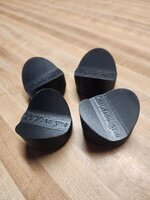
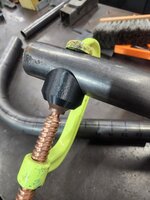
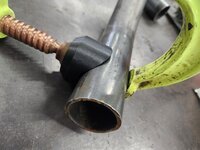
4 FN 27
ALLIANCE MEMBER
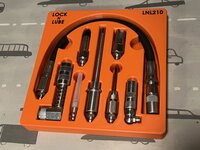
ArcReactorKC
Well-known member
I think I mentioned this earlier in the thread.
I bought a Sovol SV08 planning to turn it into a toolchanger. It was a lot cheaper than building another Voron, plus I thought it would save me some time being produced for easy assembly.
I figured before modifying it to death I should make sure it prints first. Well I've had it for almost 2 months. I've sent over 100 print jobs. It has successfully completed 20 of those. The factory bed level sensor is terribly effected by temperature changes to the point I've seen deviations of 0.8mm. So it was unusable.
Attempting to put a different bed probe on it of course is difficult since Sovol put their own fork of klipper on it so it will be a task to get it onto mainline klipper. Not an insurmountable task but a task nonetheless.
I even went as far as putting the Demon Macros on it to see if it's just my voron macros not being great for the sovol. But alas no difference in function.
The printer is physically built well. It is sturdy enough and it is just as close to square as the vorons I've built with extrusions. The biggest detractors mechanically are the bed being warped like a taco (google SV08 tacobed) and the factory inductive sensor being garbage. I did try replacing it with a higher end inductive I used years ago on a custom CoreXY that I disassembled. I can now get better standard deviations on a probe_accuracy test but the printer still struggles to auto bed level it's way out of the warp.
I'm going to have to put a voron bed on the machine to make it usable, as well as put in a bunch of hours getting the mainboard to mainline klipper.
TLDR; I will be about the same money in it as if I had built another voron from scratch, but I think I'm actually more time invested in it at this point.
TLDR x2; I should've bought the prusa XL 5 toolhead with enclosure and just been done with it. I need this machine to produce, not be a hobby. Even the Voron Toolchanger will be more hobby than reliable production machine.
I bought a Sovol SV08 planning to turn it into a toolchanger. It was a lot cheaper than building another Voron, plus I thought it would save me some time being produced for easy assembly.
I figured before modifying it to death I should make sure it prints first. Well I've had it for almost 2 months. I've sent over 100 print jobs. It has successfully completed 20 of those. The factory bed level sensor is terribly effected by temperature changes to the point I've seen deviations of 0.8mm. So it was unusable.
Attempting to put a different bed probe on it of course is difficult since Sovol put their own fork of klipper on it so it will be a task to get it onto mainline klipper. Not an insurmountable task but a task nonetheless.
I even went as far as putting the Demon Macros on it to see if it's just my voron macros not being great for the sovol. But alas no difference in function.
The printer is physically built well. It is sturdy enough and it is just as close to square as the vorons I've built with extrusions. The biggest detractors mechanically are the bed being warped like a taco (google SV08 tacobed) and the factory inductive sensor being garbage. I did try replacing it with a higher end inductive I used years ago on a custom CoreXY that I disassembled. I can now get better standard deviations on a probe_accuracy test but the printer still struggles to auto bed level it's way out of the warp.
I'm going to have to put a voron bed on the machine to make it usable, as well as put in a bunch of hours getting the mainboard to mainline klipper.
TLDR; I will be about the same money in it as if I had built another voron from scratch, but I think I'm actually more time invested in it at this point.
TLDR x2; I should've bought the prusa XL 5 toolhead with enclosure and just been done with it. I need this machine to produce, not be a hobby. Even the Voron Toolchanger will be more hobby than reliable production machine.


lilscorpion
Well-known member
Alright, need some help. X1C has been great except one issue - if I do t keep the door open with PLA at some point I get this heak soak like issue where the nozzle gets partially blocked and, even after following every YouTube video I watch, I cannot restore the normal flow. Any if you have this issue and have recommendations?
The only failed PLA print I have had was from leaving the P1S door open, the front bottom edges curled up.Alright, need some help. X1C has been great except one issue - if I do t keep the door open with PLA at some point I get this heak soak like issue where the nozzle gets partially blocked and, even after following every YouTube video I watch, I cannot restore the normal flow. Any if you have this issue and have recommendations?
I have never had a problem with PLA, Bambu or IIID-Max, with the door closed. 220 nozzle, 55 bed, 100% part cooling and 70% auxiliary cooling. I don’t remember what the exhaust fan runs at but it is running.
Poolshark314
Well-known member
If it's PLA clogged in your nozzle, I would crank your hotend to 280-300 and see if it oozes out. Can also pull the PTFE out of the print head and manually feed some filament in (different color) and then use the extrude button to push through until it changes colors to your manualAlright, need some help. X1C has been great except one issue - if I do t keep the door open with PLA at some point I get this heak soak like issue where the nozzle gets partially blocked and, even after following every YouTube video I watch, I cannot restore the normal flow. Any if you have this issue and have recommendations?
lilscorpion
Well-known member
I’ve done this and it doesn’t ooz. Flow is less than normal but not blocked.If it's PLA clogged in your nozzle, I would crank your hotend to 280-300 and see if it oozes out. Can also pull the PTFE out of the print head and manually feed some filament in (different color) and then use the extrude button to push through until it changes colors to your manual