
You are using an out of date browser. It may not display this or other websites correctly.
You should upgrade or use an alternative browser.
You should upgrade or use an alternative browser.
The Everything 3D Printer Thread
- Thread starter BoilermakerFan
- Start date
Raise the price yet on new orders? If the demand is there, seems like the right stepGoing viral on a small product that takes 6 hours to print 2 units worth out is... a lesson in frustration.
in the last 30 days we're just about at the 15,000 part count ordered.
Raise the price yet on new orders? If the demand is there, seems like the right step
yup. didnt slow it down.

moab11
Well-known member
Chances are that if you get them molded now, demand will fall off a cliff.
slowtwitch73
Well-known member
You could prob vac thermo mold those cones.
Any tips to improve the area where a support is. On this part when I remove the support it’s actually stuck to the surface and wants to pull some of it off. This part I have printed a couple of times in draft while working out the dimensions for final print. I have printed it separately on each end just to see which one works the best.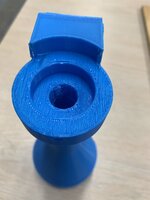

bulletpruf
Well-known member
My 12 y/o daughter is interested in getting a 3D printer. I've wanted one for a while, but have never gotten around to it, so maybe this is my opportunity.
Can anyone recommend an inexpensive one (less than $500?) for her and I to start out with? She would be printing trinkets and such, and I'd be doing garage and car-related stuff.
Thanks
Can anyone recommend an inexpensive one (less than $500?) for her and I to start out with? She would be printing trinkets and such, and I'd be doing garage and car-related stuff.
Thanks
Any tips to improve the area where a support is. On this part when I remove the support it’s actually stuck to the surface and wants to pull some of it off. This part I have printed a couple of times in draft while working out the dimensions for final print. I have printed it separately on each end just to see which one works the best.
.2 layer height?
use .22 offset for Z height in support settings.
ptt49er
Well-known member
Get the most you can from Bambu. The A1 combo is just over the $500 mark. It's the easiest "point and shoot" printer I've touched.My 12 y/o daughter is interested in getting a 3D printer. I've wanted one for a while, but have never gotten around to it, so maybe this is my opportunity.
Can anyone recommend an inexpensive one (less than $500?) for her and I to start out with? She would be printing trinkets and such, and I'd be doing garage and car-related stuff.
Thanks
kppolich
Well-known member
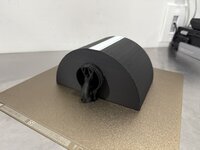
Bigger print for me - trying to make my own sink mount automatic dish soap dispenser that fits inside the corner radius of our kitchen sink. Attached with high strength magnets.
The dispenser top is powered by 2 AAA batteries from this $10 all in one and the batteries are supposed to last a year of regular use.
For v1 I ran out of filament at 99% and made due with some white.
Overall, too big and missed the corner profile I was trying to match.
I'll print the next one in 2 pieces to save on the support and glue the top on to the bottom container.


The dispenser top is powered by 2 AAA batteries from this $10 all in one and the batteries are supposed to last a year of regular use.
For v1 I ran out of filament at 99% and made due with some white.
Overall, too big and missed the corner profile I was trying to match.
I'll print the next one in 2 pieces to save on the support and glue the top on to the bottom container.
The superdraft setting is .28 I think without having my slicer software open to look at..2 layer height?
use .22 offset for Z height in support settings.
bulletpruf
Well-known member
Get the most you can from Bambu. The A1 combo is just over the $500 mark. It's the easiest "point and shoot" printer I've touched.
Ok, the A1 Mini Combo for $599? - https://www.amazon.com/Multi-Color-...mpensation/dp/B0CRYZWJLG?tag=atomicindus08-20
ptt49er
Well-known member
I'd go direct with Bambu or Microcenter

 us.store.bambulab.com
Bambu Lab A1 | Multi-color 3D Printer
Fully automated, Bambu Lab A1 with AMS lite shines as the best 3D printer for beginners, making multi-color 3d printing and multi-filament 3d printing accessible to EVERYONE!
There are some good Bambu alternatives depending on your budget and wants. Some people love multi color, some don't care.My 12 y/o daughter is interested in getting a 3D printer. I've wanted one for a while, but have never gotten around to it, so maybe this is my opportunity.
Can anyone recommend an inexpensive one (less than $500?) for her and I to start out with? She would be printing trinkets and such, and I'd be doing garage and car-related stuff.
Thanks
The Flashforge 5M is about $240 off their eBay store. It's very fast, good print quality and basically plug and play (really most of the new printers are). You can buy an enclosure kit+print parts to make it enclosed for about $50 (parts+material). This is the printer I have. I don't use network printing. I use Orca slicer.
The biggest gap between my setup and say the A1 without multi color unit is the software experience isn't as integrated.
The new Elegoo Centuari Carbon (~$330 after shipping) looks like a really attractive option. It will probably add multi color in the future which means you can possibly upgrade later. Three reviews all seem good. However you have to order and wait a a while for delivery. Perhaps the of July for delivery. This is an enclosed printer so better for materials like ABS that you might want to use in a car.
While the A1 family is a very good option, they are open bed slingers. This will limit your ability to use filaments that want higher print temps. However, if you are going to print mostly PLA that's not as big a deal. Pre-price hikes the Bambu printers were easier to recommend since they were just a bit more expensive. Now they are a lot more expensive and there are good alternative options. That and Bambu's software issues make it easier to suggest alternatives.
Thanks for asking - I will be following along as well. Drafting - its for more than just racing.My 12 y/o daughter is interested in getting a 3D printer. I've wanted one for a while, but have never gotten around to it, so maybe this is my opportunity.
Can anyone recommend an inexpensive one (less than $500?) for her and I to start out with? She would be printing trinkets and such, and I'd be doing garage and car-related stuff.
Thanks

bulletpruf
Well-known member
There are some good Bambu alternatives depending on your budget and wants. Some people love multi color, some don't care.
The Flashforge 5M is about $240 off their eBay store. It's very fast, good print quality and basically plug and play (really most of the new printers are). You can buy an enclosure kit+print parts to make it enclosed for about $50 (parts+material). This is the printer I have. I don't use network printing. I use Orca slicer.
There's someone local selling FLASHFORGE Adventurer 5M Pro's for $270 new (open box). These are enclosed. Sounds like a good deal, right? Looks like they sell for $420 on Amazon.
gpiggaz
Well-known member
Watch a few reviews from auroratech. She's pretty darn thorough in her reviews.
She also has a listing of printers at different price/performance points that she recommends.
I have no affiliation - Heck, I'm still using my old Ender 3 V2 (modified with direct drive extruder, Dual Z motors, and a CR touch z probe.) But when I do finally decide to buy a newer printer, I'll review what she's recommending and buy that.
She also has a listing of printers at different price/performance points that she recommends.
I have no affiliation - Heck, I'm still using my old Ender 3 V2 (modified with direct drive extruder, Dual Z motors, and a CR touch z probe.) But when I do finally decide to buy a newer printer, I'll review what she's recommending and buy that.
bulletpruf
Well-known member
Watch a few reviews from auroratech. She's pretty darn thorough in her reviews.
She also has a listing of printers at different price/performance points that she recommends.
I have no affiliation - Heck, I'm still using my old Ender 3 V2 (modified with direct drive extruder, Dual Z motors, and a CR touch z probe.) But when I do finally decide to buy a newer printer, I'll review what she's recommending and buy that.
Thanks for the info!
Scott
The 5M pro for $270, assuming it's truly just open box etc, is a really good deal. The printer has nice filtration etc. One other down side I forgot to mention earlier, they have a smaller build area vs the A1 and Elegoo Centuari. The 5M's 220x220 is the same as the Ender 3 and many other printers. It was the old "standard" size consumer printer. The Bambu introduced the somewhat larger 255x255 size. Perhaps this was because Bambu didn't want to release a 300mm "helmet" class printer, something that most of the others had. Either way, the 5M's build area/volume is smaller. The only time it mattered to me is when I was printing a miniature car frame. It wanted to print it as large as possible.There's someone local selling FLASHFORGE Adventurer 5M Pro's for $270 new (open box). These are enclosed. Sounds like a good deal, right? Looks like they sell for $420 on Amazon.
rslaback
Well-known member
There are bucketloads of people that successfully cut their teeth on an Ender v2 or v3 and they are dirt cheap. Their upgrades are incredibly reasonable and the community support is incredible if you need it.My 12 y/o daughter is interested in getting a 3D printer. I've wanted one for a while, but have never gotten around to it, so maybe this is my opportunity.
Can anyone recommend an inexpensive one (less than $500?) for her and I to start out with? She would be printing trinkets and such, and I'd be doing garage and car-related stuff.
Thanks
gpiggaz
Well-known member
While I agree it's been great cutting my teeth on the Ender it's still a bit fiddly even with upgrades that improved it tremendously - (As mentioned above, dual Z axis, CR Touch, Direct Drive extruder were the big ones) I still have probably 1 in 5 or 6 prints fail. I actually own one of these in each location we live and they do get used quite a bit. It's amazing using Fusion to design parts to print on them, I'm finally getting somewhat proficient after messing with Fusion for about a year. I've had my Ender 3V2's for more than 3 years each. So I've been through a lot with them. I know you can get one now for around $100 plus upgrades ( I think I saw them that cheap recently) For the money they might be hard to beat, but with a $500 budget, I'd suggest looking for something more modern. Like I said above the Auroratech channel does really good reviews and makes pretty solid recommendations.There are bucketloads of people that successfully cut their teeth on an Ender v2 or v3 and they are dirt cheap. Their upgrades are incredibly reasonable and the community support is incredible if you need it.
When talking about Enders, keep in mind the V3 models are a lot more plug and play vs the older models. V3 models all have fix build plates (no more adjusting knobs to level the bed). All also have auto z height (confusingly z-height and bed level aren't the same thing). The V3SE is fast compared to an Ender 3 but slow vs most new printers. The V3KE is more reasonable. The V3 (not KE or SE) is roughly the same speed as the rest of the current printers. Yes, there are speed differences but all are much faster than the standard stuff from 3 years back.
rslaback
Well-known member
Time to post another project. I use timers to water our sweet corn/tomato/squash patch daily. My **** retentiveness just could not handle the timer just laying in the grass or fastened willy nilly to the post. Enter a man with too much time, Autocad and a 3D printer.
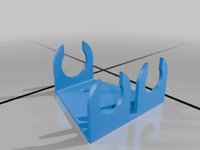

Enter the rabbit hole, time to make one for the 2 port timer as well.

Enter the rabbit hole, time to make one for the 2 port timer as well.
bugnut
ALLIANCE MEMBER
Quick question for the masses. I recently updated the latest software for the Bambu x1c. Since performing the update print times have increased by about 35%. I checked this by going to my print history and looking at time to print, and it is obviously taking longer. Has anyone else experienced this. My next step will be to revert to a previous version of software, but wondering if it is just me (again). TIA
kaymccampbell
Well-known member
Did you uncheck the Screw The User checkbox ten layers down in the Obscure Settings tree?Quick question for the masses. I recently updated the latest software for the Bambu x1c. Since performing the update print times have increased by about 35%. I checked this by going to my print history and looking at time to print, and it is obviously taking longer. Has anyone else experienced this. My next step will be to revert to a previous version of software, but wondering if it is just me (again). TIA
neblinc
Well-known member
Bed leveling on by default?Quick question for the masses. I recently updated the latest software for the Bambu x1c. Since performing the update print times have increased by about 35%. I checked this by going to my print history and looking at time to print, and it is obviously taking longer. Has anyone else experienced this. My next step will be to revert to a previous version of software, but wondering if it is just me (again). TIA
bugnut
ALLIANCE MEMBER
stinkity stoink
Well-known member
I feel like this happened to me also . If you find a fix please post. I have looked, but have no idea what I’m looking for.Quick question for the masses. I recently updated the latest software for the Bambu x1c. Since performing the update print times have increased by about 35%. I checked this by going to my print history and looking at time to print, and it is obviously taking longer. Has anyone else experienced this. My next step will be to revert to a previous version of software, but wondering if it is just me (again). TIA
kaymccampbell
Well-known member
Didja read the release notes? After several hours of swearing, I usually go spend 20 minutes with the release notes to find relief. Or at least a reason.
Odes
Well-known member
I’m in the market for a new printer I’ve narrowed it down to bambu x1c or p1s
Is the x1c worth it? And what spare parts or supplies should I order with it. A bit of background I’ve had a ender 5 for a few years and it has been off and on but it has been turning out great prints lately. I want a second printer that I don’t have to tinker with so much
Is the x1c worth it? And what spare parts or supplies should I order with it. A bit of background I’ve had a ender 5 for a few years and it has been off and on but it has been turning out great prints lately. I want a second printer that I don’t have to tinker with so much
draco_1967
Well-known member
I went with the P1S. I haven't felt the need for any of the functionality of the X1C for my use.
I purchased some extra nozzles (hardened and different sizes), but I wish I would have bought the full assembly. Changing just the nozzle takes a lot of time vs the full nozzle/fan assembly. I'm eyeing an aftermarket hotend setup that allows more traditional quick screw-in nozzle changes.
I purchased some extra nozzles (hardened and different sizes), but I wish I would have bought the full assembly. Changing just the nozzle takes a lot of time vs the full nozzle/fan assembly. I'm eyeing an aftermarket hotend setup that allows more traditional quick screw-in nozzle changes.
Cruzan80
Well-known member
Yes, this is one thing that I am glad Bambu changed for the A1/A1 Mini and then the H2D (similar mechanisms, not identical between A/H). One lever to hold it down, magnets for initial positioning, quick and easy to swap.
If/when you get a huge nasty blob, then you can take out the couple of hex heads, and swap the lever if needed.
If/when you get a huge nasty blob, then you can take out the couple of hex heads, and swap the lever if needed.
niget2002
Well-known member
print at a 45 degree angle. you waste more material on supports, but can end up with a better finish.Any tips to improve the area where a support is. On this part when I remove the support it’s actually stuck to the surface and wants to pull some of it off. This part I have printed a couple of times in draft while working out the dimensions for final print. I have printed it separately on each end just to see which one works the best.
I will also give that a try. I see in Prusa they have a "pattern angle" for support material that I am thinking would be that.print at a 45 degree angle. you waste more material on supports, but can end up with a better finish.
bugnut
ALLIANCE MEMBER
@kaymccampbell Rain forecast all week will try to dig into it then.
niget2002
Well-known member
I'm not sure how Prusa does it. In Simplify3d, you just rotate the part 45 degrees so it's sitting on the build plate crooked. Then you use normal supports. I also typically use a raft if I'm printing at a 45 to help that corner it is sitting on stick better.I will also give that a try. I see in Prusa they have a "pattern angle" for support material that I am thinking would be that.
Jehannum
Well-known member
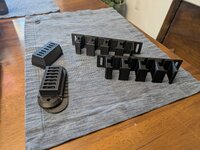
relay and fuse holders to address the relayed halogen headlights, the low and high speed electric fans, the vacuum pump, fuel pump, and the Sniper hyperspark ignition kajigger on my '67 GTO. Right now, it's a nightmare rat's nest of wires tucked away next to the battery out of sight, but it's beginning to be 1) unreliable, 2) difficult to troubleshoot, and 3) a drag on my mind.
My GTO, my 240Z, my kid's MR2, and my friend's Firebird at the father's day car show last weekend:

My GTO, my 240Z, my kid's MR2, and my friend's Firebird at the father's day car show last weekend:
Neat idea! What type of filament did you print them with? (Also I love that 240)relay and fuse holders to address the relayed halogen headlights, the low and high speed electric fans, the vacuum pump, fuel pump, and the Sniper hyperspark ignition kajigger on my '67 GTO. Right now, it's a nightmare rat's nest of wires tucked away next to the battery out of sight, but it's beginning to be 1) unreliable, 2) difficult to troubleshoot, and 3) a drag on my mind.