To avoid these ads, REGISTER NOW!

The Everything 3D Printer Thread

To avoid these ads, REGISTER NOW!

bulletpruf

Well-known member
Joined
Nov 28, 2013
Messages
10,912
Location
San Antonio
There's someone local selling FLASHFORGE Adventurer 5M Pro's for $270 new (open box). These are enclosed. Sounds like a good deal, right? Looks like they sell for $420 on Amazon.
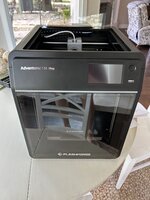
Got the 5M Pro today at a local liquidator. Purchased as "open box" but it's new, never been unboxed. $215 out the door.

IMG_3832.JPG
 

WildBill

ALLIANCE MEMBER
Joined
Aug 20, 2021
Messages
1,976
Location
PNW
The Bambu printers are on sale at a bunch of places right now, the P1S Combo is down to $699 with the original AMS and $819 with the AMS2, I believe the AMS2 has built in drying and is faster at switching material, among other improvements. Best Buy, Micro Center, and the Bambu site have them on sale. All the other Bambu printers are also on sale.
 

Max

ALLIANCE MEMBER
Joined
Jun 16, 2018
Messages
3,313
Location
Georgia
I am very close to pulling the trigger on a P1S. But there is so much bad stuff on the web about Bambu and the software. So I have I hope a simple question for people that have a Bambu printer. Can I run the tools, and the printer, without connection to the web? I'll open access in general for firmware updates if I think I need them, but in general I don't want the printer or the SW to talk to the web. If my designs have to go to a cloud somewhere to print, well then I'll have to explore other options...
 

draco_1967

Well-known member
Joined
Jan 3, 2021
Messages
205
Location
Utah
You can run the printer unconnected. You would transfer files for printing on an SD card. You lose the camera and monitoring ability of being online, but it still prints.
 

Dh3256

Well-known member
Joined
Mar 19, 2018
Messages
1,139
I am very close to pulling the trigger on a P1S. But there is so much bad stuff on the web about Bambu and the software. So I have I hope a simple question for people that have a Bambu printer. Can I run the tools, and the printer, without connection to the web? I'll open access in general for firmware updates if I think I need them, but in general I don't want the printer or the SW to talk to the web. If my designs have to go to a cloud somewhere to print, well then I'll have to explore other options...
Yes, you don't have to connect to the web, and most of the concerns seem to be misinformed. There was an earlier discussion in the thread, if you want to understand both sides, but most people are not concerned about it.
 
  • Like
Reactions: Max

Cruzan80

Well-known member
Joined
Jul 22, 2015
Messages
4,155
Location
Denver, CO
As said before, yes. I made a simple box to tape next to the screen to hold a Micro-SD->USB stick, so it would be harder to misplace it when moving back/forth. Be aware, the firmware for the printer and the slicer firmware do occasionally need to "match" (if you update your printer firmware after a long time, it may force you to update the slicer as well). If you don't have the right color selected in the slicer, you can manually tell it which colors to use when printing on the screen.

For downloading files from MakerWorld, you need to make an account, IIRC, or it puts a limit on the number of downloads. Depending on model, itat be a .STL or a .3MF (what Bambu Slicer uses to save). If it is a 3mf, you are able to save individual .STL files from within the slicer if needed.
 
  • Like
Reactions: Max

ArcReactorKC

Well-known member
Joined
Jun 1, 2019
Messages
2,237
Location
Out in the county NE of KCMO
I am very close to pulling the trigger on a P1S. But there is so much bad stuff on the web about Bambu and the software. So I have I hope a simple question for people that have a Bambu printer. Can I run the tools, and the printer, without connection to the web? I'll open access in general for firmware updates if I think I need them, but in general I don't want the printer or the SW to talk to the web. If my designs have to go to a cloud somewhere to print, well then I'll have to explore other options...
All of my bambu's are set in my firewall to not have access to the internet, I still use orcaslicer to send the files over the network and can see the cameras over my internal network. This enables me to use home assistant through MQTT to control a lot of what they do and still get notifications without letting them speak to bambu servers. Just enable lan mode in the interface.
 

Max

ALLIANCE MEMBER
Joined
Jun 16, 2018
Messages
3,313
Location
Georgia
All of my bambu's are set in my firewall to not have access to the internet, I still use orcaslicer to send the files over the network and can see the cameras over my internal network. This enables me to use home assistant through MQTT to control a lot of what they do and still get notifications without letting them speak to bambu servers. Just enable lan mode in the interface.
Thank you. I’ll do the same with my router.

Edited to add: I bought a P1S today. Obviously there is going to be a learning curve. :) I'm looking forward to learning new tools.
 
Last edited:

ER70S-2

Well-known member
Joined
Jan 2, 2015
Messages
796
I cant justify a new printer since my Prusa MK3S+ still runs perfectly, so I ordered the 3.5S upgrade kit. It will give me wifi printing, a new display, and 2x faster prints with input shaping. For $250 it was a no-brainer.
 

cdoublejj

Well-known member
Joined
Apr 11, 2022
Messages
167
Location
MO
i need to get a new after i sent the POS bambu labs back. creality seems to be the most open source friendly and NON anti consumer next to Prusa.
 

Citation

Well-known member
Joined
Jan 20, 2016
Messages
3,209
Location
Indy
i need to get a new after i sent the POS bambu labs back. creality seems to be the most open source friendly and NON anti consumer next to Prusa.
On ebay the Flashforge 5M is $220 from the company account. That's where I got mine. The 5M pro is also on sale but if you are mostly PLA the open frame 5M is good.
 

cdoublejj

Well-known member
Joined
Apr 11, 2022
Messages
167
Location
MO
I might as well get a good one that do composites for stuff like Intake manifolds and car parts. But it would be nice to get something closer to click to print like bambu but it seems the eaiser to use the more anti consumer and locked down they are. I think I was looking at the k2 plus or one the big new ones. They poop though and multi head technology is starting to come out so it will be outdated in 16 months, mti head has way way less waste
 

Citation

Well-known member
Joined
Jan 20, 2016
Messages
3,209
Location
Indy
Two of my sibs got K2s and have been happy with them. If you are printing things like manifolds I can imagine wanting to be anything less than a 300mm build size. Ideally bigger.
I might as well get a good one that do composites for stuff like Intake manifolds and car parts. But it would be nice to get something closer to click to print like bambu but it seems the eaiser to use the more anti consumer and locked down they are. I think I was looking at the k2 plus or one the big new ones. They poop though and multi head technology is starting to come out so it will be outdated in 16 months, mti head has way way less waste
 

ArcReactorKC

Well-known member
Joined
Jun 1, 2019
Messages
2,237
Location
Out in the county NE of KCMO
I might as well get a good one that do composites for stuff like Intake manifolds and car parts. But it would be nice to get something closer to click to print like bambu but it seems the eaiser to use the more anti consumer and locked down they are. I think I was looking at the k2 plus or one the big new ones. They poop though and multi head technology is starting to come out so it will be outdated in 16 months, mti head has way way less waste
I've been happy with the K2+'s we've got now. They have been running in production for a couple weeks without much hiccup.

All are running engineering filaments (ABS, ASA, Nylon) on 0.6mm nozzles. I've been pretty happy with them and the quality/reliability has been just as good if not better than the X1C's and having the larger build plate has been great.

On the other end I haven't been able to get any of the Prusa XL units we got in just a little bit ago to work worth a damn, to be fair they are all running multimaterial with 3 or more toolheads. So the process is more complicated/convoluted in general. Regardless though the experience is more tinker, less click-print.

On the far other end of the spectrum I have an orange storm giga on the way I am planning to put a coprint system on for some of my larger multimaterial prints. I am expecting to spend a few days just getting it calibrated and dialed in though. I just got the plexi panels in for the enclosure so it'll be a fun/frustrating project I am sure.
 

cdoublejj

Well-known member
Joined
Apr 11, 2022
Messages
167
Location
MO
I've been happy with the K2+'s we've got now. They have been running in production for a couple weeks without much hiccup.

All are running engineering filaments (ABS, ASA, Nylon) on 0.6mm nozzles. I've been pretty happy with them and the quality/reliability has been just as good if not better than the X1C's and having the larger build plate has been great.

On the other end I haven't been able to get any of the Prusa XL units we got in just a little bit ago to work worth a damn, to be fair they are all running multimaterial with 3 or more toolheads. So the process is more complicated/convoluted in general. Regardless though the experience is more tinker, less click-print.

On the far other end of the spectrum I have an orange storm giga on the way I am planning to put a coprint system on for some of my larger multimaterial prints. I am expecting to spend a few days just getting it calibrated and dialed in though. I just got the plexi panels in for the enclosure so it'll be a fun/frustrating project I am sure.
Have you messaged prusa yet?
 
To avoid these ads, REGISTER NOW!

Firebrick43

Well-known member
Joined
May 12, 2015
Messages
13,973
Location
West central Indiana
What is the table?
 

ArcReactorKC

Well-known member
Joined
Jun 1, 2019
Messages
2,237
Location
Out in the county NE of KCMO
Have you messaged prusa yet?
I have, but these are more calibration issues than downright "won't print" issues.

To be transparent I've also never been a prusa fanboy and have criticized them for directions they have taken on many iterations of their machines. Buying these XL's was a last ditch effort as I've run out of time to tinker with my own designs. I was more than ready to be unhappy with these machines from the get go. A portion of this is growing pains working in Prusa Slicer as I had gone from Cura to Orcaslicer a few years ago. While prusa slicer and orca share many similarities they are not identical.

Now on the other hand my SV08 I migrated to mainline klipper and coprint is now printing along working production like I had hoped for it a long time ago.
 

cdoublejj

Well-known member
Joined
Apr 11, 2022
Messages
167
Location
MO
well good to know i saw youtuber get a great responses from prusa, at least for some calibration. looking like reality k2+ and pooping or wait for multi head mid next year.
 

ArcReactorKC

Well-known member
Joined
Jun 1, 2019
Messages
2,237
Location
Out in the county NE of KCMO
well good to know i saw youtuber get a great responses from prusa, at least for some calibration. looking like reality k2+ and pooping or wait for multi head mid next year.
Don't get me wrong the XL is a decent machine and put together well. It is the only multi-head out of the box in its price range I am aware of.

If you are printing as a hobby it would be well worth the investment, but if you are printing for profit it'll be a let down initially. As I narrow in some of the calibration each one is getting better and better. I was really hoping for an out of the box slice and print solution but as of this moment I don't think that is realistic for a multi-toolhead machine.
 

cody1325

Well-known member
Joined
Apr 17, 2024
Messages
1,075
Location
Southwest Virginia
Finally got the Flashforge 5M on order today. USPS is supposed to deliver it tomorrow.

I also decided to start throwing the "junk" out of the basement so I can use it for hobby stuff. Thus, I'm getting rid of a treadmill that hasn't seen use in a decade, and an air hockey table that warped from a variety of factors (mostly relating to having been used as a table and workbench--often loaded down).

However, as I have been moving stuff around, I'm curious what surfaces would be appropriate to set it down on.

I'm eventually filling that corner with secondhand kitchen cabinets/counters (and getting wall outlets installed--there's only a handful in the basement, and all but two are ceiling-mount), but have a sizeable old dining room table (15 year old Kmart special) that otherwise isn't being used, as well as a small section of cabinetry I can easily move. Would that be appropriate for the time being?
 

cdoublejj

Well-known member
Joined
Apr 11, 2022
Messages
167
Location
MO
I think I was about $4100 ea. for my 5x 5 toolhead machines.

It sounds like a lot but I've got more than that into failed printer designs that never made a complete print.
Hell I bet I had over $5k into my E3D toolchanger that has never been completed.
You got one of those filament recycling machines to reuse failed prints?
 

ArcReactorKC

Well-known member
Joined
Jun 1, 2019
Messages
2,237
Location
Out in the county NE of KCMO
I seriously thought about going down that route after building my railcore.

So glad I didnt
I was super excited when they released it. I bought a bunch of parts and started putting it all together. When I first started it was before I had started working with klipper and was trying to build the whole thing around RepRap firmware. I was not good at it then, and I'm still not now. I used the e3d files for a jumping off point but of course being me I thought I could make it better as well my physical construction didn't exactly match their intended.

I was able to get single material prints to work just fine but I never got multitoolhead prints tuned well enough to call them "good" as well it was extremely slow by todays standards and was most often running at a max of 90mm/s. I think at that time firmware limitations and a volcano hotend were the biggest hold up on real fast prints.

I am thinking I might repurpose some of the kinematics for my next SV08 toolchanger.
 

Firebrick43

Well-known member
Joined
May 12, 2015
Messages
13,973
Location
West central Indiana
Lots of people on the Facebook printer pages I watch have similar stories to yours.

I think the biggest problem with most tool change heads is that they have to much weight and inertia

I am even switching over (when I get time)my rail core to a orbiterv3 just to get the inertia down and my bondtech set up is pretty light for a direct drive extruder and hotend
 

ArcReactorKC

Well-known member
Joined
Jun 1, 2019
Messages
2,237
Location
Out in the county NE of KCMO
Lots of people on the Facebook printer pages I watch have similar stories to yours.

I think the biggest problem with most tool change heads is that they have to much weight and inertia

I am even switching over (when I get time)my rail core to a orbiterv3 just to get the inertia down and my bondtech set up is pretty light for a direct drive extruder and hotend
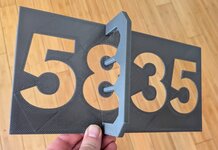
I am hopeful that the bondtech INDX system will be a true game changer and we will see some more innovation in the toolchanger space. I'm planning to build a new voron around it just to see how it goes.
 

WildBill

ALLIANCE MEMBER
Joined
Aug 20, 2021
Messages
1,976
Location
PNW
I am hopeful that the bondtech INDX system will be a true game changer and we will see some more innovation in the toolchanger space. I'm planning to build a new voron around it just to see how it goes.
It looks really cool, I signed up to be a tester for it. So far they have sent me two questionnaires about what printers I have and about my technical background. So hopefully I am being considered. I also am backing the Wondermaker 4 head printer, it looks pretty good so far.
 

pcrov

Well-known member
Joined
Feb 27, 2023
Messages
375
Location
Ontario, CA
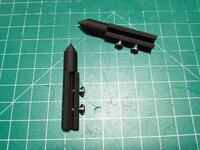
I posted this over in the "what are these pointy things" thread but thought I'd show off share it here too.

This is my centerline attachment for calipers. The model is parametric so you can customize them as you like. I've only been learning 3d modeling for a few days but I found this project super satisfying. It's wild the kind of detail you can iterate on.


And here's the model on onshape: https://cad.onshape.com/documents/f...3fa7cacef4a89fc151/e/134bfeab7fcc5e4b6fa7210f

Copy to tweak the variables to your liking.
 

Attachments

  • IMG_20250708_030131793.jpg
    IMG_20250708_030131793.jpg
    829.5 KB · Views: 37
  • IMG_20250708_030452417.jpg
    IMG_20250708_030452417.jpg
    1.1 MB · Views: 36
  • Screenshot 2025-07-08 030820.png
    Screenshot 2025-07-08 030820.png
    393.9 KB · Views: 28
To avoid these ads, REGISTER NOW!
Top Bottom