To avoid these ads, REGISTER NOW!

The Everything 3D Printer Thread

LeonardY

Well-known member
Joined
Apr 16, 2011
Messages
5,033
Location
Southern California
Made a quick attachment deer feeder so I can just carry one into the woods and without draining the corn from the barrel mount another thrower motor.

Parts required:
Dollar store plastic trash can & wire trash can
3d printed blast gate
3-20mm neodymium magnets
3d printed backer ring-acts a stiffener for the magnets
1 steel ring 6” od x 4”id x.12 thk
Moultrie feeder motor
Misc hardware

When assembled as shown the four outermost bolt holes in the blast gate secure the assembly to the barrel/feeder. When affixed I can now close the blast gate, remove the motor assembly in it’s entirety, because of the magnets and replace it with another unit.

Another benefit of this setup is it has been keeping, *****, squirrels and birds out of the feeder motor and assembly. The upside down trash can focuses the throw into a smaller area also.
om%2Fm%2FER8wX-vSH1kAAAAC%2Fimpressive-darth-vader.gif
 
To avoid these ads, REGISTER NOW!

67CarGuy

Well-known member
Joined
Feb 6, 2008
Messages
763
Location
Outside Boston, MA
A question for those of you who have been printing for a few years now, or who at least have more experience than I do:

Anyone print book nooks? They look neat, I can see the appeal... but my bookshelves are filled with books! I don't have space for a fun little visual diversion. Are they practical? Of course not! But I also recognize that not everything we do (especially on GJ) is always practical. It's...fun to have a little fun sometimes. Just curious to see what y'all have done, if anything.
Thanks!
 

Cruzan80

Well-known member
Joined
Jul 22, 2015
Messages
4,175
Location
Denver, CO
I noticed they are running a "Challenge" on MakerWorld, and pointed it out to our librarian at my HS (they also have an X1C for students to use). Told them that they should randomly scatter some around as needed to fill up spaces on shelves, vs just end-holders.
 

Jehannum

Well-known member
Joined
May 3, 2012
Messages
1,349
Location
Albuquerque, NM
Broke the pot metal gubbin that holds the mirror adjuster in the door card for the GTO, so I'm gonna have to fire up some plastic thinger, because the pot metal piece isn't available separate from a whole new door card.

Step 1: print a keyway that fits over the mirror adjuster
Step 2: add a front part to the keyway that fits under the screw-on escutcheon that's supposed to retain it from the front side.
Step 3: add a back part that secures the keyway to the door card so I can pass the mirror adjuster through.

So, I started back on my ghetto 3D scan method of using the bezier tool in Inkscape.
Screenshot 2026-01-25 at 12.36.11 PM.png

Which renders this:

Screenshot 2026-01-25 at 12.37.00 PM.png

which gets the ol' linear_extrude to get this:

PXL_20260125_235356640.jpg.jpeg

PXL_20260125_235410106.jpg.jpeg

Now on to step 2.
 

ER70S-2

Well-known member
Joined
Jan 2, 2015
Messages
798
Alright Bambu bros... Need some help. The top surfaces of my prints are atrocious. Filament has been calibrated. The problem stems from where the printer stops printing a portion of a layer, goes to another portion, and then meets back up where it left off before. It's hard to explain, but see the second pic. That pic is from the second to last layer. It creates a ridge on the second to last layer where the portions of the layer meet up and it shows right through the top layer. It is not from infill.

I see a lot of people on Bambu groups with terrible top layers, but of course everyone's like "dry yer filament!"

My prior printer that was 5 years old never ever did this, so there has to be a fix.

topa.jpegtopb.jpeg
 

Model A Fan

Well-known member
Joined
Dec 1, 2011
Messages
1,210
Location
NW Washington
I noticed they are running a "Challenge" on MakerWorld, and pointed it out to our librarian at my HS (they also have an X1C for students to use). Told them that they should randomly scatter some around as needed to fill up spaces on shelves, vs just end-holders.
So other people know what you're referring to, here's the link:

https://makerworld.com/en/contests/126?designId=[object%20Object]&orderBy=hotScore&name=Master%20Challenge:%20Book%20Nook%20Design%20Contest#tab-Entries
 

Model A Fan

Well-known member
Joined
Dec 1, 2011
Messages
1,210
Location
NW Washington
The link you posted doesn't work (looks like something in the forum link insertion software borked). Try this one instead.
Yep, not sure why that one won't work, but you got the correct link. Thank you for posting it. There truly is so much neat stuff to print and build/make on these types of pages. I'm waiting for parts to hopefully fix my P1S and start printing Multiboard for my garage to get organization flowing.
 

bugnut

ALLIANCE MEMBER
Joined
Jul 14, 2012
Messages
3,850
Location
Central Ohio
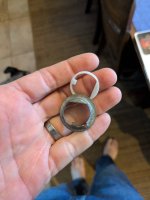
In post #5645 I showed the magnetic quick change feeder mounting. I finished up the last print, which is a retrofit for the oldest style of feeder we're using. I now plan on switching them out as we refill the barrels with corn. These are the 4 different feeder styles I have currently in use. They now interchange in moments. Final step is to replace a few screws with flatheads so they have no protrusion on the steel ring.
 

Attachments

  • 20260127_115809.jpg
    20260127_115809.jpg
    531.8 KB · Views: 26
  • 20260127_115628.jpg
    20260127_115628.jpg
    600.5 KB · Views: 17
  • 20260127_115327.jpg
    20260127_115327.jpg
    793.2 KB · Views: 18
  • 20260127_115257.jpg
    20260127_115257.jpg
    772 KB · Views: 29
  • 20260127_115229.jpg
    20260127_115229.jpg
    872.8 KB · Views: 35

duneslider

Well-known member
Joined
Jan 20, 2013
Messages
2,247
Location
Riverton, Utah

duneslider

Well-known member
Joined
Jan 20, 2013
Messages
2,247
Location
Riverton, Utah
Ooh, I like the multi chamber setup on that
That's what had me looking at them, being able to have different temps going on in different chambers seems nice. I usually have petg in a couple and leave a couple whatever random pla silk the kids are liking in the others. I don't care much about the kids randomness going on but like to keep the petg in good condition for the stuff I am doing.
 
To avoid these ads, REGISTER NOW!

Model A Fan

Well-known member
Joined
Dec 1, 2011
Messages
1,210
Location
NW Washington

Cruzan80

Well-known member
Joined
Jul 22, 2015
Messages
4,175
Location
Denver, CO
Isn't the ams2 pro already heated?
The AMS2 can either heat or print, not both at the same time. According to Bambu, the PFTE tubes are not designed to be heated while printing. I would think that the Sunlu add-on would affect the AMS 1 the same way...
 

mike93lx

ALLIANCE MEMBER
Joined
Dec 9, 2013
Messages
37,403
Location
Richmond, VA
The AMS2 can either heat or print, not both at the same time. According to Bambu, the PFTE tubes are not designed to be heated while printing. I would think that the Sunlu add-on would affect the AMS 1 the same way...
those are the same PTFE tubes that are inside the heated enclosure, right? :)

i don't know how much being able to heat while printing matters though. my big thing is that I don't want to be transferring spools around and being able to have them be at least maintained between prints would be nice.
 

jayz66ragtop

Well-known member
Joined
Sep 11, 2009
Messages
1,521
Location
SoCal
I've read they updated it recently so you can dry while printing but it'll lower the drying temp at the time.
I just updated to the latest firmware last week and it did not let me dry while printing. From what I read it's not recommended to even keep the filament fed so that the spool can be rotated as it's dried.
 

jayz66ragtop

Well-known member
Joined
Sep 11, 2009
Messages
1,521
Location
SoCal
Just found it again. Looks like a work-in-progress https://www.reddit.com/r/BambuLab/comments/1qod4u9
Ok, that's an update to the slicer not the firmware. Just got notified of the slicer update yesterday or the day before but hadn't had a chance to install it yet. Prior to that version of the slicer you couldn't even initiate a drying cycle through the slicer, only from the screen on the printer and it wouldn't let you dry and print. I didn't try it but he screen on the printer even said to remove filament from the feeder while drying so it could spin the spool. I thought about leaving the filament in and try drying to see what would happen but I was chicken to mess up my brand new $2500 setup to go against what Bambu suggested.


On edit: Just installed version 2.5.66 it doesn't have the option to dry still. I do see the Reddit post says "Minimum supported firmware version: 01.02.30.00" which must be a beta version. My printer says I have the latest firmware version 01.01.02.00. I am not subscribed to the beta feed for firmware on this printer.


Note, no way to initiate drying like on the Reddit post:
1769802682307.png


Software versions:

1769802618668.png


I realized after posting this may seem argumentative and I did not intend it to be that way, just wanted to share what I'm seeing as available for my setup.


Second edit: Reading through the Reddit post, they note that it's only for the H2D for now it seems, not even for the H2C which is a disappointment but hopefully they will roll it out for all of the H series printers soon.
 
Last edited:

jayz66ragtop

Well-known member
Joined
Sep 11, 2009
Messages
1,521
Location
SoCal
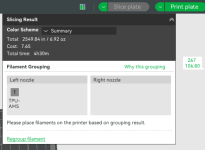
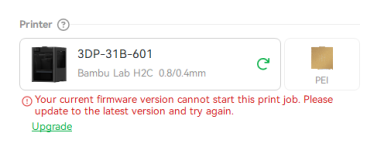
Well, a little more fun with the H2C, filament, and the firmware version. The slicer apparently knows of future features BUT will not allow me to use them. What do I mean? Bambu has said at some point they will allow TPU for AMS to be printed from the left print head in a future firmware. I'm drying filament in the two AMS 2 Pro's so I wanted to see what would happen if I tried printing from the HT AMS which is connected to the left print head currently.

Loaded up the project and sliced it and all looked good.
1769848720683.png

Hit the "Print Plate" button annnnnnnnnnnnnnnnnnnnd F U!

1769848782770.png

but maybe there is hope at the end of that "Upgrade" button. A glimmer of hope...

DENIED!!! I'm on the latest version :confused: Oh well, it is interesting and the SWE thinks it's a bug to be telling me about future features that I cannot get yet. Damn tease!

1769802618668.png
 

WildBill

ALLIANCE MEMBER
Joined
Aug 20, 2021
Messages
1,984
Location
PNW
I shelled out $232 for a 5M. Hopefully it makes me happy-er-ish.
Nice, I have three 5Ms and two AD5X multi material printers in my collection. I'm really happy with the quality and speed VS the price. They are the fastest printer I have used, including a lot of others with the same advertised speed. My two Anycubic S1 Combos are rated the same but are about 25% slower by default, also kinda just turds in general.

I use cheap aftermarket hotends with replaceable nozzles on mine. I haven't had any issues with them and like that they heat up and cool down about twice as fast, at the cost of three or four degrees of temp variation during operation. I did break a factory nozzle once and Flashforge sent a new one for free asap without any hassle.

I would recommend an aftermarket hotend and a bunch of types of nozzles, much less expensive than the factory fixed nozzle setup. Also immediately print out a better spool holder, the factory one on the back will bind up and get caught mid print on about half the reels I've tried.

I like the high right side mounted version of these, this guy makes a ton of cool 3D print files for the 5M - https://www.printables.com/model/834097-flashforge-adventurer-5m-ad5m-improved-spool-holde

If you want to print TPU I bypass the whole feed tube and drop it straight into the print head from above, I printed a roller spool holder for a shelf above that lets it drop straight down. It works really well that way. Kept binding and stretching when I tried running it normally.

I also recommend a different built plate, the factory one is fine but you have to clean it really well or a lot stuff will not stick, and some small parts won't ever stick without a brim. I got one of these and it works great, especially on little stuff - https://www.amazon.com/dp/B0DSZFD7F9?tag=atomicindus08-20


niget2002

Well-known member
Joined
Oct 2, 2012
Messages
11,121
Location
Josephine, TX
Ok. It's been a while since I've updated in this thread. If you've been following along in the 'what did you do in the garage' thread, you may have heard some of this.

About the time we were getting iced in, I was testing and failing to figure out why my Marlin based controller was refusing to use the bed mesh. I tried all types of settings all the way up until I would have to flash a new firmware on the board to do any more testing. I've always hated Marlin and only tolerated OctoPrint. So this was my best excuse to finally switch to Klipper. I have Klipper running on my older bed slinger, so I'm somewhat familiar with it.

I had also bout a new Manta 8 board and CMBD, but I haven't wanted to go through the trouble of swapping out the controllers because I'd have to design new mounts, put new ends on some of the cables, and half a dozen other "I don't want to do this" stuff.

BUT! I have a spare Pi4 doing nothing. So I tossed Klipper on that and did a flash of the SKR Pro v1.2 controller that's already on the printer. 2 seconds later and I had the Klipper software talking to the controller. This was the first day of icepocolypse. By the end of day two, I had the printer moving around, but some of the 'add ons' that I have on the printer weren't working yet.

Throughout the week I continued working on the printer in the evenings.

As of today, I have the following working.

* printer flashed to klipper
* Pi4 running Klipper software
* Klipperscreen working
* Z_tilt working
* Bed mesh working (the whole reason I was doing this)
* Chamber heater working
* Exhaust fan working
* Ambient temperature probe to help validate if chamber heater is needed (don't bother setting it if ambient is higher than set point)

I've also started making progress on two upgrades I've been putting off
* EBB36 has been installed via USB-C and input shaper enabled and working Katapult and Klipper firmware installed on EBB36
* SFS v2.0 filament sensor (initial pin selection and brain storming for where to mount done)

What I'm still waiting on parts for
* USB-C breakout boards
* removing the huge umbilical I have going to the print head and replacing with CAN either via breakout boards or a U2C that's being delivered
* Install and configure the SFS v2.0

What I've discovered in the process
* The reason the bed mesh looks ugly is the huge 6mm aluminum plate I'm using for the heated bed has an ever so slight warp in it :( .

If I put a straight edge across the back of the print bed on the aluminum plate itself, you can see just a touch of light in the middle of the back edge, meaning the two corners are slightly higher. The bed mesh should be able to adjust for it, but I may need to consider rebuilding the heated bed. This was not a cheap bed. It's 300mm x 300mm with a magnetic build plate, AC high-wattage heat mat, and insulation.

I did get one print done AFTER setting up the input shaper and all ghosting is gone! So that's a good thing. The bed mesh is working now, so that's a good thing. And Klipper is WAY easier to configure than re-flashing Marlin after every change.
 

niget2002

Well-known member
Joined
Oct 2, 2012
Messages
11,121
Location
Josephine, TX
Man, I was unsure before buying but am glad I went for bambu...
I consider the 3d printer just as much of a hobby as the prints it makes. I enjoy working on them. And to be fair, I hadn't made any changes to this machine since replacing the 3d printed core with a machined aluminum one.

I meant to post a picture of 'before' and 'after' getting the input shaper working.

Before. You can clearly see the ghosting as the printer rounded corners.

PXL_20260202_000050867.jpg

After. No more ghosting. I did lose a little acceleration speed, but I should get some of that back when I swap out the umbilical cords.

PXL_20260202_000038059.jpg
 
To avoid these ads, REGISTER NOW!
Top Bottom