Cruzan80
Well-known member
Snap-Flash. Since it is a snappy Flashforge...

BobTook delivery of and setup the Flashforge Adventurer 5M. It's currently printing the plinth at 9x the speed of the Ender.
Any suggestions on case colors or a snappy name for it? All comments from the peanut gallery gladly accepted.
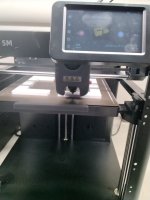
Except Flashforge's colors were originally blue and white ... Maybe an "alternate universe" look?The Flash - Red and Yellow accents
I meant this one lolExcept Flashforge's colors were originally blue and white ... Maybe an "alternate universe" look?

Flash GordonTook delivery of and setup the Flashforge Adventurer 5M. It's currently printing the plinth at 9x the speed of the Ender.
Any suggestions on case colors or a snappy name for it? All comments from the peanut gallery gladly accepted.
dang near 1 month old A1 died at the trade show on the last day.
booth traffic was down 75% after it wasn't working.

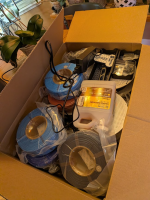
Good catch.Just picked this up, another P1S but with the AMS2 Pro and a box of filament and supplies for 500. I already have a P1S so I will move one along. I've wanted to add an AMS for a while and a similar setup came up a couple of weeks ago and was gone in a day. So I saw this and figured why not. This machine has 81 hours on it, mine had 282.
Without knowing the error this is a shot in the dark, but does the filament type match?I'm struggling with something on my P1s that maybe someone here knows how to deal with.
I've been sending print files to the printer so my son can run them when he switches build plates. It worked great before I started messing around with colors but now fails every time. The model color matches (down to the RGB code) between the model and what I am telling it is in the AMS, but I get an error every time. Works find if I print directly from bambu studio (vs sending the file and printing from the printer)
I'll try it again tonight and share the error code, but figured I'd share to see if someone knows rhe fix
Yes. All generic PETGWithout knowing the error this is a shot in the dark, but does the filament type match?
Maybe that's the issue. It's coded as #3 in the print, but I want it to pull from slot 1 or 2. I'll move the filament from. 1 to 4Can you manually assign the AMS slots on the printer when you try to print, or is it not letting you?
The p1s just throws and error with no options to resolve at the unit.The alignment between Bambu Studio and the printer shouldn't matter (aka. Bambi Studio has Black as color 1, but it is in slot 3).
I meant if it doesn't see the correct one, it will ask which one you want to use on the screen (at least the X1's). Can you then "manually" tell it? If not, I would also suspect a type mismatch (aka, if I slice it as PLA, it won't let me grab PLA-CF, even manually).
Any chance someone accidentally changed the type in the slicer program?
The p1s is very basicGotcha. Sorry, I only have experience with the X1 and H series. Mine looks like this.

Making dust collection fittings is one of the things I've found the printer most useful for. I recently printed a 4" to (3) 2.5 adapter from a design I found on Thingiverse and a while back I printed a custom adapter for a pretty rare little bandsaw. That one my brother designed for me and it took several iterations to get it right.I am building a thein baffle to improve my dust collector separation, and needed to make the 4" intake duct tangent to the main housing. Rather than piece something together with plywood and PVC, I just fired up solidworks and printed exactly what I needed.
I may upload this one, as it saves a bunch of time over building something.


Recently found a model for an R/C snow groomer like you might see leaving The Overlook Hotel...
Printables link
It's been a long while since I did anything with R/C vehicles. Just what I need: an expensive hobby that I can feed with another hobby!


The plate had about 50 parts on it and my pc is really slow working this model, so I gave up on testing. Next weekend I'll have time to mess around moreMaybe that's the issue. It's coded as #3 in the print, but I want it to pull from slot 1 or 2. I'll move the filament from. 1 to 4
3 when we start the next print in a couple hrs.

Yes, once I get a couple tweaks made will post it online and share the link. Haven't verified any others but works with OSI and assume it works with most others. Will make a longer extension and a direct screw on nozzle also. Some refinements to the wall thickness could be made ...but I just dont care on an 11g print.

What are these?Handed out a bunch this morning....see what the feedback comes back as.
Believe that was a 15 hr print for 24 nozzles in PETG. The 2 handed "snap test" is possible to break but it's tough. Will get some TPU and try that as well
extended caulk nozzles.What are these?
extended caulk nozzles.

In all seriousness, this seems like a really cool organization and if the need exists, I would consider buying another printer just to help out.I would be on board for this, cause I mean who only needs one printer...
Great ideaextended caulk nozzles.
Having too short a caulk can be embarrassing for sure.
Useful for deeper cavities becoming more common with 2x8 wall construction
Having too short a caulk can be embarrassing for sure.
Print them in red... Call them Red RocketsThere is a reason the ones I handed out aren't black....the jokes are just too easy

Any bambu machine.Is there a thread about a newb getting into 3D printing? Didn't really want to ask a question that has been asked 100 times already. I started reading the post and will keep reading as time allows to learn what I can. I've kicked around the idea of getting a printer for a few years and think I'm ready to pull the trigger. But don't know much of anything about them. Also not not the biggest computer guy. I can get around and have done some sketch up work for laying out stuff for remodeling projects and did take a drafting/CAD course 25 years ago in high school. So not completely stupid but haven't kept up and probably forgot most if not everything I learned back then.
Want to get a machine and play around with it and see if I can figure it out. Just want to make things for shop organization, drawer dividers, hardware bins, holders for m12 and m18 batteries and tools(have bought a bunch online), etc. Is there a decent machine for a beginner? I was googling and since I really don't know what to look for in a machine it's hard to figure out what machines are decent. Prices are all over the place, don't want to spend 1000 dollars on something and not be able to figure it out. But also don't want to spend 200 on one and it be junk, is there a good middle of the line machine that isn't overly complicated to get up and running? I'm starting to look at file sharing on thingiverse and ready to buy a machine and see if I can get some things printed and learn as I go. Thanks for any advice or if there is already answers to all this if you have a link so I can go read it.


