To avoid these ads, REGISTER NOW!

The Everything 3D Printer Thread

To avoid these ads, REGISTER NOW!

67CarGuy

Well-known member
Joined
Feb 6, 2008
Messages
763
Location
Outside Boston, MA
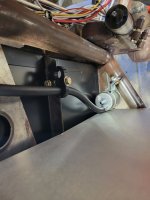
Started my second overnight print (a Pistenbully - aka a snow groomer, but R/C-sized) only to have this happen:
Print error-1.jpeg

Pretty sure that's a support portion that somehow pulled away from the main body (this is the cabin, on it's side) while printing. This was probably somewhere around 1-2AM, not that it matters much. Next time I'll try printing it upright, and might switch to tree supports...
Still need to order some grey (or is it gray?) or black TPU for the treads and some tires I'll need for another print. And I need to find some sources for small metric hardware to assemble these things... the local hardware store doesn't have much that works.

But it's not all fun and games! I've also designed and printed some holders for the silverware drawer, because none of the ones I could find really worked for my setup. Here's an in-progress iteration:
Screenshot 2026-04-02 at 6.13.03 PM.png

We determined that the rounded version works better, and just needed to fine-tune the spacing and overall dimensions.
 

Dh3256

Well-known member
Joined
Mar 19, 2018
Messages
1,139
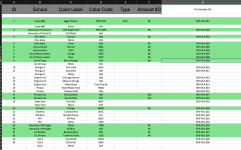
I can't do it all at one go. just stretched too thin right now. first batch will cover the bills for the second batch. Only green made the cut. Dont come for my head on a stick.

1775138069984.png
1775138106027.png
still no Pitt (University of Pittsburgh)? One of the oldest best known universities in the country, 1787
 

Black300zx

Well-known member
Joined
Apr 8, 2019
Messages
781
Location
Elkton, Md
It's been a while since I've been active in this thread. Need to spend some time catching up. A 22month old toddler keeps me firmly in the "do more, document less" mindset when I'm working on hobby stuff. Still have my Ender 3 Max Neo, although we've had bit of a love/hate relationship over the past year (largely my doing) which I'll post about soon just for the sake of sharing experiences.

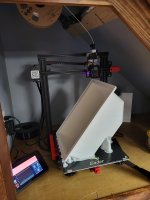
Anyway, I'm finally about to make use of the expanded build volume that drove me to buy this over the regular Ender 3 V2 (or whatever was the current model back then). 4 layers into a 978g print that Cura says will take 3d9h, however the Cura estimates are usually 20-30% longer than what I see w/ the Sonic Pad.

Wish me luck. This hopefully will be the first of (2) storage bins for under the rear seats of my boat (Fiberglass bins were optional). White PETG

1775435726053-png.2517331


1775435806515.png
 

Attachments

  • 1775435726053.png
    1775435726053.png
    3.8 MB · Views: 386

67CarGuy

Well-known member
Joined
Feb 6, 2008
Messages
763
Location
Outside Boston, MA
Ok, school me: How do you all track how much of a spool you've used / got left? My slicing program helpfully calculates how much filament a given print will use (I'm guessing most programs do this nowadays) but the only method I've come up with for tracking spool usage is writing down what each print used on a scrap of paper and keeping it with the spool.... there's gotta be a better way!
 

loganb

ALLIANCE MEMBER
Joined
Dec 29, 2011
Messages
5,497
Location
Omaha, NE
Ok, school me: How do you all track how much of a spool you've used / got left? My slicing program helpfully calculates how much filament a given print will use (I'm guessing most programs do this nowadays) but the only method I've come up with for tracking spool usage is writing down what each print used on a scrap of paper and keeping it with the spool.... there's gotta be a better way!

If I really care I weigh the spool and compare to any empty spool of the same source. However I'll admit Im lazy and if Im worried make sure I have another spool of the same stuff loaded in the AMS so it just rolls to it if spool one runs out
 

mike93lx

ALLIANCE MEMBER
Joined
Dec 9, 2013
Messages
37,364
Location
Richmond, VA
Ok, school me: How do you all track how much of a spool you've used / got left? My slicing program helpfully calculates how much filament a given print will use (I'm guessing most programs do this nowadays) but the only method I've come up with for tracking spool usage is writing down what each print used on a scrap of paper and keeping it with the spool.... there's gotta be a better way!
Buy more of the filament and have a printer setup that can swap automatically 😉
 

ER70S-2

Well-known member
Joined
Jan 2, 2015
Messages
797
Ok, school me: How do you all track how much of a spool you've used / got left? My slicing program helpfully calculates how much filament a given print will use (I'm guessing most programs do this nowadays) but the only method I've come up with for tracking spool usage is writing down what each print used on a scrap of paper and keeping it with the spool.... there's gotta be a better way!
I weigh every new spool and write the weight in it. Then all I have to do is weigh it again to figure out how much I used. Subtract that from 1000g and then you know exactly how much is left on the spool.
 

mike93lx

ALLIANCE MEMBER
Joined
Dec 9, 2013
Messages
37,364
Location
Richmond, VA
I weigh every new spool and write the weight in it. Then all I have to do is weigh it again to figure out how much I used. Subtract that from 1000g and then you know exactly how much is left on the spool.
How close to 1kg are you finding your filaments?

I've weighed a couple empty spools to back into a quantity, but only in prints where I have to swap over and I'm trying to get an idea on timing
 

Black300zx

Well-known member
Joined
Apr 8, 2019
Messages
781
Location
Elkton, Md
Ok, school me: How do you all track how much of a spool you've used / got left? My slicing program helpfully calculates how much filament a given print will use (I'm guessing most programs do this nowadays) but the only method I've come up with for tracking spool usage is writing down what each print used on a scrap of paper and keeping it with the spool.... there's gotta be a better way!
I also weigh spools and then re-weigh to figure out what's left. I used to track use on paper or on the side of the spool, but that would get inaccurate when I would fight under extrusion issues.

Pretty much halfway through the print. About 550-600g used. Layers should start getting smaller soon.
 

Attachments

  • 20260407_074921.jpg
    20260407_074921.jpg
    529.4 KB · Views: 26

mike93lx

ALLIANCE MEMBER
Joined
Dec 9, 2013
Messages
37,364
Location
Richmond, VA
I also weigh spools and then re-weigh to figure out what's left. I used to track use on paper or on the side of the spool, but that would get inaccurate when I would fight under extrusion issues.

Pretty much halfway through the print. About 550-600g used. Layers should start getting smaller soon.
Do you get a notification if the filament runs out or do you have to watch it?
 

Black300zx

Well-known member
Joined
Apr 8, 2019
Messages
781
Location
Elkton, Md
Do you get a notification if the filament runs out or do you have to watch it?
When I installed the sprite direct drive extruder a couple years ago, there wasn't an obvious and easy way to retain the filament sensor, so the answer has been "I've got to watch it and keep track".

Last week I finally made a mount for the filament sensor and added an e-chain, so after these prints finish I'll be seeing what I can do with the sonic pad to pause, notify and prep for spool change
 
To avoid these ads, REGISTER NOW!

ER70S-2

Well-known member
Joined
Jan 2, 2015
Messages
797
How close to 1kg are you finding your filaments?

I've weighed a couple empty spools to back into a quantity, but only in prints where I have to swap over and I'm trying to get an idea on timing
I have actually never weighed an empty spool to see how much filament was on it. I have a ton of them around, so I definitely can.

All I really do is check to see if I have about 10-20g more than what I need for a print before starting the print. This method never lets me down, so the filament manufacturers must be putting very close to 1Kg or more on the spools.
 

67CarGuy

Well-known member
Joined
Feb 6, 2008
Messages
763
Location
Outside Boston, MA
I weigh every new spool and write the weight in it. Then all I have to do is weigh it again to figure out how much I used. Subtract that from 1000g and then you know exactly how much is left on the spool.
Thanks for the tips and suggestions, all! I'll have to start borrowing my wife's kitchen scale...
 

Black300zx

Well-known member
Joined
Apr 8, 2019
Messages
781
Location
Elkton, Md
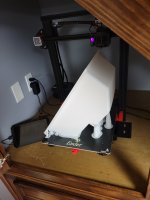
Overall it was the most successful large print I've done. Some minor warping on two corners and a few layers pulled apart on the front right corner, but I realized this morning that somehow the nozzle temp was overridden to 220 instead of 240. Judging by the amount of filament left, I think it was under extruding by about 4 or 5%. It'll be perfectly functional with a bit of west systems 105 soaked into the cracks and infill. Worst case it becomes a mold for a real fiberglass copy.

Second bin is 90 layers in with correct nozzle temp and gyroud infill instead of cubic. Hopefully the layer separation is resolved
 

Attachments

  • 20260408_122156.jpg
    20260408_122156.jpg
    555.6 KB · Views: 52

moab11

Well-known member
Joined
Nov 22, 2015
Messages
553
Location
Thunder Bay, Ontario
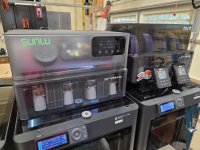
looks like a cleaner and smaller overall package compared to the Eibos, I generally like my Sunlu stuff, so will be interested to how you like it.
 

mike93lx

ALLIANCE MEMBER
Joined
Dec 9, 2013
Messages
37,364
Location
Richmond, VA
looks like a cleaner and smaller overall package compared to the Eibos, I generally like my Sunlu stuff, so will be interested to how you like it.
Agreed. The eibos is a little silly in comparison with the big riser and control panels. It also has a pile of parts that install internally to separate the chambers and control air flow.

Having two zones on the eibos feels like it should be helpful, but I don't think I really need it
 

Black300zx

Well-known member
Joined
Apr 8, 2019
Messages
781
Location
Elkton, Md
Second bin printed great with the temp bumped to 240. Touch of warping in thr same corner, but really happy with it. The layer separation was fixed. First bin had the inner walls at 60mm/s and outer at 40 being conservative and to avoid having the print shake loose. Bumped inner and outer up to 80mm/s for this one and knocked 9hrs off the print time (54hrs total) and it did fine. Will probably try 100mm/s next big print.
 

Attachments

  • 20260410_195321.jpg
    20260410_195321.jpg
    486.1 KB · Views: 32

ed_

Well-known member
Joined
Nov 5, 2019
Messages
183
Location
Maine
My latest contraption. It's a scavenger oil cap designed for a PCV valve instead of a catch can.
1.png

The OEM b20 setup has the pcv valve on the head but I've swapped the b20 head for a gsr (vtec) head and the GSR has the pcv valve on the block so there's no where for a pcv valve to go now.

I initially bought a Jackspania racing scavenger oil cap and was going to use that to run a catch can setup but that felt over complicated for a NA build so I changed directions.

The unit is printed in two halves that bolt together with o-rings to help seal the vapor passage tubes. It's printed in pc-cf so it should hopefully survive engine bay temps.
2.jpg
The thing on the right is an adapter for tightening down the threaded collar. The only socket I had big enough to fit the threaded collar was an impact socket and it wouldn't fit because the walls were too thick.
3.jpg
4.jpg
 

mike93lx

ALLIANCE MEMBER
Joined
Dec 9, 2013
Messages
37,364
Location
Richmond, VA
My latest contraption. It's a scavenger oil cap designed for a PCV valve instead of a catch can.
1.png

The OEM b20 setup has the pcv valve on the head but I've swapped the b20 head for a gsr (vtec) head and the GSR has the pcv valve on the block so there's no where for a pcv valve to go now.

I initially bought a Jackspania racing scavenger oil cap and was going to use that to run a catch can setup but that felt over complicated for a NA build so I changed directions.

The unit is printed in two halves that bolt together with o-rings to help seal the vapor passage tubes. It's printed in pc-cf so it should hopefully survive engine bay temps.
2.jpg
The thing on the right is an adapter for tightening down the threaded collar. The only socket I had big enough to fit the threaded collar was an impact socket and it wouldn't fit because the walls were too thick.
3.jpg
4.jpg
Fantastic!
 

Damon L.

Well-known member
Joined
Mar 23, 2008
Messages
169
Location
SE Minnesota
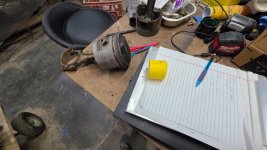
Decided to try my hand at large ice molding for drinks this weekend. First, we need an object. I modeled a 401 Buick Nailhead piston in Solidworks and printed at half scale:
Small nailhead.jpg

That turned out, so I made a couple of centering fixtures.
Ice block fixtures.jpg

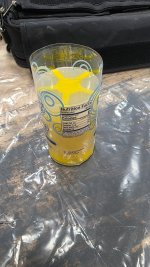
Hot glued the pieces together, inserted into a water bottle, and filled with food safe silicone:
Molding.jpg

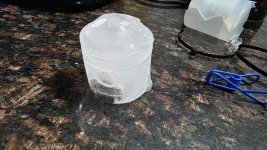
Demolded 5 hours later, decided to give it a test run as a proof of concept. I'm calling this one successful:
Success.jpg

I did design it so that it should be capable of directional freezing (crystal clear ice), but I was in a hurry to try it out. I'll work on the clarity thing from here.
 

niget2002

Well-known member
Joined
Oct 2, 2012
Messages
11,115
Location
Josephine, TX
For the ongoing conversation regarding running out of filament during a print...

One of the best upgrades I made to my printer is the filament sensor. It'll pause the print if the filament runs out or breaks for any reason. It gives me a chance to swap filament or reload it before resuming the print.

The best use is when I need to prototype something. I can burn through 3-4 different colors of filament that are almost out if I don't care that the entire print isn't one color. I use OcotApp on my phone to track current print jobs to get alerts when they pause.
 

Black300zx

Well-known member
Joined
Apr 8, 2019
Messages
781
Location
Elkton, Md
For the ongoing conversation regarding running out of filament during a print...

One of the best upgrades I made to my printer is the filament sensor. It'll pause the print if the filament runs out or breaks for any reason. It gives me a chance to swap filament or reload it before resuming the print.

The best use is when I need to prototype something. I can burn through 3-4 different colors of filament that are almost out if I don't care that the entire print isn't one color. I use OcotApp on my phone to track current print jobs to get alerts when they pause.
Same feeling here after getting mine hooked back up the other week. After printing those big bins I burned through the remains of 3 partial spools printing gridfinity bins. I was happy with how well the sonic pad and printer finished the gcode line, moved away from the print while keeping temperature at setpoint until I changed spools
 
To avoid these ads, REGISTER NOW!
Top Bottom