To avoid these ads, REGISTER NOW!

The Everything 3D Printer Thread

Legion Prime

Well-known member
Joined
Sep 5, 2018
Messages
740
Location
Leelenau County MI
I just got my Ender 3 V2 last week and it was very simple to set up and get printing. Watch the assembly guides from CHEP & Tomb of 3D Printed Horrors and you'll be GTG as the assembly guide it comes with will get you there, just not necessarily very well. My only hiccup was once everything was together and working it wouldn't print, turned out to be fixed by formatting and using another SD card. I don't know if it was the card or the formatting but it was the card that came with the printer with the manuals and all so I just snagged another I had laying around and problem solved.
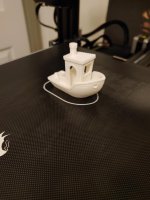
I was having some bed adhesion issues with the PLA so I tried an elmers glue stick which helped a little. Upping the bed temps let me finish the SS Benchy, next though I'm going to try it with the warmer bed and no glue as it is kind of a pain to keep cleaning off.
This is going to be great for winter between keeping me busy and keeping me active. My computer being downstairs at one end of the house and the printer setup upstairs at the other end of the house keeps me running.
 

Attachments

  • 2020-12-14 23.11.00.jpg
    2020-12-14 23.11.00.jpg
    82.2 KB · Views: 105
  • 2020-12-14 23.17.42.jpg
    2020-12-14 23.17.42.jpg
    110.8 KB · Views: 114
  • 2020-12-14 20.46.56.jpg
    2020-12-14 20.46.56.jpg
    150.8 KB · Views: 106
  • 2020-12-14 21.02.24.jpg
    2020-12-14 21.02.24.jpg
    131 KB · Views: 101
To avoid these ads, REGISTER NOW!

penright

ALLIANCE MEMBER
Joined
Dec 27, 2016
Messages
618
Location
SW of Mustang, OK
Mine's helping organize my metal pegboard(Wall Control) again this week...few updates, changed to orange filament last weekend:]

Great Look!!! Really clean!!! I like it!!!
Still looking at copying the vise-grip holders. :)

Orange filament? What is a K-State guy doing with America's Brightest Orange? At least it is not burnt. :)
 

bdbecker

ALLIANCE MEMBER
Joined
Nov 18, 2015
Messages
5,542
Location
Iowa
...I was having some bed adhesion issues with the PLA so I tried an elmers glue stick which helped a little. Upping the bed temps let me finish the SS Benchy, next though I'm going to try it with the warmer bed and no glue as it is kind of a pain to keep cleaning off...

Welcome to the 3DP club!

Elmers purple glue stick and 60C bed temp seems to be the magic combo on my CR-10 S4. I've also been doing rafts on long prints where the cost of starting over is high. Rafts are also nice because you can see how well you've got your bed leveled.

When you need to clean your plate, don't use soap or try to scrub the glue off. Instead, just put it in the sink and let hot water run over it for a minute or two and the glue will just wash away with almost no effort on your part. It took me a few washings to figure that out.
 

Legion Prime

Well-known member
Joined
Sep 5, 2018
Messages
740
Location
Leelenau County MI
Welcome to the 3DP club!

Elmers purple glue stick and 60C bed temp seems to be the magic combo on my CR-10 S4. I've also been doing rafts on long prints where the cost of starting over is high. Rafts are also nice because you can see how well you've got your bed leveled.

When you need to clean your plate, don't use soap or try to scrub the glue off. Instead, just put it in the sink and let hot water run over it for a minute or two and the glue will just wash away with almost no effort on your part. It took me a few washings to figure that out.

I actually got much better results with a warmer bed and no glue. Next up I'll be playing with hotend temps now that I've exhausted the filament they packaged with the printer.
 

txvwnut

Well-known member
Joined
Jan 1, 2015
Messages
7,587
Location
Bedford, Texas
I actually got much better results with a warmer bed and no glue. Next up I'll be playing with hotend temps now that I've exhausted the filament they packaged with the printer.

If your using the slicer program that Creality sent with the printer ditch it and switch to Cura. In Cura you can set a first layer bed temp separately from the printing temp which will help in adhesion. I was using the stock Creality slicer and was having some minor adhesion issues and switched to Cura and problem solved. Also if your bed is not correctly leveled it will cause adhesion issues as well. Filament will cause issues too so if your using the filament that came with the printer burn it up on playing and get good filament for the stuff you want to make.
 

ArcReactorKC

Well-known member
Joined
Jun 1, 2019
Messages
2,237
Location
Out in the county NE of KCMO
I feel like I'm always saying this to someone but if you need glue, or hairspray, or another adhesion promoter there is something wrong.

In all of my printers from the 120x100 beds to the 500x500 beds. I have found if I need glue or hairspray my level is off, or my glass is dirty. Keep your glass clean. If it has a design on it check that whatever you use won't ruin it. I have a few creality beds and I use alcohol to clean them every so often.

You will appreciate how much easier prints release when the bed cools down as well as the much cleaner first layer when you remove it.
 

bdbecker

ALLIANCE MEMBER
Joined
Nov 18, 2015
Messages
5,542
Location
Iowa
I feel like I'm always saying this to someone but if you need glue, or hairspray, or another adhesion promoter there is something wrong...

Now that I think about it, I don't think I've ever actually tried printing without glue on the bed. I guess I'd just heard it recommended so many times that I never even thought to question it. I'll have to give it a shot on the next print and see what happens.
 

penright

ALLIANCE MEMBER
Joined
Dec 27, 2016
Messages
618
Location
SW of Mustang, OK
I switched to one of the PEI and love it.

I am including this link only for context. The one I bought is currently unavailable. I paid the same price and looks exactly like what I bought.
ref=dp_prsubs_1


It works for me. Sticks well without any special treatment come off easy.
 

ArcReactorKC

Well-known member
Joined
Jun 1, 2019
Messages
2,237
Location
Out in the county NE of KCMO
Now that I think about it, I don't think I've ever actually tried printing without glue on the bed. I guess I'd just heard it recommended so many times that I never even thought to question it. I'll have to give it a shot on the next print and see what happens.

Back in the starting days of hobbyist 3d printing it seems like we were having trouble finding good parts, flat glass, good straight rods, etc. As well as we were using ABS for a lot of filament which we all know likes to warp. I can remember using gluestick to get my prints to stay on the bed back in 2014 when I built my first reprap. I think so many got used to seeing it they thought it was necessary. Now with the amazing build surfaces available plus flat glass and linear rails it's so much easier to get a good first layer. I mean just look how popular the BLTouch is. With autoleveling we can make even a **** dished bed stick well!
 

Legion Prime

Well-known member
Joined
Sep 5, 2018
Messages
740
Location
Leelenau County MI
If your using the slicer program that Creality sent with the printer ditch it and switch to Cura. In Cura you can set a first layer bed temp separately from the printing temp which will help in adhesion. I was using the stock Creality slicer and was having some minor adhesion issues and switched to Cura and problem solved. Also if your bed is not correctly leveled it will cause adhesion issues as well. Filament will cause issues too so if your using the filament that came with the printer burn it up on playing and get good filament for the stuff you want to make.

Nah, I have Cura 4.8. The bed seems pretty level I went around leveling it with a postit until I went to all 4 corners without needing to make an adjustment. I tried printing another kit card last night to kill off the inbox filament with the bed at 67 and apart from wet filament came out great. What would you suggest for the first layer, 70 then drop it back to 65 or should I try higher? Keep going hotter till I start getting elephant footing then knock it back a couple degrees? Next I figured I'd start trying to figure out how to get a heat tower programmed up and start playing with hotend temp now that I've got the bed temp in a better state and start scrounging around and build up an enclosure.
 

LutzTD

Well-known member
Joined
Dec 31, 2011
Messages
3,673
Location
Lutz, Florida
I was having tons of issues with lifting. tried turning 45, rafts etc. then a friend told me about Aquanet purple. I almost never have any lift problems anymore. My bed is removable, so after I remove the print and scrape it I spray it liberally with Aquanet, the next cycle heats the bed and it works very well for me. I print mostly HIPS. I see some feel the hairspray is not needed, but when you have a large print and a corner lifts due to shrinkage its a disaster and quite expensive, not to mention having to wait for another spool of material. I sometimes leave this printing in the shop overnight or many hours un-attended. I will keep my hairspray insurance. I have a Zortrax M200 and use only Zortrax materials.
 

Attachments

  • aquanet.JPG
    aquanet.JPG
    38.9 KB · Views: 69
Last edited:

white91formula

Well-known member
Joined
Dec 11, 2012
Messages
424
Location
Boston, MA
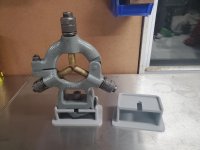
OCD got the most of me. Version two of the steady rest holder. Made it shorter to get rid of the extra room under the clamp.
 

Attachments

  • 20201216_164659.jpg
    20201216_164659.jpg
    111.5 KB · Views: 136

txvwnut

Well-known member
Joined
Jan 1, 2015
Messages
7,587
Location
Bedford, Texas
Nah, I have Cura 4.8. The bed seems pretty level I went around leveling it with a postit until I went to all 4 corners without needing to make an adjustment. I tried printing another kit card last night to kill off the inbox filament with the bed at 67 and apart from wet filament came out great. What would you suggest for the first layer, 70 then drop it back to 65 or should I try higher? Keep going hotter till I start getting elephant footing then knock it back a couple degrees? Next I figured I'd start trying to figure out how to get a heat tower programmed up and start playing with hotend temp now that I've got the bed temp in a better state and start scrounging around and build up an enclosure.

I run my bed at 70c with a first layer temp of 75c but I pretty much print PETG or ABS. I think I used the same temps for the filament that came with the printer. How I got to my numbers was through running prints and adjusting temps till I started seeing the results I wanted. The other thing is to keep the printer out of any breeze as that will affect the heating as well. I bought the Creality enclosure(it basically a tent but it insulated) as I just didn't have the time acquire materials and build an enclosure and my printer lives in the shop which usually cold this time of year as I don't run the heater at temp around the clock.
 

WoodsTruck

Well-known member
Joined
Jan 12, 2013
Messages
1,019
The other thing is to keep the printer out of any breeze as that will affect the heating as well. I bought the Creality enclosure(it basically a tent but it insulated) as I just didn't have the time acquire materials and build an enclosure and my printer lives in the shop which usually cold this time of year as I don't run the heater at temp around the clock.

Any pictures of your enclosure?

I have to run mine out in the shop when I have long print times and I don't heat it unless I'm out working.
 

Legion Prime

Well-known member
Joined
Sep 5, 2018
Messages
740
Location
Leelenau County MI
I run my bed at 70c with a first layer temp of 75c but I pretty much print PETG or ABS. I think I used the same temps for the filament that came with the printer. How I got to my numbers was through running prints and adjusting temps till I started seeing the results I wanted. The other thing is to keep the printer out of any breeze as that will affect the heating as well. I bought the Creality enclosure(it basically a tent but it insulated) as I just didn't have the time acquire materials and build an enclosure and my printer lives in the shop which usually cold this time of year as I don't run the heater at temp around the clock.

Yeah, we keep the house generally between 50 and 55 in the winter but I've got it in the spare bedroom so I just close the door to keep the cat out when it's printing. I've got some plywood and 1x2 I figured I'd make a framework around then just get a chunk of that foam insulation to cover everything up and then figure out something to see through for the front. The only other thing I plan on spending any money on for it is a raspberry pi so I can start playing with octoprint but I want to get it printing well as is before I go and start fooling with anything else. Maybe I'll bump the bed temp up to 70 for the heat tower I'm working on getting ready in Cura ATM. I will be sure to let you know how that goes, that's a project for tomorrow though.
 
Last edited:

txvwnut

Well-known member
Joined
Jan 1, 2015
Messages
7,587
Location
Bedford, Texas
Any pictures of your enclosure?

I have to run mine out in the shop when I have long print times and I don't heat it unless I'm out working.

Here ya go. I plan on printing a support bar or two for the roof as I don’t really care for the sag. Might even add a light so I can see the print through the window a little better.
 

Attachments

  • 8DEC9AAF-EC81-4BEE-B832-0EBCBE2A37A9.jpg
    8DEC9AAF-EC81-4BEE-B832-0EBCBE2A37A9.jpg
    88.9 KB · Views: 104
  • DDD27764-03D2-4C66-906C-5910A21C974B.jpg
    DDD27764-03D2-4C66-906C-5910A21C974B.jpg
    103.9 KB · Views: 117
To avoid these ads, REGISTER NOW!

loganb

ALLIANCE MEMBER
Joined
Dec 29, 2011
Messages
5,493
Location
Omaha, NE
Orange filament? What is a K-State guy doing with America's Brightest Orange? At least it is not burnt. :)

Being confused ;)

When I bought the printer I wanted at least 1 bright color to try and they had orange in stock which made sense as the printers they make are orange and black. Bad part is it does look like I'm and Okie State fan...but as you pointed out it could be worse and make it look like a Longhorn!

Sent from The Garage Journal mobile app
 

loganb

ALLIANCE MEMBER
Joined
Dec 29, 2011
Messages
5,493
Location
Omaha, NE
I was looking at your K-State logo. So I was referencing college colors.

You know what they say about "attempted humor". That is when some humor is not funny. :)

Your sentiment is correct about attempted humor, just it was I with the attempt not you! I was making the joke about being "confused" as to why someone who bleeds purple was printing with bright orange...not confused on the reference!
 

sixleaker

Active member
Joined
Dec 13, 2012
Messages
41
Location
Chico, CA
4ab4767cd72aac78040c7ee3e91b1f7d.jpg
Lol well there goes 13 hours of printing down the drain ....... guess some lessons on how much filament is left on the role have to be learned the hard way.

On a happier note got my first print done and have a little plastic dog to show for it [emoji1787]. Atleast I got the printer up and running. Now time for a new roll and start again .


Sent from my iPhone using Tapatalk
 

Attachments

  • 4ab4767cd72aac78040c7ee3e91b1f7d.jpg
    4ab4767cd72aac78040c7ee3e91b1f7d.jpg
    77.9 KB · Views: 14

white91formula

Well-known member
Joined
Dec 11, 2012
Messages
424
Location
Boston, MA
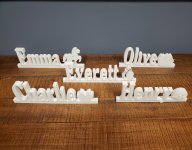
Finished up some Xmas gifts.

Left them plain white so the kids can paint and decorate how they want.
 

Attachments

  • IMG_20201222_224150_743.jpg
    IMG_20201222_224150_743.jpg
    148.2 KB · Views: 95

youinreverse

Well-known member
Joined
Nov 9, 2015
Messages
128
Location
SLC
Lol well there goes 13 hours of printing down the drain ....... guess some lessons on how much filament is left on the role have to be learned the hard way.

On a happier note got my first print done and have a little plastic dog to show for it [emoji1787]. Atleast I got the printer up and running. Now time for a new roll and start again .


Sent from my iPhone using Tapatalk

I'm always afraid of this so last time I finished off a spool of filament, I weighed the empty roll and wrote it on the next full spool of that same brand. That way when my slicer tells me how much filament the print is going to use, I can weigh the spool and subtract the weight of the empty spool so I know exactly how much filament I'm working with.
 

WoodsTruck

Well-known member
Joined
Jan 12, 2013
Messages
1,019
You are pretty trusting.

My slicer underestimates the time it will take to print by anywhere from 20 minutes on a tiny object to several hours on a large job. I can only imagine how inaccurate the material length would be. Pull out the electronic balance and find out I guess.
 

loganb

ALLIANCE MEMBER
Joined
Dec 29, 2011
Messages
5,493
Location
Omaha, NE
4ab4767cd72aac78040c7ee3e91b1f7d.jpg
Lol well there goes 13 hours of printing down the drain ....... guess some lessons on how much filament is left on the role have to be learned the hard way.

On a happier note got my first print done and have a little plastic dog to show for it [emoji1787]. Atleast I got the printer up and running. Now time for a new roll and start again .


Sent from my iPhone using Tapatalk
Whats the printer?

Sent from The Garage Journal mobile app
 

loganb

ALLIANCE MEMBER
Joined
Dec 29, 2011
Messages
5,493
Location
Omaha, NE
Cause I'm a smartass and wanted to claim to the small family gathering tomorrow that I gave them all covid....

View media item 109186
I printed some Corona Virus "things"....file from Thingiverse...smaller one is about 2" diameter, larger one is around 4" or so. .3mm layers, Prusament PLA, 5% infill. Will drill a hole and put a hook thru them so they can hang them on the tree if they dare to remember this year

Gyroid infill on a sphere just looks cool

View media item 109183
 

vavet

Well-known member
Joined
Mar 6, 2012
Messages
5,318
Location
Ashland, VA
I’ve read this whole thread over the last month or so and I’m finally posting! Santa brought me a Ender3 v2. I assembled it, leveled it, and started printing. My first Benchy got about halfway and then failed when it came unstuck. I tried again two more times, but it failed earlier than the first. I finally got a successful print with some help from an elmers glue stick.
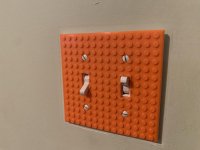
I’ve printed several things in the last few days: a lego switch plate for my sons’s room, two Cali(bration) cats, a new gearshift knob for my car, and a bag holder that attaches to the headrest post in my car.
One of the pieces for the bag holder is about 1/2” diameter and 3 inches tall. It has failed 3 times now about 60% of the way through because it becomes unstuck.

The first time I tried to print the bag holder pieces, I put them all on one project, sliced it, and printed it. I thought that would be a cool way to do it, even though it would take longer, it should run unattended pretty well....unless something fails. So what do you do? You can’t edit the file in the middle of printing and get it to omit the additions to one particular piece but keep the other 4 pieces going. Do you just abort the whole print? Do you avoid printing multiple pieces at a time?
 

Attachments

  • AE112F40-16C5-4266-9D2C-2B1DB97BE731.jpg
    AE112F40-16C5-4266-9D2C-2B1DB97BE731.jpg
    77.7 KB · Views: 134
  • EE297C5D-168A-4B52-9D99-B734ABD6E30B.jpg
    EE297C5D-168A-4B52-9D99-B734ABD6E30B.jpg
    110.7 KB · Views: 116
  • F808CB45-6A82-4FB9-82E1-B346CC294FAE.jpg
    F808CB45-6A82-4FB9-82E1-B346CC294FAE.jpg
    151.5 KB · Views: 118
Last edited:

WoodsTruck

Well-known member
Joined
Jan 12, 2013
Messages
1,019
I use the magnetic base on my Ender 5 and usually print with a raft or brim at least. I haven't had anything come loose mid-print.
 

txvwnut

Well-known member
Joined
Jan 1, 2015
Messages
7,587
Location
Bedford, Texas
Vavet, what’s your bed temp and what material? On my Ender 3Pro I found running max bed temps suggested for the filament I’m using helps with bed adhesion. I have switched to the PEI bed since I’ve ruined a couple of the stock build plates printing ABS. Also for prints with a small footprint a raft or brim always helps to aid in bed adhesion.
 

vavet

Well-known member
Joined
Mar 6, 2012
Messages
5,318
Location
Ashland, VA
Vavet, what’s your bed temp and what material? On my Ender 3Pro I found running max bed temps suggested for the filament I’m using helps with bed adhesion. I have switched to the PEI bed since I’ve ruined a couple of the stock build plates printing ABS. Also for prints with a small footprint a raft or brim always helps to aid in bed adhesion.

Maybe I should try a raft or brim. I've used regular PLA and PLA+.
For the PLA+, I had nozzle temp set to 210 and bed temp set to 65.
 

pwhittle

Well-known member
Joined
May 9, 2011
Messages
252
Location
Woodstock, GA
... So what do you do? You can’t edit the file in the middle of printing and get it to omit the additions to one particular piece but keep the other 4 pieces going. Do you just abort the whole print? Do you avoid printing multiple pieces at a time?


If you add a Raspberry Pi and OctoPrint to control the printing (highly recommended), you can specify some areas to exclude partway through the print.

Paul


Sent from my iPad using The Garage Journal mobile app
 

txvwnut

Well-known member
Joined
Jan 1, 2015
Messages
7,587
Location
Bedford, Texas
Maybe I should try a raft or brim. I've used regular PLA and PLA+.
For the PLA+, I had nozzle temp set to 210 and bed temp set to 65.

Run that bed temp at 70 or 75. If you are using Cura slicer instead of the one that comes with the printer you can set a first layer bed temp higher than the printing temp, this will aid in adhesion. So you could set the first layer to 70 or 75 then the printing temp to 65. I do this with all my prints and have noticed it helps greatly with tricky prints that give me trouble.
 

vavet

Well-known member
Joined
Mar 6, 2012
Messages
5,318
Location
Ashland, VA
Run that bed temp at 70 or 75. If you are using Cura slicer instead of the one that comes with the printer you can set a first layer bed temp higher than the printing temp, this will aid in adhesion. So you could set the first layer to 70 or 75 then the printing temp to 65. I do this with all my prints and have noticed it helps greatly with tricky prints that give me trouble.

I think the slicer that came with the printer is Cura...maybe it’s “based” on Cura?

Anyway...tried it again last night with a brim using the default settings for a brim and it printed successfully. Thanks to everyone for the suggestions.

Is there a 3d printing wiki that you like to use for run of the mill questions like this?
 

txvwnut

Well-known member
Joined
Jan 1, 2015
Messages
7,587
Location
Bedford, Texas
It’s Cura based and has very few tuning features like Cura. If you try Cura and see what all it can do you’ll stop using the one Creality sent with the printer.
 

vavet

Well-known member
Joined
Mar 6, 2012
Messages
5,318
Location
Ashland, VA
How significant is the moisture absorption with the filament and how long can it be open before it's an issue?

I see lots of storage options with wide range of bdugets. What about the way they ship the filament - vacuum sealed with a dessicant pack inside? Could you use a readily available vacuum sealer device marketed for kitchen use?
 

Darby9

Well-known member
Joined
Jan 18, 2020
Messages
110
Location
San Francisco
How significant is the moisture absorption with the filament and how long can it be open before it's an issue?

You'll get a million opinions on this, and it will depend on humidity. I print mostly in ABS and leave one color loaded on the machine all the time. One or two months, no problem. Six months I start getting issues. Relative humidity around here is 65%.

At one of my client's shops where I sort-of maintain their printers, I bought a Rubbermaid-type container with a gasket, threw a couple big desiccant bags in that, and it's worked well enough for their PLA. A vacuum sealer and a couple small desiccant bags would be great.
 
To avoid these ads, REGISTER NOW!
Top Bottom