To avoid these ads, REGISTER NOW!

The Everything 3D Printer Thread

Jim_No_Garage

Well-known member
Joined
Jan 15, 2011
Messages
3,299
Location
Millington NJ
Using wifi due to printer location in the garage. No easy way to get wired connection there.

I have an IP address for the pi that worked up close to the router itself (verified by plugging into tv as a screen and using keyboard/mouse to navigate) but haven't been able to duplicate this in the garage yet.
For reference the printer is approximately 20-25 feet from the router, with a repeater within 6 feet.


Sent from my Pixel 3a using Tapatalk

I guess I'm not clear on the physical setup you have in place.

If you have the pi (and printer) near the router/access point your good?

If you move the pi (and printer) to the garage you can't get to the pi's webserver from your laptop (even though there is a wifi repeater nearby so the pi should be able to get onto the network). And can't login locally on the pi in the garage because of no video device in the garage? Time for a garage TV! :pimpflash

It sounds like your wifi signal in the garage isn't good enough - even with the repeater.

Jim
 
To avoid these ads, REGISTER NOW!

Bessy

Well-known member
Joined
Dec 18, 2012
Messages
992
Location
Ontario, Canada
I guess I'm not clear on the physical setup you have in place.


If you have the pi (and printer) near the router/access point your good?


If you move the pi (and printer) to the garage you can't get to the pi's webserver from your laptop (even though there is a wifi repeater nearby so the pi should be able to get onto the network). And can't login locally on the pi in the garage because of no video device in the garage? Time for a garage TV! :pimpflash


It sounds like your wifi signal in the garage isn't good enough - even with the repeater.


Jim
Hi Jim,

Sorry that maybe wasn't super clear. Here's the set up:
The router is hooked up in the upper level via ethernet in the upper north-east corner of the loft. Repeater is plugged into the ceiling in the garage below, with the printer along the west wall, about 8' from the north west corner, 6' from the repeater.

When I tested the connection with the pi attached to the monitor and keyboard up in the loft (upper floor) not two feet from the router, it booted and was connected. I then shut it down and took it down to the printer and got no signal at all from the wifi. So I added the repeater, updated the octopi-wpa-supplicant.txt to reflect the extender's login info, but I haven't got it to connect since.

At least twice, sporadically, when I've plugged the card into the laptop, it's shown as corrupt and in need of repair. I'm wondering if need to start fresh again from square one? Definitely would be good to have a screen down in the garage but the printer has maxed my toy budget for the time being. I may need to temporarily steel the tv from up in the loft just to get myself running.

Thanks,

B.

Sent from my Pixel 3a using Tapatalk
 

vavet

Well-known member
Joined
Mar 6, 2012
Messages
5,318
Location
Ashland, VA
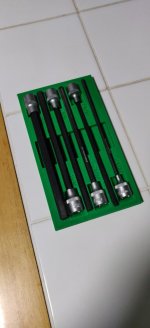
Does anyone have experience with any of the 3d scanner app for iPhone? Are there any decent free or low cost apps? I’d like to make a tray to organize tools in my toolbox. The current project is 2 1/4 drive ratchets, a few extensions, and similar items.
I’m sure the 3d print will turn out much better if I can get a good 3d scan instead of trying to measure the contours of the tools.
 

Darby9

Well-known member
Joined
Jan 18, 2020
Messages
110
Location
San Francisco
Does anyone have experience with any of the 3d scanner app for iPhone? Are there any decent free or low cost apps? I’d like to make a tray to organize tools in my toolbox. The current project is 2 1/4 drive ratchets, a few extensions, and similar items.
I’m sure the 3d print will turn out much better if I can get a good 3d scan instead of trying to measure the contours of the tools.

There are some cool ones for the fancier iPhones that have LIDAR etc sensors. I've watched a bunch of videos, but they seem more for making AR/VR characters/settings, not mm-accurate scans. I almost bought a 12 Pro to get this feature, then talked myself out of it, because the file cleanup to get smooth surfaces looked painful.

One trick I have seen work for 2D shapes is to trace the part onto white paper, scan that on a regular printer/scanner, then import that into CAD. Or, it's a small/flattish thing, like a pair of pliers, put it directly on the scanner glass. It won't capture 3D features like rivet heads correctly, but it's close.

How cumbersome this method is depends how well your CAD plays with the format the scanner creates. Fusion360 seems to do it well (plays with image files better). Solidworks is clunky (convert file to DXF, import as sketch into a new part document, adjust the scale if you need to, then make it a block to lock the sketch elements together)
 

vavet

Well-known member
Joined
Mar 6, 2012
Messages
5,318
Location
Ashland, VA
There are some cool ones for the fancier iPhones that have LIDAR etc sensors. I've watched a bunch of videos, but they seem more for making AR/VR characters/settings, not mm-accurate scans. I almost bought a 12 Pro to get this feature, then talked myself out of it, because the file cleanup to get smooth surfaces looked painful.

One trick I have seen work for 2D shapes is to trace the part onto white paper, scan that on a regular printer/scanner, then import that into CAD. Or, it's a small/flattish thing, like a pair of pliers, put it directly on the scanner glass. It won't capture 3D features like rivet heads correctly, but it's close.

How cumbersome this method is depends how well your CAD plays with the format the scanner creates. Fusion360 seems to do it well (plays with image files better). Solidworks is clunky (convert file to DXF, import as sketch into a new part document, adjust the scale if you need to, then make it a block to lock the sketch elements together)

Thank you! This is exactly the type of feedback I was hoping to get. Actually, I was hoping it would be positive and I'd be able to do it, but now I know it would be a waste of money or an exercise in futility to try to 3d scan a ratchet, hoping I could make a tray for it.
 

speed bump

Well-known member
Joined
May 28, 2008
Messages
6,317
Location
Butte Montana
Does anyone have experience with any of the 3d scanner app for iPhone? Are there any decent free or low cost apps? I’d like to make a tray to organize tools in my toolbox. The current project is 2 1/4 drive ratchets, a few extensions, and similar items.
I’m sure the 3d print will turn out much better if I can get a good 3d scan instead of trying to measure the contours of the tools.

One of the things I have found is dont get fancy and you will get be able to fit the shape. It doesn't need to be perfect. Here is hex bit holder I did as a PETG test this weekend. All I did was measure the ODs, measure relevant lengths and oversize slightly. This one isn't perfect but for the hour of modeling I did it's not bad.
 

Attachments

  • IMG_20210314_205040.jpg
    IMG_20210314_205040.jpg
    41 KB · Views: 172

banjopete

Well-known member
Joined
Oct 5, 2014
Messages
300
Location
Edmonton, Alberta, Canada
Thank you! This is exactly the type of feedback I was hoping to get. Actually, I was hoping it would be positive and I'd be able to do it, but now I know it would be a waste of money or an exercise in futility to try to 3d scan a ratchet, hoping I could make a tray for it.
There's a nyc cnc video on YouTube that shows how to create a sketch from a photo that would likely get you awfully close to what you're trying to do for tool shapes and sizes. You get to scale the picture from a few caliper measurements of the actual tool then it's just a game of shapes and sizes with the sketch tools in fusion.

Lots of different ways but this may help you with one idea.


Bessy

Well-known member
Joined
Dec 18, 2012
Messages
992
Location
Ontario, Canada
Quick update re the Ender 5+ Octoprint install:

Ended up moving a 32" tv down to the garage to connect to the Pi. I've now got it mounted to the wall, with a wireless keyboard/mouse combo connected to the Pi along with the printer (two free USB slots for now). I ended up buying a new (smaller) monitor for my desktop as well as a new (Lexar) micro SD card for the Pi. I flashed the new card this evening and while I cannot certainly confirm that the other sd card was the issue, I have managed to set up the Pi on the network on the first try with the new card. It's still pretty chilly down there, especially at night, as I have not yet figured out why the baseboard heat doesn't want to work anymore (I'm no electrician), so I'll probably wait for the weekend to attempt another print of any significant duration.

I used two of the vent holes on the purchased Pi box and attached it to the right rear column of the printer using two M3 screws and t-nuts. I will fab up a mount for the Pi camera next and install to see how that works. If I'm not happy with it, I can always swap in my logitech camera for the time being.

The wall the printer is on was supposed to be a temporary location, but the more I look at it, the more I am convinced it will likely stay there. Pending the COVID-19 situation this year, we're planning on a move before the end of the year, so I'm trying not to do too much to the garage in the mean time, or at least nothing that cannot be undone when we eventually pack things up.

Thanks for the support so far!

B.

Sorry no photos.
 

Jim_No_Garage

Well-known member
Joined
Jan 15, 2011
Messages
3,299
Location
Millington NJ
One of the things I have found is dont get fancy and you will get be able to fit the shape. It doesn't need to be perfect. Here is hex bit holder I did as a PETG test this weekend. All I did was measure the ODs, measure relevant lengths and oversize slightly. This one isn't perfect but for the hour of modeling I did it's not bad.

I like the recessed dimensions on your part.

I tried raised dimensions on a punch tray and used the wrong font. Next item will have a larger font and the text recessed.

attachment.php


Cheers

Jim
 

white91formula

Well-known member
Joined
Dec 11, 2012
Messages
424
Location
Boston, MA
Well can't have success without failure with this sort of hobby.


The question is do I just use it, or re print it.
 

Attachments

  • 20210318_232810.jpg
    20210318_232810.jpg
    76.5 KB · Views: 169

WoodsTruck

Well-known member
Joined
Jan 12, 2013
Messages
1,019
I didn't color match. I'll do better in the future.

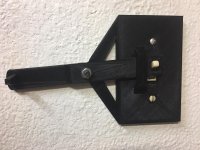
New fridge stuck out past the old switch so I had to improvise after turning the switch over.
 

Attachments

  • IMG_5109.jpg
    IMG_5109.jpg
    147.7 KB · Views: 114

WoodsTruck

Well-known member
Joined
Jan 12, 2013
Messages
1,019
I broke the clips on my 30 year old Peet boot dryer. Printed up a draw latch for each side and I'm back in business.
 

Attachments

  • draw latch.jpg
    draw latch.jpg
    147.3 KB · Views: 86

shortykorte

Well-known member
Joined
Sep 1, 2014
Messages
8,034
Location
Tallahassee, Fl
Great ideas on the light switches. One of the two color printers would be great for the raised letters.


Sent from my iPhone using Garage Journal
 
To avoid these ads, REGISTER NOW!

white91formula

Well-known member
Joined
Dec 11, 2012
Messages
424
Location
Boston, MA
OCD got the best of me. Reprinted the 3 spot switch.

I dint have multi color printer. Only single extruder. I tell it to pause at certain layer height and swap the filament. Not ideal but it works.

Also ironing didn't make difference in top layer finish.
 

Attachments

  • 16162918570998767820270817375074.jpg
    16162918570998767820270817375074.jpg
    39 KB · Views: 178

PelicanPines

ALLIANCE MEMBER
Joined
Apr 30, 2014
Messages
38,104
Location
New Jersey, USA, Earth, My own reality

vpd66

Well-known member
Joined
Mar 1, 2010
Messages
709
Location
Central Wisconsin
Thanks to the LABEL possibilities... I'm gonna dip my left leg into the 3D Printer Hobby Market ... as soon as I get my Tax Refund... a month... pfft. 2 weeks more like it.

Somebody talk me INTO or OUT OF... getting the following.

Creality Ender 3 Max 3D Printer, 300 x 300 x 340mm, All Metal FDM 3D Printer with Larger Glass Bed Silent Mainboard All Metal Extruder Smart Sensor Dual Cooling Fans

I won't talk you out of buying an Ender 3! I own one and they are great! I will suggest that the Ender 3 pro would be a wiser model to get for a first machine. The Max has not been out very long and I just believe the "Pro" is a proven machine and a better value. Besides if you really take to 3D printing you will find that you will be wanting a second machine. I keep upgrading my machine (not that it needs it I just like tinkering) and everytime I make an upgrade it takes a little time to redial the machine in. It would be nice to have a second machine so you always have a functioning machine. Caution! 3D printing can be addictive!
 

techieman33

Well-known member
Joined
Jun 18, 2018
Messages
1,096
Location
Kansas
Thanks to the LABEL possibilities... I'm gonna dip my left leg into the 3D Printer Hobby Market ... as soon as I get my Tax Refund... a month... pfft. 2 weeks more like it.

Somebody talk me INTO or OUT OF... getting the following.

Creality Ender 3 Max 3D Printer, 300 x 300 x 340mm, All Metal FDM 3D Printer with Larger Glass Bed Silent Mainboard All Metal Extruder Smart Sensor Dual Cooling Fans

Looks like it has about $50 worth of upgrades that you would probably want to do anyway. The silent board is well worth it, especially if the printer is in your living space. The sound of the stepper motors can get annoying pretty fast. The other upgrade is the all metal extruder. The ender 3 and 3 pro have a plastic extruder that breaks pretty commonly. So your basically paying $50 for the bigger print size. So if you want the bigger bed then go for it.
 

vpd66

Well-known member
Joined
Mar 1, 2010
Messages
709
Location
Central Wisconsin
Looks like it has about $50 worth of upgrades that you would probably want to do anyway. The silent board is well worth it, especially if the printer is in your living space. The sound of the stepper motors can get annoying pretty fast. The other upgrade is the all metal extruder. The ender 3 and 3 pro have a plastic extruder that breaks pretty commonly. So your basically paying $50 for the bigger print size. So if you want the bigger bed then go for it.

I've had my Ender 3 for over a year and have run 8 rolls of PLA and one roll of PETG through it without a problem. I have had one hot end clog when I was getting PETG dailed in but other then that I'm still using the stock hot end. I do have a all metal hot end and direct drive setup I want to switch to but I have my machine working so good now its hard for me to touch it! LOL My Ender 3 is the bare bones model and I paid $189 for it in January 2020. The noise of the drivers doesn't bother me. I have it in a spare bedroom and have let it run when I go to bed and it doesn't bother me at all. In my opinion when just getting into 3D printing its better to start with a basic machine to get your feet wet. These machines are very cheap to upgrade and can be done has you learn 3d printing. I'm sure at this point he doesn't even know what a hot end is.
 

PelicanPines

ALLIANCE MEMBER
Joined
Apr 30, 2014
Messages
38,104
Location
New Jersey, USA, Earth, My own reality
VPD66, ... Yes, I have watched enough videos and read enough online stuff to know what the "Hot End" is.

From what I have learned so far about the Ender 3's ... the Ender 3 Max is just a bigger format Ender 3 Pro...

Spending $200 for a base system... adding $100 worth of upgrades sounds like an option but... going to a bigger format is a $$ upgrade or a 2nd machine. Getting it all rolled into ONE 3D printer as an Ender 3 Max for $350ish sounds like a buy once... suffer once deal.

Now I just have to wait for my tax refund.

Thanks for all the input. I went back and seriously looked at the Ender 3 Pro again thanks to Techie and VPD66. Still partially on the fence... but the size option is leaning me towards the Max...

Already collecting STL files... LMAO. Playing with a Slicer to get used to the options.

Still can NOT find an STL file for my big WANT a 3D printer for. SimplyGo Oxygen Concentrator "Battery Cover"...
 

techieman33

Well-known member
Joined
Jun 18, 2018
Messages
1,096
Location
Kansas
I've had my Ender 3 for over a year and have run 8 rolls of PLA and one roll of PETG through it without a problem. I have had one hot end clog when I was getting PETG dailed in but other then that I'm still using the stock hot end. I do have a all metal hot end and direct drive setup I want to switch to but I have my machine working so good now its hard for me to touch it! LOL My Ender 3 is the bare bones model and I paid $189 for it in January 2020. The noise of the drivers doesn't bother me. I have it in a spare bedroom and have let it run when I go to bed and it doesn't bother me at all. In my opinion when just getting into 3D printing its better to start with a basic machine to get your feet wet. These machines are very cheap to upgrade and can be done has you learn 3d printing. I'm sure at this point he doesn't even know what a hot end is.

I didn't even bring up the hot end. I mentioned the extruder. Which is the part with the gear that pushes filament into the bowden tube. On the ender 3/3 pro it's mostly plastic. It works fine for some people, and others it breaks within days. Which then causes problems that people new to printing struggle to diagnose.
 

PelicanPines

ALLIANCE MEMBER
Joined
Apr 30, 2014
Messages
38,104
Location
New Jersey, USA, Earth, My own reality
I didn't even bring up the hot end. I mentioned the extruder. Which is the part with the gear that pushes filament into the bowden tube. On the ender 3/3 pro it's mostly plastic. It works fine for some people, and others it breaks within days. Which then causes problems that people new to printing struggle to diagnose.

The Max... is metal... I'm NOT sure what the big woop is about getting that BLUE bowden tube... I do understand the issues with the connectors and clips etc... but what's so great about the better bowden tube?

Here is my guess... I will get the max... fall in love with 3D printing... and get a Ender 3 Pro before the year is out... and put a label on it (3D Printer #2)
 

techieman33

Well-known member
Joined
Jun 18, 2018
Messages
1,096
Location
Kansas
The Max... is metal... I'm NOT sure what the big woop is about getting that BLUE bowden tube... I do understand the issues with the connectors and clips etc... but what's so great about the better bowden tube?

Here is my guess... I will get the max... fall in love with 3D printing... and get a Ender 3 Pro before the year is out... and put a label on it (3D Printer #2)

Looks like it is an all metal hot end, that's another potentially nice upgrade. The stock setup on a regular ender 3 has the bowden tube going all the way down to and touching the hot nozzle. It works fine for the most part. But if it's not making good contact with the nozzle than it can leak, making a mess and ruining prints. With the upgraded hot end the bowden tube doesn't go down that far into the hot end. So the filament coming out of it is still cool, thus no leak potential.

A longer term problem is that the heat (especially if printing with materials that require higher temps like ABS) damages the tube and can lead to the tube clogging. So every so often you have to cut the damaged end off. The blue capricorn tubing helps there because it can handle higher temps than the stock tubing can. But it's not that big of a deal with an all metal hot end since the tube shouldn't be getting hot. That being the case the one potential benefit is that the blue tube is smaller it has a 1.9mm inner diameter, the stock one is 2mm. Some people argue that the smaller diameter is better and helps with retraction. Others say it really doesn't make much of a difference. And some argue that the 2mm tube is actually better for softer materials like TPU.

Basically a stock ender 3 in any config is a pretty solid printer. But if your into 3d printing then you probably like to tinker with just about anything. And so there's lots of great upgrades out there, and others that are just going to be a waste of money. A lot of them will actually lower your print quality until you can figure out how to tweak all the settings to get it back to printing how it was, and hopefully a little bit better eventually. But it's all part of the fun of modifying it.
 

Bessy

Well-known member
Joined
Dec 18, 2012
Messages
992
Location
Ontario, Canada
Octopi is working!

Had a weird issue the first time around attempting this print, the bed didn't home at the proper height. Cancelled the print, rehomed using the printer itself and it seems to be working so far. Another 2hrs to go. b7ffaa410bdc3c9b4b551e6661508f77.jpg

Sent from my Pixel 3a using Tapatalk
 

PelicanPines

ALLIANCE MEMBER
Joined
Apr 30, 2014
Messages
38,104
Location
New Jersey, USA, Earth, My own reality
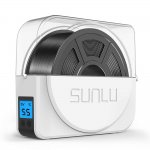
A friend has one of these dryers... are they worth it? I don't have plans to get exotic with all kinds of filaments. He told me... put the spool in this for a bunch of hours before the print (to dry the material)... then let it spool out from this box during the print.

He said it makes a big difference in print quality.
 

Attachments

  • 61n5owdYsXL._SL1500_.jpg
    61n5owdYsXL._SL1500_.jpg
    71.2 KB · Views: 72

vpd66

Well-known member
Joined
Mar 1, 2010
Messages
709
Location
Central Wisconsin
The Max... is metal... I'm NOT sure what the big woop is about getting that BLUE bowden tube... I do understand the issues with the connectors and clips etc... but what's so great about the better bowden tube?

Here is my guess... I will get the max... fall in love with 3D printing... and get a Ender 3 Pro before the year is out... and put a label on it (3D Printer #2)

I'm just giving my opinion. I was in your shoes a little over a year ago. I bought the cheapest model because I knew jack s**t about 3D printing and didn't know if I would end up with a usable machine or just another hobby idea turned into a paper weight. Has it turns out it is a very easy machine to learn and has more then paid for itself. I paid $189 for the basic Ender 3 and with the upgrades I've done I have about $250 in the machine. I have no regret in buying the cheapest model but I would recommend paying the $40 more and getting the "pro". Also don't get hung up on 3d printer size capacity. The stock Ender 3 has a very usable size bed. The Max has larger bed but really doesn't print any faster then a stardard Ender 3. The largest thing I've printed on my Ender 3 was a 21" RC boat hull. It was several prints and several hours of printing. Like it took me a week and a half of running my Ender 3 to complete it. An Ender 3 Max would not have made the printing time any faster so i see no usable gain in that model. If you really do need more capacity then step up to a CR10 (around $600). Also if you do buy a standard Ender 3 Pro and want more print area there is an aftermarket company called Ender extender that sells kits to extend the capacity of the stock Ender 3. Also the "blue tubing" has you call it is Capracorn tubing. It is high temp, more precisionly sized, and made of a slicker material. It is a very cheap upgrade ( like $16.00 for the kit) and the kit gives you enough tubing to make about 3 bowden tubes. I upgraded mine from the start.
 

Jim_No_Garage

Well-known member
Joined
Jan 15, 2011
Messages
3,299
Location
Millington NJ
I have an Ender 3 V2 that I bought in January and I love it. You have to factor in that they are working machines built with minimum quality parts to reach the price point. Everybody seems to hot-rod them as desired. I have already had 1 fan fail on the hot end which cooked the oem bowden tube. So 2 replacement fans and the capricorn bowden tube kit and I'm back in business for now.

I got some free stickers too with the parts! Everybody knows stickers add print quality - horsepower doesn't help a 3d printer . . .

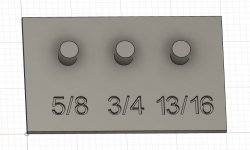
I print little organizational things for the house/garage/basement. I'm currently printing a little base to hold my spark plug sockets in my tool box.

A couple minutes in Fusion 360 (the longest part was doing the text) - and 2 hours of printing and it will be done!

Cheers

Jim
 

Attachments

  • Fusion_Snapshot.jpg
    Fusion_Snapshot.jpg
    69.3 KB · Views: 84

purplezr2

Well-known member
Joined
Jun 1, 2010
Messages
5,290
Location
Central MN
Enders 3Max has a $40 off coupon on amazon currently, is this a good starter printer.

I haven't printed anything, but have had parts at work printed on big stratasys machines at work.

I just want to make similar simple stuff like trays and maybe some small router jigs etc.
 

R-mm

Well-known member
Joined
Dec 24, 2013
Messages
420
Hey guys last year I bought an Ender 3 Pro for my design firm. The office has been closed for obvious reasons and I've been enjoying the machine at home, making parts and prototypes for various car projects and tool upgrades. I am about to reopen the office so I need to get myself another 3DP for personal use.

I liked the Ender, upgraded to Swiss Micro hot end. But a year is a lifetime with 3DP and I didn't really research the Ender all that much to begin with. Looking for suggestions below $500 for personal use. Relatively small footprint and quiet operation a plus. This looks nice?

https://www.creality3dofficial.com/products/creality-cr-6-se-3d-printer
 
To avoid these ads, REGISTER NOW!
Top Bottom