To avoid these ads, REGISTER NOW!

The Everything 3D Printer Thread

PelicanPines

ALLIANCE MEMBER
Joined
Apr 30, 2014
Messages
38,104
Location
New Jersey, USA, Earth, My own reality
R-mm... I am getting the CR10 V3 directly from Creality website. It lists for $512 but they have coupons of about $40 or more that get applied when you are ready to checkout... they don't apply until the last second so be patient.

I was all into the Ender 3s but I want to print TPU which is 'soft' and this CR10 V3 has a DIRECT hot end... so no tube... no separate extruder...

The CR10 has MANY upgrades to the Ender 3... consider it.
 
Last edited:
To avoid these ads, REGISTER NOW!

bored350

Well-known member
Joined
Mar 17, 2011
Messages
222
Location
Arkansas
I'm about to be a new 3d printer owner and was on the fence which ender 3 model to purchase but the $40 off discount makes the 3 max a no brainer to me. I have no design background so for now will be using existing designs or outsourcing design work until I learn fusion or the like.

Since the max has the upgrades already mentioned, are there any other accessories I should be looking at?
What material should I start off printing with?
How long does a typical roll of filament last (I realize this is a relative question, just looking for something to reference against).
Most importantly (to me at least) I will be in the market for a new computer soon. Are there any specific things I need or should spec to future-proof support of my new printing hobby?


TIA

Sent from my moto g stylus using Tapatalk
 

R-mm

Well-known member
Joined
Dec 24, 2013
Messages
420
R-mm... I am getting the CR10 V3 directly from Creality website. It lists for $512 but they have coupons of about $40 or more that get applied when you are ready to checkout... they don't apply until the last second so be patient.

I was all into the Ender 3s but I want to print TPU which is 'soft' and this CR10 V3 has a DIRECT hot end... so no tube... no separate extruder...

The CR10 has MANY upgrades to the Ender 3... consider it.

Its been a minute since I upgraded the Ender3Pro but doesn't the direct driver all metal upgrade address that? https://store.micro-swiss.com/collections/ender-3/products/micro-swiss-direct-drive-extruder
 

Monza Harry

Well-known member
Joined
Dec 29, 2018
Messages
1,433
Location
Windsor ON
Two things:... Found this in the WTF thread... It fits here perfectly.

https://www.garagejournal.com/forum/showpost.php?p=9010770&postcount=70022

Second... Nobody commented on my previous posting about a filament dryer by SUNLU... does anybody have one?.. are they worth it?.. Looks like I'm getting one from AWDeals.
P, Pines In my day job I'm a mouldmaker, and most if not all mould tryouts now a days, have the material dried prior to the tryout. This removes another variable to the end result, you may not notice a difference but material containing moisture will show lines of a different colour called splay. Your new "toy" should help you by removing unknowns. Harry
 

PelicanPines

ALLIANCE MEMBER
Joined
Apr 30, 2014
Messages
38,104
Location
New Jersey, USA, Earth, My own reality

youinreverse

Well-known member
Joined
Nov 9, 2015
Messages
128
Location
SLC
I'm about to be a new 3d printer owner and was on the fence which ender 3 model to purchase but the $40 off discount makes the 3 max a no brainer to me. I have no design background so for now will be using existing designs or outsourcing design work until I learn fusion or the like.

Since the max has the upgrades already mentioned, are there any other accessories I should be looking at?
What material should I start off printing with?
How long does a typical roll of filament last (I realize this is a relative question, just looking for something to reference against).
Most importantly (to me at least) I will be in the market for a new computer soon. Are there any specific things I need or should spec to future-proof support of my new printing hobby?


TIA

Sent from my moto g stylus using Tapatalk

To answer a couple of your questions,

PLA is the most simple to print with, and should serve you well for most applications that aren't seeing high heat or direct sunlight.

To get a gauge on how fast you'll be going through filament, download a slicer such as Cura or PrusaSlicer and download a few STLs that you want to print. When you slice the STL, the slicer program will give you an estimate on how much material it will take to print.
 

brawls43

Well-known member
Joined
Aug 29, 2012
Messages
133
Location
Minneapolis
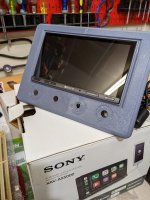
Printed a trial piece for a radio surround for my old truck. Going to add HVAC controls along the bottom as well. Might tweak the design a bit more, but I'm glad it fits so far!
 

Attachments

  • PXL_20210326_213611182.MP.jpg
    PXL_20210326_213611182.MP.jpg
    107.9 KB · Views: 95

WoodsTruck

Well-known member
Joined
Jan 12, 2013
Messages
1,019
Printed a trial piece for a radio surround for my old truck. Going to add HVAC controls along the bottom as well. Might tweak the design a bit more, but I'm glad it fits so far!

Any plans to finish the face of this print?

I was experimenting with non acetone fingernail polish remover then some clear nail polish on some of mine. I need to find more of a matte type polish to cut the glare.
 

brawls43

Well-known member
Joined
Aug 29, 2012
Messages
133
Location
Minneapolis
Any plans to finish the face of this print?

I was experimenting with non acetone fingernail polish remover then some clear nail polish on some of mine. I need to find more of a matte type polish to cut the glare.

I've acetone smoothed other parts, it worked okay for me in the past. On this part I'm not sure my full plan yet. I wish I had a big enough print bed to print it 1 piece. I may prime, sand, and paint the piece for finishing, if I can get the font lettering sized right and printing well. I wanted to print it face up and trying the ironing feature, but with the long support arm, it was going to be 3 day prints. I may still do that style print on my final part.
 

R-mm

Well-known member
Joined
Dec 24, 2013
Messages
420
I've got the CR-6 SE, bought it from the Kickstarter. Great output, easy to use, solid printer. Love the automatic bed leveling.

Good to hear. The inherited wisdom on this printer is that the kickstarter versions had issues but they made good later on. You've not had problems? I think the power switch was one of them.
 

vavet

Well-known member
Joined
Mar 6, 2012
Messages
5,318
Location
Ashland, VA
Is it unwise to leave a 3D printer unattended? Do they pose a fire risk? It seems anything electrical, especially with a heating element, could be a fire risk.

My 3D printer is in a bonus room over the garage. It's the only upstairs part of the house. I frequently leave it to print overnight while we are asleep or while we are gone for the day.
What is the chance of something shorting out and causing a fire? The room has smoke detectors that are connected to the other detectors in the house, so I'm less worried about surviving a fire and more worried about the damage it could cause.
 

vpd66

Well-known member
Joined
Mar 1, 2010
Messages
709
Location
Central Wisconsin
Is it unwise to leave a 3D printer unattended? Do they pose a fire risk? It seems anything electrical, especially with a heating element, could be a fire risk.

My 3D printer is in a bonus room over the garage. It's the only upstairs part of the house. I frequently leave it to print overnight while we are asleep or while we are gone for the day.
What is the chance of something shorting out and causing a fire? The room has smoke detectors that are connected to the other detectors in the house, so I'm less worried about surviving a fire and more worried about the damage it could cause.

I do the same with my printer. They do sell "tent" style enclosures that are fire proof. This is one that I think is going to be a future purchase.


https://www.amazon.com/dp/B089VLHJT6/?tag=atomicindus08-20
 

jfleisher

Well-known member
Joined
Dec 13, 2010
Messages
1,065
Location
Marysville, Ohio
Good to hear. The inherited wisdom on this printer is that the kickstarter versions had issues but they made good later on. You've not had problems? I think the power switch was one of them.

I proactively replaced the power switch, it was pretty simple.
 

techieman33

Well-known member
Joined
Jun 18, 2018
Messages
1,096
Location
Kansas
Is it unwise to leave a 3D printer unattended? Do they pose a fire risk? It seems anything electrical, especially with a heating element, could be a fire risk.

My 3D printer is in a bonus room over the garage. It's the only upstairs part of the house. I frequently leave it to print overnight while we are asleep or while we are gone for the day.
What is the chance of something shorting out and causing a fire? The room has smoke detectors that are connected to the other detectors in the house, so I'm less worried about surviving a fire and more worried about the damage it could cause.

They do pose a fire risk. The main culprit is thermal runaway. Basically the temp sensor in the hot end or bed fails for some reason and so the printer sees a lower temperature than it actually is. So it keeps pumping power to it and it overheats to the point of starting a fire. A lot of printers have thermal runaway protection that should shut them off after a period of time if it's not behaving as expected. You'll want to check to see if you have that feature and make sure it's enabled, and maybe even test it to see if it actually works. Since the wires are constantly moving while printing there is always the risk that it will fatigue to the point of failure in the middle of a print, it not something you can just assume will keep working if it's working at the start of a print.

Personally I look at it like a space heater. Odds are everything will be fine, but it doesn't hurt to check on it every once in a while to make sure everything is working as expected. I don't mind leaving it running overnight, but will usually pause a print if I know there won't be anyone in the house for a while.
 

PelicanPines

ALLIANCE MEMBER
Joined
Apr 30, 2014
Messages
38,104
Location
New Jersey, USA, Earth, My own reality
Printed a trial piece for a radio surround for my old truck. Going to add HVAC controls along the bottom as well. Might tweak the design a bit more, but I'm glad it fits so far!

Any plans to finish the face of this print?

I was experimenting with non acetone fingernail polish remover then some clear nail polish on some of mine. I need to find more of a matte type polish to cut the glare.

There is an option in the CURA SLICER called "IRONING" It completely smooths the finish layer. Apparently this option is only in the Cura Slicer. Just learned about this last night... no experience beyond YouTube with it. Certainly looked like a solution.
 

R-mm

Well-known member
Joined
Dec 24, 2013
Messages
420
As I read more I become more interested in getting functional high strength parts from a sub $1000 home FDM machine. I came across this from matter hackers which is explicitly designed for their NylonX and similar https://www.matterhackers.com/store/l/pulse-xe-nylonx-advanced-materials-3d-printer/sk/MFG0HF92

I realize that a printer like the Prusa can be upgraded to do something similar. I'm curious to hear from those whose goals are high temp resistance / functional / underhood /etc parts.
 

loganb

ALLIANCE MEMBER
Joined
Dec 29, 2011
Messages
5,494
Location
Omaha, NE
There is an option in the CURA SLICER called "IRONING" It completely smooths the finish layer. Apparently this option is only in the Cura Slicer. Just learned about this last night... no experience beyond YouTube with it. Certainly looked like a solution.
Prusa slicer also now supports ironing

When dialed in, the top surface finish with ironing is incredibly smooth buts its super slow to print...like 10% or so the speed to print the same layer without ironing so I'll use it when desired but definitely not something I leave on as a default

Sent from The Garage Journal mobile app
 
OP
B

BoilermakerFan

Well-known member
Joined
Apr 17, 2006
Messages
2,188
Location
Indianapolis, Indiana
Dryers are important for filaments that are hydrascopic like Nylon. PLA really isn't affected too much by humidity and doesn't really absorb moisture. PETG is slightly hydrascopic but I've never had any major issues.

Instead of a single spool dryer, there are better models that hold 4 spools or you can buy a food dehydrator which will hold 6-8 spools at a time.

I've considered buying a food dehydrator for my filament, but I'm not printing any parts where moisture would be a significant concern. When I get to that point, I'll invest in one.

And I agree, having a printer working well and dialed in is great, then getting another one to tinker with while keeping one online is really nice.

I printed all the parts for my upgrade on my stock Presa Mk2 before upgrading it to a Bear Mk2.5S. It took a few days to get it all dialed back in after the upgrade. I have plans for a second wave of upgrades, but I'll be getting another printer up and running before I tear down my Bear Presa again
 
To avoid these ads, REGISTER NOW!

Keyblazer

Well-known member
Joined
Jul 30, 2009
Messages
1,471
Location
Irvine, CA
I Did it!
I'm on the map!

Ender 3 v2...
Printing great with PLA right out of the box!
attachment.php


attachment.php


attachment.php


attachment.php


attachment.php


attachment.php
 

PelicanPines

ALLIANCE MEMBER
Joined
Apr 30, 2014
Messages
38,104
Location
New Jersey, USA, Earth, My own reality
KeyBlazer... Damn that's beautiful.

All I got so far is my Raspberry Pi for Octoprint (to control things). I still can't order the printer... I have a mission from the MRS.. if I am a good boy... I get a CR-10 V3 Printer... Instead of the Ender 3. Plus she got me the Raspberry Pi and a 3foot by 2 foot industrial stainless table to set things up on.

Plus my "task" to complete is making a GOOD spot for the whole setup ... instead of a corner in the garage... I will have some great space in our home office.

Prusa slicer also now supports ironing

When dialed in, the top surface finish with ironing is incredibly smooth buts its super slow to print...like 10% or so the speed to print the same layer without ironing so I'll use it when desired but definitely not something I leave on as a default

Sent from The Garage Journal mobile app

A Prusa Mini is going to be my second printer I think... Good to know their slicer has that option too.

Time doesn't matter for a quality part.

Thanks for the heads up.
 
Last edited:

MushCreek

Well-known member
Joined
Jan 14, 2015
Messages
9,737
Location
Upstate South Carolina
I have a question about 3D printing in general- How do you print a really odd-shaped part with little in the way of a flat surface? I'd like to print rear view mirror holders for '67 Ford pick-ups. It's a one year only part. The problem is that there aren't really any flat surfaces. Even the mounting surface is curved where it fits the header above the windshield. You could print it flat, but then it would be difficult to machine the mounting area because it would be hard to hold on to. I suppose you could print a 'nest' to hold it as well.
 

vavet

Well-known member
Joined
Mar 6, 2012
Messages
5,318
Location
Ashland, VA
I have a question about 3D printing in general- How do you print a really odd-shaped part with little in the way of a flat surface? I'd like to print rear view mirror holders for '67 Ford pick-ups. It's a one year only part. The problem is that there aren't really any flat surfaces. Even the mounting surface is curved where it fits the header above the windshield. You could print it flat, but then it would be difficult to machine the mounting area because it would be hard to hold on to. I suppose you could print a 'nest' to hold it as well.

Slicing programs have the option to add supports. This is useful for parts like you mention with no flat surfaces or for parts with overhangs. It prints additional material in such a way that it breaks off fairly easily after the part is done.
Higher end printers have dual filament capability. They can print in a different color or different material. PVA is water soluble and is what I’ve seen used to print supports that can then be dissolved away when the print is complete. This works well when the part geometry is such that breaking off the printed material can be difficult. I haven’t had any problem breaking away the PLA that I use for my parts.
 

vavet

Well-known member
Joined
Mar 6, 2012
Messages
5,318
Location
Ashland, VA
I Did it!
I'm on the map!

Ender 3 v2...
Printing great with PLA right out of the box!

Congrats. That's the same one Santa brought me last year. I've had lots of fun with it. After reading about all the problems that can arise, I was worried that a 3d printer was an exercise in maintaining a 3d printer and you could make some stuff, but it's really been pretty trouble free. I've certainly had some failed prints, but they are in the minority. I'm amazed how much stuff you can make from a single 1kg spool of material and the level of accuracy you can get.
I suppose if you want beautiful finishes, it might be a little harder, but for functional parts where perfect appearance is not required, it's pretty easy.
 

vpd66

Well-known member
Joined
Mar 1, 2010
Messages
709
Location
Central Wisconsin
I see. I could add supports where the screw holes will go, and drilling the holes will remove the supports.

The supports are a sacrificial part of the print. You simply break them off when the print is complete. They are usually a honey comb and a small screwdriver is all that is need to remove them.
 

Keyblazer

Well-known member
Joined
Jul 30, 2009
Messages
1,471
Location
Irvine, CA
Printed a bunch of stuff so far, and happy with the results.
I’ve ordered a filament runout sensor too.
Are there any other good upgrades to the V2?

At the moment I’m doing single parts, but not tried multiple parts at once yet.
What are the pros and cons of multiple parts in one print?
 

niget2002

Well-known member
Joined
Oct 2, 2012
Messages
11,112
Location
Josephine, TX
KeyBlazer... Damn that's beautiful.

All I got so far is my Raspberry Pi for Octoprint (to control things). I still can't order the printer... I have a mission from the MRS.. if I am a good boy... I get a CR-10 V3 Printer... Instead of the Ender 3. Plus she got me the Raspberry Pi and a 3foot by 2 foot industrial stainless table to set things up on.

Plus my "task" to complete is making a GOOD spot for the whole setup ... instead of a corner in the garage... I will have some great space in our home office.


A Prusa Mini is going to be my second printer I think... Good to know their slicer has that option too.

Time doesn't matter for a quality part.

Thanks for the heads up.


Depending on where your office is in relation to your bedroom... it might not be a good idea. I started with my 3d printer inside the house. I ended up sticking it in an enclosure. I could hear the printer running downstairs in another room. Very annoying. It's not that is was necessarily loud, but in the dead of the night the sound carries. Now I have it out in the shop.
 

vavet

Well-known member
Joined
Mar 6, 2012
Messages
5,318
Location
Ashland, VA
Printed a bunch of stuff so far, and happy with the results.
I’ve ordered a filament runout sensor too.
Are there any other good upgrades to the V2?

At the moment I’m doing single parts, but not tried multiple parts at once yet.
What are the pros and cons of multiple parts in one print?

I have one of the filament guides I found on thingiverse. My filament broke a couple times because the bend was too sharp going into the extruder.

Re: multiple parts...this is a quandry.
On the upside, you can set up multiple parts for a 10 hour print, and it's all done when you get up. On the downside, if something fails, you've wasted a lot of filament. Even if you're aware that one of your prints failed at hour 6, you have to decide if you want to abort the whole thing or try to keep the spaghetti from damaging the other pieces that are OK up to that point. It's a calculated risk and you'll get to know what prints are sketchier/more likely to fail and print those one at a time.
 
OP
B

BoilermakerFan

Well-known member
Joined
Apr 17, 2006
Messages
2,188
Location
Indianapolis, Indiana
I've had two larger prints fail several hours into the print. Both times it was caused by the filament on the spool binding so it wouldn't spin and uncoil. Both spools were ones that I have swapped in and out several times and the bind was always a couple layers down in the spool. So now I just take extra precautions when removing the spools and extra precautions when reloading the spools.

Other than that, just minor dimensional errors which are easy to recalibrate. Now I print the Z offset calibration test every time I switch spools. Z offset only varies a few thousands, but it makes a big difference on the finished parts.

I've had one nozzle clog. It was the original nozzle on my printer when I bought it used. It was not a genuine E3D nozzle.

I switched back to a genuine E3D nozzle and I use a small HF brass parts brush to clean the nozzle after it's up to temp right before the print starts the calibration. Haven't had an issue since.
 

Keyblazer

Well-known member
Joined
Jul 30, 2009
Messages
1,471
Location
Irvine, CA
Printed like 10 parts so far.
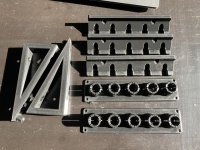
Air tool wall mounts, pressure washer nozzle storage mount, and Makita battery charger mount

The triangular Makita mount is prone to failure it seems.
It starts at the sharp end,? Which is prone to peeling up, s as NS ether it works and leaves a curled edge...
Orbit rips the print off the bed.
 

Attachments

  • 6CAD6E28-A499-42F6-9C55-37248DC5532E.jpg
    6CAD6E28-A499-42F6-9C55-37248DC5532E.jpg
    145.2 KB · Views: 108
  • 6DF6ACDE-593A-401F-A718-9E5B03362E71.jpg
    6DF6ACDE-593A-401F-A718-9E5B03362E71.jpg
    95.7 KB · Views: 86
  • CE291214-79EC-4280-9463-C907386C4A06.jpg
    CE291214-79EC-4280-9463-C907386C4A06.jpg
    120.8 KB · Views: 81
  • 295ABFD9-0D3C-44FB-ABF8-712D279C9D7A.jpg
    295ABFD9-0D3C-44FB-ABF8-712D279C9D7A.jpg
    100.9 KB · Views: 79

vpd66

Well-known member
Joined
Mar 1, 2010
Messages
709
Location
Central Wisconsin
Printed like 10 parts so far.
Air tool wall mounts, pressure washer nozzle storage mount, and Makita battery charger mount

The triangular Makita mount is prone to failure it seems.
It starts at the sharp end,? Which is prone to peeling up, s as NS ether it works and leaves a curled edge...
Orbit rips the print off the bed.

That just needs a little tuning of your slicer settings to get the "point" of that triangle to come out. Are you using anything for bed adhesion? Also try printing it with a "brim" instead of a "skirt". A Brim gives you a little more surface area of the print to adhere to the bed. It is all just slicer tweaking. Also recheck your bed leveling. It looks like your tip might be too far away from your bed. Little things like that can make all the difference.
 

Bodj Built

Well-known member
Joined
Feb 3, 2016
Messages
1,165
Location
Moorpark, CA
Picked up a flashforge adventure 3 lite last weekend and have been playing around with it. Prints small parts great. Trying to switch over to ABS and having some issues with perimeter layers separating on straight tall cylinders. For example, I made this coozie with my logo on it, and everywhere the embossing has a flat horizontal section, there is a split in the layers. I’m about to reprint it, but have the logos angled so there are no flat sections.

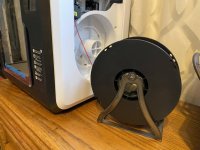
Aside from that, it works great. I use some hairspray on the bed when printing ABS and it sticks great. Made a 1kg spool holder on the plasma table. Spins freely enough to not bind, yet keeps a little tension on it so the spool doesn’t unravel
IMG_4813.jpgIMG_4814.jpgIMG_4812.jpg
 

bczygan

Well-known member
Joined
Nov 4, 2009
Messages
22,002
Location
DETROIT! Arsenal of Scrappers
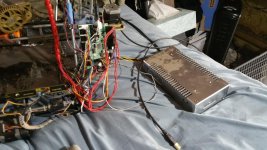
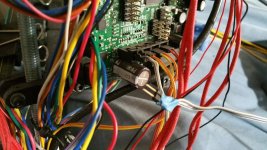
What software do I need to get this one going?

What board is it?

What can I print with it? Functionality?

And where does the wire with the blue tape go?

It goes to a thermister where ?

Bill
 

Attachments

  • Printer 2a.jpg
    Printer 2a.jpg
    109.8 KB · Views: 110
  • Printer 2b.jpg
    Printer 2b.jpg
    107.3 KB · Views: 80
  • Printer 2c.jpg
    Printer 2c.jpg
    116.2 KB · Views: 91
Last edited:
To avoid these ads, REGISTER NOW!
Top Bottom