To avoid these ads, REGISTER NOW!

The modern/digital fabrication thread

OP
S

slodat

ALLIANCE MEMBER
Joined
Feb 6, 2010
Messages
3,679
Location
Central-ish, WA
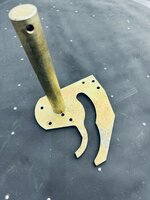
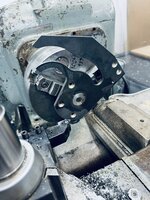
Challenging project came in the shop this week.. Make three of these:
IMG_3425.jpeg

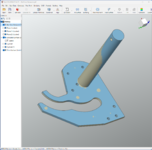
The scanner is perfect for this sort of thing. Scanned the part from two different angles and aligned the scans.
1696007408040.png

Final scan:
1696007637283.png

Meshed and opened in QuickSurface. The mesh data is used to create a sketch. What's nice about QS is you can reference the scan data while creating the sketch.
1696013183278.png

That's used to make parametric geometry in QS.
1696013267530.png

With the scan visible we can see how they look.
1696013301318.png

Again, the comparision tool is really helpful to see how the model is compared to the scan.
1696013337737.png

1696013426469.png

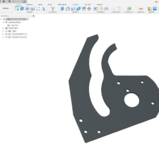
This step file is then brought into Fusion for refinement and making the parts.
1696013712448.png
 
To avoid these ads, REGISTER NOW!
OP
S

slodat

ALLIANCE MEMBER
Joined
Feb 6, 2010
Messages
3,679
Location
Central-ish, WA
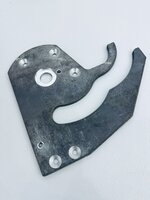
The scanner / Quick Surface combo was perfect for this project. I cut the plate on the plasma, and milled the features on the Tree CNC knee mill.

IMG_3431.jpeg

Turned both ends of the cold rolled bar and had this:

IMG_3449.jpeg

Welding went quite well. I snuck up on the fit between the shoulder on the shaft and bore in the plate. They stayed true. I was surprised how well the welding went. Turned down the weld with the Pacemaker.

IMG_3446.jpeg

Family photo:
IMG_3448.jpeg

I’m really happy with the end result. Customer is as well. Next up is sorting out some in house CAD plating.
 
OP
S

slodat

ALLIANCE MEMBER
Joined
Feb 6, 2010
Messages
3,679
Location
Central-ish, WA
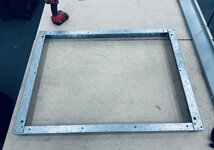
Working on reverse engineering a piece of equipment to use as a reference for making parts, modifications, etc. There's a lot of this out there, and plenty of work coming from this equipment. First order of business is to model the base frame.

IMG_3828.jpeg

Pretty simple parts. The hole placement is critical to these parts working correctly. It took three different scans to get everything.
IMG_3832.jpeg

In this scan we can see the black section, there's no data there.

View attachment 1970418

This is the first two scans aligned.

View attachment 1970419

All three scans aligned. Now we have the whole part, from all sides.

View attachment 1970420


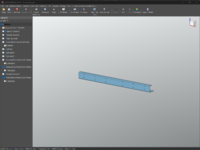
In QuickSurface. I'm getting a little faster in QS. The modeled part in QS:

1697041031821.png


The heatmap comparison:
1697041139984.png

The model was brought into Fusion, into the assembly. Then, I noticed this:
1697041252096.png

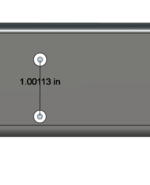
The right-hand vertical component (corner post) upper hole doesn't line up with the base frame. Hmm.. I didn't scan the holes in the corner post. I measured spacing and did a pattern across the part. Whelp...

IMG_3831.jpeg


1697041416729.png

Turns out the top and bottom three holes on the corner post are ~1" spacing, and the rest are ~1.25" spacing.

1697041516403.png

The scanner is more than earning its keep. Cool stuff.
 
Last edited:

Bodj Built

Well-known member
Joined
Feb 3, 2016
Messages
1,165
Location
Moorpark, CA
Loving this thread! Almost pulled the trigger on an Einstar recently, but none of my computers are powerful enough to handle it, so it would effectively double my entry cost. Maybe in a bit I'll be able to get a complete setup.
 
OP
S

slodat

ALLIANCE MEMBER
Joined
Feb 6, 2010
Messages
3,679
Location
Central-ish, WA
Loving this thread! Almost pulled the trigger on an Einstar recently, but none of my computers are powerful enough to handle it, so it would effectively double my entry cost. Maybe in a bit I'll be able to get a complete setup.
I've watched a couple of videos about the Einstar, but I haven't used one. I had the Einscan HX for about 18 months, and it was great. The Freescan Combo I have now is on another level as far as the detail goes. They do have some pretty big computer spec requirements. I think a guy could do just fine with the Einstar, and others at the price point. To me, the real improvement has been QuickSurface. Since I posted this morning, I received a sample part from a customer, scanned, reverse engineered, and am now making the parts. They will ship this afternoon. Pretty cool!
 
OP
S

slodat

ALLIANCE MEMBER
Joined
Feb 6, 2010
Messages
3,679
Location
Central-ish, WA
In the spirit of contributing relevant posts from my shop thread to this one.. here goes ;) These are copy/paste, hopefully it all translates.

I've been contemplating ways to increase my part density and cycle time since I started making parts one operation at a time. I did a lot of reading and so on trying to sort out the right thing for my production parts. One of the challenges is the VMC only has 25.9" of X travel. Several parts are setup to use 11-12" stock, and one part is almost 12" long. I finally settled on the Pierson Workholding pro pallet system. They offer a 10x16" pallet. I can turn the long part and run it on the Y axis in this setup. Having 12" of material in the jaws of a vise is a recipe for lots of fun issues. The pallet will work great with that length on the Y.

In the end, I gain a lot switching the parts that I can to the pallets. Some parts will still be done in vises because it's the best/only way I have to make them. Those parts are long cycle times, so it's not as big of a concern. The longer cycle times mean I can work on other stuff while the parts are running.

I'll say this is a long time coming. I've been slowly working up to being able to handle the CAD and CAM for this as well. Definitely no easy feat compared to where I started. I did a rough model of the table at home tonight. I'll update the model with some measurements in the morning. This model will be included in all the CAM files. My favorite part is the WCS origin will not change! It's the center of the diamond point for X/Y and the top of the ground pad for Z. Everything will be built off that.

The table with the pallet bases.
1709190190702.png

The first pallet with the OP1 work holding in progress. There is stock on the right, and an open pocket on the left.
1709190251962.png

The whole getup with stock in both pockets.
1709190144406.png

The next step is bringing in the parts for OP2 on the bottom.
 
OP
S

slodat

ALLIANCE MEMBER
Joined
Feb 6, 2010
Messages
3,679
Location
Central-ish, WA
Do you have to machine the actual pallets yourself? A better way to ask, if you have the time (because I've been seeing things like this in just about every YouTube video I watch and wondering if I'm missing out): What's the complete workflow from nothing to making chips?
This is how I plan to do things. Being self taught I’m continuously learning the hard way (from experience?). That’s my disclaimer. It’s important to note: a lot of folks have duplicates of the same pallet so one can be unloaded/reloaded while the other runs. Initially I don’t plan to have duplicates. For now it’s about density, longer cycle times, and moving as many parts to the VMC as I’m able to. It’s enclosed, has flood coolant, more tools, and everything is faster/more powerful. The longer cycles will have less time per part. Once I have a feel for where demand is, I can see about duplicate pallets to keep the spindle turning.

I have four parts that can use the same OP1 workholding. Three or four should be able to use the OP2. Not sure about the fourth yet. If this works the way I’m hoping I’ll have multiples of these most likely.

This is what I see the workflow being today for a given part. Design and then machine pallet. Prove out the CAM for the parts. Run all the OP1/OP2 that I’m able to in pallets in the VMC. That’s the overview. Obviously there’s a lot in there. I’ve found work holding to be the most time consuming and most difficult machining I’ve done so far. There’s just a ton of fiddling. As I learn lessons, there’s less.

I plan to buy pallets. It’s a no brainer to me: they come ready to use. I bought several of Pierson’s largest 10x16. Mostly because my parts are not tiny and I’m trying to use as much of the work envelope as I can.

Back to making the pallets. I’m doing my best to leverage all of Fusion’s features that can and hopefully will make this modular and easier. I have all the fixture clamps and their associated pockets modeled. I can then drop them in a new pallet setup and pattern. It looks like this is a good approach. I’ve accepted I could and may very well scrap a pallet or two. Or part of it’s useful area.

Here's how I've approached this so far.. First I modeled the machine table. Then I brought in Pierson's step file of the PPS base and pallet. I made an assembly of the table with the bases in the location that gives them the most equal travel. That's saved as a separate file in Fusion.

I saw a video with a cool trick for making the Mitee Bite clamp pockets. Essentially, you make a negative of the pocket and add it to a file with the clamp. Then you can drop that into a new design and pattern it around. It's going well so far. What I've come up with is a folder of setup items that are the fixturing components:

1709232625450.png

Then the CAM Fusion file starts looking like this:
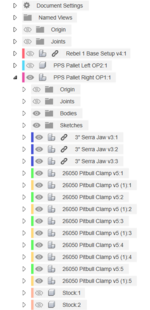
1709232697654.png

Once I have the 3" Serra Jaw file sorted out, I'll break the link. Then I can do anything job specific and it not change the base configuration. Also, when you use combine with a linked component you don't have the option to not save the tools. This adds clutter to the design in my opinion. So, I break the link for that reason as well.

This is the pitbull clamp and associated pocket as a component:
1709232826984.png

And a wireframe to help illustrate what I'm doing:
1709232918047.png

I want the clamp to be able to be low on the stock, and the stock is in a pocket below the top plane of the pallet. Having the pocket modeled to the top edge of the clamp makes it easy when I go to combine the pocket with the pallet to cut the pocket it out - when I want the pocket lower in the pallet. Hope that makes sense.
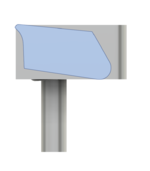
1709233045111.png

This gives an idea of what I'm getting at:
1709233135213.png

This is very much a work in progress in its infancy. I am going to use Mitee Bite's backer strips for the Pitbull clamps. This adds 0.025" to the pocket depth and back wall.

1709233427308.png

I don't have that fully modeled yet, and I will. Also, it's obvious the Serra strip on the left of the part isn't making contact. I need to make some adjustments there.

So, once these "setup" component models are dialed in, modeling the pallet should go pretty quick in theory. I haven't started OP2 yet. I plan to use the Uniforce clamps for OP2.

Again, I can't recommend Haas tooling highly enough! They only cary a few of the Mitee Bite items. Their pricing is really good in general. They offer 5% off for being in their club thing. It also gets you free overnight shipping. They also offer 10% off for buying any mix of 10 clamping fixture items. And, I had a 20% off coupon. These all stack. All told, I got just over 1/3 off on the order. Placed it yesterday, and it's already here this morning.
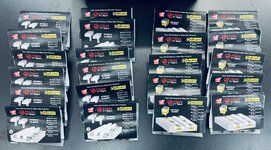
IMG_5355.jpeg

I had to source the backer plates and some Talon grips elsewhere. I also ordered some of the previously mentioned Serra strips from the manufacturer, Anderson Manufacturing. I can't recommend these enough for OP1 stuff. I use their jaws in the vises for all OP1 work and they've never let me down. And, they only need 0.06" to hold on to.

Feel free to ask any questions. Typing this up has helped me identify several things I need to address. Happy to share what I'm learning.

edit: went ahead and modeled the backer plate.
1709235608471.png
 
OP
S

slodat

ALLIANCE MEMBER
Joined
Feb 6, 2010
Messages
3,679
Location
Central-ish, WA
Note for context: there was a lot of conversation about the benefits and challenges with parametric modeling and the different parametric CAD systems out there..

Good points! I work with an engineering team that does everything in Creo. It looks cumbersome. I've not used Solidworks. At this point, I'm very happy with Fusion for CAM and CAD. I have no intention of looking elsewhere. When it comes to using any software, I try to look at it like other tools. Meaning I try to work within its limits and best practices. I try.

When it comes to pulling a dimension, this may not work the way it does in Solidworks, but I'm able to modify my designs these days. It took some time to learn best practices. For example, I never use the move tool. I use joints for every position and component relationship. I also use user parameters where it makes sense. This is an example from the pallet project.
At first I didn't have any parameters. As things went along, I realized I wanted to be able to adjust the position of the pitbull clamps as I sorted out the design. This is when I started making user parameters.

1709319923924.png

This evolved in to me wanting the stock pockets to be built from user parameters. Specifically, the amount of crush depth into the SerraJaws. The parameters:

1709319841139.png

In that table you can see the equations I'm using for the stock spacing. Those parameters are used in the only sketch in the whole model:

1709319768108.png

It's the first thing I did in the model. This is how I kept the pitbull clamps parametric and easy to change.. There's a top and bottom clamp. Each has a joint using the parameters described above. The pallet side of that joint is the center of the line that is the stock edge. The PitbullX is the offset from that point. PitbullXspacing is the distance to the next pitbull to the right. I use one rectangular pattern to make the two far right instances:

1709320397346.png

There's a midplane in the center of the pallet:
1709320493032.png

The four pitbull components are then mirrored on that plane:
1709320554091.png

THEN, the combine is used to cut the pitbull pockets into the pallet:
1709320613098.png

This is the power of doing it this way.. Let's say the stock is actually 2.02. I change that parameter and everything moves. Or I do a small test pallet and find out I want the pitbulls .02 higher or lower.. Or I want a similar pallet, but for a 4" x 5" part.

1709321128784.png

Obviously, once I have all my pitbull spacing sorted out, I won't be changing those going forward. Having the ability to adjust via the parameter table is huge in the development process. Also, This is a real world thing I will be doing. What I haven't done yet is the rest of the pallet! :ROFLMAO:

Edited to add: this is how the section view looks now. The "crush" depth of the SerraJaw is a parameter.

1709321799241.png
 
OP
S

slodat

ALLIANCE MEMBER
Joined
Feb 6, 2010
Messages
3,679
Location
Central-ish, WA
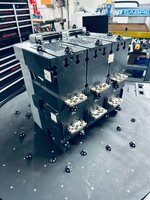
Another project for the scanner.

IMG_5443.jpeg

It never ceases to amaze me how the scanning and processing can completely consume the resources of a very well-equipped machine.

1710038552883.png

The scanning gets a little easier/less fussy each time I use it on an actual project. Scan came out good for what I'm doing.

1710039843733.png

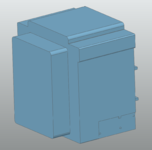
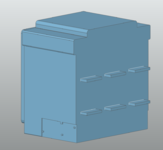
Then, it all went to ****. I had a hell of a time figuring out how to do the reverse engineering in QuickSurface last night. So, I went home for the day. I'm happy to report I have the model that I need for the project. It actually went really well. It definitely would require a lot more reverse engineering work if I was wanting to accurately model the breaker. Since I only need a few features, this works well.

1710104858164.png

1710104901497.png

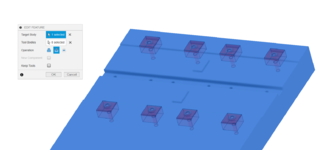
The rest of the modeling can be done in Fusion. Again, the scan is reference data, and it works SO well for that.

1710105051569.png

This is the scan and solid model at the same time.

1710105019876.png

The heat map tells the whole story.
 

Black300zx

Well-known member
Joined
Apr 8, 2019
Messages
782
Location
Elkton, Md
@slodat - thanks for linking this in the 3d printing thread! I got myself a CR Scan Ferret with the primary purpose of capturing usable envelope and interface geometry to reverse engineer parts for my 300ZX. I have several discontinued interior parts in mind, but I also have aspirations of designing various bits for the engine and engine bay.

I've been getting scans that are frankly better quality than I expected from a $200 scanner. Like many, I'm still figuring out the best workflow and SW packages to make parametric models from the mesh.

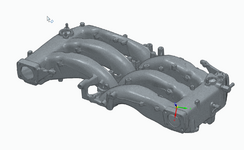
Here's some of the work I've done so far. Hope to scan the block, heads, and lower intake plenum this weekend or next.
 

Attachments

  • 1735069282999.png
    1735069282999.png
    408.8 KB · Views: 22
  • 1735067112649.png
    1735067112649.png
    907.1 KB · Views: 23
OP
S

slodat

ALLIANCE MEMBER
Joined
Feb 6, 2010
Messages
3,679
Location
Central-ish, WA
I’ve had a lot of older Nissans (Datsun 510s, 521, 620, etc) and am quite familiar with the Z32. Was my dream car the year I graduated high school.

I have found QuickSurface to work quite well for reverse engineering aka making a solid model from scan data.

For reference geometry you can create a sketch from a plane through a mesh in Fusion. From there you can use solid modeling tools within Fusion to create a model. It really depends on how much of the scan you care to model.

Something to keep in mind… you don’t have to model everything. For example if all you care about is bolt hole locations. That’s all you need to model. This approach can be used to significantly reduce the size of the mesh making it a lot easier to work with in Fusion.

I’m happy to help where I’m able.
 

Black300zx

Well-known member
Joined
Apr 8, 2019
Messages
782
Location
Elkton, Md
Thanks, I'm looking forward to learning tricks & techniques from this thread. I have a free seat of Solid Edge thru work that I've primarily been using. It has some decent reverse engineering toolsets that are working OK, but I need to dabble in Fusion more. One thing I've noticed it that fusion seems to be a memory hog, using several times more ram for the same mesh. This thread is the first time I've hear of QuickSurface, so I'll need to check that out as well.
 
Last edited:
OP
S

slodat

ALLIANCE MEMBER
Joined
Feb 6, 2010
Messages
3,679
Location
Central-ish, WA
QuickSurface is purpose build mesh -> solid model reverse engineering software. It’s the main competitor to Geomagic Design X. Design X is $20k/seat.
 

Black300zx

Well-known member
Joined
Apr 8, 2019
Messages
782
Location
Elkton, Md
Can confirm it works....

experience1.jpg

Can also confirm it's not yet at the "push go and walk away" phase lol
I image your Otter behaves similarly (but better??) as my ferret. On that scan try "small" and "geometry" settings. Should track well with as much detail as that housing has. What works well is to scan what's visible, pause the scan, rotate the object, then resume scanning.

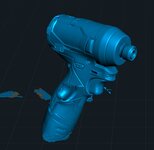
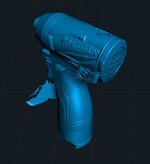
If I have time this weekend I'll try to make a video of scanning my M12 impact driver to capture what I've learned about the software.
 

loganb

ALLIANCE MEMBER
Joined
Dec 29, 2011
Messages
5,505
Location
Omaha, NE
I image your Otter behaves similarly (but better??) as my ferret. On that scan try "small" and "geometry" settings. Should track well with as much detail as that housing has. What works well is to scan what's visible, pause the scan, rotate the object, then resume scanning.

If I have time this weekend I'll try to make a video of scanning my M12 impact driver to capture what I've learned about the software.

Picked up a lazy susan bearing/turntable and it improved it
scan3.jpg


scan 2.jpg


It's still losing it's self a bit as it tries to blend and orient the pieces together as you can see from the extra trigger/grip assy it grew in this last scan...but definitely better. Learning how to better control and manage the scanner helps too....I can see a small tripod being very helpful for some of these pieces that can sit on a turntable and leave the scanner more stationary
 

kaymccampbell

Well-known member
Joined
Feb 27, 2015
Messages
29,448
Location
Upstate New York
Picked up a lazy susan bearing/turntable and it improved it
scan3.jpg


scan 2.jpg


It's still losing it's self a bit as it tries to blend and orient the pieces together as you can see from the extra trigger/grip assy it grew in this last scan...but definitely better. Learning how to better control and manage the scanner helps too....I can see a small tripod being very helpful for some of these pieces that can sit on a turntable and leave the scanner more stationary
Maybe it's like AI, with the extra fingers n whatnot.
 
To avoid these ads, REGISTER NOW!

Black300zx

Well-known member
Joined
Apr 8, 2019
Messages
782
Location
Elkton, Md
Picked up a lazy susan bearing/turntable and it improved it
scan3.jpg


scan 2.jpg


It's still losing it's self a bit as it tries to blend and orient the pieces together as you can see from the extra trigger/grip assy it grew in this last scan...but definitely better. Learning how to better control and manage the scanner helps too....I can see a small tripod being very helpful for some of these pieces that can sit on a turntable and leave the scanner more stationary
Are you using the desktop PC software, or a smartphone app? If you're using the desktop software I've found that it's helpful to pause the scan periodically to check if there are any odd artifacts. If you do find duplicate features you can click the "back up" button and restart the scan.
 

Cruzan80

Well-known member
Joined
Jul 22, 2015
Messages
4,182
Location
Denver, CO
Got some for my CAD class, and the students love them. Had to yell at them to stop playing to "assemble" racing magame in the app.
 

loganb

ALLIANCE MEMBER
Joined
Dec 29, 2011
Messages
5,505
Location
Omaha, NE
Are you using the desktop PC software, or a smartphone app? If you're using the desktop software I've found that it's helpful to pause the scan periodically to check if there are any odd artifacts. If you do find duplicate features you can click the "back up" button and restart the scan.

Desktop right now, after I play around a bit will try the android app. I was playing around with it more today and paying more attention to lighting conditions and it significantly improved the result. At least when playing on this M12 driver, loosing tracking was generally in the darker areas due to shadows from the tool/in the room. Once I fixed some of that it improved results

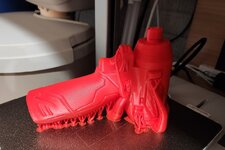
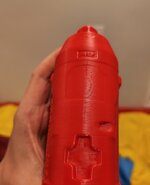
Imported to Blender as a .ply file type in order to clean up some excess random floating vertices

m12 scan4.jpg

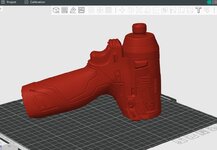
Then kicked to the slicer to see how it looks there

m12 scan5.jpg

4 hour print time...so why not...let's see what happens!

Next up after I probably scan some other stuff will be to see what I can do with the resulting .stl in CAD. Unfortunately this may push me to upgrade CAD package as right now my basic Alibre package doesn't do Boolean operations which is what I think these models may lend themselves most to. Drop a .stl into a solid, do some type of an offset then Boolean subtract the material. Fusion360 for personal does look like you can do the Boolean...so will get to play with both and see what may be easier
 

WoodsTruck

Well-known member
Joined
Jan 12, 2013
Messages
1,019
That would have taken forever on my Ender 5 as it is currently set up.
Super stoked you can scan and then print so quickly.
 

Black300zx

Well-known member
Joined
Apr 8, 2019
Messages
782
Location
Elkton, Md
Great stuff @loganb . I also have found that lighting and exposure settings are critical. The IR live-view in the upper left corner of the screen is super helpful and made me quickly realize that the auto-exposure setting was adjusting for my desk light in the background.
 

Black300zx

Well-known member
Joined
Apr 8, 2019
Messages
782
Location
Elkton, Md
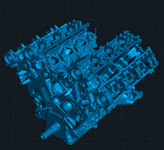
Last night I finished doing a leakdown test on my Z's longblock, mic'd out the cams and measured cam journal clearance. Before tearing the heads off to take it to the machine shop I decided to see how well my lightweight "work" laptop handles 3D scanning w/ my Ferret. I drug it down to the garage, plugged it in, and got to business. I scraped all of the gasket surfaces (oilpan, intake/exhaust ports, valve covers, oil/water pump, etc) to give myself the best shot of getting accurate datum surfaces. I had to go quite a bit slower than with my desktop, and it took a LOT longer to regain tracking when lost, but I'd say it was a success for my uses.

I won't be making CNC porting programs from this, but I 1000% should be able to CAD-design some cooling hardlines, more user-friendly timing covers, and whatever other accessories I might want in the future. When I pull the engine stand off I'll get a local scan of the rear and merge them together.

Fairly slow framerates compared to my desktop:
1736105267847.png

I moved the scan file over to my desktop to process. Sucked up about 30gb of ram and took probably 20 minutes
1736105301463.png

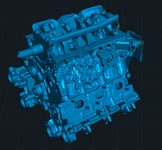
Final mesh:
1736105388751.png
1736105429557.png
1736105471127.png
 
Last edited:

Black300zx

Well-known member
Joined
Apr 8, 2019
Messages
782
Location
Elkton, Md
For most of these scans I've turned on the "hole fill" and "closure" setting when exporting the STLs from the Creality Scan software, so they come into Solid Edge as solid bodies. In solid edge I will select planar mesh regions and create best-fit datum planes. I can then sketch on those datum planes to create hole centerpoints and additional datum axes/planes that I can use to mate all of the parts together into an assembly. I hope to get a useable scan of the engine bay while its out.

If you're asking what I plan to actually use this scan data for...well that's a bit of a TBD. Right now I'm oppotunistically collecting the data while I have everything apart. A few projects have been on my mind, but we'll see if I ever actually get to them:

1 - The PS timing cover can't be removed without removing the coolant hardpipes, so if you're dyno tuning to optimize cam timing you have to either leave the cover off, or dump coolant repeatedly. I'd like to design a 2pc replacement cover that can give access to adjust cam timing without removing the coolant pipes

2 - I've always had a fascination with carbon fiber fabrication. If I ever get competent with it, I'd like to design CF intercooler and intake piping that improves flow, sheds ~10lbs over the stock steel piping, and fits better than the tubular 2.5" aftermarket kits currently available.

3 - Who knows from there. Composite upper manifold to shed another 10lbs?
 
OP
S

slodat

ALLIANCE MEMBER
Joined
Feb 6, 2010
Messages
3,679
Location
Central-ish, WA
The first paragraph was what I was asking. Sounds great. Would love to hear how well Solid Edge does with the mesh as reference. This is what I really appreciate about QuickSurface. That, and the heatmap comparison of the solid geometry to the mesh data.

Great work!
 

Cruzan80

Well-known member
Joined
Jul 22, 2015
Messages
4,182
Location
Denver, CO
Don't know if I mentioned it on here or on the 3D printing thread, but I recently realized that OnShape allows parametric CAD along with mesh geometry. Not sure exactly how it compares to the others.
 

loganb

ALLIANCE MEMBER
Joined
Dec 29, 2011
Messages
5,505
Location
Omaha, NE
Last night I finished doing a leakdown test on my Z's longblock, mic'd out the cams and measured cam journal clearance. Before tearing the heads off to take it to the machine shop I decided to see how well my lightweight "work" laptop handles 3D scanning w/ my Ferret. I drug it down to the garage, plugged it in, and got to business. I scraped all of the gasket surfaces (oilpan, intake/exhaust ports, valve covers, oil/water pump, etc) to give myself the best shot of getting accurate datum surfaces. I had to go quite a bit slower than with my desktop, and it took a LOT longer to regain tracking when lost, but I'd say it was a success for my uses.

I won't be making CNC porting programs from this, but I 1000% should be able to CAD-design some cooling hardlines, more user-friendly timing covers, and whatever other accessories I might want in the future. When I pull the engine stand off I'll get a local scan of the rear and merge them together.

Fairly slow framerates compared to my desktop:
1736105267847.png

I moved the scan file over to my desktop to process. Sucked up about 30gb of ram and took probably 20 minutes
1736105301463.png

Final mesh:
1736105388751.png
1736105429557.png
1736105471127.png

Curious....did you need to setup any spotlights to help light the block appropriately for good scanning or is the ambient lighting in the shop bright enough?
 

Black300zx

Well-known member
Joined
Apr 8, 2019
Messages
782
Location
Elkton, Md
Curious....did you need to setup any spotlights to help light the block appropriately for good scanning or is the ambient lighting in the shop bright enough?
When I prep this scan to add to my assembly I'll take some time to detail the process I use in Solid Edge and post it here in case it's helpful for anyone.

I didn't have to set up any lighting or use any spray. My garage is pretty well lit and I actually found that this scan went easier than in my office.
 
To avoid these ads, REGISTER NOW!
Top Bottom