
You are using an out of date browser. It may not display this or other websites correctly.
You should upgrade or use an alternative browser.
You should upgrade or use an alternative browser.
Above 1200 Sq/FT The Salvage Garage
- Thread starter Strouty
- Start date
Wokspaces above 1200 squarefeet.



FullRaceMerc
Well-known member
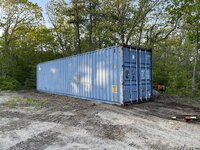
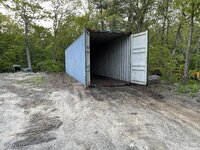
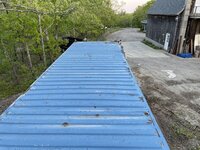
Con...gratulations!Let there be Conex.
xtremek
Well-known member
Glad to see it's in place.
I may have just created a new project. That answer will have to wait a couple weeks.
I need to go to one of the tower sites this afternoon and get all my measurements, yesterday got screwed up and I did t have time. I hope to have all the info off to the engineer by tomorrow, need to get that off the list.
I need to go to one of the tower sites this afternoon and get all my measurements, yesterday got screwed up and I did t have time. I hope to have all the info off to the engineer by tomorrow, need to get that off the list.
bimmer1980
Well-known member
Did you find another forklift, crane, truck or burb'....?
Good progress on the container. Hopefully that helps free up some shop space so you can continue to make progress.
Remember the "sweat labor" requirements for the future project......
Good progress on the container. Hopefully that helps free up some shop space so you can continue to make progress.
Remember the "sweat labor" requirements for the future project......
kent_323is
Well-known member
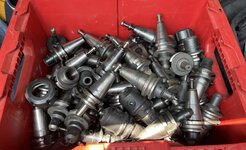
CNC vertical machining center?
Another weird thing that happened today, the Blurb got 16.6 MPG on a 320 mile fill up that was less than half highway miles. That is about where it should be, but I have been getting 13.5 or worse. Not sure what changed, I will be curious to see what this next tank gets.
kaymccampbell
Well-known member
It's softening you up, in the hope that you'll still look fondlly upon it at the upcoming catastrophic failure.Another weird thing that happened today, the Blurb got 16.6 MPG on a 320 mile fill up that was less than half highway miles. That is about where it should be, but I have been getting 13.5 or worse. Not sure what changed, I will be curious to see what this next tank gets.
I was kind of thinking the same thing. Seems like that is the vicious cycle, maybe it knows that I have been clearing out the shop to put the XC70 in, once that is fixed I will be using that as my DD. Of course that may need an engine and not just the band aid that I am hoping for. I suspect that will be an over the next couple weeks project, I just need to clean up a bit more stuff and then it can go on the lift.
I have lots of paperwork to do today, need to setup the old computer, then get a printer working, in order to do that I have to do some cleaning and a bit of shuffling, but that is what always happens.
I have lots of paperwork to do today, need to setup the old computer, then get a printer working, in order to do that I have to do some cleaning and a bit of shuffling, but that is what always happens.
I found out something not so cool about my iMac, they hid the screen rotation function, I figured out how to get it back, but if you restart the computer you are screwed. The screen is one third the normal size and if you can log in, you can't get to the top or bottom of the screen where all the menus are, it took me 20 minutes to figure out how to fix it. You have to boot into safe mode, then you can restart the computer and it is back to landscape mode like normal. I guess if I rotate the screen, I need to rotate it back before a power down or a restart, then I don't have to go through the hassle of safe mode. At least now I know how to fix it, I was worried I may have to go back to the computer guys again, or reload the operating system, either one would have been a pain. The reason I want to be able to use the computer in landscape is for viewing spreadsheets and other longer documents. I have a 49" curved monitor on order, so that will be for my normal landscape mode, should make everything I do a lot easier once I get things figure out. The only sucky part is that the office walls are slanted (gambrel style roof) and I can't move the monitor over as far as I would like in landscape mode, this means that the big monitor will be hanging off the desk a bit. Once it arrives and I do some test fitting, I may just be able to swap the landscape monitor to the left side and use the ultrawide one on the right side, just not sure if that will work for me, who knows, it might even be better?
I have the new mounts setup and I am about to setup the old computer so I can pull data off it, then setup quickbooks and the printer, after that I am in business, I hope.
I have the new mounts setup and I am about to setup the old computer so I can pull data off it, then setup quickbooks and the printer, after that I am in business, I hope.
Well, I found out something very cool, if you put two apple products next to each other that both have bluetooth mouse and keyboard, you can seamlessly use the mouse from one to the other, also able to drag and drop things between the two devices. I didn't even have to set anything up for that, pretty interesting, just like dual monitors, except separate computers. Maybe this is old tech, but it is the first time I have done it and it is going to make things much easier to get all the info sorted between the two computers.
I knew that, but the side by side computers is a pretty nice function, it is just like having two monitors, but double the computing power.
I have to try and setup the copier now, waiting for the IT department to get back to me on that one. I think it will be pretty simple, except that the printer is in a different building, all on the same network though, so shouldn't be to big of a deal. I got all the quickbooks setup and functional, nothing dramatic, just some time. I need to call the engineer soon, so we can get things rolling with the tower analysis, it has taken me way too long to get to this point.
I have to try and setup the copier now, waiting for the IT department to get back to me on that one. I think it will be pretty simple, except that the printer is in a different building, all on the same network though, so shouldn't be to big of a deal. I got all the quickbooks setup and functional, nothing dramatic, just some time. I need to call the engineer soon, so we can get things rolling with the tower analysis, it has taken me way too long to get to this point.
I got all the info I had to the engineer, spoke with my contact and we are going to setup a conference call to go over everything. Now I need to grab some more office supplies from the old office so I have some paper and other things, then I can actually get some work done. I hadn't logged into quickbooks since mid April, so I have to deal with a lot.
jack stand
Well-known member
So when are you getting one of those slick container trailers?

To be honest, I am not even sure why they have dual wheel axles, the trailer was a banana and the conex only weighs 8400 over the 40’. My suburban weighs about the same, it looked like a stripped down camper trailer with a couple hydraulic rams. I would build one if anything, but I am more interested in making up a dolly that would work in conjunction with the Tru-Hitch, if I do it right, you would be able to haul them with stuff in them, plus you don’t need to tilt them to a 45 degree angle to load and unload.
Don’t give him any ideasSo when are you getting one of those slick container trailers?
the real question is, got the office done yet?Chilly morning, it is trash day, then I need to organize some paperwork and get checks printed. I really want to do other things since it is going to be a nice day, but the checks need to be done first. I should have a good stretch of weather for a while, only bad part is that I will have to water the grass over at the tower site.
I have been looking for a grading bucket for the Mitsu, the ones that are reasonably priced are all too small, but everything else is way too big. I have found one that I think will work, still researching sizes of machines versus bucket size versus pin size. I wish there was an easy way to figure it out, not that anything ever seems to be easy.
I have been looking for a grading bucket for the Mitsu, the ones that are reasonably priced are all too small, but everything else is way too big. I have found one that I think will work, still researching sizes of machines versus bucket size versus pin size. I wish there was an easy way to figure it out, not that anything ever seems to be easy.
xtremek
Well-known member
Just curious why so long to get fully moved into the office. I get the lack of an elevator was a HUGE sticking point, but what is the block? Just time and other urgent needs?
I have to sort and put away files, boxes and boxes and boxes of files. It has to be culled and then certain files need to be scanned as well. I am not going to just dump everything into drawers and make it look pretty from an outside perspective. The setup before was a mess and while I did a quick sort before moving things to the house office, things need to be labeled and organized much better. In the midst of this, I am playing catch up, then there are the physical things that need to be done to the office, the computer and tech aspects, all while dealing with day to day, plus emergencies, and my elbow. I think I can cut the paper in half just by looking through all the tower files, so it will be worth the effort. My end goal is to have everything that I need in digital format, with a hardcopy in the office as a backup and for Dad, he will not be into the digital side of things. Timeframe depends a lot on what else pops up, I still have the tower sites to deal with, the docks at the lake should probably have gone in last week, some more tree work, and lawyery things. This doesn't include any of my stuff, so you get the idea, it is going to take me a while.
Here is my new space, I needed to find some stuff and this is the mess that two boxes made, I have about 30 more boxes in the house and there are another ten already up in the office. Some boxes are going to be much easier to deal with than others, but it is still going to be a chore.

The good thing is, I will have plenty of space for storage, I went a bit overkill, but I would rather have too many file drawers than not enough. My plan is to clean what is up here, then work on bringing more boxes up and dealing with them as they arrive.

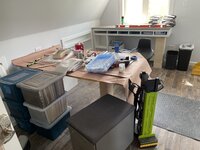
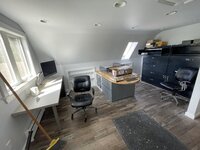
The good thing is, I will have plenty of space for storage, I went a bit overkill, but I would rather have too many file drawers than not enough. My plan is to clean what is up here, then work on bringing more boxes up and dealing with them as they arrive.
Last edited:
68400BIRD
Well-known member
The new office looks really nice. I think it is a great idea to work on one box at a time and not even bring the other ones up. Small victories keep things rolling smoothly. I have the same problem at work. I tend to bounce from problem to problem when I just need to sit down and start with the oldest problem and work forward. That is what I have been doing lately and it works much better just like you mentioned earlier.
Last edited:
FullRaceMerc
Well-known member
Looks like you're making good headway. I'll bet it feels good to be getting some of this behind you.
Jayman17
Well-known member
Nice looking office space!
xtremek
Well-known member
Sounds like a solid plan. One box a week?
One box a week would put me into next year!
I am going in spurts, if I am actually concentrating on the office files, I think a couple boxes a day is reasonable, some will be much easier to deal with than others, so I could see getting through a bunch more if things are aligned just right. I have a conference call at 2, then after that I still have bills to enter and checks to print. I have a clean desk and all the papers in order, I need to print out the invoices from emails, then I should be good to go. I don’t want to be in here tomorrow, at least if I have help, if I don’t have any help, I will probably concentrate on the office again.
I am going in spurts, if I am actually concentrating on the office files, I think a couple boxes a day is reasonable, some will be much easier to deal with than others, so I could see getting through a bunch more if things are aligned just right. I have a conference call at 2, then after that I still have bills to enter and checks to print. I have a clean desk and all the papers in order, I need to print out the invoices from emails, then I should be good to go. I don’t want to be in here tomorrow, at least if I have help, if I don’t have any help, I will probably concentrate on the office again.
xtremek
Well-known member
OH OH OH OH!!! I know this answer............TROUBLE!!! Do I win anything? 
You just won the opportunity to help move an 8000 pound CNC mill...
that doesn't even function.........
Of course that is next weekend, but I do need to prep things a bit, going to try and get the E-Brake working on the Oyster, I am bringing it with me when I go, should make loading it much easier and safer.
that doesn't even function.........
Of course that is next weekend, but I do need to prep things a bit, going to try and get the E-Brake working on the Oyster, I am bringing it with me when I go, should make loading it much easier and safer.
1Garageman
Well-known member
Looks like you have room on your lot now for this awesome Suburban!!

I could make one of those.
Today is just plain old going to be messed up. I am at my house waiting for the computer monitor to be delivered, my Buddy is at the Salvage Garage taking apart the Hyster forklift so we can get the E-Brake working, looks like it may need some more parts. That was kind of the plan, figure out what we need and get it ordered, then get it back together next week. Having to wait for the monitor was not really planned, but I will need help installing it, so it kind of made sense. I am working on sourcing some of the parts now, then I have a water heater in the Blurb to unload, then at some point we are going to bring it into the basement so I can upgrade our current water heater. Lots of randomness today!
Today is just plain old going to be messed up. I am at my house waiting for the computer monitor to be delivered, my Buddy is at the Salvage Garage taking apart the Hyster forklift so we can get the E-Brake working, looks like it may need some more parts. That was kind of the plan, figure out what we need and get it ordered, then get it back together next week. Having to wait for the monitor was not really planned, but I will need help installing it, so it kind of made sense. I am working on sourcing some of the parts now, then I have a water heater in the Blurb to unload, then at some point we are going to bring it into the basement so I can upgrade our current water heater. Lots of randomness today!