To avoid these ads, REGISTER NOW!

Tool Inventory Software

Keep

Well-known member
Joined
Jan 1, 2009
Messages
1,398
Location
Oshawa, Ontario
I have been pm'd from a few folks about this db so I figured I would post an update.

Here is a copy of the current database. It is fully functional and you can use it as is. I will be adding some more reports but other thats about it.

Some requirements.

Access 2007. I used a lot of the features in 07 so it will not open in earlier versions. It also does not work in Open office. You can connect to the data, but none of the forms function.

Please do not laugh at the graphics as design is not my strong point...lol

Here are some screenshots:

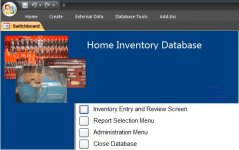
This is the entry screen: Just click a button.

attachment.php


The main entry screen:

attachment.php


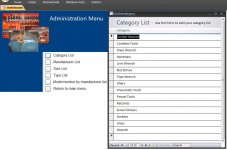
Administration screen - this is where you edit your lists: Click the list you wish to edit and it will popup.

attachment.php


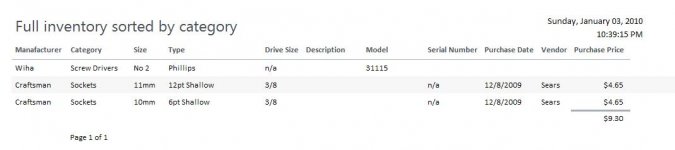
And here is one of the two reports that are currently created:
This is a full listing of your inventory. It is listed by category and manufacturer.

attachment.php


I know its getting lost being posted in here but once its done I will create a post for it.

Here is the download link for those that wish a copy.

http://www.netquickposse.org/files/HomeInventory.zip

On another note does anyone have a copy of a manufacturer catalog with part numbers? You can add them manually in this but I would like to try importing a full list to see what I will be up against. Snap-on, Matco, Mac, Craftsman would be a good start.
 

Attachments
  • adminmenu.JPG
    adminmenu.JPG
    76.6 KB · Views: 674
  • entryscreen.JPG
    entryscreen.JPG
    77.3 KB · Views: 672
  • fullreport.JPG
    fullreport.JPG
    25.7 KB · Views: 662
  • mainscreen.JPG
    mainscreen.JPG
    30.6 KB · Views: 666
Last edited:
To avoid these ads, REGISTER NOW!

torqueman2002

Well-known member
Joined
Jun 3, 2009
Messages
6,138
Location
SE Michigan
Hi Keep;

I have spent a couple of hours getting to know MS Access and using your database template.

Nice job! The input screen is well laid out and intuitive. I like the number of fields and the pre-loaded pull down selections.

I've had fun looking for images for the Grey Pneumatic universal shallow impact sockets, great feature that.

What size images (file size, resolution, ...) are you using? Some of the ones I got off of Grey's website are going to prove to be too big I think, sure is nice to open the file and see all the detail though.

My last exposure to a database was db3. I built a database to keep track of my music collection. I let it get away from me and didn't keep it current because it was too hard to use. I now have Itunes/iPod keeping track automatically. Over 10,000 songs now.

If I haven't said thank you yet, be sure that I do appreciate the work you put into this and that you are sharing it with the forum.

It's guys like you that make this a great place to read and post! :beer:
 
Last edited:

mr2autoxr

Well-known member
Joined
Aug 3, 2005
Messages
83
Location
Michigan
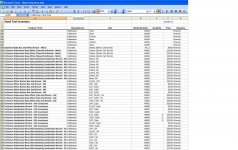
I finally have finished inventorying all of my hand tools in my box. I just used Excel because I didn't have Access and it is better than nothing. I've added a few screen shots to show the idea.

If anyone wants to see the entire file let me know and I can email it to you.

Mike
 

Attachments

  • Inventory1.jpg
    Inventory1.jpg
    153.3 KB · Views: 137
  • Inventory2.jpg
    Inventory2.jpg
    156.2 KB · Views: 106
  • Inventory3.jpg
    Inventory3.jpg
    154.5 KB · Views: 76

Mickey O

Well-known member
Joined
Oct 25, 2009
Messages
6,153
Location
Chicago, IL
I finally have finished inventorying all of my hand tools in my box. I just used Excel because I didn't have Access and it is better than nothing. I've added a few screen shots to show the idea.

If anyone wants to see the entire file let me know and I can email it to you.

Mike

You can always import spread sheets into a database if you get one.

Always a good idea to email the files to yourself to one of those free email accounts so you have it if your computer takes a **** (so the files are stored online), fire or whatever or burn a disk and keep it else where for the same reason.
 

44boggers

Active member
Joined
Jan 30, 2010
Messages
28
I have a program called FileMaker Pro Advanced for my Mac. It is great. I can catalog everything, add prices to each tool and photos. Very simple and clean program.
 

diogenes

Well-known member
Joined
Dec 31, 2009
Messages
480
Location
The State of Taxation
Great job, Keep.

I just spent a little time hunting around to see if there was some kind of "Access Lite" application that would allow someone to run the Access database without Access installed. I found a couple of things that look promising, but I don't have the time right now to see.

Keep, that last link (to the Access Run-Time) may be just what is needed...
 

diogenes

Well-known member
Joined
Dec 31, 2009
Messages
480
Location
The State of Taxation
I think I have found a way to run the Access database for everyone whether or not you have the Access program. :bounce:

I'm going to PM Keep with the info I found and when it's ready for prime time I will be willing to host the file. I just ran the database on a computer that did not have MS Office installed and it worked, so i don't think we are far off... :thumbup:
 

nolatoolguy

Banned
Joined
Jan 11, 2010
Messages
1,065
Location
Louisiana
Me, personally i use exel i put manufacture,model number, cerial number(depending on type tool), size(depending on tool) and thats about it
 
To avoid these ads, REGISTER NOW!

Keep

Well-known member
Joined
Jan 1, 2009
Messages
1,398
Location
Oshawa, Ontario
Hi Keep;

I have spent a couple of hours getting to know MS Access and using your database template.

Nice job! The input screen is well laid out and intuitive. I like the number of fields and the pre-loaded pull down selections.

I've had fun looking for images for the Grey Pneumatic universal shallow impact sockets, great feature that.

What size images (file size, resolution, ...) are you using? Some of the ones I got off of Grey's website are going to prove to be too big I think, sure is nice to open the file and see all the detail though.

My last exposure to a database was db3. I built a database to keep track of my music collection. I let it get away from me and didn't keep it current because it was too hard to use. I now have Itunes/iPod keeping track automatically. Over 10,000 songs now.

If I haven't said thank you yet, be sure that I do appreciate the work you put into this and that you are sharing it with the forum.

It's guys like you that make this a great place to read and post! :beer:

Sorry I missed your questions. You can add whatever size picture you want. It will shrink it down to "thumbnail" size on the screen.

Those premade pictures were just ones I found on the net. When I actually use it I will take my own pictures and add it to the db. This way makes it a little easier for the insurance company to believe it instead of just a bunch of "off the web" pictures.

I have finished up the db adding the last report, I will update the file linked above.
 

Keep

Well-known member
Joined
Jan 1, 2009
Messages
1,398
Location
Oshawa, Ontario
Oh yeah. I will be digging into the options listed by diogenes, hopefully we can package it up so everyone can use it for free.
 

toolfreak

Well-known member
Joined
Jan 8, 2006
Messages
1,273
Location
Illinois
I was going to update the inventory thread I started a few weeks ago but for some reason I can't find it. I guess it got deleted since I went to my user cp and went to threads started and it's not there. Anyways, I just got done dealing with the insurance people and they are using an inland marine policy to insure my tools at home and work. I inventoried all my Snap on and higher price tools but when I emailed the list to the insurance agent found out it was a waste of time to inventory anything under $1000. They wanted a description and serial number on anything over $1000 but the tools under that is insured in a similar policy that covers anything up to $25k.
 

Keep

Well-known member
Joined
Jan 1, 2009
Messages
1,398
Location
Oshawa, Ontario
Good to know. I plan on using this for not only my tools but my home electronics as well.

Thanks to diogenes ideas I can package this up for everyone to use for free. The download will be about 60mb which is nothing with todays connections. I have a few tweaks to make and little issues to sort out but I should have a final version up by this weekend.

diogenes - the dupe record was broke on the main db, when I enabled the ability to edit the value lists it broke the dupe record creation, so I took the button off, you can still copy a record in the list on the bottom of the main form, just highlight copy/paste into new record. Not exactly what I wanted but still will work. Thanks for finding that and the dev extentions!
 

Mrbossman

Well-known member
Joined
Aug 31, 2015
Messages
150
Hello
I got the Access file up and running. I was wondering if you could add a location field. So I could specify where the tool is .... Took box1, Tool box2, storage shed, loaned to Mike ect....
 
Last edited:

swflge8

Active member
Joined
Apr 2, 2015
Messages
35
Location
fort myers
Wow I was just thinking about this yesterday I have to say this is neat, Awesome job Mike. I know what i'm doing Friday.
 

Mrbossman

Well-known member
Joined
Aug 31, 2015
Messages
150
I have been pm'd from a few folks about this db so I figured I would post an update.

Here is a copy of the current database. It is fully functional and you can use it as is. I will be adding some more reports but other thats about it.

Some requirements.

Access 2007. I used a lot of the features in 07 so it will not open in earlier versions. It also does not work in Open office. You can connect to the data, but none of the forms function.

Please do not laugh at the graphics as design is not my strong point...lol

Here are some screenshots:

This is the entry screen: Just click a button.

attachment.php


The main entry screen:

attachment.php


Administration screen - this is where you edit your lists: Click the list you wish to edit and it will popup.

attachment.php


And here is one of the two reports that are currently created:
This is a full listing of your inventory. It is listed by category and manufacturer.

attachment.php


I know its getting lost being posted in here but once its done I will create a post for it.

Here is the download link for those that wish a copy.

http://www.netquickposse.org/files/HomeInventory.zip

On another note does anyone have a copy of a manufacturer catalog with part numbers? You can add them manually in this but I would like to try importing a full list to see what I will be up against. Snap-on, Matco, Mac, Craftsman would be a good start.


Hello

Can you add a location field that can be a sort category?
 

dclassical

Well-known member
Joined
Sep 25, 2008
Messages
1,130
Good job.

A long time ago I wrote a little something using PHP and mySQL, but never finished it. I should get back to it. I tend to get database things working but then I am too lazy to write a nice interface (after all I can enter an item using SQL lol).

Again, good job - looking nice.
 
To avoid these ads, REGISTER NOW!
Top Bottom