To avoid these ads, REGISTER NOW!

Troubleshooting cat5e cable for my POE camera

PCustoms

Well-known member
Joined
Jul 23, 2011
Messages
22,598
Location
VT
I saw that and wanted to wait to see how long it would take someone to notice that…….. You my friend are now a winner for the "Spot the Code Violation of Week" award! 🏆 (y)🤠(y) :beer:

I better give it back, while I haven't buried any I do have a short run in a carport.
 
To avoid these ads, REGISTER NOW!

RiverRider

Well-known member
Joined
Mar 3, 2015
Messages
587
Location
DFW area
nope. the pinouts are different and each pair has a different rate of twist per inch. this is why when people say the color code doesnt matter as long as its the same on both ends (often ignoring 568A or B) is wrong..... the twists per inch differences matter and they must go on the correct pins...


Not quite accurate there sir.

Cat 6 vs. Cat 6a, there is a difference in the cable itself, with "a" being capable of higher bandwidth. I believe that's where the twists per inch makes itself a factor.

When comparing Cat 6a to Cat 6b, there is no difference electrically between them but the colors of the wires are switched around. As long as both ends are both "a" or both ends are "b" then it makes no difference whatsoever whether your cable is Cat 6a or Cat 6b.
 

wyliesdiesels

Well-known member
Joined
Aug 14, 2012
Messages
19,998
Location
Modesto, CA
Not quite accurate there sir.

Cat 6 vs. Cat 6a, there is a difference in the cable itself, with "a" being capable of higher bandwidth. I believe that's where the twists per inch makes itself a factor.

That was just one example i was making about ethernet cabling but yes CAT5e, CAT6 and CAT6 all have different characteristics allowing them to run at different max frequencies (not bandwidths; more on that below). CAT5e is spec'd to 100mhz, CAT6 is spec'd to 250Mhz, and CAT6a is spec'd to 500mhz. the different characteristics include twists per inch varied by pair, cross talk dividers, jacketing material, gauge of conductors, etc

in terms of being able to run at higher bandwidth this isnt true or accurate. CAT5e CAT6 and CAT6a can ALL run at 10Gbps. The difference is HOW far (length) they can run that speed at. CAT5e can run 10Gbps at up to about 45m under ideal conditions, CAT6 can run 10Gbps up to about 55m, and CAT6a can run 10Gbps up to about 100m.... the issue is with interference, noice, EMI, and cable resistance. the longer the cable the worse it gets, thus causing higher speeds to not work at longer lengths

So in terms of being accurate, you were not.

When comparing Cat 6a to Cat 6b,

no such thing as CAT6b. did you mean TIA568b? that is a pinout not a cable type.

there is no difference electrically between them but the colors of the wires are switched around.

there actually IS an electrical difference between the pairs when connected to a circuit. different rates of twists causes the wires to have different rates of inductive pickup (making them electrically different when connected to a circuit), meaning each pair is susceptible to noise and interference at different levels. These differences help to mitigate the effects of the noise and interference. its the reason for having different twists per inch between each pair. have you ever worked with "balanced" XLR cables? There is a reason they suppress noise vs. an unbalanced cable.

As long as both ends are both "a" or both ends are "b" then it makes no difference whatsoever whether your cable is Cat 6a or Cat 6b.

if you think thats what i said then you misunderstood me. i wasnt claiming there is a difference when both ends are pinned A or pinned B. what i was saying is that people claim the color code doesnt matter as long as they are the same on both ends (meaning forget A 568a or 568b and do whatever color code you want). this is incorrect. again, there is a reason for the different rates of twist per pair and they must be in either 568a or 568b pinout to leverage the noise suppression effects of the different twists per inch on each pair....
 

BurtEggley

Well-known member
Joined
Oct 8, 2024
Messages
861
Cody, where are you with this? Can you show a photo of what you are using to test the cable with? I would start over with a known good tester and a known good short, 3' to 5' cable on that tester to be sure that it is not showing a cross linked pair. Then I would put the remote on one end and go to the other with the main tool. If it shows cross linked, I would reverse the tools - meaning the remote and tool would switch ends. If the reversed pair was still there, I would believe that the wires are reversed on either end. There are meters that will also tell you how far out an error is in the cable. I used to use a fluke one all the time to find where errors were. It is really unlikely that a pair broke in half and then reversed themselves. MANY pieces of modern networking will self correct reversed wire errors, so if there is an error it may have existed for some time. I keep a spare known good camera around to replace any that I have trouble with. It is easier than spending hours chasing a defective chip in a camera.

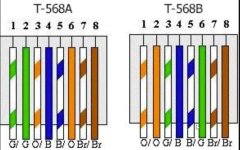
Print a copy and carry it with you when you are troubleshooting. Both images show the same. Use whichever is easier for your eyes to follow. Use a flashlight and magnifying lens if needed on the plug.

568.jpg

568.jpg
 

Norcal

Well-known member
Joined
Mar 16, 2008
Messages
13,753
There is one time I slid the conduit over the conductors as the pipe was laid, later pulled the cable out & relocated it to a new service being installed, was very careful when gluing up the couplings so had no problems, & it pulled out with ease later, (3 -1/0 AL conductors in a 2" SCH 40 PVC conduit), thinking about pulling it out again to add a grounding conductor so can run a data line out there. Really have regretted 3-wire feed what was just a pump house, now my shop is also attached, could be classified as spending a Dollar to save a dime, but 3-wire feeds were code compliant then.
 
OP
C

Codyboy

Well-known member
Joined
Jan 31, 2019
Messages
1,638
Location
S.E. TEXAS
Cody, where are you with this? Can you show a photo of what you are using to test the cable with? I would start over with a known good tester and a known good short, 3' to 5' cable on that tester to be sure that it is not showing a cross linked pair. Then I would put the remote on one end and go to the other with the main tool. If it shows cross linked, I would reverse the tools - meaning the remote and tool would switch ends. If the reversed pair was still there, I would believe that the wires are reversed on either end. There are meters that will also tell you how far out an error is in the cable. I used to use a fluke one all the time to find where errors were. It is really unlikely that a pair broke in half and then reversed themselves. MANY pieces of modern networking will self correct reversed wire errors, so if there is an error it may have existed for some time. I keep a spare known good camera around to replace any that I have trouble with. It is easier than spending hours chasing a defective chip in a camera.

Print a copy and carry it with you when you are troubleshooting. Both images show the same. Use whichever is easier for your eyes to follow. Use a flashlight and magnifying lens if needed on the plug.

568.jpg

568.jpg
The tester is a southwire m550.
On a good cabrl it shows good as I've tested it on known good cables.
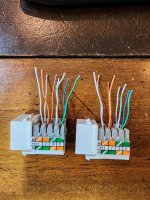
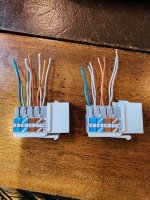
I'm certain I did not mix up the colors when terminating them. Each pair as you know are twisted together and I leave that pair twisted to keep track of it and only separate them before termination.
 

Attachments

  • 20260423_110042.jpg
    20260423_110042.jpg
    947.4 KB · Views: 12

BurtEggley

Well-known member
Joined
Oct 8, 2024
Messages
861
Look at the colors with a magnifying glass. Some of the colors can be washed out and look alike - red and brown or red and orange etc. Not every cable maker uses excellent colors. Also, I have had it happen to me where the conductor ends up in the wrong channel even though it starts in the right place where it first goes into the connector but two wires flop inside the connector right before they slide into the crimp channels. What may be going on here is that the cable was always wrong, but you did not know it. The camera may have been correcting the error because modern networking is designed to do that. Also the camera may not have even been using that pair but for some reason, maybe an update, maybe a failed component, it is now.
 
OP
C

Codyboy

Well-known member
Joined
Jan 31, 2019
Messages
1,638
Location
S.E. TEXAS
Look at the colors with a magnifying glass. Some of the colors can be washed out and look alike - red and brown or red and orange etc. Not every cable maker uses excellent colors. Also, I have had it happen to me where the conductor ends up in the wrong channel even though it starts in the right place where it first goes into the connector but two wires flop inside the connector right before they slide into the crimp channels. What may be going on here is that the cable was always wrong, but you did not know it. The camera may have been correcting the error because modern networking is designed to do that. Also the camera may not have even been using that pair but for some reason, maybe an update, maybe a failed component, it is now.
I'm dealing with punch down jacks, not rj45s.

Unless the jacks from two different manufacturers are made wrong, there is no way I mixed up the colors when punching them down.
Pairs stay twisted until I punch them down.
 

BurtEggley

Well-known member
Joined
Oct 8, 2024
Messages
861
I'm dealing with punch down jacks, not rj45s.

Unless the jacks from two different manufacturers are made wrong, there is no way I mixed up the colors when punching them down.
Pairs stay twisted until I punch them down.
the choice to look over each punch down is yours. I've made mistakes like that before even when I thought it was right. The other option is to get a meter that tells you how far away the fault is. $$$
 

PCustoms

Well-known member
Joined
Jul 23, 2011
Messages
22,598
Location
VT
the choice to look over each punch down is yours. I've made mistakes like that before even when I thought it was right. The other option is to get a meter that tells you how far away the fault is. $$$
If it worked fine before, then had an issue, it wasn't the punch down.

If he re-terminated anyway, and it's still doing the exact same failure, it wasn't/isn't the punch down.
 

35Ford

Well-known member
Joined
Apr 4, 2020
Messages
140
Location
Central MA
Cat5 is around $.12 / ft. I’d fly 250’ of it on top of the ground, terminate, test and plug in the camera. Total time, less than an hour with a whole bunch of questions answered.
 

PCustoms

Well-known member
Joined
Jul 23, 2011
Messages
22,598
Location
VT
Cat5 is around $.12 / ft. I’d fly 250’ of it on top of the ground, terminate, test and plug in the camera. Total time, less than an hour with a whole bunch of questions answered.

What does that answer?

He could test 250' of cable in a box and it would test fine. The camera isn't the issue

Hint: his cable has failed
 

rdoty

ALLIANCE MEMBER
Joined
Feb 7, 2018
Messages
638
Location
Massachusetts
the choice to look over each punch down is yours. I've made mistakes like that before even when I thought it was right. The other option is to get a meter that tells you how far away the fault is. $$$
Klein Tools VDV501-851 Cable Tester Kit with Scout Pro 3 for Ethernet / Data, Coax / Video and Phone Cables, 5 Locator Remotes, Yellow is a versatile tool that can measure cable length or length to break. For $100 I think it is a good deal. Much better than the generic $10 or $20 cable checkers.
 

cgrutt

Well-known member
Joined
Mar 4, 2016
Messages
8,211
Klein Tools VDV501-851 Cable Tester Kit with Scout Pro 3 for Ethernet / Data, Coax / Video and Phone Cables, 5 Locator Remotes, Yellow is a versatile tool that can measure cable length or length to break. For $100 I think it is a good deal. Much better than the generic $10 or $20 cable checkers.
I have that and it works good. There are newer tools for not much more that test POE, fiber and may include toner (I know the Klein can tone a line but not sure if that price includes the wand.

Here's an example for $125 does alot for the money.

Screenshot_20260423_194804_Chrome.jpg

The POE tester is good for camera work. I've had RJ45s test ok with the Klein but not support POE to power up the camera.
 

35Ford

Well-known member
Joined
Apr 4, 2020
Messages
140
Location
Central MA
What does that answer?

He could test 250' of cable in a box and it would test fine. The camera isn't the issue

Hint: his cable has failed
Yup. See how quick that was? If this new tested cable was stretched out over the ground, the OP could also prove if his camera was good or bad. I think those are the answers he’s looking for.
 

BurtEggley

Well-known member
Joined
Oct 8, 2024
Messages
861
having installed ethernet cables, and tested them for a living in domain of about 1800 people, my suggestions have been valid. Cody may consider inspecting the ends to make sure the colors are in the correct place, and then test it with nothing on either end but the tester and a known good cable, isolating that segment. If he is using prefab cables from each end of the block, then he can replace those, which he appears to have already done. If he wants to know where the error is in the 250' cable, if one is there, he can use a cable tester that tells him how far out the fault is. If he wants to test the camera, he can temporarily remove it and plug it in closer to the other end to see how it performs there. Basically, remove the underground section from the testing completely. As he said, it is not easy for him to remove the cable if it is bad.

That said, his camera may work fine without that specific pair being needed. In fact, the camera may never have used that pair, and it may have been that way since day 1. Generally, a camera is a one-way device, streaming signal to you but you not back to it. It does not need bidirectional 1GB traffic. The only traffic it likely gets back is programming, and return packets if is TCP/IP. If it is UDP, return packets are not a requirement. Also, the storm may have upset it to where it is not using the correct IP address range. In that case he may need to manually reset it following the manual. I have had to reset mine a couple times when they farted.
 
To avoid these ads, REGISTER NOW!
OP
C

Codyboy

Well-known member
Joined
Jan 31, 2019
Messages
1,638
Location
S.E. TEXAS
Yup. See how quick that was? If this new tested cable was stretched out over the ground, the OP could also prove if his camera was good or bad. I think those are the answers he’s looking for.
The camera is bad. I pulled it down and used a known good cable about 3ft long to connect it to the nvr.
And the cable is also bad.
 
OP
C

Codyboy

Well-known member
Joined
Jan 31, 2019
Messages
1,638
Location
S.E. TEXAS
having installed ethernet cables, and tested them for a living in domain of about 1800 people, my suggestions have been valid. Cody may consider inspecting the ends to make sure the colors are in the correct place, and then test it with nothing on either end but the tester and a known good cable, isolating that segment. If he is using prefab cables from each end of the block, then he can replace those, which he appears to have already done. If he wants to know where the error is in the 250' cable, if one is there, he can use a cable tester that tells him how far out the fault is. If he wants to test the camera, he can temporarily remove it and plug it in closer to the other end to see how it performs there. Basically, remove the underground section from the testing completely. As he said, it is not easy for him to remove the cable if it is bad.

That said, his camera may work fine without that specific pair being needed. In fact, the camera may never have used that pair, and it may have been that way since day 1. Generally, a camera is a one-way device, streaming signal to you but you not back to it. It does not need directional 1GB traffic. The only traffic it likely gets back is programming, and return packets if is TCP/IP. If it is UDP, return packets are not a requirement. Also, the storm may have upset it to where it is not using the correct IP address range. In that case he may need to manually reset it following the manual. I have had to reset mine a couple times when they farted.
Read the thread. All that with the exception of a device to tell me how far the bad spot is.
Ive tested it nine ways to Sunday.
 
OP
C

Codyboy

Well-known member
Joined
Jan 31, 2019
Messages
1,638
Location
S.E. TEXAS
having installed ethernet cables, and tested them for a living in domain of about 1800 people, my suggestions have been valid. Cody may consider inspecting the ends to make sure the colors are in the correct place, and then test it with nothing on either end but the tester and a known good cable, isolating that segment. If he is using prefab cables from each end of the block, then he can replace those, which he appears to have already done. If he wants to know where the error is in the 250' cable, if one is there, he can use a cable tester that tells him how far out the fault is. If he wants to test the camera, he can temporarily remove it and plug it in closer to the other end to see how it performs there. Basically, remove the underground section from the testing completely. As he said, it is not easy for him to remove the cable if it is bad.

That said, his camera may work fine without that specific pair being needed. In fact, the camera may never have used that pair, and it may have been that way since day 1. Generally, a camera is a one-way device, streaming signal to you but you not back to it. It does not need bidirectional 1GB traffic. The only traffic it likely gets back is programming, and return packets if is TCP/IP. If it is UDP, return packets are not a requirement. Also, the storm may have upset it to where it is not using the correct IP address range. In that case he may need to manually reset it following the manual. I have had to reset mine a couple times when they farted.
My first job was with a telephone contractor.
Way before cat anything was even thought of and not much twist to any one pair.
Strip back a 200 pair cable and ALL the WHITES are just that, white. They didnt have the hint of what pair it was for. If it did you couldn't see it.
Best keep track of them. The white/slate doesn't go with the green or blue.
God thats been a long time ago.
Still remember the paired colors in order
Wh/bl, wh/or, wh/gr, wh/br, wh/sl.
 

35Ford

Well-known member
Joined
Apr 4, 2020
Messages
140
Location
Central MA
The camera is bad. I pulled it down and used a known good cable about 3ft long to connect it to the nvr.
And the cable is also bad.
So it looks like you may have had two failures. That can complicate the troubleshooting a bit but it looks like you have it figured out. Nicely done. Now to figure out a permanent repair…….
 

Chuckster in NJ

Well-known member
Joined
Jan 26, 2010
Messages
2,287
Location
Hunterdon County NJ
My first job was with a telephone contractor.
Way before cat anything was even thought of and not much twist to any one pair.
Strip back a 200 pair cable and ALL the WHITES are just that, white. They didnt have the hint of what pair it was for. If it did you couldn't see it.
Best keep track of them. The white/slate doesn't go with the green or blue.
God thats been a long time ago.
Still remember the paired colors in order
Wh/bl, wh/or, wh/gr, wh/br, wh/sl.
We have come a long way since "tip and ring"……….. Glad you are making progress on fixing your problem!

TIP! Next time you have a problem with your cameras or computers get in touch with the 9’th grade kid down the street and he can fix it for you. ;)
 

rdoty

ALLIANCE MEMBER
Joined
Feb 7, 2018
Messages
638
Location
Massachusetts
I have that and it works good. There are newer tools for not much more that test POE, fiber and may include toner (I know the Klein can tone a line but not sure if that price includes the wand.

Here's an example for $125 does alot for the money.

Screenshot_20260423_194804_Chrome.jpg

The POE tester is good for camera work. I've had RJ45s test ok with the Klein but not support POE to power up the camera.
Interesting! It is amazing how many high end features are showing up in affordable tools. PoE testing would really be useful. And if you are working with fibre that would be a lifesaver.
 

RiverRider

Well-known member
Joined
Mar 3, 2015
Messages
587
Location
DFW area
That was just one example i was making about ethernet cabling but yes CAT5e, CAT6 and CAT6 all have different characteristics allowing them to run at different max frequencies (not bandwidths; more on that below). CAT5e is spec'd to 100mhz, CAT6 is spec'd to 250Mhz, and CAT6a is spec'd to 500mhz. the different characteristics include twists per inch varied by pair, cross talk dividers, jacketing material, gauge of conductors, etc

in terms of being able to run at higher bandwidth this isnt true or accurate. CAT5e CAT6 and CAT6a can ALL run at 10Gbps. The difference is HOW far (length) they can run that speed at. CAT5e can run 10Gbps at up to about 45m under ideal conditions, CAT6 can run 10Gbps up to about 55m, and CAT6a can run 10Gbps up to about 100m.... the issue is with interference, noice, EMI, and cable resistance. the longer the cable the worse it gets, thus causing higher speeds to not work at longer lengths

So in terms of being accurate, you were not.


no such thing as CAT6b. did you mean TIA568b? that is a pinout not a cable type.


there actually IS an electrical difference between the pairs when connected to a circuit. different rates of twists causes the wires to have different rates of inductive pickup (making them electrically different when connected to a circuit), meaning each pair is susceptible to noise and interference at different levels. These differences help to mitigate the effects of the noise and interference. its the reason for having different twists per inch between each pair. have you ever worked with "balanced" XLR cables? There is a reason they suppress noise vs. an unbalanced cable.


if you think thats what i said then you misunderstood me. i wasnt claiming there is a difference when both ends are pinned A or pinned B. what i was saying is that people claim the color code doesnt matter as long as they are the same on both ends (meaning forget A 568a or 568b and do whatever color code you want). this is incorrect. again, there is a reason for the different rates of twist per pair and they must be in either 568a or 568b pinout to leverage the noise suppression effects of the different twists per inch on each pair....


Yes, I was being lazy about the pinout type nomenclature. I'm flogging myself for that. The point I insist on is that electrically they are identical because to color coding of the twisted pairs is of no consequence.


As to cable types, Cat6a can support 500 MHz bandwidth, as compared to Cat6’s 250 MHz bandwidth.

I am fully aware of how twisted pairs work---and inductance and capacitance, noise cancellation and a few other things in the world of electronics. I have been retired for a relatively short time but I worked in the field for almoist 50 years performing a fairly wide range of functions and duties.
 
To avoid these ads, REGISTER NOW!
Top Bottom