To avoid these ads, REGISTER NOW!

Vehicle Maintenance Log

Handyandy23

Well-known member
Joined
Nov 8, 2017
Messages
1,523
Location
Ontario, Canada
I keep a maintenance board in the shop for all our vehicles and equipment. Lists all routine services and hours and whatnot. Simple enough.
Big whiteboard with vehicles listed, basic filter info, amount of fluids and type etc labeled and then marker times as needed.

Any major work or shop receipts go in the accompanying filing cabinet in the shop by vehicle file.


Sent from my iPhone using Tapatalk

This is a really good idea - I like it. Simple and effective. My issue with small pads in the glove box or an excel sheet is they're out of sight and out of mind. Unless I think "oil change must be coming up" I won't look at it. White board keeps it in your face and on your mind. Also has the obvious flexibility to put any info you want on it too.
 
To avoid these ads, REGISTER NOW!

ilovevocs

Well-known member
Joined
Jun 26, 2009
Messages
1,966
Location
Toledo, Ohio
Another Sharpie guy here.

Date and mileage on oil filter and air cleaner.

Tires get rotated as required. I’m not a mileage guy on tire rotations. I keep an eye on my tires and give them what they need to wear evenly.


I must say my daily drivers are trucks so checking mileage off the filter is easy, doesn’t require the lift or a jack.
 
Last edited:

rburke65

Well-known member
Joined
Nov 10, 2007
Messages
12,349
Location
Canfield, Ohio
For me a software program is just another thing to maintain. Not as fancy as some but I like the sharpie on the sides of filters and such.
 

JamesW84

Well-known member
Joined
Jul 13, 2015
Messages
827
Location
Springfield, MO
I use a dry erase board with similar info as others: Vehicle, Filter part #, oil capacity, date, mileage. It's just easier than a program. I'm very computer literate, just don't want to do it that way, but that is a better way for a history vs last time done.

The notebook idea also sounds good.
 

Bert_

Well-known member
Joined
Dec 24, 2016
Messages
9,699
Location
NW Iowa
Old fashioned - Every major piece of equipment and pretty much everything with an engine has its own file. Just about everything gets logged, and all the records are kept in those files. File cabinet is in the shop. Also have set up digital files in the past few years to track photos and equipment related PDF's.

^Same here, without the photos though.

I'm sort of surprised by the number of people who keep their records on a computer
 

Jlbc212

Well-known member
Joined
Dec 7, 2013
Messages
1,530
Location
Northeast MA
I use the notepad function on my phone. When I purchase a vehicle or piece of equipment I list the date, purchase price, model, vin or serial numbers, all standard maintenance parts and torque specs. I then continue on with the note when I perform any type of service. When I visit an auto parts store I pull out my phone, check my notes and know exactly what type of oil, filter, plugs or whatever it is I need to buy. I also keep a file box in the garage. Each vehicle gets a file folder for receipts. I also use an indelible marker to make notations directly on the vehicle.
 
To avoid these ads, REGISTER NOW!

Git

Well-known member
Joined
May 18, 2008
Messages
6,894
Location
S Cal
If your going to use a computer (for a spreadsheet, etc) you should really take a look at Microsoft OneNote

It's basically an electronic notebook. I use it for just about everything. You can create tables - if you like that spreadsheet look, you can easily paste in pics, links to web pages, zip up a file an add it to the page (all your receipts for something for example or pdf files of manuals) etc,

Then if you want a hard copy you can just print it out if you want. Best of all, it's free. It comes as an app with Win10 or you can download the standalone version. You can also keep the notebook in the 'cloud' (like google docs) so you can access it from anywhere

https://www.onenote.com/

Instead of using duct tape - I use blue painters tape (it actually holds up quite well). I also take a pic with my cell phone which automatically uploads to my dropbox on my computer. I just copy and paste the pic into OneNote

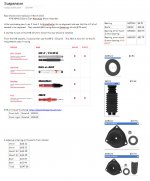
Here is a pic of my OneNote page when I was trying to figure out what shocks and parts I needed
 

Attachments

  • SNAG-684.jpg
    SNAG-684.jpg
    141.8 KB · Views: 38
Last edited:

Matt M PA

Well-known member
Joined
Oct 21, 2008
Messages
3,174
Location
SE PA
I have an app on my phone called Car Minder. Works very easy, allows you to export the history. It's simple to set up and add services and repairs. It also has a note section on each item where you can add torque specs, filter #s, etc. I have found it to be a huge help.
 

logan_gibson

Well-known member
Joined
Oct 8, 2015
Messages
65
I have a Google drive folder for each vehicle. In that folder I have a spreadsheet with a maintenance log, any issue found during maintenance, and any general notes.

I also have a folder inside of it that has receipts for everything purchased or any labor on the car.

And another with images of the car from when I got it, any damage done, and before/after photos of modifications.

I can access the folder from my phone/work/home so its easy to update.


Sent from my Pixel 2 XL using Tapatalk
 

dbabicky

Well-known member
Joined
Dec 30, 2012
Messages
874
Location
NE Wisconsin
Digital or paper as I throw the paper ones away after 90 days. Digital is kept until something happens then I cannot touch them. Like your reference though.

At least some one gets it !! LOL !!! I figured there would be more people on here that would understand my reference !! LOL !!!
 

Larey

Well-known member
Joined
Sep 10, 2013
Messages
135
Location
Fussa, Japan
Onenote is amazing as one I was a Parts salesman and had to keep notes and this program allowed me to have access to and maintain the notes across multiple platforms. I have recently started adapting it to home use to include measurements need for home improvement based off rooms. I have been wanting to adapt vehicle maintenance over to this as well. We shall see.

Larey

If your going to use a computer (for a spreadsheet, etc) you should really take a look at Microsoft OneNote

It's basically an electronic notebook. I use it for just about everything. You can create tables - if you like that spreadsheet look, you can easily paste in pics, links to web pages, zip up a file an add it to the page (all your receipts for something for example or pdf files of manuals) etc,

Then if you want a hard copy you can just print it out if you want. Best of all, it's free. It comes as an app with Win10 or you can download the standalone version. You can also keep the notebook in the 'cloud' (like google docs) so you can access it from anywhere

https://www.onenote.com/

Instead of using duct tape - I use blue painters tape (it actually holds up quite well). I also take a pic with my cell phone which automatically uploads to my dropbox on my computer. I just copy and paste the pic into OneNote

Here is a pic of my OneNote page when I was trying to figure out what shocks and parts I needed
 

NewShockerGuy

Well-known member
Joined
Oct 12, 2010
Messages
2,481
Location
Northern Virginia / DC
I use excel spreadsheet to track my car maintenance and costs. It's pretty easy. Please click on these two files (attachments) and that'll give you some idea.


I like that! Any way you could attach that as a file so we could use as a template by chance? I'm not great at excel at all. I could use that and just have each tab be a new vehicle using your template. Very clear and to the point!

Thanks,
-Nigel
 
To avoid these ads, REGISTER NOW!
Top Bottom