To avoid these ads, REGISTER NOW!

What is everyone using for exterior security system cameras & DVR?

flat tire

Well-known member
Joined
Mar 24, 2015
Messages
2,916
Location
hills of wv.
game cameras. no wires, no dvr
don't have to worry about power outages or phone lines being cut
put one in plain sight and hide the others
 
To avoid these ads, REGISTER NOW!

PWC Repair

Well-known member
Joined
Dec 27, 2012
Messages
3,179
Location
Arkansas
We also have the Night Owl system. Mine is 4 cameras, all outside in the weather for about 8 months now and still working fine. Daytime pic is very good, night is ok for maybe 10ft, fuzzy beyond that at night. Can set it on all the time, certain hours, or motion only. Motion also has sensitivity adjustment so it doesn't save every time the wind blows. wi-fi accessible from the app with security.Can also alert your phone every time it motion records so you can check it out right then. Was great when we were on vacation. I have the DVR that came with it set to only save 7 days at a time, on the 8th it just starts recording over the oldest data. You always have the latest 7 days saved. I felt it was $200 well spent.
 

jboehm

Well-known member
Joined
Dec 2, 2016
Messages
98
Location
Spring, Texas
I have Foscam ip cameras paired with a program called Xeoma which does the recording. For moble viewing I use either the Foscam app or the Owlr app.
 

adam0872

Active member
Joined
Jan 17, 2017
Messages
33
Location
North Dakota
Don't spend all your money on those big systems. If you have an old phone you can download an app and turn it into a camera that takes pictures upon motion or it can record. Then I have it set up to send me the pictures to my email
 

thool

Well-known member
Joined
Jun 23, 2015
Messages
5,306
Location
Rochester, NY
A house nearby has these white huge pendant cameras on every corner of his house. They are the kind that can be rotated, like you find on municipal parking garages...don't get these! Ugly as all getout.
 

padroo

Well-known member
Joined
Nov 25, 2011
Messages
564
Location
Chesterton, In.
They have 4k camera systems out if you have to have the very highest resolution.
The IR (infra red) lights on these cameras work good up close but fail miserably if you need good video at night. The best way is to add seperate IR lighting to help supplement you built in camera lighting.
 

ambenz

Well-known member
Joined
Dec 12, 2010
Messages
4,236
Location
NW Chicago Suburbs
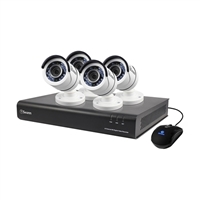
I have a Swann Communications DVR & Camera Kit; 8-Channel; 4 Cameras Included; 1TB Pre-Installed HDD; 1080p Resolution

466718_121871_01_front_thumbnail.jpg


Got mine on sale for $300, on sale at Microcenter. I have had it for 4 months and the camera power supply died, so I bought a new one with more amps, spending $25...it is pretty clear....
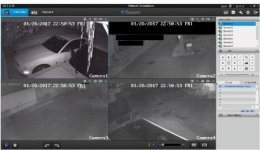
Night time shot with a LED flood on very dim (triggers bright with sensor) Inside garage, no lights.

attachment.php


I view it on my laptop in the house using a Ethernet 2-Port Powerline Network Adapter With AC Pass-Through Kit that connects to my wireless router.
So the only issue has been the power supply, I am pretty happy!
Just can't do any better for less money!
 

Attachments

  • swann.jpg
    swann.jpg
    20.3 KB · Views: 692
Last edited:

eastbaysubaru

Well-known member
Joined
Dec 6, 2009
Messages
340
Location
NorCal
FWIW, I've got a two camera (Amcrest cameras) system with a PC running Blue Iris and I've been very happy. The software is highly configurable and it can email or text you when motion is detected. Very happy with it thus far.

-Brian
 

Vinko

Well-known member
Joined
Jul 7, 2008
Messages
5,829
Location
Los Angeles
The Axis cameras for outdoor and the Hikvision for inside with the Exacqvision have been great. Running this for a few months now. One Hikvision went on the blink (under warranty) and is being replaced. Other than that, so far, so good. Thanks to everyone who gave me info. It took a while, but got it going.
 

RWorth

Well-known member
Joined
Aug 29, 2016
Messages
592
Location
Cape Cod , Mass.
I bought the Blue Iris program a couple of months ago, I think it was about 50 bux for the online download. I already had a DLINK TPZ camera that I was playing with so I linked it with the Blue Iris easily and let it do it's thing for a few weeks.

Then I started to look at cameras and found I can spend anywhere from 20 bux to 3K for an HD camera. SO I did an experiment. I bought a Cam for $22 from amazon, I screwed with it for a few days and never got it to hook up with its own program or the Blue Iris, so I tossed it in the trash and bought a Lorex LNB3143B-W. The BLue Iris system found it and linked with it no problem and it works very nicely day and night.

There is a very long story to go with the Lorex camera, but to shorten it out. I bought the Cam about 6 weeks ago, it came in with a cracked lens over the IR bullb array, they were very friendly and helpfull, but don't seem to understand English very well, so it took about 5 weeks of comunication to get them to send me a new Camera, it's supposedly on it's way now. Believe it or not I'm not unhappy with them sofar, I truely think they just have problems with the language. (we'll see). In the mean time I do like the Camera and the Price,$135 so I ordered another.
 

JVarhol

Member
Joined
May 17, 2017
Messages
21
At work I use a 16 channel Night Owl HAD DVR system it came with 8 720P cameras, is accessible from anywhere iver the internet and even has an app. I ran 8 cameras over 4 channel Baluns so I only had to run 2 Ethernet cables which is super nice when you have to run cable in a J-Channel. Overall the system works fantastic and I've had no problems.

Sent from my XT1575 using Tapatalk
 

Z7What

Member
Joined
May 31, 2017
Messages
11
I have a system i installed at my house as well as installed about half dozen other systems. The first thing i will say is i HIGHLY suggest with whatever brand you get is to make sure its POE. POE stands for Power Over Ethernet. It makes running wires very easy. Most systems i see come with 50-75' cables but since most of the time you need a shorter or longer run i dont use them. Whenever i install a system i also order a 1000' roll of Cat6(Ethernet Cable) off Amazon for $56. The reason i like the POE systems is that the power to the camera and the video feed from the camera to the dvr are all in the same Cat6 cable. The cable is cheap, you can run it exactly how you want it and where you want it, put a RJ45 plug on it and your done.

First you decide where you want the DVR. Some factors affect this placement. For viewing its best to have near a TV(DVR connects via HDMI to the TV). It also needs to be connected to your internet modem for mobile viewing. If you dont have a TV in the same room, i normally just put the DVR in the living room TV cabinet, hook it up to the tv via the HDMI and just run a Cat6 wire from the modem to the DVR using some of the 1000' roll you also purchased.

Next is where you want the cameras mounted. What i do is hook one of the cameras up using the longest supplied cable and just run it threw the house along the floor and then out the nearest window/door to the location you think you want it. Climb the ladder and hold the camera up in the direction you think you wanted it. I then pull out my phone and start viewing the camera on the app for deciding a final location place. Once you decide drill your hole and run the Cat6 from that location into the attic and then down the wall to the location of the DVR.

The system i have is cheap, but impressive. Its a Annke 720P 4 Camera 1TB System i got off Amazon for $220ish a couple years back. I think the footage the cameras provides is great. They even provided the local police department footage of the guy that broke in my neighbors house. Of course if i was to do it again i would get the 1080P system now.

Im at work currently with no wifi or much cell signal so i cant pull my camera app up to snap a picture to post but will once i get home.

Wayne
 

Z7What

Member
Joined
May 31, 2017
Messages
11
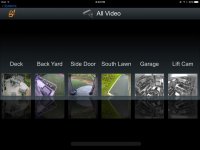
Here's a screen shot from the mobile app.

98563B58-0ED7-4997-A17D-6DC2686ADEAC.jpg

Wayne
 
Last edited:

Eslader

Well-known member
Joined
Feb 27, 2013
Messages
674
There's a school of thought that says putting the DVR in the entertainment center is a bad idea, because when the burglar comes in and steals the TV and stereo, he's gonna take the DVR with him too.

I've got mine in a closet far away from anything of interest to a thief, and it's chained to the shelf to give the burglar an extra headache should he manage to find it and try to steal it.

Of course, I also have the footage mirrored on NAS located elsewhere, so he's gonna have to spend a lot of time roaming around finding everything he needs to steal in order to get both copies.
 

JackAndy

Well-known member
Joined
Apr 4, 2017
Messages
130
Location
Minneapolis
I built an 8 camera DVR system about 10 years ago for a customer. I used normal coax for video signal and a single DC power supply box with individual wires with a UPS. The PC, UPS and camera power supply were all in a locked cabinet in the basement to prevent the video from being stolen.

If I had to do it again, I like the POE option that Z7What mentioned. I like the UPS option too though so I'd want the Ethernet switches to have a UPS. That might get cumbersome because I could end up with 5 of them and each one needs to be checked etc.

As for an actual 'DVR', I've always used PC's. I buy used Lenovo Thinkstation workstation (practically servers) off of ebay for about $400. The one I have currently connects to my dashcam when I park the car and it uploads that day's video and saves it for one month. My dashcam was "free" because its an old Samsung Galaxy S5 smart phone I happen to have. Its mounted behind the mirror on a wizgear magnetic phone mount. Since it has wifi, I set it up to upload the video and its all 1080p with audio, telemetry like speed, brake, etc.

Long story short, its a new house and I intend to add the surveillance. I want to piece together my system and choose my own cameras though. Any suggestion for cameras?
 

Z7What

Member
Joined
May 31, 2017
Messages
11
There's a school of thought that says putting the DVR in the entertainment center is a bad idea, because when the burglar comes in and steals the TV and stereo, he's gonna take the DVR with him too.

I've got mine in a closet far away from anything of interest to a thief, and it's chained to the shelf to give the burglar an extra headache should he manage to find it and try to steal it.

Of course, I also have the footage mirrored on NAS located elsewhere, so he's gonna have to spend a lot of time roaming around finding everything he needs to steal in order to get both copies.

That's actually very good advice that I've never thought of. I to have a 2TB NAS that I could use to back it up. I'm in search of a lot to built a new house so I'll be selling this house soon so I won't waste my time in runing Cat to do it but I will put that on my list of things I plan to do when I start building my house. I have a pretty big gun safe that I could put the DVR in. Not only would it keep the DVR safe, the heat coming off of it would help keep the humidity down in the safe itself. Thanks for the tip! Seriously thanks, that will be something I do for sure in the new house.

Wayne
 

swharris

Well-known member
Joined
Jan 10, 2010
Messages
403
Location
So. Cal.
I have 7 AXIS 215 PTZ cameras mounted inside and 9 AXIS 215 PTZ-E mounted all around the outside of my home/garage. These are networked through my server room and are managed and recorded through exacqVision software on a dedicated camera server with 12 TB of storage. I can also view and manipulate all cameras with my iPhone and iPads, as well as all the touch screens located in my home and garage. In case someone still manages to get in...I'm also a REALLY good shot!

You put a urinal in a garage that small and right next to the sink. Just pee in the sink lol.

Can't you just step inside the house?
 
To avoid these ads, REGISTER NOW!

PurdueSD

Well-known member
Joined
Mar 25, 2006
Messages
1,577
Location
Indiana
I have a system i installed at my house as well as installed about half dozen other systems. The first thing i will say is i HIGHLY suggest with whatever brand you get is to make sure its POE. POE stands for Power Over Ethernet. It makes running wires very easy. Most systems i see come with 50-75' cables but since most of the time you need a shorter or longer run i dont use them. Whenever i install a system i also order a 1000' roll of Cat6(Ethernet Cable) off Amazon for $56. The reason i like the POE systems is that the power to the camera and the video feed from the camera to the dvr are all in the same Cat6 cable. The cable is cheap, you can run it exactly how you want it and where you want it, put a RJ45 plug on it and your done.

First you decide where you want the DVR. Some factors affect this placement. For viewing its best to have near a TV(DVR connects via HDMI to the TV). It also needs to be connected to your internet modem for mobile viewing. If you dont have a TV in the same room, i normally just put the DVR in the living room TV cabinet, hook it up to the tv via the HDMI and just run a Cat6 wire from the modem to the DVR using some of the 1000' roll you also purchased.

Next is where you want the cameras mounted. What i do is hook one of the cameras up using the longest supplied cable and just run it threw the house along the floor and then out the nearest window/door to the location you think you want it. Climb the ladder and hold the camera up in the direction you think you wanted it. I then pull out my phone and start viewing the camera on the app for deciding a final location place. Once you decide drill your hole and run the Cat6 from that location into the attic and then down the wall to the location of the DVR.

The system i have is cheap, but impressive. Its a Annke 720P 4 Camera 1TB System i got off Amazon for $220ish a couple years back. I think the footage the cameras provides is great. They even provided the local police department footage of the guy that broke in my neighbors house. Of course if i was to do it again i would get the 1080P system now.

Im at work currently with no wifi or much cell signal so i cant pull my camera app up to snap a picture to post but will once i get home.

Wayne

Im really impressed with your setup! Ive got one big limitation. I am rural and do not have any high speed internet access. (My only option being the Cable company wants 12k to run back to me)

Thats not happening. So we currently are using an cell hotspot with an unlimited data plan for internet access. Works quite well actually, fast enough to stream netflix, but i can't seem to get around its trickery and implement it into a router to set up a real home network. So the hotspot itself is currently acting as my wireless network. I recently purchased a canary to try and it didn't play well the hot spot so i sent it back.

That being said, i would like a CCTV system with maybe 4 cameras. Do you think any of them will be able to use my hotspot internet for remote access? If not i would still like to set up a system even if it isn't remotely accessible.
 
Last edited:

Eslader

Well-known member
Joined
Feb 27, 2013
Messages
674
Your cable/cell company have nothing to do with your LAN. You set up your LAN yourself - it stands for Local Area Network, and refers to the network within your home.

A router/ does not require internet access in order to function - it will do just fine running your camera network without the internet.

Tell us more about your hotspot hardware and we might be able to help you get it working with a router.
 

PurdueSD

Well-known member
Joined
Mar 25, 2006
Messages
1,577
Location
Indiana
Your cable/cell company have nothing to do with your LAN. You set up your LAN yourself - it stands for Local Area Network, and refers to the network within your home.

A router/ does not require internet access in order to function - it will do just fine running your camera network without the internet.

Tell us more about your hotspot hardware and we might be able to help you get it working with a router.

Yep, I mis-spoke there. Fixed it. I have an ZTE hotspot through ATT. It creates its own WIFI network. I attempted to use it to supply internet to my Apple airport extreme about a year ago. My memory is a little foggy, but seems like I got it to show that it was connected and working but it didn't actually supply internet to the router. I think i remember reading some info online that suggested the Hotspots have some way of blocking them from being used in that capacity. I would be happy to try again if anyone would like to help me resolve! I know just enough about networking to be dangerous. Hah!

Here is the product info pdf for my hotspot:https://www.att.com/support_static_files/manuals/ATT_Velocity_MF923.pdf
 
Last edited:

DadGarage

Member
Joined
Aug 21, 2017
Messages
6
We used to have a canary and never had problems connecting it to our network. What we didn't like about it is its too sensitive motion detection. now we have an Arlo Pro. The base is hardwired. but the camera can work wireless. But if I am to compare Arlo pro and Canary, I'd go with the first. This review here outweighed the Canary thoughi still think Arlo pro's battery will need further improvements :/
 
Last edited:

Eslader

Well-known member
Joined
Feb 27, 2013
Messages
674
And as was pointed out after that post, the video of your robbery can be very useful even without a license plate. Robbers are very often frequent fliers. If you get even a lousy shot of their face, it's pretty likely that cops will recognize them because they see them a lot.

I'd rather have their face than their license plate if I had to choose - a stolen car, a covered plate, an owner who claims he wasn't driving that night... All of those things make it harder to prove who was driving than if you have a picture of who was driving.
 

Tmart86

Well-known member
Joined
Jul 12, 2017
Messages
151
Location
Cedar Rapids Iowa
License plates are easy if you can commit to a field of view that allows for 50-75 pixels per foot for the camera you want to record plate numbers with you will get them just fine even at night. I have had success with the axis p1425-LE MKII. With a 1080p Camera you are still left with a decent image that's not just a license plate. Lighting plays into this as well. some license plate recognition software only requires 40 pixels per foot to get accurate plate information
 

bcradio

Well-known member
Joined
Jan 30, 2012
Messages
6,017
Location
New Mexico
But the real key is to have a system that will notify you when motion is detected. The video is just the icing on the cake.
 

engineer2

Well-known member
Joined
Dec 13, 2009
Messages
11,798
Location
Chicago burbs
I'd rather have their face than their license plate if I had to choose - a stolen car, a covered plate, an owner who claims he wasn't driving that night.
I agree. Cops have told me if you don't have the face, you haven't got a case.
 

Eslader

Well-known member
Joined
Feb 27, 2013
Messages
674
But the real key is to have a system that will notify you when motion is detected. The video is just the icing on the cake.

That's a double-edged sword. Wind blows tree limbs around? Motion alert. A rabbit wanders across your driveway? Motion alert. People walking by on the sidewalk? Another motion alert.

Intrusion detection should be more localized, and only detecting in ways that wildlife and wind-blown trees won't set it off, otherwise it'll make you mad and you'll turn it off. You can do that with hot-zones on cameras, but then when the kid spraypaints your mailbox it won't detect it because you've blocked the sidewalk from motion detection.
 
Joined
Jun 30, 2011
Messages
1,080
Location
AZ
My Hikvision has targeted motion detection alerts. The installer told me that 90% of the time he activates it for the customer, he eventually returns within a couple of months to turn it off. Too many text messages, emails, etc.
 

Tmart86

Well-known member
Joined
Jul 12, 2017
Messages
151
Location
Cedar Rapids Iowa
My Hikvision has targeted motion detection alerts. The installer told me that 90% of the time he activates it for the customer, he eventually returns within a couple of months to turn it off. Too many text messages, emails, etc.

I agree motion is horrible for alerts. there are plenty of video analytics available that use a basic concept of cross line detection that is way more reliable than motion. you can also you a camera with I/O options and use things like drive way sensors, PIR sensors, or simple magnetic door sensors etc to trigger alerts. or interrupt the door bell circuit and use the door bell as an alert trigger for your front door. its all about having a installer that thinks out side the box just a little to make your system perform well
 

bcradio

Well-known member
Joined
Jan 30, 2012
Messages
6,017
Location
New Mexico
That's a double-edged sword. Wind blows tree limbs around? Motion alert. A rabbit wanders across your driveway? Motion alert. People walking by on the sidewalk? Another motion alert.

Intrusion detection should be more localized, and only detecting in ways that wildlife and wind-blown trees won't set it off, otherwise it'll make you mad and you'll turn it off. You can do that with hot-zones on cameras, but then when the kid spraypaints your mailbox it won't detect it because you've blocked the sidewalk from motion detection.

Nothing will ever be perfect, so if you expect that then you'll be disappointed 100% of the time. The alerts from the cameras connected via internet are the best thing available right now. I would not even consider one without motion zones of course as there would be too many false alarms.

In 5 years from now they will likely have something better, but these are the best available currently. If you have your camera sending too many false alarms, place it elsewhere or turn off the alerts.
 

garage guy1of38

Well-known member
Joined
Nov 1, 2016
Messages
138
Location
Ontario, Canada
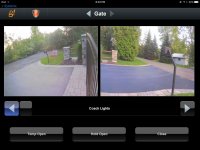
I use a mix of Axis and Vivotek IP POE cameras at my house.
All recorded by a 10tb Inaxsys NVR

They're all integrated through my Automation system.

When the shop is finished there will be 8 more cams for an on site total of 22 cameras.
 

Attachments

  • IMG_4910.jpg
    IMG_4910.jpg
    122.4 KB · Views: 56
  • IMG_4909.jpg
    IMG_4909.jpg
    126 KB · Views: 44
  • IMG_4908.jpg
    IMG_4908.jpg
    109.6 KB · Views: 41
  • IMG_4907.jpg
    IMG_4907.jpg
    128 KB · Views: 47

Eslader

Well-known member
Joined
Feb 27, 2013
Messages
674
The alerts from the cameras connected via internet are the best thing available right now.

That's the point. No they aren't. They're one of the worst methods for sending real-time alerts, because you get alerts all the time, even with motion zones, and then you end up ignoring them all. Security that is so obnoxious that it gets ignored is not security.

Use the motion detection to record, but not to send intruder alerts in real time. That means you'll get a lot of video of people walking by on the sidewalk, and trees swaying in the wind, but who cares? Storage is cheap, and you just set it to auto-dump recordings that are more than a couple weeks old.


If you want real-time intrusion detection then you need things like driveway sensors, door/window sensors, etc. The only time real-time motion alerts for security cameras are useful without annoying you into complacency is when it's an indoor camera and no one is home, and you don't have pets that roam the house.
 

Tmart86

Well-known member
Joined
Jul 12, 2017
Messages
151
Location
Cedar Rapids Iowa
Use the motion detection to record, but not to send intruder alerts in real time. That means you'll get a lot of video of people walking by on the sidewalk, and trees swaying in the wind, but who cares? Storage is cheap, and you just set it to auto-dump recordings that are more than a couple weeks old.

To add to the Storage is cheap comment there is no reason not to record 24/7 Ive never set up any system Ive installed using motion detection. Id rather record at 5fps per second and not miss any thing than 20-30fps and hope the motion window is setup good enough to detect. 2TB will get you several weeks of recording at 1080p/2mp per 4 cameras

My standard install is 24/7 recording between 12-15fps with motion alerts sent to a dedicated email account. this provides you time stamps of motion detection to allow for easy video review and not worry about what you missed before or after the motion window was triggered.
 

Eslader

Well-known member
Joined
Feb 27, 2013
Messages
674
I do the motion recording simply because a lot of the cameras point at things where stuff rarely happens. I have them set to a 10 second pre-roll to guarantee that I catch anything from before it gets into frame, and the motion sensor is set sensitive enough that a rabbit going by on the sidewalk at the end of the driveway will trip it. I record HD, 30fps, and the system is quite happy doing so with all cameras rolling.

I also have camera groups set, so for instance if one driveway camera's motion sensor trips, all front-facing cameras roll simultaneously.

It took me some trial and error to get it where I wanted it, since I'm not a professional security installer, but I'm pretty happy with the setup as it is now.

I use Blue Iris as my recording software, which is nice because all the alerts are neatly stored and can be paged through quickly without having to refer to emails.
 

bcradio

Well-known member
Joined
Jan 30, 2012
Messages
6,017
Location
New Mexico
That's the point. No they aren't. They're one of the worst methods for sending real-time alerts, because you get alerts all the time, even with motion zones, and then you end up ignoring them all. Security that is so obnoxious that it gets ignored is not security.

Use the motion detection to record, but not to send intruder alerts in real time. That means you'll get a lot of video of people walking by on the sidewalk, and trees swaying in the wind, but who cares? Storage is cheap, and you just set it to auto-dump recordings that are more than a couple weeks old.


If you want real-time intrusion detection then you need things like driveway sensors, door/window sensors, etc. The only time real-time motion alerts for security cameras are useful without annoying you into complacency is when it's an indoor camera and no one is home, and you don't have pets that roam the house.

Incorrect!

All this shows is that you don't know how to place your cameras correctly AND do not know how to set up your motion zones correctly. You can't blame the equipment for your lacking abilities. :thumbup:

I get MAYBE 1 false notification a week on mine which is no big deal. It did take a few weeks though to tweak everything to where I wasn't getting false notifications. If you are monitoring high motion areas however, these might not be for you. Otherwise (which is the case most often), these are about the best option you can get hands down.

Certainly you can add other things such as sensors and whatnot to improve the entire system, but definitely not needed.
 

Tmart86

Well-known member
Joined
Jul 12, 2017
Messages
151
Location
Cedar Rapids Iowa
Incorrect!

All this shows is that you don't know how to place your cameras correctly AND do not know how to set up your motion zones correctly. You can't blame the equipment for your lacking abilities. :thumbup:

I get MAYBE 1 false notification a week on mine which is no big deal. It did take a few weeks though to tweak everything to where I wasn't getting false notifications. If you are monitoring high motion areas however, these might not be for you. Otherwise (which is the case most often), these are about the best option you can get hands down.

Certainly you can add other things such as sensors and whatnot to improve the entire system, but definitely not needed.


if you only get one false motion alert Id be willing to bet I could walk onto your property and never be seen.
 
To avoid these ads, REGISTER NOW!
Top Bottom