To avoid these ads, REGISTER NOW!

WiFi Extenders

hilld

Well-known member
Joined
Jan 19, 2010
Messages
867
Location
Vancouver, WA & San Juan Island, WA
We have the Google mech system and like it alot. I can be 2-3 houses down and still pick up a signal.

Wayne

That is not always good to have your signal leak out that far. Some systems let you adjust the power settings.

Cracking the Wifi password can be done in seconds using the right tools. You don't want the wrong people on your network.
 
To avoid these ads, REGISTER NOW!

smackey05

Well-known member
Joined
Oct 21, 2009
Messages
792
Location
Massachusetts
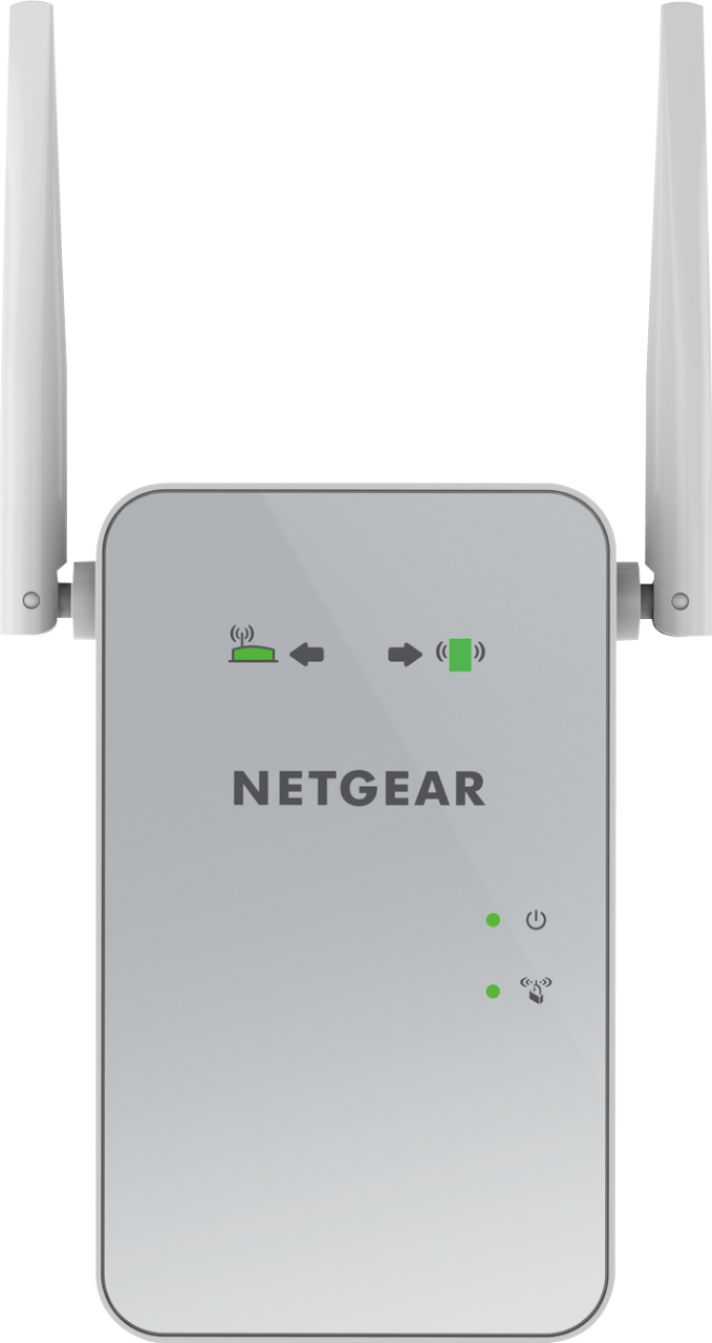
I just got an extender and it seems to work well. I didn't go the mesh route. My garage is probably 75' away from my house. My house WiFi is centrally located and I added the extender to a plug on an inside wall of the house closest to the garage.

Previously I wasn't able to get any WiFi in the garage and now I am able to have HD video and take work video calls.

This is the model I got:
https://www.bestbuy.com/site/netgea...-range-extender-white/3993445.p?skuId=3993445

3993445_sd.jpg
 

kbenz

New member
Joined
Mar 25, 2021
Messages
1
Location
kannapolis. NC
look at my post right above yours.

you put the transmit AP on the house aimed at your shop.
you put the receive AP on the shop aimed at the house.

you run ethernet from the AP on the shop INSIDE the metal building, and connect your computer or a router.

if you had a WOOD barn, you wouldn't need the 2nd AP, since the transmit AP on the house would make it INSIDE the barn. they do a good 500'.

my shop is 350 ft. from house and metal except roof.

I can pickup wifi from the house transmit AP behind the shop, into the woods, and up the road, but not INSIDE the shop...

those little plug in extenders are good for 20ft. or so. I have two I played around with, they help getting across a large house but not outside.

the ones I posted are used commercially in public parks, mobile home parks, etc. and only $60 ea. edit link below, they are now only $40 ea...

which one did you use? they list 3 on amazon. Is the 2.4ghz enough
 

Ron_J

Well-known member
Joined
Jul 10, 2018
Messages
295
Location
Central PA
I have a detached that is about 60' from the house. I could get wifi but it was weak and sometimes would kick me off.

Bought a $30 extender from Amazon, plugged it in the garage (into the outlet closest to the house) and it works great.
 

onkyo

Well-known member
Joined
Dec 23, 2011
Messages
94
A "wifi extender" should be a last resort, I would use powerline adapters before using an extender.
Cable is your best bet, sometimes it is not possible, in which case I would use a Point to Point bridge between the buildings.
You have more to worry about through email than some random hacker sitting somewhere on your block, if you are "scared of the hackers because you watch cnn" setup the bridge endpoints on a different network with a /29 subnet , as well as specifying the MAC address of each endpoints, as well as a huge random key.
example:
if your internal IP are 192.168.1.0/24 setup your bridge on a 192.168.2.0/29 which will give you 6 host addresses to use, 1 for each endpoint, and 4 others to use if you somehow need to change the config or and another ap later.

Unless you do something real interesting for a living or for some other reason, would be at a higher risk for attack the random hacker does not give 2 craps about you. On the other hand some prince in india wants to give you some money if you respond to his email.
 

Bigshow0003

Active member
Joined
Apr 10, 2020
Messages
36
Location
Vilas County, WI
I've been following this thread closely as I want to add wifi to my shop as well. Apparently I'm a total novice because I'm constantly googling things from the thread that I have no idea what they mean... LAN, AP, Bridge, ubiquiti, cat5, etc etc.

I read many comments that users are getting wifi to their 'garages' no problem. I consider 'shops' and 'garages' quite different. A detached 'garage' being stick built, with siding of some sort, and a shingle roof. Where as a 'shop' being a pole building, steel sides with steel roof.

Am I correct in that I need to pursue wifi differently for a steel sided, steel roofed shop, because the signal won't penetrate those barriers. However on a detached garage (non-steel building) the signal will. Therefore depending on the structure I should approach adding wifi differently. (Note - In a case that running a buried cat5 or cat6 cable, which appears to be the best method based on posts above, is not possible).
 

boatshoes

Well-known member
Joined
Feb 20, 2019
Messages
126
Location
Atlanta
I've been following this thread closely as I want to add wifi to my shop as well. Apparently I'm a total novice because I'm constantly googling things from the thread that I have no idea what they mean... LAN, AP, Bridge, ubiquiti, cat5, etc etc.

I read many comments that users are getting wifi to their 'garages' no problem. I consider 'shops' and 'garages' quite different. A detached 'garage' being stick built, with siding of some sort, and a shingle roof. Where as a 'shop' being a pole building, steel sides with steel roof.

Am I correct in that I need to pursue wifi differently for a steel sided, steel roofed shop, because the signal won't penetrate those barriers. However on a detached garage (non-steel building) the signal will. Therefore depending on the structure I should approach adding wifi differently. (Note - In a case that running a buried cat5 or cat6 cable, which appears to be the best method based on posts above, is not possible).

I think post #10 https://www.garagejournal.com/forum/showpost.php?p=9002982&postcount=10 is a good rule of thumb for anyone who doesn't want to bury a wire. How far do you need to go?
 

Showkey

"MEMBER EMERITUS"
Joined
Aug 9, 2014
Messages
8,638
Location
Wausau WI

boatshoes

Well-known member
Joined
Feb 20, 2019
Messages
126
Location
Atlanta
The whole problem with extenders they all 1/2 the speed or bandwidth or both at the same time. That maybe ok with some applications especially if you start with 200 Mbps.

MESH maybe more expensive but it solves the coverage problem with no speed or bandwidth compromise.

It's a wireless bridge, not an extender/repeater.
Mesh only solves the coverage problem if you have short hops between stations.
With mesh, you're paying for convenience and ease of setup. But you can save money with a wireless bridge setup if you know what your requirements are.
 

Bigshow0003

Active member
Joined
Apr 10, 2020
Messages
36
Location
Vilas County, WI

Bigshow0003

Active member
Joined
Apr 10, 2020
Messages
36
Location
Vilas County, WI

BruceMc

Well-known member
Joined
Jan 17, 2015
Messages
2,163
Location
Fairbanks, AK
I was originally thinking mesh system, but now reading comments here it appears many users state that a mesh system will get me wifi TO the shop, but not IN the shop (due to the steel structure).

So I believe you are correct in that post 10 may be my best solution.

I have that setup reaching to a rental approx 500' away. I added an access point on the far end for two 4K IP cameras and wifi. It's worked flawlessly for the last 15 months. All in right now for a hair over $105 --

https://www.amazon.com/gp/product/B00P4JKQGK/?tag=atomicindus08-20

https://www.amazon.com/gp/product/B004UBU8IE/?tag=atomicindus08-20

I also added a small UPS on the far end to keep things up and running in a power outage.
 

Showkey

"MEMBER EMERITUS"
Joined
Aug 9, 2014
Messages
8,638
Location
Wausau WI
It's a wireless bridge, not an extender/repeater.
Mesh only solves the coverage problem if you have short hops between stations.
With mesh, you're paying for convenience and ease of setup. But you can save money with a wireless bridge setup if you know what your requirements are.

Not sure what the definition of short hop is ?

My shop is 1000 sqft, the shop is metal siding inside, vinyl siding outside, asphalt shingles, 100’ from the home, the home is 100’ long, two levels and 3.5 car garage a three station mesh cover all the building and all the area around the buildings with 200 Mbps over 4 acres. The exact same speed a cat 6 cable to a laptop.

The ORBI was $300 at Costco a few years back when installed.

Prior I had gone down the higher quality routers $$$, 2.4 5.0, number of extenders $$, multiple AP with multiple routers $$$ all with various levels of success. At $300 that was fraction of the prior money spent and the success was unprecedented.

It’s also the only system ( Mesh) where the router or modem did ( does) not have to reset on some regular interval to keep speed and bandwidth up.

Yes, there are multiple ways tool especially the issue. Metal siding metal building can be a very large problem for some?
 
Last edited:
To avoid these ads, REGISTER NOW!

MikeF2316

Well-known member
Joined
Dec 29, 2012
Messages
9,605
Location
Thornhill, ON
I think I'll just use my phone as a hotspot until I can run a cable.

Wow--I'm a car guy, this stuff is waaaaay over my head!

The hardest part is learning the jargon. There's all these words, someone new to this doesn't know what they all refer to. It helps to have a friend that knows his stuff, they can help you understand what each type of device does and when and where to use them. And as you can see from this thread, there's a lot of different ways to accomplish the same goal.

Running a cable is always a rock solid way to send a signal.
 

67carl

Well-known member
Joined
Dec 10, 2013
Messages
3,880
Location
California
agree hardest part is learning the jargon and understanding how to setup. TPLINK's site has some good info (Where I stole the pic in post #10) that I use for a cheat sheet...all stolen from their FAQ's. you are basically setting up your own WISP...note in #3 they detail how to setup an entire subdivision if so inclined.

note IDGAF what you buy, not affilliated with TPLINK at all but their stuff works and is dirt cheap...

https://www.tp-link.com/us/support/faq/1226/

https://www.tp-link.com/us/support/faq/2575/

https://www.tp-link.com/us/support/faq/2081/

I bought TP Link Deco S4 with three devices. Out of the box, 1 was bricked. The other 2 installed easily and worked great for about 2 weeks until we lost power. When power resumed those 2 were bricked as well. Solid red light. I used all the troubleshooting TP Link advised, including connecting my laptop to the main unit and installing new firmware. None of it worked.

So here I am, on a Saturday with no internet and 2 people who work from home. Bought on Amazon, no time to return and get replacements by Monday, so off to Best Buy and got the least expensive unit they have , a single eero box. Got it installed in 10 minutes and we're good.

Now I have to decide on replacing the Deco with another of the same and worry about bricking with any power loss, or stick with the eero and get a second module.
 

Hobby_Man22

Well-known member
Joined
Nov 16, 2020
Messages
3,581
Location
tx
I bought an extender, but looking at the modem a while back I didn't see anywhere to plug it in..... It's a netgear modem.
 

Showkey

"MEMBER EMERITUS"
Joined
Aug 9, 2014
Messages
8,638
Location
Wausau WI
Extenders don’t plug into the modem……..they plug in the wall outlet.
Its usually best to use the same brand extender as the modem.
 

Balvar24

Well-known member
Joined
May 18, 2016
Messages
870
I've got excellent wifi signal outside of my faraday cage of a shop. Any suggestions for a repeater with removeable antennas? I'd like to remote mount one antenna outside and see what kind of signal I can get inside on the cheap.
 

stimpee

Well-known member
Joined
Aug 1, 2006
Messages
70
Location
Gallatin TN
I recently built my shop (not 100% done yet). It is about 50' from the house and 30x60 in size.

I purchased a Google Nest mesh system for the house/shop. I have the wifi router unit pretty much centralized in our house (a roughly 2500sqft ranch home). In a room that is "closest" to my shop at the end of the house, I have one of the access points.

I have a second access point located in the shop, and it is located such that when our RV is parked between the house and shop, the point has a nearly unobstructed line of sight back to the one in the house. My building is pole structure with metal sheathing.

So far, after I played with the location of the point in the shop, I have good connection and good speed out in the shop. I will be putting my WFH office out there as soon as I complete my insulation and HVAC, and am hopeful that the bandwidth and reliability will be more than adequate for that purpose.

Since installing the mesh system, I have had ZERO issues with the wifi all over the house for a TON of devices and users. Typically I would reset our standard router and extender multiple times per week at a minimum, and still get sh1t connection most of the time.
 

Doug

Well-known member
Joined
Dec 20, 2005
Messages
152
Location
Salisbury, NC
After trying several different wifi extenders/repeaters with mixed (read: unreliable) success, I dug a 40' mini-trench between my house and the garage and buried a Cat6 underground-rated cable. I tied this to a used $5.00 router that I configured as an access point with a different SSID. I have no dropouts and my speeds are as good as they are in the house and my Roku never misses a beat. Two LB fittings for the entrance/exits, a length of pvc pipe and I was off to the races for less than $50.00.
 

Lucid Moments

Well-known member
Joined
Aug 9, 2015
Messages
1,775
Location
Gainesville, Ga
After trying several different wifi extenders/repeaters with mixed (read: unreliable) success, I dug a 40' mini-trench between my house and the garage and buried a Cat6 underground-rated cable. I tied this to a used $5.00 router that I configured as an access point with a different SSID. I have no dropouts and my speeds are as good as they are in the house and my Roku never misses a beat. Two LB fittings for the entrance/exits, a length of pvc pipe and I was off to the races for less than $50.00.
Hardwire is almost always going to be the best solution. Not necessarily the easiest or most convenient, but the most reliable and fastest.
 

Lucid Moments

Well-known member
Joined
Aug 9, 2015
Messages
1,775
Location
Gainesville, Ga
As long as you're dealing with buildings less than 300 feet apart.
You can go longer than 300 feet it just costs more or you get slower speeds. Cat 6a you can 160 meters or a little more at 100mbs, and if you need faster or longer distance you can do coaxial or even fiber optic.
 
To avoid these ads, REGISTER NOW!
Top Bottom