To avoid these ads, REGISTER NOW!

WiFi in the Shop

To avoid these ads, REGISTER NOW!

denis4x4

Well-known member
Joined
Jul 23, 2006
Messages
508
Location
Durango CO
Did a similar set up from the house to the shop and guest house. However, the way things are going in the tech world, seems that once you spend the bucks, something better and cheaper comes along the week after you do your thing!
 

bodyguy16

Well-known member
Joined
Nov 8, 2009
Messages
1,016
Location
QC, Canada
Did a similar set up from the house to the shop and guest house. However, the way things are going in the tech world, seems that once you spend the bucks, something better and cheaper comes along the week after you do your thing!
Been like that for years, electronics are the only things that get cheaper and cheaper

Sent from my SM-G903W using Tapatalk
 

sanddan

Well-known member
Joined
Jul 7, 2005
Messages
708
Location
Oregon
I tried to do that to get wifi in my shop but I never got it to work very well. I have a pole building with metal skin so very hard to get a signal inside. I even mounted a receiver on the outside to get the signal and used hard wire to get it inside but the hardware I used would not work consistently. Next time I would just run cable, buried in the ground, from the house.
 

ScottyB

Member
Joined
Aug 15, 2012
Messages
20
Location
Odessa, Texas
Luckily my shop is built on to my house and only about 20 feet from the modem. I love to jam out to slacker radio in the shop

Sent from my SM-G900V using Tapatalk
 

Falcon67

Well-known member
Joined
Jun 11, 2009
Messages
18,371
Location
Merkel, TX
Much better to run a wire or use something like Ubiquity nodes for a long range shot. Ive tested a couple and the results have been less than satisfatory.
 

djbmw

Well-known member
Joined
Jun 20, 2013
Messages
1,122
Location
Ottawa, Ontario, Canada
Much better to run a wire or use something like Ubiquity nodes for a long range shot. Ive tested a couple and the results have been less than satisfatory.

Agree 10000%. A wifi repeater, by nature, reduces the throughput so you will never get the speeds and bandwidth that you have at the house.

As Flacon said, if you have to go the wireless route, use access points (I personally have three Ubiquity AP's as they are dirt cheap (~$100 new and under $20 used) and can easily hit 1km LOS in rage using the integrated antenna (up to 8km with a directional antenna LOS).
 
To avoid these ads, REGISTER NOW!

tvtaurus

Well-known member
Joined
Nov 16, 2014
Messages
1,547
Location
Indiana
Here is the solution for me. As other's have mentioned, with metal buildings for your shop you get no WiFi inside with the door down. The setup that I have consists of the following:
Ethernet power line adapters:
l_10991859.jpg

https://www.amazon.com/TP-Link-Powerline-Adapter-Starter-TL-PA4010KIT/dp/B00AWRUICG/ref=sr_1_1?ie=UTF8&qid=1486504858&sr=8-1&keywords=tplink+powerline

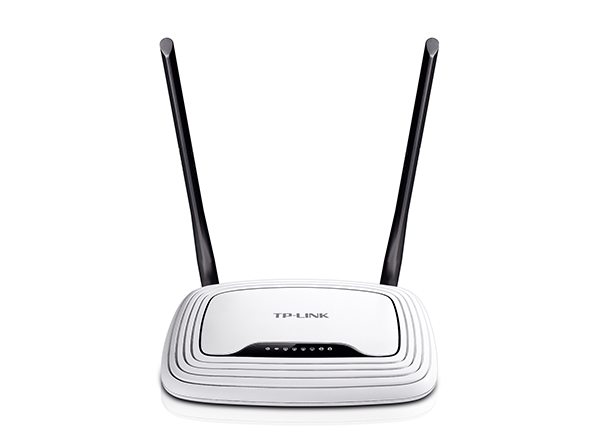
And a second router in the shop:
TL-WR841N_un_V2_1041_normal_0_20150724113930.jpg

https://www.amazon.com/TP-Link-Wireless-Router-300Mbps-TL-WR841N/dp/B001FWYGJS/ref=sr_1_3?ie=UTF8&qid=1486504874&sr=8-3&keywords=tp+link+router

I have one power line adapter plunged into my router in the house, with the other one plugged into the secondary router mounted on the wall in the shop. I loose some download speed with this connection, but the upload speed is the same as in the house. I could have set the router up as a repeater; however I just set it up with the same name and password as the one in the house. A cheap and easy solution to avoid running cat6 wire to the shop if it has already been built. I hope this helps.
 

mikeyr

Well-known member
Joined
Sep 16, 2005
Messages
1,971
Location
Santa Barbara, CA
eero ! I got a eero system for Christmas, 2 units in the house and one in the garage that is about 70ft. from the house, absolutely flawless FAST wifi all over the house and the garage. Not the cheapest method but it works so perfectly and so easily that I don't mind the few extra $.
 

941designs

Well-known member
Joined
Feb 22, 2013
Messages
218
Location
West Central Florida
I spent the big money and had our fiber ran underground to my garage. About 100' from my house. Weighed the options, bottom line no hardware to have fail and full blown wicked fast net out there. Great investment. I use my over the air HD tv antenna along with streaming tv out there to my 50" flat screen.
 

GMCGarage

Well-known member
Joined
Jan 31, 2017
Messages
1,264
Yes!

here is the solution for me. As other's have mentioned, with metal buildings for your shop you get no wifi inside with the door down. The setup that i have consists of the following:
Ethernet power line adapters:
l_10991859.jpg

https://www.amazon.com/tp-link-powerline-adapter-starter-tl-pa4010kit/dp/b00awruicg/ref=sr_1_1?ie=utf8&qid=1486504858&sr=8-1&keywords=tplink+powerline

and a second router in the shop:
tl-wr841n_un_v2_1041_normal_0_20150724113930.jpg

https://www.amazon.com/tp-link-wireless-router-300mbps-tl-wr841n/dp/b001fwygjs/ref=sr_1_3?ie=utf8&qid=1486504874&sr=8-3&keywords=tp+link+router

i have one power line adapter plunged into my router in the house, with the other one plugged into the secondary router mounted on the wall in the shop. I loose some download speed with this connection, but the upload speed is the same as in the house. I could have set the router up as a repeater; however i just set it up with the same name and password as the one in the house. A cheap and easy solution to avoid running cat6 wire to the shop if it has already been built. I hope this helps.
 

dmftoy1

Well-known member
Joined
Dec 5, 2013
Messages
145
I've had really good luck with this setup. Make sure you turn transmitter power way down if your bridging 100 yards or less.

http://ez-bridge.com


Sent from my iPad using Tapatalk
 

Crazyjake8493

Well-known member
Joined
Sep 26, 2014
Messages
3,949
Location
Upstate NY
Wired Ubiquiti access points are fantastic! I had much better success with those than the wireless access points, especially if there isn't a clear line of sight.
 
OP
H

Hector's Shop

Well-known member
Joined
Jan 25, 2014
Messages
63
Original source is coming for a NetGear Router that also transmit a WiFi Signal.
At the Shop I have the Antenna hooked up outside and wired in the building to another Router that transmits a Wifi Signal. I can create my "own Network" within that router. You can just plug in the antenna right to your computer. But I wanted to connect phone, puter, tablet, etc...

This will NOT enhance the signal or make it stronger or better Just repeats it. Its only as good as the original source.

There are plenty better products out there!! But, this definitely fits my budget and it works great.
 

MJockey

Well-known member
Joined
Jan 14, 2016
Messages
46
Location
Maryville, TN
Hector,

How far is you shop from your wifi source? How many bars did you have outside you shop say on your phone before adding this setup?

My shop is at least 350ft ( down a hill and though trees) from my router. I get 1 bar outside if I stand in the right spot. Just wondering if you setup would work for me?
 
OP
H

Hector's Shop

Well-known member
Joined
Jan 25, 2014
Messages
63
Hector,

How far is you shop from your wifi source? How many bars did you have outside you shop say on your phone before adding this setup?

My shop is at least 350ft ( down a hill and though trees) from my router. I get 1 bar outside if I stand in the right spot. Just wondering if you setup would work for me?

Shop is about 100ft. Its a clear view path! My signal barely made it outside the house, In the shop I have full bars! Download speed of 20m and upload speed of 8.2m Same as in the house!
I have one hooked up to my RV and when I travel I can pick up all kinds of connections. Obviously most need PW.

Check with Ccrane.com they have other options as well! For me works great and its real budget friendly.
 
To avoid these ads, REGISTER NOW!
Top Bottom