To avoid these ads, REGISTER NOW!

Wifi inside and outside metal pole barn?

earlybirds

Well-known member
Joined
Feb 12, 2010
Messages
70
Location
eastern Iowa
My pole barn with metal roof, overhead doors, and siding is 200 ft. from the house. I have my standby generator next to the pole barn. I have cat6 ethernet cable buried in conduit from the router in the house to the pole barn.
I know I need to connect an access point inside the pole barn for good wifi. I also want to monitor the generator outside the pole barn with wifi, but I believe the metal siding will be an issue. Suggestions?
 
To avoid these ads, REGISTER NOW!

BLUE72CAMARO

Well-known member
Joined
Jan 1, 2014
Messages
911
Location
IL
If the generator is in very close proximity to the barn you shouldnt have any issue with the wifi reaching it. My access point is in an enclosed walkway between my barns and I have good signal thru out both buildings and for within reasonable distance to the buildings for the most part. The red dot is the location of the AP and both buildings are 50'+ long.

Screenshot 2023-02-13 154007.jpg
 

skeer

Well-known member
Joined
Sep 14, 2021
Messages
1,044
Location
Standish, MI Area
The crux of this is both the distance from access point and the end device as well as how many metal objects/layers between them. Also worth mentioning, generally the newer wifi protocols have better signal penetration at the expense of range.
However, being old-school, if you have the ability.. definitely bury a cat6 feeder from your router/main network stack to the barn. Use it to uplink a typical Netgear-esque style unmanaged switch. Then you can throw an Access point onto it if you wish. Doing this allows you to run say a stationary laptop for shop research purposes without having to worry about signal rates, or putting some gigantic electro-magnetic field generating device in the shop :)
 

cgrutt

Well-known member
Joined
Mar 4, 2016
Messages
8,362
How long of a run is it from house to barn? CAT6 is effective up to 100m but starts losing signal speed at shorter distances (after about 60m IIRC). If it's pretty close I agree with above put a switch in barn and you can run an AP from there if necessary and another cable back to your generator.
 

skeer

Well-known member
Joined
Sep 14, 2021
Messages
1,044
Location
Standish, MI Area
Speaking from personal experience here: We once ran Cat5e roughly 500ft at a company I worked for years ago. It worked fine.. we never testing latency or total throughout but that office linked up and could access all the file servers/email/internet successfully. Cat5 is a might cheaper per 1000’ box than 6, and if OP has a connection under 500mb down then it’s a viable and cost effective alternative.
 

haveissues

Well-known member
Joined
Feb 9, 2011
Messages
379
Location
Hudson Valley NY
Are there any windows? If there are windows and the generator is next to the building it will probably be fine. Setup your access point with a separate network name for the 2.4 and 5ghz radios on your access point and connect the generator to the 2.4 network. It will work a little better.

You could also add an outdoor access point in addition to the one inside your building if you have issues.
 

jeepxj

Well-known member
Joined
Mar 2, 2008
Messages
17,899
How long of a run is it from house to barn? CAT6 is effective up to 100m but starts losing signal speed at shorter distances (after about 60m IIRC). If it's pretty close I agree with above put a switch in barn and you can run an AP from there if necessary and another cable back to your generator.

uhh wut.
 

dcg9381

Well-known member
Joined
Jun 20, 2018
Messages
11,917
Location
Austin, TX
I know I need to connect an access point inside the pole barn for good wifi. I also want to monitor the generator outside the pole barn with wifi, but I believe the metal siding will be an issue. Suggestions?

You won't really know till you have your AP up and pointed. You may have more then enough signal outside the building or may not... We get decent signal outside of our steel building in 3 out of 4 directions...
 

jdm5

Well-known member
Joined
Jan 1, 2012
Messages
281
Location
CT
How long of a run is it from house to barn? CAT6 is effective up to 100m but starts losing signal speed at shorter distances (after about 60m IIRC). If it's pretty close I agree with above put a switch in barn and you can run an AP from there if necessary and another cable back to your generator.

This is incorrect. Properly terminated CAT 5/6/etc copper is good for 100m, and possibly longer (but not guaranteed).
 

wyliesdiesels

Well-known member
Joined
Aug 14, 2012
Messages
20,073
Location
Modesto, CA
If the generator is in very close proximity to the barn you shouldnt have any issue with the wifi reaching it. My access point is in an enclosed walkway between my barns and I have good signal thru out both buildings and for within reasonable distance to the buildings for the most part. The red dot is the location of the AP and both buildings are 50'+ long.

Screenshot 2023-02-13 154007.jpg
Actually all depends on the sensitivity of the wifi radio on the gen, how much attentuation the metal siding causes, how strong the indoor AP is, etc

It may work or it may not
 

wyliesdiesels

Well-known member
Joined
Aug 14, 2012
Messages
20,073
Location
Modesto, CA
The crux of this is both the distance from access point and the end device as well as how many metal objects/layers between them. Also worth mentioning, generally the newer wifi protocols have better signal penetration at the expense of range.
No thats not correct. protocols have nothing to do with signal penetration.

Signal penetration and range is dependent on the frequency of the signal and the output power of the radio. Lower frequencies actually penetrate better and go farther... you have it backwards...

In terms of wifi(with only 2 spectrums) 2.4Ghz (no matter what protocal it is) will reach farther than 5Ghz (5.8Ghz).... at the same token, 2.4Ghz will not have as high of a throughput/bandwidth as 5Ghz will...

BTW Protocols for wifi are 802.11g, n, a, ac, etc... Again, those have nothing to do with signal penetration and range...
 

cgrutt

Well-known member
Joined
Mar 4, 2016
Messages
8,362
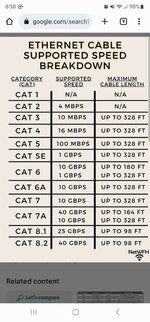
This is incorrect. Properly terminated CAT 5/6/etc copper is good for 100m, and possibly longer (but not guaranteed).

Cat 6 will support 1 GBPS up to 100m; 10 GBPS up to 55m

Screenshot_20230219_203802_Chrome.jpg
 

wyliesdiesels

Well-known member
Joined
Aug 14, 2012
Messages
20,073
Location
Modesto, CA
How long of a run is it from house to barn? CAT6 is effective up to 100m but starts losing signal speed at shorter distances (after about 60m IIRC). If it's pretty close I agree with above put a switch in barn and you can run an AP from there if necessary and another cable back to your generator.
Ummm no
 

cgrutt

Well-known member
Joined
Mar 4, 2016
Messages
8,362
CAT6 supports gig at 100m(90m horizontal, 10m patch).... your previous statement makes it sound like it doesnt past 60m...
Except you left out the part where I said it was effective up to 100m. I just recalled the distance was shorter with higher data speeds (I said 60m but it was actually 55m). Have no idea what distance the OP is running or what his data requirements were just trying to help. No worries.

ETA
I ran into this issue a couple years ago when I was helping my buddy with a large security camera project at a hotel that had 3 buildings each with multiple elevator banks and 5 parking garages. Fiber was used between MDF and IDFs and CAT6 from IDFs to the cameras due to distances, some of which were much shorter than 55m (between floors for example). There were approximately 165 cameras we were moving alot of data.
 
Last edited:

mikedodge

Well-known member
Joined
Jun 27, 2017
Messages
2,849
Connect a wifi repeater to thebethernet cable inside the pole barn. If the geberator is close it pick it up. If not then stick the repeater outside.

I have internet terminating in my pole barn but the wifi signal doesn't get too far outside the building So I put a repeater inside a wooden box up by the rafters outside to keep the weather out of it and that signal is enough to get everywhere I need it outside.
 

wyliesdiesels

Well-known member
Joined
Aug 14, 2012
Messages
20,073
Location
Modesto, CA
Connect a wifi repeater to thebethernet cable inside the pole barn. If the geberator is close it pick it up. If not then stick the repeater outside.

I have internet terminating in my pole barn but the wifi signal doesn't get too far outside the building So I put a repeater inside a wooden box up by the rafters outside to keep the weather out of it and that signal is enough to get everywhere I need it outside.
Ummm a repeater wont work since theres no existing wifi to pickup signal from
 
To avoid these ads, REGISTER NOW!

kj_mustang

Well-known member
Joined
Feb 9, 2011
Messages
1,213
Location
Harrisonburg, VA
Every building is going to be different for wireless signal penetration. If you have windows near the generator location, than a wireless access point located near the window may give a good enough signal to the generator area. If you have a spare access point, take it out to the barn and hook it up to the ethernet from the house and see. You can buy longer range access points but penetrating through metal walls is the problem. My metal sided building sets 100' from my house and I have a long range access point in a room on the closest end of the house. I have a decent wifi signal from the house standing outside my building on the front porch. Go inside the building and nothing unless I stand at a window and I get a weak signal.
 

RPH

Well-known member
Joined
Dec 17, 2006
Messages
4,190
Location
Michigan Thumb
No windows in my barn. It becomes a faraday cage when closed up. Open overhead doors or step outside and signal is present.
 

justsam

Well-known member
Joined
Aug 20, 2010
Messages
1,268
Location
Penngrove, California
" I also want to monitor the generator outside the pole barn with wifi, but I believe the metal siding will be an issue. Suggestions?

When you say you want to "monitor" What does that mean? Does the generator have some sort of smart interface? Is that interface WiFi only or is there a wired ethernet port? Some generator wireless monitoring systems I have seen are Bluetooth, not ethernet. Is this start/stop like control or does it monitor fuel level etc. Regardless this is more like low speed telemetry and I would not be concerned if data rates are not maximized.
 

dcg9381

Well-known member
Joined
Jun 20, 2018
Messages
11,917
Location
Austin, TX
" I also want to monitor the generator outside the pole barn with wifi, but I believe the metal siding will be an issue. Suggestions?
When you say you want to "monitor" What does that mean? Does the generator have some sort of smart interface? Is that interface WiFi only or is there a wired ethernet port? Some generator wireless monitoring systems I have seen are Bluetooth, not ethernet. Is this start/stop like control or does it monitor fuel level etc. Regardless this is more like low speed telemetry and I would not be concerned if data rates are not maximized.
Generac's are wifi.
 

wyliesdiesels

Well-known member
Joined
Aug 14, 2012
Messages
20,073
Location
Modesto, CA
" I also want to monitor the generator outside the pole barn with wifi, but I believe the metal siding will be an issue. Suggestions?

When you say you want to "monitor" What does that mean? Does the generator have some sort of smart interface? Is that interface WiFi only or is there a wired ethernet port? Some generator wireless monitoring systems I have seen are Bluetooth, not ethernet. Is this start/stop like control or does it monitor fuel level etc. Regardless this is more like low speed telemetry and I would not be concerned if data rates are not maximized.
yes many standby generators nowadays have smart interfaces... most are wifi only unfortunately
 

mikedodge

Well-known member
Joined
Jun 27, 2017
Messages
2,849
and when you do that they arent acting as a repeater. theyre acting as an AP. gotta use the right terminology...
Whatever. I'm only using the terminology that's being used all over the place for the consumer grade products. It's still a repeater or extender with an rj45 plug on it. Say AP and the next question will be where do I find one of those and someone is going to start pointing at products that are overkill for this situation.
 
Last edited:

AntonLargiader

Well-known member
Joined
Nov 20, 2016
Messages
1,372
Location
Charlottesville, VA
Hey Wylie, are you still big on the Ubiquiti products? I need to re-routerize my house and should probably do mesh/APs/whatever to have good coverage. Our house isn't big but a centrally located router hasn't been awesome (possibly because we have an internal brick wall). We're switching ISPs so it's a clean slate other than the new fiber modem and some CAT5e that is in place (that we need to use for my wife's work).
 

wyliesdiesels

Well-known member
Joined
Aug 14, 2012
Messages
20,073
Location
Modesto, CA
Hey Wylie, are you still big on the Ubiquiti products? I need to re-routerize my house and should probably do mesh/APs/whatever to have good coverage. Our house isn't big but a centrally located router hasn't been awesome (possibly because we have an internal brick wall). We're switching ISPs so it's a clean slate other than the new fiber modem and some CAT5e that is in place (that we need to use for my wife's work).
yes still using UBNT gear... just put a couple unifi switches in my rack at my shop
 

AntonLargiader

Well-known member
Joined
Nov 20, 2016
Messages
1,372
Location
Charlottesville, VA
So, starting from scratch for one device that has to be hardwired and two more that can be, I'm looking at:

1) the 8-port POE switch
2) a U6 Lite access point on each side of the brick wall
3) possibly a U6 Long Range on the porch.

But maybe I'm overdoing it. This is not a lot of space, it's just broken up by relatively uninterrupted brick walls. The house is square 2-story with 9" brick wall for the first story. To the north is a 1-story addition with the office, to the west is a porch, and to the SW is a detached garage with a WiFi light switch. One in the original prt for 1st and 2nd floor, one for the office (it doesn't get good WiFi from the old part), and maybe one on the porch for the porch and to cover the garage and back yard. But possibly one of the first two could be that Long Range and two would be enough? We're only talking a 100' diameter circle here.
 

haveissues

Well-known member
Joined
Feb 9, 2011
Messages
379
Location
Hudson Valley NY
It's hard to say without seeing your space but keep in mind not only does the signal from the AP have to get to the device but the device has to get back to the AP. You will generally have better luck with more access points with the power turned down than fewer higher power AP's and something like a laptop with good antennas will have better range than an wifi switch. You can always mock it up before you commit to locations, especially if you are planning on using 5ghz.
 

Spud McGee

Well-known member
Joined
Apr 11, 2022
Messages
405
When I was putting the wifis out in my shop, I used that as an opportunity to upgrade my home wifi. I moved the old unifi AP-lite out to the shop and put a new U6-pro in its place. The benefits of wifi 6 would pay off more in the house where there are more things trying to connect to the internet.

The U6-pro did not come with the POE injector like the 5s did. So you need to have your own POE injector or a POE switch for it.
 

AntonLargiader

Well-known member
Joined
Nov 20, 2016
Messages
1,372
Location
Charlottesville, VA
Thanks. The clean start means I can go single-source POE all the way. It'll be so nice to not have to have wall warts for everything. I can put the fiber modem and the switch on the same UPS and have WiFi even when the power goes out.
 

AntonLargiader

Well-known member
Joined
Nov 20, 2016
Messages
1,372
Location
Charlottesville, VA
OK, the hardware came in and I have way more questions than before. Hopefully someone can help.

The Unifi Lite switch is a fully managed switch. I need to configure it with software but when I use the Ubiquiti site I get taken straight to Consoles which seem to have a monthly subscription cost. I just want something to plug a few things into and get good WiFi. I did find a better description elsewhere which helps a bit but first I thought I'd ask here.

I have a fiber modem, installed by the fiber company. I also happen to have a simple unmanaged Netgear switch. Now I also have the 8-port Unifi switch and two Access Points. Is this all I need? Do I even need the Netgear switch now? I had thought I could just connect the new switch to the modem and APs and be good. Not so.

I have an iMac that can be hardwired to it. The article above indicates that I need to access the Unify switch through an unmanaged switch in order to manage it with the Unify Network Application for Mac. I guess my real question is, what is the simplest way I can get a functioning home network with these components now? I bought the Unifi switch figuring it would be the simplest way to run the PoE APs properly. Maybe that's not correct.
 

wyliesdiesels

Well-known member
Joined
Aug 14, 2012
Messages
20,073
Location
Modesto, CA
for unifi products you need a controller.

Can either do a software controller or a hardware controller. I prefer a hardware controller

Did you buy a controller? Or download the software?

No you dont need 2 switches.

If youd like i could help with config. Would just need remote access to a local computer
 
To avoid these ads, REGISTER NOW!
Top Bottom